C drive (OS) taking more memory

zapper4u

New member
Local time
1:08 PM
Messages
4
Its been 1 week i got my new gaming laptop, it had 2 partition C drive and D drive, my problem is with the C drive containing OS, i want to keep it free from any major software and memory for smooth running of my games.

MY C drive total space is 119 GB, after updates and one single game installed Diablo III, and no other heavy software it was taking 55 GB of memory, 64 GB free, suddenly since last 2 days my c drive used memory shoots off to more the 75 %. i deleted my restore point and got some 2 GB free but its still more then half of the memory.

1) I really cant figure out why and how it happened.Is the system restore point taking the space ?
2) can i make default save location of system restore files to D drive.
3) Installing software like 3D Max, CS5, Autocad 2012 in D drive will effect the running of these programs

Please anyone can guide me through this, m not a computer expert but i understand the basic of it

Regards
 
Last edited:

My Computer

OS
windows 7 64 bit
I'm not a computer expert, either. ;)

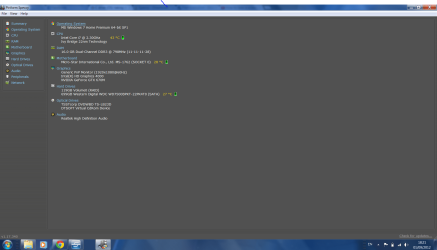
First thing I'd ask that you do is provide your system specs. At the top of any page click on "User CP" and then in the left column click on "Edit System Spec". If you don't know all of the info a free tool called Speccy can help.

Speccy - System Information - Free Download

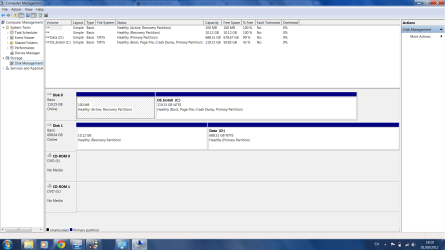
The next thing is to provide a screenshot of your Disk Management. This will give a better idea of how your hard drive is set up. Please make sure you maximize the Disk Managment screen before uploading the screenshot

How To Access Disk Management in Windows 7

http://www.sevenforums.com/tutorials/9733-screenshots-files-upload-post-seven-forums.html

Not trying to be critical but just to make sure we're talking about the same thing, memory isn't the same as free (or unused) disk space. If I'm understanding things, your C: partition has/had a total of 119GB of free space. The OS, Windows updates, restore points, and Diablo III were installed taking up 55GB leaving 64GB of remaining free space on C: partition. Then for no apparent reason, "c drive used memory shoots off to more the 75 %." Is that 75% of the original 119GB or 75% of the 64GB? That screenshot of Disk Management will be really helpful.
 

My Computer

Computer type
Laptop
Computer Manufacturer/Model Number
Sony Vaio VPCEB47GM Laptop
OS
Win 7 Pro 64-bit
CPU
Intel i5 2.4 Ghz
Memory
8GB DDR3
Graphics Card(s)
Intel HD 3000
Sound Card
IDT High Definition
Monitor(s) Displays
15.6 WGXA Anti-Glare LED
Screen Resolution
1280x800
Hard Drives
640Gb 7200rpm
Antivirus
MSE
Browser
Opera (primary) with IE9 backup
Tnx marsmimar

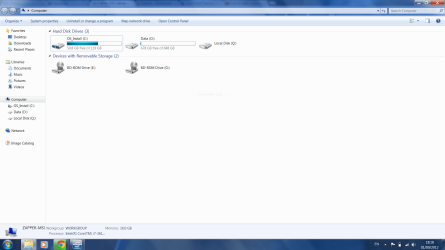
well was at work so couldn't do all that u said, just now i started and checked the memory its come down to 50 GB as occupied space, here are some specs and screenshots for your reference.
 

Attachments

  • Capture3.PNG
    Capture3.PNG
    66.1 KB · Views: 10
  • Capture.PNG
    Capture.PNG
    85.5 KB · Views: 5
  • Capture4.PNG
    Capture4.PNG
    73.8 KB · Views: 10
  • Capture 2.PNG
    Capture 2.PNG
    19.6 KB · Views: 4

My Computer

OS
windows 7 64 bit
You have 16 GB of RAM.

Do you use hibernation?

If you do not, you can get rid of your hibernation file and save 16 GB of space on the SSD.

To do that:

Open an elevated command prompt.

Type "powercfg -h off" at the prompt. Hit the enter key. Close the prompt window.

You can also check and control the amount of space used by System Restore.
 

My Computer

Computer type
PC/Desktop
Computer Manufacturer/Model Number
Ignatz Special; 4 speed manual gearbox; factory air conditioning; one of one
OS
Windows 7 Home Premium SP1, 64-bit
CPU
Intel Skylake i5-6600K, not overclocked
Motherboard
AsRock Z170M Extreme 4, micro ATX
Memory
8 GB HyperX DDR4-2666 (2 x 4 GB)
Graphics Card(s)
none; graphics are integrated on CPU
Sound Card
onboard: Realtek ALC1150; external: USB Behringer UF0-202
Monitor(s) Displays
Dell S2340M 23 inch IPS
Screen Resolution
1600 x 900
Hard Drives
System: Crucial MX100 series SSD, 128 GB;
Data: Samsung Spinpoint 103SJ, 1 TB;
Backup: WD Caviar Green WD30EZRX-00D8PB0, 3 TB
PSU
Rosewill SilentNight 500 watt fanless, semi-modular
Case
Antec Solo II
Cooling
Noctua NH-U12S; Noctua F12 intake, Noctua S12A exhaust
Keyboard
Microsoft 200 6JH-00001 USB
Mouse
Dell or Microsoft optical wired; USB
Antivirus
Microsoft Security Essentials and Malwarebytes Premium
Browser
Pale Moon
Other Info
All fans PWM; speeds at idle: CPU circa 500 rpm; intake circa 600 rpm; exhaust circa 600 rpm; CPU temps 27 idle and 47 C load in a warm room (27 C/81 F) when running Intel Extreme Tuning Utility stress test.
I don't see why you are so concerned; using HDD space will not affect performance. You can stop worrying about it. Nothing is wrong.
 

My Computer

Computer type
PC/Desktop
Computer Manufacturer/Model Number
Alienware Aurora ALX R4
OS
Windows 10 Pro (x64)
CPU
Intel Core i7-3930K (3.2GHz - 4.5GHz)
Motherboard
Alienware Aurora-R4 x79
Memory
4x Samsung 4GB PC3-12800 DDR3 (16GB 1600MHz)
Graphics Card(s)
Nvidia Geforce GTX 690
Sound Card
SteelSeries Siberia Elite
Monitor(s) Displays
Dell UltraSharp U3011
Screen Resolution
2560x1600
Hard Drives
Samsung 850 Pro 256 GB, Seagate 1TB Desktop Hybrid HDD, 2x Western Digital 4TB Green HDD
PSU
875W Some Dell PSU <.<
Case
Alienware Aurora ALX
Cooling
Custom Liquid Cooling (EK CPU & GPU blocks) dual EK 480RAD
Keyboard
Logitech G710+ Mechanical
Mouse
Logitech G700s
Internet Speed
Verizon Fios (50 mbps average)
Other Info
Server: Intel NUC D54250WYK: i5-4250U, 16GB, 256 GB mSATA, Windows Server 2012 R2
Cablog - 100 kb
downloads -0
intel 1.04 mb
Perflogs-0
program files 1.40 GB
program files (x86)- 10.0GB
User- 1.11GB
utility- 1.73GB
windows- 28.4 GB

Total GB= 42.34 GB

at present used space is 69.9 GB
69.9-42.34 =27.56 GB( i really cant understand where this 27.56 GB gone)
at present m not worried, but i still have to install my work related software like Max and cad cs5 etc.

Tnx for ur reply
 

My Computer

OS
windows 7 64 bit
I'm not sure if System Restore space and hibernation file would be included in that 42.34.

You could temporarily turn off hibernation and/or reduce System Restore space to see if used space declines.

And then turn hibernation back on and revert to the original System Restore setting after the experiment.
 

My Computer

Computer type
PC/Desktop
Computer Manufacturer/Model Number
Ignatz Special; 4 speed manual gearbox; factory air conditioning; one of one
OS
Windows 7 Home Premium SP1, 64-bit
CPU
Intel Skylake i5-6600K, not overclocked
Motherboard
AsRock Z170M Extreme 4, micro ATX
Memory
8 GB HyperX DDR4-2666 (2 x 4 GB)
Graphics Card(s)
none; graphics are integrated on CPU
Sound Card
onboard: Realtek ALC1150; external: USB Behringer UF0-202
Monitor(s) Displays
Dell S2340M 23 inch IPS
Screen Resolution
1600 x 900
Hard Drives
System: Crucial MX100 series SSD, 128 GB;
Data: Samsung Spinpoint 103SJ, 1 TB;
Backup: WD Caviar Green WD30EZRX-00D8PB0, 3 TB
PSU
Rosewill SilentNight 500 watt fanless, semi-modular
Case
Antec Solo II
Cooling
Noctua NH-U12S; Noctua F12 intake, Noctua S12A exhaust
Keyboard
Microsoft 200 6JH-00001 USB
Mouse
Dell or Microsoft optical wired; USB
Antivirus
Microsoft Security Essentials and Malwarebytes Premium
Browser
Pale Moon
Other Info
All fans PWM; speeds at idle: CPU circa 500 rpm; intake circa 600 rpm; exhaust circa 600 rpm; CPU temps 27 idle and 47 C load in a warm room (27 C/81 F) when running Intel Extreme Tuning Utility stress test.
i deleted my restore point and got some 2 GB free
Regards

You need your Restore Points. You should add one back immediately. If something goes wrong you will need to Restore. I add a new one each week to be sure I have one that is current.
 

My Computer

Computer type
PC/Desktop
Computer Manufacturer/Model Number
Custom Build
OS
Windows 7 Home Premium 32-Bit - Build 7600 SP1
CPU
Intel Core i3-2120 3.30Ghz
Motherboard
Asus P8Z68-V LX Intel Z68 Socket H2 ATX
Memory
Kingston 4 GB DDR3 1333 mhz
Graphics Card(s)
AMD Radeon HD6670
Sound Card
Sound Blaster Audigy SE 24-Bit
Monitor(s) Displays
Asus VE228
Screen Resolution
1440 X 900
Hard Drives
OCZ Vertex 3 120 GB Sata 3 SSD ==
Kingston SH103/S3 120 G Hyper X 120 GB SSD ==
Western Digital 500 GB Caviar Green 7200 RPM ==
PSU
Corsair CX600M == 600 Watt
Case
NZXT Apollo - Silver with Clear Side Panel
Cooling
Three 120 mm Fans
Keyboard
Microsoft Natural 4000
Mouse
Microsoft Custom Optical 3000
Internet Speed
AT&T Fiber Optic Wireless Network
Antivirus
Microsoft Security Essentials
Browser
Chrome
Other Info
120 mm Blue LED Fan -- Three Blue LED Lazer Light Sticks
Have you deletd all windows update backups ?
 

My Computer

Computer type
PC/Desktop
Computer Manufacturer/Model Number
Skylake Special #666
OS
Windows 10 Pro x64
CPU
Intel Core i7 6700K
Motherboard
Asus Sabertooth Z170 Mark 1
Memory
GSkill TridentZ RGB 16GB 3600 16-16-16-36
Graphics Card(s)
EVGA GTX 980 Ti SC x2
Sound Card
Realtek High Definition
Monitor(s) Displays
AOC G2460PG
Screen Resolution
1920 x 1080 144Hz
Hard Drives
Samsung 860 Pro 256GB, Seagate Barracuda 4TB x2
PSU
EVGA 1000 P2, EVGA White Custom Braided Cables
Case
Corsair Vengeance C70 Gunmetal Black
Cooling
Corsair H100i v2, Corsair ML120 x2, Thermal Grizzly Kryonaut
Keyboard
Logitech G910 Orion Spectrum
Mouse
Logitech G700s
Internet Speed
Verizon Fios Quantum Gateway 75/75
Antivirus
Windows Defender, Malwarebytes Free 3.8.3
Browser
Chrome
Other Info
Corsair SP120 x4, LG Blu-ray Drive, Durabrand HT-395 100 Watt Dolby Digital Amp, Corsair H2100 Wireless 7.1 Headset
@addram

No i haven't done that,can u tell me how to do. and will it harm my Laptop if i delete them?

Tnx
 

My Computer

OS
windows 7 64 bit

My Computer

Computer type
PC/Desktop
Computer Manufacturer/Model Number
Skylake Special #666
OS
Windows 10 Pro x64
CPU
Intel Core i7 6700K
Motherboard
Asus Sabertooth Z170 Mark 1
Memory
GSkill TridentZ RGB 16GB 3600 16-16-16-36
Graphics Card(s)
EVGA GTX 980 Ti SC x2
Sound Card
Realtek High Definition
Monitor(s) Displays
AOC G2460PG
Screen Resolution
1920 x 1080 144Hz
Hard Drives
Samsung 860 Pro 256GB, Seagate Barracuda 4TB x2
PSU
EVGA 1000 P2, EVGA White Custom Braided Cables
Case
Corsair Vengeance C70 Gunmetal Black
Cooling
Corsair H100i v2, Corsair ML120 x2, Thermal Grizzly Kryonaut
Keyboard
Logitech G910 Orion Spectrum
Mouse
Logitech G700s
Internet Speed
Verizon Fios Quantum Gateway 75/75
Antivirus
Windows Defender, Malwarebytes Free 3.8.3
Browser
Chrome
Other Info
Corsair SP120 x4, LG Blu-ray Drive, Durabrand HT-395 100 Watt Dolby Digital Amp, Corsair H2100 Wireless 7.1 Headset
Back
Top