C:\ will boot but is not system partition

chasoscar

New member
Local time
7:49 AM
Messages
24
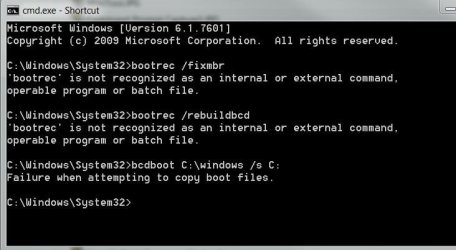
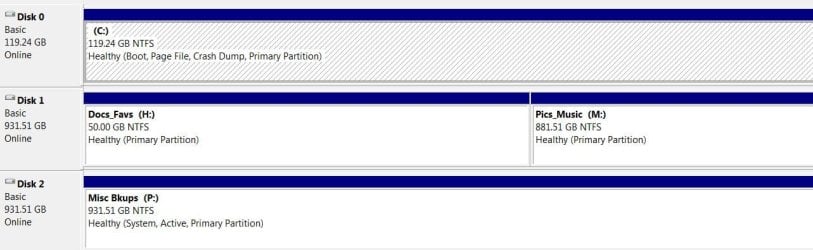
I installed Win7/64 and finally got everything like I wanted it. I wont say how much time I have put into it but a lot. Unfortunately I forgot to disconnect other drive when installing and when I went to make a backup I saw that Windows had marked one of my other drives P:\ as the Active/System. Now when I try to make a 50gb System backup, it includes the full 1Tb P:\ drive making the backup over 1Tb. If I unplug that ‘other’ P:\ system drive, the computer will not boot. My C:\ drive/partition is marked as Boot but is not marked Active. I have tried repairing C:\ using bootrec /fixmbr & bootrec /rebuildbcd commands and also bcdboot c:\windows /s C: to create the system partition on the drive C but it will not accept the commands. Is this because the partition is not marked Active? Can anyone suggest a fix? If this cant be fixed easily, can I make a backup of the C:\ drive that is currently the boot partion(w/OS) then do a fresh install on that drive with a 100mb ‘system reserved partition’ then restore the backup of the C:\ boot partition.
aarrgghh..... Please help. TIA
 

Attachments
  • Disk Management.2JPG.JPG
    Disk Management.2JPG.JPG
    69.3 KB · Views: 1
  • Command Prompt Capture4.JPG
    Command Prompt Capture4.JPG
    42.4 KB · Views: 40

My Computer My Computer

Computer Manufacturer/Model Number
2 - "Main" boxes- Both Built Clones
OS
Windows7/64bit Ultimate/Windows 7/32bit Ultimate
CPU
Core i7 920 @ 3.2 & P4 @ 2.4g
Motherboard
MSI Big Bang XPower & Asus P4P800E-deluxe
Memory
6gigs Crucial Dominator & 3gigs Kingston
Graphics Card(s)
Evga 512mb GeForce 9800 GTX+
Sound Card
MSI & Creative X-Fi Xtreme SB0790
Monitor(s) Displays
Dual- Viewsonic 21" & Samsung 42"
Screen Resolution
1440 x 900
Hard Drives
1- 64Gb OCZ Vertex SSD (System/Progs)
5- 1TB WDs
4- 250Gb Seagates
PSU
OCZ 600w & Antec 450w
Case
2- Antec Plus View 1000AMG RTL
Cooling
Coolermaster Hyper N 520
Keyboard
Logitech
Mouse
Logitech Nano 6 button
Internet Speed
6Mb/sec
Other Info
Favorite hobby- Amateur Gynecologist
Hi chasoscar,

Unfortunately I forgot to disconnect other drive when installing and when I went to make a backup I saw that Windows had marked one of my other drives P:\ as the Active/System.

It is easily done! This is why when I give instructions for a clean install I mark doing this as important!

Have a look at this thread, especially Post #4. SIW2 has a tool which I think will sort out your problem =>
SIW2 Boot Media.

I hope this helps!
 
Last edited:

My Computer My Computer

Computer type
Laptop
Computer Manufacturer/Model Number
Fujitsu LIFEBOOK
OS
Win 7 HP SP1 64-bit Vista HB SP2 32-bit Linux Mint 18.3
CPU
Intel(R) Pentium(R) CPU P6200 @ 2.13GHz
Motherboard
FUJITSU FJNBB06
Memory
4.00 GB
Graphics Card(s)
Intel(R) Graphics Media Accelerator HD
Sound Card
[1] Realtek High Definition Audio [2] Intel(R) Display Audio
Screen Resolution
1366 x 768 x 32 bits (4294967296 colors) @ 59 Hz
Hard Drives
TOSHIBA MK5076GSX
Antivirus
AVG FREE
Under Disk Manger, make C: drive Active.
Disconnect all other drives from the MB (Disk 1 & 2).
Boot from the Win 7 installation disk and do a boot repair.
Once you can boot from the C: drive, change the boot priority to disk 0, reconnect Disk 1 & 2 drives to the MB.
Under Disk Manger, make P: drive not Active.
 

My Computers My Computers

System One System Two

  • Computer type
    PC/Desktop
    Computer Manufacturer/Model Number
    custom build
    OS
    Windows 7 HP 64
    CPU
    i5 6600K - 800MHz to 4200MHz
    Motherboard
    GA-Z170-HD3P
    Memory
    4+4G GSkill DDR4 3000
    Graphics Card(s)
    IG - Intel 530
    Monitor(s) Displays
    Samsung 226BW
    Screen Resolution
    1680x1050
    Hard Drives
    (1) -1 SM951 – 128GB M.2 AHCI PCIe SSD drive for Windows 7 and Lubuntu
    (2) -1 WD SATA 3 - 1T for Data
    (3) -1 WD SATA 3 - 1T for backup
    PSU
    Thermaltake 450W TR2 gold
    Keyboard
    Old and good Chicony mechanical keyboard
    Mouse
    Logitech mX performance - 9 buttons (had to disable some)
    Internet Speed
    500Mb/s
    Browser
    Firefox 64
    Other Info
    TinyWall firewall
  • Computer type
    Laptop
    System Manufacturer/Model Number
    Asus Q550LF
    OS
    Windows 7 Pro
    CPU
    i7-4500U 800MHz to 3.0GHz
    Motherboard
    Asus Q550LF
    Memory
    (4+4)G DDR3 1600
    Graphics Card(s)
    IG intel 4400 + NVIDIA GeForce GT 745M
    Sound Card
    Realtek
    Monitor(s) Displays
    LG Display LP156WF4-SPH1
    Screen Resolution
    1920 x 1080
    Hard Drives
    BX500 120G SSD for Windows and programs +
    1T HDD for data
    Internet Speed
    500 Mb/s
    Browser
    Firefox
    Other Info
    TinyWall firewall
Under Disk Manger, make C: drive Active.
Disconnect all other drives from the MB (Disk 1 & 2).
Boot from the Win 7 installation disk and do a boot repair.
Once you can boot from the C: drive, change the boot priority to disk 0, reconnect Disk 1 & 2 drives to the MB.
Under Disk Manger, make P: drive not Active.

Sounds easy, but I dont want to rush into anything without being sure. It seems I read somewhere that marking C:\ active when the OS is already installed on that drive without a 'system reserved' partition can cause more problems. Can you comment on this? Also how do I change the boot priority?

Also, I am not proficent in the command line... does anyone have any ideas why the command line is not accepting my boot repair commands..... could it be because the C:\ volume is not marked as active?

I dont want to consider this option until it is my last option but what about what I mentioned in the OP, if all else fails, can I make a backup of the current C:\ drive(as is) as the boot partion(w/OS) then do a fresh install on the C:\ drive including the 100mb ‘system reserved partition marked Active’ then restore the backup of the C:\ as the boot partition. Does anyone know if this will work? Any ideas appreciated.

Also...... Thanks Paul. I have downloaded the .iso but havent used it yet. My system is booting fine now, Im worried and I hope to explore all options before doing anything that would risk losing many days of work.
 

My Computer My Computer

Computer Manufacturer/Model Number
2 - "Main" boxes- Both Built Clones
OS
Windows7/64bit Ultimate/Windows 7/32bit Ultimate
CPU
Core i7 920 @ 3.2 & P4 @ 2.4g
Motherboard
MSI Big Bang XPower & Asus P4P800E-deluxe
Memory
6gigs Crucial Dominator & 3gigs Kingston
Graphics Card(s)
Evga 512mb GeForce 9800 GTX+
Sound Card
MSI & Creative X-Fi Xtreme SB0790
Monitor(s) Displays
Dual- Viewsonic 21" & Samsung 42"
Screen Resolution
1440 x 900
Hard Drives
1- 64Gb OCZ Vertex SSD (System/Progs)
5- 1TB WDs
4- 250Gb Seagates
PSU
OCZ 600w & Antec 450w
Case
2- Antec Plus View 1000AMG RTL
Cooling
Coolermaster Hyper N 520
Keyboard
Logitech
Mouse
Logitech Nano 6 button
Internet Speed
6Mb/sec
Other Info
Favorite hobby- Amateur Gynecologist
Hi chasoscar,

Windows had marked one of my other drives P:\ as the Active/System. If I unplug that ‘other’ P:\ system drive, the computer will not boot. My C:\ drive/partition is marked as Boot but is not marked Active. I have tried repairing C:\ using bootrec /fixmbr & bootrec /rebuildbcd commands and also bcdboot C:\windows /s C: to create the system partition on the drive C but it will not accept the commands. Is this because the partition is not marked Active?

Don't you mean bcdboot C:\windows /s P:?
 

My Computer My Computer

Computer type
Laptop
Computer Manufacturer/Model Number
Fujitsu LIFEBOOK
OS
Win 7 HP SP1 64-bit Vista HB SP2 32-bit Linux Mint 18.3
CPU
Intel(R) Pentium(R) CPU P6200 @ 2.13GHz
Motherboard
FUJITSU FJNBB06
Memory
4.00 GB
Graphics Card(s)
Intel(R) Graphics Media Accelerator HD
Sound Card
[1] Realtek High Definition Audio [2] Intel(R) Display Audio
Screen Resolution
1366 x 768 x 32 bits (4294967296 colors) @ 59 Hz
Hard Drives
TOSHIBA MK5076GSX
Antivirus
AVG FREE
Hi chasoscar,

Also, I am not proficent in the command line... does anyone have any ideas why the command line is not accepting my boot repair commands..... could it be because the C:\ volume is not marked as active?

Are you entering the commands after booting into a Win 7 installation DVD or USB?
 

My Computer My Computer

Computer type
Laptop
Computer Manufacturer/Model Number
Fujitsu LIFEBOOK
OS
Win 7 HP SP1 64-bit Vista HB SP2 32-bit Linux Mint 18.3
CPU
Intel(R) Pentium(R) CPU P6200 @ 2.13GHz
Motherboard
FUJITSU FJNBB06
Memory
4.00 GB
Graphics Card(s)
Intel(R) Graphics Media Accelerator HD
Sound Card
[1] Realtek High Definition Audio [2] Intel(R) Display Audio
Screen Resolution
1366 x 768 x 32 bits (4294967296 colors) @ 59 Hz
Hard Drives
TOSHIBA MK5076GSX
Antivirus
AVG FREE
Hi chasoscar,


Don't you mean bcdboot C:\windows /s P:?

Im not sure. I was told it needed to be bcdboot c:\windows /s C: to create the system partition on the drive C
Is that not correct?
Also, I was entering the commands within the Windows installation AND also using the command prompt on a Windows Repair Disk with the P:\ drive disconnected... neither worked
 

My Computer My Computer

Computer Manufacturer/Model Number
2 - "Main" boxes- Both Built Clones
OS
Windows7/64bit Ultimate/Windows 7/32bit Ultimate
CPU
Core i7 920 @ 3.2 & P4 @ 2.4g
Motherboard
MSI Big Bang XPower & Asus P4P800E-deluxe
Memory
6gigs Crucial Dominator & 3gigs Kingston
Graphics Card(s)
Evga 512mb GeForce 9800 GTX+
Sound Card
MSI & Creative X-Fi Xtreme SB0790
Monitor(s) Displays
Dual- Viewsonic 21" & Samsung 42"
Screen Resolution
1440 x 900
Hard Drives
1- 64Gb OCZ Vertex SSD (System/Progs)
5- 1TB WDs
4- 250Gb Seagates
PSU
OCZ 600w & Antec 450w
Case
2- Antec Plus View 1000AMG RTL
Cooling
Coolermaster Hyper N 520
Keyboard
Logitech
Mouse
Logitech Nano 6 button
Internet Speed
6Mb/sec
Other Info
Favorite hobby- Amateur Gynecologist
The M$ reserved partition is on the drive but it doesn't show under Windows Disk Manager.

You'r making it difficult. Windows installation disk has a boot repair.

Under Disk Manger, make C: drive Active. Yes, you can have more than one disk active (MBR = set)
Disconnect all other drives from the MB (Disk 1 & 2).
Boot from the Win 7 installation disk and do a boot repair.
Once you can boot from the C: drive, on BIOS change the boot priority to disk 0, reconnect Disk 1 & 2 drives to the MB.
Under Disk Manger, make P: drive not Active.
 

My Computers My Computers

System One System Two

  • Computer type
    PC/Desktop
    Computer Manufacturer/Model Number
    custom build
    OS
    Windows 7 HP 64
    CPU
    i5 6600K - 800MHz to 4200MHz
    Motherboard
    GA-Z170-HD3P
    Memory
    4+4G GSkill DDR4 3000
    Graphics Card(s)
    IG - Intel 530
    Monitor(s) Displays
    Samsung 226BW
    Screen Resolution
    1680x1050
    Hard Drives
    (1) -1 SM951 – 128GB M.2 AHCI PCIe SSD drive for Windows 7 and Lubuntu
    (2) -1 WD SATA 3 - 1T for Data
    (3) -1 WD SATA 3 - 1T for backup
    PSU
    Thermaltake 450W TR2 gold
    Keyboard
    Old and good Chicony mechanical keyboard
    Mouse
    Logitech mX performance - 9 buttons (had to disable some)
    Internet Speed
    500Mb/s
    Browser
    Firefox 64
    Other Info
    TinyWall firewall
  • Computer type
    Laptop
    System Manufacturer/Model Number
    Asus Q550LF
    OS
    Windows 7 Pro
    CPU
    i7-4500U 800MHz to 3.0GHz
    Motherboard
    Asus Q550LF
    Memory
    (4+4)G DDR3 1600
    Graphics Card(s)
    IG intel 4400 + NVIDIA GeForce GT 745M
    Sound Card
    Realtek
    Monitor(s) Displays
    LG Display LP156WF4-SPH1
    Screen Resolution
    1920 x 1080
    Hard Drives
    BX500 120G SSD for Windows and programs +
    1T HDD for data
    Internet Speed
    500 Mb/s
    Browser
    Firefox
    Other Info
    TinyWall firewall
The M$ reserved partition is on the drive but it doesn't show under Windows Disk Manager.

You'r making it difficult. Windows installation disk has a boot repair.

Under Disk Manger, make C: drive Active. Yes, you can have more than one disk active (MBR = set)
Disconnect all other drives from the MB (Disk 1 & 2).
Boot from the Win 7 installation disk and do a boot repair.
Once you can boot from the C: drive, on BIOS change the boot priority to disk 0, reconnect Disk 1 & 2 drives to the MB.
Under Disk Manger, make P: drive not Active.

Like I said, it looks easy and I dont see a problem doing what you say. I am not intentionally making it hard but I am cautious about loosing my work. My system is working fine now but I am old and know no one to help if something goes wrong and to be honest, I dont know if I am up to starting over. I know how important it is to backup, and I always have, but I cant even do that until this is resolved. What should be a 50gb backup is over 1Tb because it is including the entire P:\ drive. I simply want to understand the fix and be sure before I do anything that isnt reversable.

I have tried using the Win7 installation disc numerous times .... attempting to repair the boot, to restore previous images and using 'boot repair' command lines..... all unsucessful. Even though I admit that I am not proficient using the command line, I dont understand my problem using the boot repair commands because I have used them before(a long time ago) and would appreciate anyones ideas on what the problem is with that. As to setting the boot priority to disk 0 in the Bios(MSI) the only 'boot priority' option I see there is 1st,2nd,3rd boot with the drive names. The OS is on (Crucial M4-128) and it is set for the 1st boot. I dont see an option to choose 0,1,2

If things do go bad, can I take a Backup of the current C:\ drive as the boot partition and do a fresh install of Windows on that drive but now with a 100mb ‘system reserved partition’ then restore the Backup of the C:\ boot partition.
Would that be an option?
Thank you,
Charlie
 

My Computer My Computer

Computer Manufacturer/Model Number
2 - "Main" boxes- Both Built Clones
OS
Windows7/64bit Ultimate/Windows 7/32bit Ultimate
CPU
Core i7 920 @ 3.2 & P4 @ 2.4g
Motherboard
MSI Big Bang XPower & Asus P4P800E-deluxe
Memory
6gigs Crucial Dominator & 3gigs Kingston
Graphics Card(s)
Evga 512mb GeForce 9800 GTX+
Sound Card
MSI & Creative X-Fi Xtreme SB0790
Monitor(s) Displays
Dual- Viewsonic 21" & Samsung 42"
Screen Resolution
1440 x 900
Hard Drives
1- 64Gb OCZ Vertex SSD (System/Progs)
5- 1TB WDs
4- 250Gb Seagates
PSU
OCZ 600w & Antec 450w
Case
2- Antec Plus View 1000AMG RTL
Cooling
Coolermaster Hyper N 520
Keyboard
Logitech
Mouse
Logitech Nano 6 button
Internet Speed
6Mb/sec
Other Info
Favorite hobby- Amateur Gynecologist
On a Legacy - MBR BIOS, by boot priority, the boot sequence is:
- BIOS takes the boot sequence to a MBR on a disk. (In your case to disk 2, Active, system)
- MBR takes the boot sequence to a boot loader on a partition (In your case to disk 0, partition C: , BOOT).

As you can see (and that's your case) it can use the MBR on one disk (disk 2) and loads a boot loader on another disk (disk 0, partition C:)

If you try a boot repair with disk 2 attached, it doesn't find anything wrong. That is why you must disconnect all other drives from the MB (Disk 1 & 2) leaving on only disk 0.
With only disk 0, it wont find a MBR set on disk 0 and it and will do a boot repair. (set it Active)
Then you have to clean the MBR of disk 2, making it non active.

If you try by commands you can make a mistake, By Boot Repair from Win 7 installation disk it's a safe procedure.
 

My Computers My Computers

System One System Two

  • Computer type
    PC/Desktop
    Computer Manufacturer/Model Number
    custom build
    OS
    Windows 7 HP 64
    CPU
    i5 6600K - 800MHz to 4200MHz
    Motherboard
    GA-Z170-HD3P
    Memory
    4+4G GSkill DDR4 3000
    Graphics Card(s)
    IG - Intel 530
    Monitor(s) Displays
    Samsung 226BW
    Screen Resolution
    1680x1050
    Hard Drives
    (1) -1 SM951 – 128GB M.2 AHCI PCIe SSD drive for Windows 7 and Lubuntu
    (2) -1 WD SATA 3 - 1T for Data
    (3) -1 WD SATA 3 - 1T for backup
    PSU
    Thermaltake 450W TR2 gold
    Keyboard
    Old and good Chicony mechanical keyboard
    Mouse
    Logitech mX performance - 9 buttons (had to disable some)
    Internet Speed
    500Mb/s
    Browser
    Firefox 64
    Other Info
    TinyWall firewall
  • Computer type
    Laptop
    System Manufacturer/Model Number
    Asus Q550LF
    OS
    Windows 7 Pro
    CPU
    i7-4500U 800MHz to 3.0GHz
    Motherboard
    Asus Q550LF
    Memory
    (4+4)G DDR3 1600
    Graphics Card(s)
    IG intel 4400 + NVIDIA GeForce GT 745M
    Sound Card
    Realtek
    Monitor(s) Displays
    LG Display LP156WF4-SPH1
    Screen Resolution
    1920 x 1080
    Hard Drives
    BX500 120G SSD for Windows and programs +
    1T HDD for data
    Internet Speed
    500 Mb/s
    Browser
    Firefox
    Other Info
    TinyWall firewall
On a Legacy - MBR BIOS, by boot priority, the boot sequence is:
- BIOS takes the boot sequence to a MBR on a disk. (In your case to disk 2, Active, system)
- MBR takes the boot sequence to a boot loader on a partition (In your case to disk 0, partition C: , BOOT).

As you can see (and that's your case) it can use the MBR on one disk (disk 2) and loads a boot loader on another disk (disk 0, partition C:)

If you try a boot repair with disk 2 attached, it doesn't find anything wrong. That is why you must disconnect all other drives from the MB (Disk 1 & 2) leaving on only disk 0.
With only disk 0, it wont find a MBR set on disk 0 and it and will do a boot repair. (set it Active)
Then you have to clean the MBR of disk 2, making it non active.

If you try by commands you can make a mistake, By Boot Repair from Win 7 installation disk it's a safe procedure.

Ive already tried the Boot repair using the rescue disk with only disk 0 connected. It does not see the OS and when that happens the only option is to use the command line but it is not accepting the commands(i.e.- bootrec /FixMbr - bootrec /FixBoot - bootrec /RebuildBcd - bcdboot c:\windows /s C:) I was previously familiar with the command line. That was a long time ago. I know the correct commands but I still may be doing something wrong .... i.e. syntax, spacing, etc(if you check the screenshots above, it is not accepting them)I have asked several times. Is the fact that the C:/ drive is not marked active causing this. I also asked if marking the C: partition Active before the boot is fixed can cause a problem that cant be reversed. I am hoping that marking C: active will somehow solve the problems I am having without causing more problems or something that cant be reversed. I am not in a rush because everything is 'working' now and I just want to be cautious. But I really need to figure this out so I can make a backup. I REALLY appreciate your time and advice.... I just need to understand a few things(in red) beforehand. Thanks Mega and Paul

**** this is not important unless things go south but I would like to know if it is an option ..... can I take a Backup of the current C:\ drive as the boot partition and do a fresh install of Windows on that drive except now with a 100mb ‘system reserved partition’ then restore the Backup of the C:\ boot partition. The only problem I can see with that is the C: partition size will decrease after adding the 100mb System partition and the old C: may not transfer. I do have mini tool to resize the partition but it wants to put the system partition at the end(not sure if that matters).
Again thanks for your advice and any answers.
C
 

My Computer My Computer

Computer Manufacturer/Model Number
2 - "Main" boxes- Both Built Clones
OS
Windows7/64bit Ultimate/Windows 7/32bit Ultimate
CPU
Core i7 920 @ 3.2 & P4 @ 2.4g
Motherboard
MSI Big Bang XPower & Asus P4P800E-deluxe
Memory
6gigs Crucial Dominator & 3gigs Kingston
Graphics Card(s)
Evga 512mb GeForce 9800 GTX+
Sound Card
MSI & Creative X-Fi Xtreme SB0790
Monitor(s) Displays
Dual- Viewsonic 21" & Samsung 42"
Screen Resolution
1440 x 900
Hard Drives
1- 64Gb OCZ Vertex SSD (System/Progs)
5- 1TB WDs
4- 250Gb Seagates
PSU
OCZ 600w & Antec 450w
Case
2- Antec Plus View 1000AMG RTL
Cooling
Coolermaster Hyper N 520
Keyboard
Logitech
Mouse
Logitech Nano 6 button
Internet Speed
6Mb/sec
Other Info
Favorite hobby- Amateur Gynecologist
Under Disk Manger, did you made C: drive Active.
 

My Computers My Computers

System One System Two

  • Computer type
    PC/Desktop
    Computer Manufacturer/Model Number
    custom build
    OS
    Windows 7 HP 64
    CPU
    i5 6600K - 800MHz to 4200MHz
    Motherboard
    GA-Z170-HD3P
    Memory
    4+4G GSkill DDR4 3000
    Graphics Card(s)
    IG - Intel 530
    Monitor(s) Displays
    Samsung 226BW
    Screen Resolution
    1680x1050
    Hard Drives
    (1) -1 SM951 – 128GB M.2 AHCI PCIe SSD drive for Windows 7 and Lubuntu
    (2) -1 WD SATA 3 - 1T for Data
    (3) -1 WD SATA 3 - 1T for backup
    PSU
    Thermaltake 450W TR2 gold
    Keyboard
    Old and good Chicony mechanical keyboard
    Mouse
    Logitech mX performance - 9 buttons (had to disable some)
    Internet Speed
    500Mb/s
    Browser
    Firefox 64
    Other Info
    TinyWall firewall
  • Computer type
    Laptop
    System Manufacturer/Model Number
    Asus Q550LF
    OS
    Windows 7 Pro
    CPU
    i7-4500U 800MHz to 3.0GHz
    Motherboard
    Asus Q550LF
    Memory
    (4+4)G DDR3 1600
    Graphics Card(s)
    IG intel 4400 + NVIDIA GeForce GT 745M
    Sound Card
    Realtek
    Monitor(s) Displays
    LG Display LP156WF4-SPH1
    Screen Resolution
    1920 x 1080
    Hard Drives
    BX500 120G SSD for Windows and programs +
    1T HDD for data
    Internet Speed
    500 Mb/s
    Browser
    Firefox
    Other Info
    TinyWall firewall
Not yet..... I promise I am not trying to make this hard but I have asked the same questions several times without getting definative answers..... if marking the C: partition Active before the boot is fixed can cause a problem that cant be reversed It is very frustrating to keep asking the same questions over and over and not recieve answers to them...... that is why I put them in RED.
I feel like you want me to "just mark C: Active and not ask any questions"
I really do appreciate your help and patience.
 

My Computer My Computer

Computer Manufacturer/Model Number
2 - "Main" boxes- Both Built Clones
OS
Windows7/64bit Ultimate/Windows 7/32bit Ultimate
CPU
Core i7 920 @ 3.2 & P4 @ 2.4g
Motherboard
MSI Big Bang XPower & Asus P4P800E-deluxe
Memory
6gigs Crucial Dominator & 3gigs Kingston
Graphics Card(s)
Evga 512mb GeForce 9800 GTX+
Sound Card
MSI & Creative X-Fi Xtreme SB0790
Monitor(s) Displays
Dual- Viewsonic 21" & Samsung 42"
Screen Resolution
1440 x 900
Hard Drives
1- 64Gb OCZ Vertex SSD (System/Progs)
5- 1TB WDs
4- 250Gb Seagates
PSU
OCZ 600w & Antec 450w
Case
2- Antec Plus View 1000AMG RTL
Cooling
Coolermaster Hyper N 520
Keyboard
Logitech
Mouse
Logitech Nano 6 button
Internet Speed
6Mb/sec
Other Info
Favorite hobby- Amateur Gynecologist
I already answered the question on #8:

The M$ reserved partition is on the drive but it doesn't show under Windows Disk Manager.

You'r making it difficult. Windows installation disk has a boot repair.

Under Disk Manger, make C: drive Active. Yes, you can have more than one disk active (MBR = set)
Disconnect all other drives from the MB (Disk 1 & 2).
Boot from the Win 7 installation disk and do a boot repair.
Once you can boot from the C: drive, on BIOS change the boot priority to disk 0, reconnect Disk 1 & 2 drives to the MB.
Under Disk Manger, make P: drive not Active.
 

My Computers My Computers

System One System Two

  • Computer type
    PC/Desktop
    Computer Manufacturer/Model Number
    custom build
    OS
    Windows 7 HP 64
    CPU
    i5 6600K - 800MHz to 4200MHz
    Motherboard
    GA-Z170-HD3P
    Memory
    4+4G GSkill DDR4 3000
    Graphics Card(s)
    IG - Intel 530
    Monitor(s) Displays
    Samsung 226BW
    Screen Resolution
    1680x1050
    Hard Drives
    (1) -1 SM951 – 128GB M.2 AHCI PCIe SSD drive for Windows 7 and Lubuntu
    (2) -1 WD SATA 3 - 1T for Data
    (3) -1 WD SATA 3 - 1T for backup
    PSU
    Thermaltake 450W TR2 gold
    Keyboard
    Old and good Chicony mechanical keyboard
    Mouse
    Logitech mX performance - 9 buttons (had to disable some)
    Internet Speed
    500Mb/s
    Browser
    Firefox 64
    Other Info
    TinyWall firewall
  • Computer type
    Laptop
    System Manufacturer/Model Number
    Asus Q550LF
    OS
    Windows 7 Pro
    CPU
    i7-4500U 800MHz to 3.0GHz
    Motherboard
    Asus Q550LF
    Memory
    (4+4)G DDR3 1600
    Graphics Card(s)
    IG intel 4400 + NVIDIA GeForce GT 745M
    Sound Card
    Realtek
    Monitor(s) Displays
    LG Display LP156WF4-SPH1
    Screen Resolution
    1920 x 1080
    Hard Drives
    BX500 120G SSD for Windows and programs +
    1T HDD for data
    Internet Speed
    500 Mb/s
    Browser
    Firefox
    Other Info
    TinyWall firewall
Sorry, I missed that. Thank you Mega... I will mark it Active and see it that solves my problems. It may be a day or two I am having to deal with a sick dog. I have made backups of C:\ but still dont know if they will be usable after fixing the boot.
Again thanks for your help and I will let you know how it goes.
 

My Computer My Computer

Computer Manufacturer/Model Number
2 - "Main" boxes- Both Built Clones
OS
Windows7/64bit Ultimate/Windows 7/32bit Ultimate
CPU
Core i7 920 @ 3.2 & P4 @ 2.4g
Motherboard
MSI Big Bang XPower & Asus P4P800E-deluxe
Memory
6gigs Crucial Dominator & 3gigs Kingston
Graphics Card(s)
Evga 512mb GeForce 9800 GTX+
Sound Card
MSI & Creative X-Fi Xtreme SB0790
Monitor(s) Displays
Dual- Viewsonic 21" & Samsung 42"
Screen Resolution
1440 x 900
Hard Drives
1- 64Gb OCZ Vertex SSD (System/Progs)
5- 1TB WDs
4- 250Gb Seagates
PSU
OCZ 600w & Antec 450w
Case
2- Antec Plus View 1000AMG RTL
Cooling
Coolermaster Hyper N 520
Keyboard
Logitech
Mouse
Logitech Nano 6 button
Internet Speed
6Mb/sec
Other Info
Favorite hobby- Amateur Gynecologist
Don't worry, you won't loose anything as long you do what I told you on #3, in same sequence.
 

My Computers My Computers

System One System Two

  • Computer type
    PC/Desktop
    Computer Manufacturer/Model Number
    custom build
    OS
    Windows 7 HP 64
    CPU
    i5 6600K - 800MHz to 4200MHz
    Motherboard
    GA-Z170-HD3P
    Memory
    4+4G GSkill DDR4 3000
    Graphics Card(s)
    IG - Intel 530
    Monitor(s) Displays
    Samsung 226BW
    Screen Resolution
    1680x1050
    Hard Drives
    (1) -1 SM951 – 128GB M.2 AHCI PCIe SSD drive for Windows 7 and Lubuntu
    (2) -1 WD SATA 3 - 1T for Data
    (3) -1 WD SATA 3 - 1T for backup
    PSU
    Thermaltake 450W TR2 gold
    Keyboard
    Old and good Chicony mechanical keyboard
    Mouse
    Logitech mX performance - 9 buttons (had to disable some)
    Internet Speed
    500Mb/s
    Browser
    Firefox 64
    Other Info
    TinyWall firewall
  • Computer type
    Laptop
    System Manufacturer/Model Number
    Asus Q550LF
    OS
    Windows 7 Pro
    CPU
    i7-4500U 800MHz to 3.0GHz
    Motherboard
    Asus Q550LF
    Memory
    (4+4)G DDR3 1600
    Graphics Card(s)
    IG intel 4400 + NVIDIA GeForce GT 745M
    Sound Card
    Realtek
    Monitor(s) Displays
    LG Display LP156WF4-SPH1
    Screen Resolution
    1920 x 1080
    Hard Drives
    BX500 120G SSD for Windows and programs +
    1T HDD for data
    Internet Speed
    500 Mb/s
    Browser
    Firefox
    Other Info
    TinyWall firewall
Back
Top