Solved Can access certain websites in win7 safe mode but not in normal !!!

asif

New member
Local time
12:20 PM
Messages
4
Hi,

Got a problem with 3 websites that I can only seem to access when in windows 7 safe mode using Firefox.

I have tried possibly everything mentioned when googling the issue except for reinstalling win 7 which would be my very last option.

I know the websites are not down as i can still view them in safe mode when I try to ping them on the pc get " general failure" message.

Any tips folks.
 

My Computer My Computer

At a glance

Windows 7 Home Premium 32bit Service Pack 1Pentium Dual Core 2.50Ghz4GB
Computer type
PC/Desktop
Computer Manufacturer/Model Number
HP SFF DC7900
OS
Windows 7 Home Premium 32bit Service Pack 1
CPU
Pentium Dual Core 2.50Ghz
Memory
4GB
Antivirus
MALWARE
Browser
FIREFOX 24
Welcome to the Seven Forums.

Maybe you have already tried a clean boot:
http://www.sevenforums.com/tutorial...ation-conflicts-performing-clean-startup.html

Maybe you have already tried looking at your system's host file:
http://www.sevenforums.com/tutorials/78266-hosts-file-use-windows-7-vista.html

And resetting IE:
http://www.sevenforums.com/tutorials/1222-internet-explorer-reset.html

For these websites, you mentioned that you...
...can view them in the safe mode
...cannot ping them in the normal mode
Can you ping them in the safe mode?
Some web servers do not respond to pings.

You might also want to look at tracert. You can use if just like ping from the command prompt window. It is normal to get a few timeouts on some of the hops.

Can you share one or more of these websites with us so that we can give specific tests?

For your antivirus tool, you listed malware. Did you meant Malwarebytes? You might want to make a scan with ESET's online scanner.
 

My Computer My Computer

At a glance

W7 Pro SP1 64biti78GBIntel HD Graphics
Computer type
Laptop
Computer Manufacturer/Model Number
Employer provided Dell Latitude
OS
W7 Pro SP1 64bit
CPU
i7
Memory
8GB
Graphics Card(s)
Intel HD Graphics
Hard Drives
crappy SSD
Antivirus
Employer mandated Symantec Endpoint Protection
Browser
Pale Moon 64bit, IE11 64bit & Chrome 64bit
Welcome to the Seven Forums.

Maybe you have already tried a clean boot:
http://www.sevenforums.com/tutorial...ation-conflicts-performing-clean-startup.html

Maybe you have already tried looking at your system's host file:
http://www.sevenforums.com/tutorials/78266-hosts-file-use-windows-7-vista.html

And resetting IE:
http://www.sevenforums.com/tutorials/1222-internet-explorer-reset.html

For these websites, you mentioned that you...
...can view them in the safe mode
...cannot ping them in the normal mode
Can you ping them in the safe mode?
Some web servers do not respond to pings.

You might also want to look at tracert. You can use if just like ping from the command prompt window. It is normal to get a few timeouts on some of the hops.

Can you share one or more of these websites with us so that we can give specific tests?

For your antivirus tool, you listed malware. Did you meant Malwarebytes? You might want to make a scan with ESET's online scanner.

Hey your a star!!!
Tried the clean boot and it was malwarebytes that was the culprit so have uninstalled it and those 3 websites are back up.
Strange been using malwarebytes (free) for a couple of years on xp and never had an issue even the one that I just unistalled was (free) anyway problem solved any recommendations to replace the malwarebytes with one that is free and just as effective.

Thanks again
 

My Computer My Computer

At a glance

Windows 7 Home Premium 32bit Service Pack 1Pentium Dual Core 2.50Ghz4GB
Computer type
PC/Desktop
Computer Manufacturer/Model Number
HP SFF DC7900
OS
Windows 7 Home Premium 32bit Service Pack 1
CPU
Pentium Dual Core 2.50Ghz
Memory
4GB
Antivirus
MALWARE
Browser
FIREFOX 24
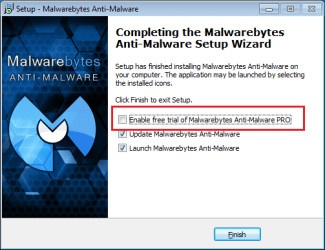
You can install Malwarebytes again and uncheck the option of the pro trial. (You might not be offered the pro trial on the second and/or subsequent installs.) That should keep the website screening part from installing/running.

MBAM.png
 

My Computer My Computer

At a glance

W7 Pro SP1 64biti78GBIntel HD Graphics
Computer type
Laptop
Computer Manufacturer/Model Number
Employer provided Dell Latitude
OS
W7 Pro SP1 64bit
CPU
i7
Memory
8GB
Graphics Card(s)
Intel HD Graphics
Hard Drives
crappy SSD
Antivirus
Employer mandated Symantec Endpoint Protection
Browser
Pale Moon 64bit, IE11 64bit & Chrome 64bit
What I've done is gone for the PRO and have added those websites to the ignore list by right clicking on the malwarebytes icon and that has enabled me to view those websites.
 

My Computer My Computer

At a glance

Windows 7 Home Premium 32bit Service Pack 1Pentium Dual Core 2.50Ghz4GB
Computer type
PC/Desktop
Computer Manufacturer/Model Number
HP SFF DC7900
OS
Windows 7 Home Premium 32bit Service Pack 1
CPU
Pentium Dual Core 2.50Ghz
Memory
4GB
Antivirus
MALWARE
Browser
FIREFOX 24
That will work too - thanks for posting that solution.

Glad you got it working.
 

My Computer My Computer

At a glance

W7 Pro SP1 64biti78GBIntel HD Graphics
Computer type
Laptop
Computer Manufacturer/Model Number
Employer provided Dell Latitude
OS
W7 Pro SP1 64bit
CPU
i7
Memory
8GB
Graphics Card(s)
Intel HD Graphics
Hard Drives
crappy SSD
Antivirus
Employer mandated Symantec Endpoint Protection
Browser
Pale Moon 64bit, IE11 64bit & Chrome 64bit
Thanks for all your input.
 

My Computer My Computer

At a glance

Windows 7 Home Premium 32bit Service Pack 1Pentium Dual Core 2.50Ghz4GB
Computer type
PC/Desktop
Computer Manufacturer/Model Number
HP SFF DC7900
OS
Windows 7 Home Premium 32bit Service Pack 1
CPU
Pentium Dual Core 2.50Ghz
Memory
4GB
Antivirus
MALWARE
Browser
FIREFOX 24
Back
Top