Solved Browsers working in safe mode with networking but not in normal mode

Kavitha ms

New member
Local time
3:41 PM
Messages
18
Location
India
Hi ,

I'm using windows7 32-bit operating system. I have internet explorer 8( it never worked since installation, always shows "No network connection") and Google chrome installed in my computer. I had been using Google chrome which crashed yesterday. I re-installed Chrome and now it says there is no internet connection. In short, I cannot use internet in my computer. Any other browser installed comes up showing the same "No Network connectivity" thing. And then I started the computer in "safe mode with networking" and I could use see that both Google chrome and Internet explorer are working. But they do not work in normal mode. I really don't know what to do to solve this problem. And internet is working as I'm using internet in my mobile using WIFI from the same internet connection.

Thanks you,
Kavitha
 

My Computer My Computer

At a glance

windows 7 Professional 32bitAMD Athlon(tm) II X2 Processor 3.01GHz2.00GB (RAM)
Computer type
PC/Desktop
OS
windows 7 Professional 32bit
CPU
AMD Athlon(tm) II X2 Processor 3.01GHz
Memory
2.00GB (RAM)
Internet Speed
100Mbps
Browser
Internet Explorer 8, Google Chrome version 33.0.1750.149

My Computer My Computer

At a glance

Win-7-Pro64bit 7-H-Prem-64biti7-5930K 2nd i9-9940x both water blocked VRM'...Trident-z 3200C14 2nd Trident-z 3600C16EVGA 1080ti ftw3 2nd Titan Xp both water blocked
Computer type
PC/Desktop
Computer Manufacturer/Model Number
Custom assembled by me :}
OS
Win-7-Pro64bit 7-H-Prem-64bit
CPU
i7-5930K 2nd i9-9940x both water blocked VRM's too
Motherboard
ASUS SABERTOOTH X99 2nd ASUS x299 Apex
Memory
Trident-z 3200C14 2nd Trident-z 3600C16
Graphics Card(s)
EVGA 1080ti ftw3 2nd Titan Xp both water blocked
Sound Card
Built-in Realtek
Monitor(s) Displays
1-AOC G2460PG 24"G-Sync 144Hz/ 2nd 1-ASUS VG248QE 24" 144Hz
Screen Resolution
1920 x 1080 144Hz
Hard Drives
2-Samsung M.2 Evo & Evo Plus
2-Samsung 850 EVO 500GB SSD's/ 3-2.5 W.D. Black 1tb-&3-1tb/3-3.5 WD Black 1tb hdd's
PSU
EVGA SuperNOVA 1000-P2 2nd 1200-P2
Case
2-Corsair Obsidian Series 450D Black ATX Mid Tower
Cooling
Custom water loops
Keyboard
Logitech G710+/ 2nd Logitech G910
Mouse
2-RedDragon M901 Perdition 16400 dpi Gaming mouse = wired
Internet Speed
Comcast Ping 19ms 89.31mbps download speed 6.12mbps upload
Antivirus
Malwarebytes Pro/ Superantispyware Pro
Browser
FireFox & Pale moon
Other Info
2nd ASUS X299 Apex/Intel i9-9940x with Custom water loop/7H-Prem-x64/Corsair 450D case/Ram Trident-z 3600C16 4x8gb / Samsung970Evo plus 500gb SSD/Dual ssd EZ swap evo/PSU EVGA SuperNova 1200w-P2 80+Platinum/GPU Titan Xp /8-ML-140 on push-pull on 2-280GTX rads

My Computer My Computer

At a glance

Windows 10 Home x64INTEL Core i5-750 Quad-Core 3.37GHzHyperX Fury Black Series 8GB (2 x 4GB) 1866MhzEVGA GeForce GTX 750 Superclocked 1GB 128-Bit...
Computer type
PC/Desktop
OS
Windows 10 Home x64
CPU
INTEL Core i5-750 Quad-Core 3.37GHz
Motherboard
ASUS P7P55D
Memory
HyperX Fury Black Series 8GB (2 x 4GB) 1866Mhz
Graphics Card(s)
EVGA GeForce GTX 750 Superclocked 1GB 128-Bit GDDR5
Monitor(s) Displays
LG 32MA68HY 32" IPS
Screen Resolution
1920 x 1080
Hard Drives
Samsung 840 Evo 120GB, SEAGATE 500GB Barracuda® 7200.12, SATA 3 Gb/s, 7200 RPM, 16MB cache
PSU
ANTEC TruePower New TP-550, 80 PLUS, 550W
Case
ANTEC Three Hundred Illusion
Cooling
COOLER MASTER Hyper 212 Plus, 4 x 120mm 1 x 140mm Noctua's
Internet Speed
85 + Mbps
Antivirus
Avast
Browser
Vivaldi
Hi and welcome to SevenForums,
Work you way down this list,
Troubleshooting for win-7,
http://www.sevenforums.com/tutorials/220165-troubleshooting-steps-windows-7-a.html
Post which Security suite you have installed as well,
Cheers.

I had installed Norton internet security in my computer which I had uninstalled long back. But it is still in the program list. I am not able to uninstall now. And I cannot understand how to troubleshoot using the tutorial that you referred to me. I don't know how to do it. Is there any other way by which I can fix this problem ?

Thanks,
Kavitha
 

My Computer My Computer

At a glance

windows 7 Professional 32bitAMD Athlon(tm) II X2 Processor 3.01GHz2.00GB (RAM)
Computer type
PC/Desktop
OS
windows 7 Professional 32bit
CPU
AMD Athlon(tm) II X2 Processor 3.01GHz
Memory
2.00GB (RAM)
Internet Speed
100Mbps
Browser
Internet Explorer 8, Google Chrome version 33.0.1750.149
Welcome to Seven Forums Kavitha ms. Since both work in Safe Mode, there must be a conflict. Try performing a Clean start and see if you can find the culprit

http://www.sevenforums.com/tutorial...ation-conflicts-performing-clean-startup.html

Security programs, or parental control programs are most suspect, but it can be anything. A Guy

I tried this. It didn't help. But after this, Ms Office suite and adobe reader got crashed too. Now Most of the programs in my computer doesn't work. And these things doesn't work even in safe mode. :(
I don't know what to do now. I can't do a windows re-installation as I have no device to back-up my data now. I'm really stuck up with this :(

Thanks,
Kavitha
 

My Computer My Computer

At a glance

windows 7 Professional 32bitAMD Athlon(tm) II X2 Processor 3.01GHz2.00GB (RAM)
Computer type
PC/Desktop
OS
windows 7 Professional 32bit
CPU
AMD Athlon(tm) II X2 Processor 3.01GHz
Memory
2.00GB (RAM)
Internet Speed
100Mbps
Browser
Internet Explorer 8, Google Chrome version 33.0.1750.149
Hi,
That is bad news,
Safe mode with networking,
Shut down your machine, Unplug it and Hold the power button down for 30/45 seconds (Power Drain)
If this is a Laptop remove the Battery and use power drain,
Power up and Tap the F8 key continuously until you see a black page with white text,
Use the down arrow key to toggle to safe mode with networking/ hit the enter key.
Login as usual

If you succeed in getting into safe mode with networking please go directly to this site and download the scanner,
http://www.bleepingcomputer.com/download/adwcleaner/
Here is a picture of the Download button to use and the process to run the scanner,
Click the image to increase it,
Adwcleaner download process
After using the Clean button inside the scanner your machine will boot,
After boot a Text file will open,
Click on File on the top left and save as and name it and save it to your desktop,
Right click the text files body and Select All,
Then right click it and Copy,
Right click in a reply here type "here ya go" and right click and Paste.
 

My Computer My Computer

At a glance

Win-7-Pro64bit 7-H-Prem-64biti7-5930K 2nd i9-9940x both water blocked VRM'...Trident-z 3200C14 2nd Trident-z 3600C16EVGA 1080ti ftw3 2nd Titan Xp both water blocked
Computer type
PC/Desktop
Computer Manufacturer/Model Number
Custom assembled by me :}
OS
Win-7-Pro64bit 7-H-Prem-64bit
CPU
i7-5930K 2nd i9-9940x both water blocked VRM's too
Motherboard
ASUS SABERTOOTH X99 2nd ASUS x299 Apex
Memory
Trident-z 3200C14 2nd Trident-z 3600C16
Graphics Card(s)
EVGA 1080ti ftw3 2nd Titan Xp both water blocked
Sound Card
Built-in Realtek
Monitor(s) Displays
1-AOC G2460PG 24"G-Sync 144Hz/ 2nd 1-ASUS VG248QE 24" 144Hz
Screen Resolution
1920 x 1080 144Hz
Hard Drives
2-Samsung M.2 Evo & Evo Plus
2-Samsung 850 EVO 500GB SSD's/ 3-2.5 W.D. Black 1tb-&3-1tb/3-3.5 WD Black 1tb hdd's
PSU
EVGA SuperNOVA 1000-P2 2nd 1200-P2
Case
2-Corsair Obsidian Series 450D Black ATX Mid Tower
Cooling
Custom water loops
Keyboard
Logitech G710+/ 2nd Logitech G910
Mouse
2-RedDragon M901 Perdition 16400 dpi Gaming mouse = wired
Internet Speed
Comcast Ping 19ms 89.31mbps download speed 6.12mbps upload
Antivirus
Malwarebytes Pro/ Superantispyware Pro
Browser
FireFox & Pale moon
Other Info
2nd ASUS X299 Apex/Intel i9-9940x with Custom water loop/7H-Prem-x64/Corsair 450D case/Ram Trident-z 3600C16 4x8gb / Samsung970Evo plus 500gb SSD/Dual ssd EZ swap evo/PSU EVGA SuperNova 1200w-P2 80+Platinum/GPU Titan Xp /8-ML-140 on push-pull on 2-280GTX rads
here ya go

# AdwCleaner v3.022 - Report created 19/03/2014 at 20:01:43
# Updated 13/03/2014 by Xplode
# Operating System : Windows 7 Professional (32 bits)
# Username : kavitha - KAVITHA-PC
# Running from : C:\Users\kavitha\Desktop\AdwCleaner.exe
# Option : Clean

***** [ Services ] *****


***** [ Files / Folders ] *****


***** [ Shortcuts ] *****


***** [ Registry ] *****


***** [ Browsers ] *****

-\\ Internet Explorer v8.0.7600.17267


-\\ Google Chrome v

[ File : C:\Users\kavitha\AppData\Local\Google\Chrome\User Data\Default\preferences ]


*************************

AdwCleaner[R0].txt - [3565 octets] - [19/03/2014 19:52:55]
AdwCleaner[R1].txt - [861 octets] - [19/03/2014 20:00:58]
AdwCleaner[S0].txt - [3720 octets] - [19/03/2014 19:54:15]
AdwCleaner[S1].txt - [783 octets] - [19/03/2014 20:01:43]

########## EOF - C:\AdwCleaner\AdwCleaner[S1].txt - [842 octets] ##########


While downloading, I didn't get the option to save it on my desktop. It got downloaded directly. So, I pasted it in the desktop after downloading.

Thanks,
Kavitha
 

My Computer My Computer

At a glance

windows 7 Professional 32bitAMD Athlon(tm) II X2 Processor 3.01GHz2.00GB (RAM)
Computer type
PC/Desktop
OS
windows 7 Professional 32bit
CPU
AMD Athlon(tm) II X2 Processor 3.01GHz
Memory
2.00GB (RAM)
Internet Speed
100Mbps
Browser
Internet Explorer 8, Google Chrome version 33.0.1750.149
Re-run the scanner starting normally,
I'm assuming you ran it using safe mode with networking ?
Cheers.
 

My Computer My Computer

At a glance

Win-7-Pro64bit 7-H-Prem-64biti7-5930K 2nd i9-9940x both water blocked VRM'...Trident-z 3200C14 2nd Trident-z 3600C16EVGA 1080ti ftw3 2nd Titan Xp both water blocked
Computer type
PC/Desktop
Computer Manufacturer/Model Number
Custom assembled by me :}
OS
Win-7-Pro64bit 7-H-Prem-64bit
CPU
i7-5930K 2nd i9-9940x both water blocked VRM's too
Motherboard
ASUS SABERTOOTH X99 2nd ASUS x299 Apex
Memory
Trident-z 3200C14 2nd Trident-z 3600C16
Graphics Card(s)
EVGA 1080ti ftw3 2nd Titan Xp both water blocked
Sound Card
Built-in Realtek
Monitor(s) Displays
1-AOC G2460PG 24"G-Sync 144Hz/ 2nd 1-ASUS VG248QE 24" 144Hz
Screen Resolution
1920 x 1080 144Hz
Hard Drives
2-Samsung M.2 Evo & Evo Plus
2-Samsung 850 EVO 500GB SSD's/ 3-2.5 W.D. Black 1tb-&3-1tb/3-3.5 WD Black 1tb hdd's
PSU
EVGA SuperNOVA 1000-P2 2nd 1200-P2
Case
2-Corsair Obsidian Series 450D Black ATX Mid Tower
Cooling
Custom water loops
Keyboard
Logitech G710+/ 2nd Logitech G910
Mouse
2-RedDragon M901 Perdition 16400 dpi Gaming mouse = wired
Internet Speed
Comcast Ping 19ms 89.31mbps download speed 6.12mbps upload
Antivirus
Malwarebytes Pro/ Superantispyware Pro
Browser
FireFox & Pale moon
Other Info
2nd ASUS X299 Apex/Intel i9-9940x with Custom water loop/7H-Prem-x64/Corsair 450D case/Ram Trident-z 3600C16 4x8gb / Samsung970Evo plus 500gb SSD/Dual ssd EZ swap evo/PSU EVGA SuperNova 1200w-P2 80+Platinum/GPU Titan Xp /8-ML-140 on push-pull on 2-280GTX rads
No. I downloaded it in safe mode. And I ran the software in normal mode only.
 

My Computer My Computer

At a glance

windows 7 Professional 32bitAMD Athlon(tm) II X2 Processor 3.01GHz2.00GB (RAM)
Computer type
PC/Desktop
OS
windows 7 Professional 32bit
CPU
AMD Athlon(tm) II X2 Processor 3.01GHz
Memory
2.00GB (RAM)
Internet Speed
100Mbps
Browser
Internet Explorer 8, Google Chrome version 33.0.1750.149
Hi okay good not that running it would be a bad idea in safe mode....
You would just need to repeat the scan under normal startup,
Well the scan was pretty clean,

I would go to your Computer manufactures website and look under the Help/ Support sections for driver updates,
Wired networking and wireless and graphic's card while your there, check all drivers,
It should have a utility to search and find your drivers installed and if newer ones are available,
Cheers.
 

My Computer My Computer

At a glance

Win-7-Pro64bit 7-H-Prem-64biti7-5930K 2nd i9-9940x both water blocked VRM'...Trident-z 3200C14 2nd Trident-z 3600C16EVGA 1080ti ftw3 2nd Titan Xp both water blocked
Computer type
PC/Desktop
Computer Manufacturer/Model Number
Custom assembled by me :}
OS
Win-7-Pro64bit 7-H-Prem-64bit
CPU
i7-5930K 2nd i9-9940x both water blocked VRM's too
Motherboard
ASUS SABERTOOTH X99 2nd ASUS x299 Apex
Memory
Trident-z 3200C14 2nd Trident-z 3600C16
Graphics Card(s)
EVGA 1080ti ftw3 2nd Titan Xp both water blocked
Sound Card
Built-in Realtek
Monitor(s) Displays
1-AOC G2460PG 24"G-Sync 144Hz/ 2nd 1-ASUS VG248QE 24" 144Hz
Screen Resolution
1920 x 1080 144Hz
Hard Drives
2-Samsung M.2 Evo & Evo Plus
2-Samsung 850 EVO 500GB SSD's/ 3-2.5 W.D. Black 1tb-&3-1tb/3-3.5 WD Black 1tb hdd's
PSU
EVGA SuperNOVA 1000-P2 2nd 1200-P2
Case
2-Corsair Obsidian Series 450D Black ATX Mid Tower
Cooling
Custom water loops
Keyboard
Logitech G710+/ 2nd Logitech G910
Mouse
2-RedDragon M901 Perdition 16400 dpi Gaming mouse = wired
Internet Speed
Comcast Ping 19ms 89.31mbps download speed 6.12mbps upload
Antivirus
Malwarebytes Pro/ Superantispyware Pro
Browser
FireFox & Pale moon
Other Info
2nd ASUS X299 Apex/Intel i9-9940x with Custom water loop/7H-Prem-x64/Corsair 450D case/Ram Trident-z 3600C16 4x8gb / Samsung970Evo plus 500gb SSD/Dual ssd EZ swap evo/PSU EVGA SuperNova 1200w-P2 80+Platinum/GPU Titan Xp /8-ML-140 on push-pull on 2-280GTX rads
Thank you. :)
I would try to find out if any updates are available for drivers.
 

My Computer My Computer

At a glance

windows 7 Professional 32bitAMD Athlon(tm) II X2 Processor 3.01GHz2.00GB (RAM)
Computer type
PC/Desktop
OS
windows 7 Professional 32bit
CPU
AMD Athlon(tm) II X2 Processor 3.01GHz
Memory
2.00GB (RAM)
Internet Speed
100Mbps
Browser
Internet Explorer 8, Google Chrome version 33.0.1750.149
Okay we'll wait for an update,
Cheers.
 

My Computer My Computer

At a glance

Win-7-Pro64bit 7-H-Prem-64biti7-5930K 2nd i9-9940x both water blocked VRM'...Trident-z 3200C14 2nd Trident-z 3600C16EVGA 1080ti ftw3 2nd Titan Xp both water blocked
Computer type
PC/Desktop
Computer Manufacturer/Model Number
Custom assembled by me :}
OS
Win-7-Pro64bit 7-H-Prem-64bit
CPU
i7-5930K 2nd i9-9940x both water blocked VRM's too
Motherboard
ASUS SABERTOOTH X99 2nd ASUS x299 Apex
Memory
Trident-z 3200C14 2nd Trident-z 3600C16
Graphics Card(s)
EVGA 1080ti ftw3 2nd Titan Xp both water blocked
Sound Card
Built-in Realtek
Monitor(s) Displays
1-AOC G2460PG 24"G-Sync 144Hz/ 2nd 1-ASUS VG248QE 24" 144Hz
Screen Resolution
1920 x 1080 144Hz
Hard Drives
2-Samsung M.2 Evo & Evo Plus
2-Samsung 850 EVO 500GB SSD's/ 3-2.5 W.D. Black 1tb-&3-1tb/3-3.5 WD Black 1tb hdd's
PSU
EVGA SuperNOVA 1000-P2 2nd 1200-P2
Case
2-Corsair Obsidian Series 450D Black ATX Mid Tower
Cooling
Custom water loops
Keyboard
Logitech G710+/ 2nd Logitech G910
Mouse
2-RedDragon M901 Perdition 16400 dpi Gaming mouse = wired
Internet Speed
Comcast Ping 19ms 89.31mbps download speed 6.12mbps upload
Antivirus
Malwarebytes Pro/ Superantispyware Pro
Browser
FireFox & Pale moon
Other Info
2nd ASUS X299 Apex/Intel i9-9940x with Custom water loop/7H-Prem-x64/Corsair 450D case/Ram Trident-z 3600C16 4x8gb / Samsung970Evo plus 500gb SSD/Dual ssd EZ swap evo/PSU EVGA SuperNova 1200w-P2 80+Platinum/GPU Titan Xp /8-ML-140 on push-pull on 2-280GTX rads
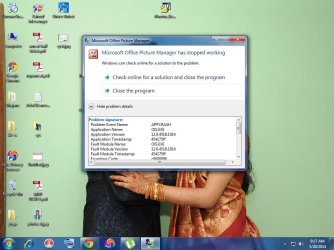
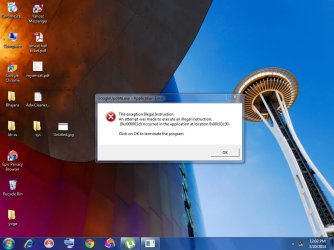
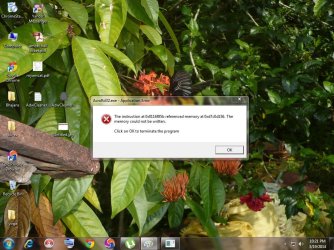
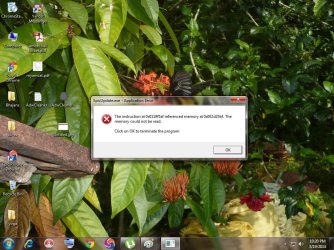
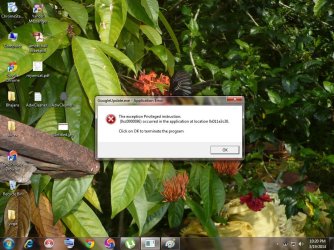
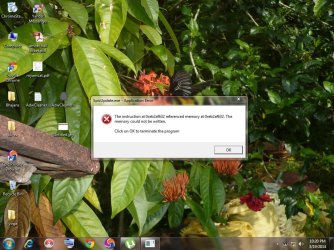
Now, When I turn on the pc in normal mode, these pop ups are coming. I've added the screenshots here.
 

Attachments

  • 1.jpg
    1.jpg
    75.1 KB · Views: 1
  • a.jpg
    a.jpg
    142.9 KB · Views: 1
  • b.jpg
    b.jpg
    142.3 KB · Views: 1
  • c.jpg
    c.jpg
    142.6 KB · Views: 1
  • d.jpg
    d.jpg
    143.5 KB · Views: 1
  • e.jpg
    e.jpg
    142.4 KB · Views: 1

My Computer My Computer

At a glance

windows 7 Professional 32bitAMD Athlon(tm) II X2 Processor 3.01GHz2.00GB (RAM)
Computer type
PC/Desktop
OS
windows 7 Professional 32bit
CPU
AMD Athlon(tm) II X2 Processor 3.01GHz
Memory
2.00GB (RAM)
Internet Speed
100Mbps
Browser
Internet Explorer 8, Google Chrome version 33.0.1750.149
My Computer My Computer

At a glance

Win-7-Pro64bit 7-H-Prem-64biti7-5930K 2nd i9-9940x both water blocked VRM'...Trident-z 3200C14 2nd Trident-z 3600C16EVGA 1080ti ftw3 2nd Titan Xp both water blocked
Computer type
PC/Desktop
Computer Manufacturer/Model Number
Custom assembled by me :}
OS
Win-7-Pro64bit 7-H-Prem-64bit
CPU
i7-5930K 2nd i9-9940x both water blocked VRM's too
Motherboard
ASUS SABERTOOTH X99 2nd ASUS x299 Apex
Memory
Trident-z 3200C14 2nd Trident-z 3600C16
Graphics Card(s)
EVGA 1080ti ftw3 2nd Titan Xp both water blocked
Sound Card
Built-in Realtek
Monitor(s) Displays
1-AOC G2460PG 24"G-Sync 144Hz/ 2nd 1-ASUS VG248QE 24" 144Hz
Screen Resolution
1920 x 1080 144Hz
Hard Drives
2-Samsung M.2 Evo & Evo Plus
2-Samsung 850 EVO 500GB SSD's/ 3-2.5 W.D. Black 1tb-&3-1tb/3-3.5 WD Black 1tb hdd's
PSU
EVGA SuperNOVA 1000-P2 2nd 1200-P2
Case
2-Corsair Obsidian Series 450D Black ATX Mid Tower
Cooling
Custom water loops
Keyboard
Logitech G710+/ 2nd Logitech G910
Mouse
2-RedDragon M901 Perdition 16400 dpi Gaming mouse = wired
Internet Speed
Comcast Ping 19ms 89.31mbps download speed 6.12mbps upload
Antivirus
Malwarebytes Pro/ Superantispyware Pro
Browser
FireFox & Pale moon
Other Info
2nd ASUS X299 Apex/Intel i9-9940x with Custom water loop/7H-Prem-x64/Corsair 450D case/Ram Trident-z 3600C16 4x8gb / Samsung970Evo plus 500gb SSD/Dual ssd EZ swap evo/PSU EVGA SuperNova 1200w-P2 80+Platinum/GPU Titan Xp /8-ML-140 on push-pull on 2-280GTX rads
Last edited:

My Computer My Computer

At a glance

Windows 7 Ult, Windows 8.1 Pro,Q9650-4.275GHz, E8600 4.5GHz, E6750-3.8GHzG.Skill PC2 9600 1200Mhz 5 5 5 15 2TGTX480
Computer type
PC/Desktop
Computer Manufacturer/Model Number
Home built
OS
Windows 7 Ult, Windows 8.1 Pro,
CPU
Q9650-4.275GHz, E8600 4.5GHz, E6750-3.8GHz
Motherboard
Evga 780i FTW
Memory
G.Skill PC2 9600 1200Mhz 5 5 5 15 2T
Graphics Card(s)
GTX480
Sound Card
Asus Xonar D2
Monitor(s) Displays
HannsG
Screen Resolution
1680X1050
Hard Drives
GSkill Phoenix Pro 120GB SSD
PSU
ThermalTake Toughpower 1000Watt modular
Case
ThermalTake XaserV
Cooling
Xigmatek S1283
Keyboard
Logitech G15
Mouse
Logitech G9
Internet Speed
T1
At the very least you should run the Norton removal tool by following directions in the link below.
https://support.norton.com/sp/en/us/home/current/solutions/kb20080710133834EN_EndUserProfile_en_us

This machine looks pretty messed up and I'm not completely sure what the problem might be but following the directions in the link below may get us closer to solving the problem.

Please post the results from these tests> Mini Tool Test for pchf


I tried removing norton using Norton removal tool. And now, the internet and IE and Opera are working in normal mode. Thank you so much :)
But now, Google chrome which had crashed again. :(

But other programs like adobe reader, Ms-Office suite etc are still not working. I cannot even open a jpg file. I've included the screenshot when i open a jpg file. This is the case with safe mode too. Pdf files, Ms-office suite and pictures are not getting opened. I uninstalled and then again installed the adobe reader. It worked for sometime and then crashed.
 

Attachments

  • pic.jpg
    pic.jpg
    94.1 KB · Views: 0
Last edited:

My Computer My Computer

At a glance

windows 7 Professional 32bitAMD Athlon(tm) II X2 Processor 3.01GHz2.00GB (RAM)
Computer type
PC/Desktop
OS
windows 7 Professional 32bit
CPU
AMD Athlon(tm) II X2 Processor 3.01GHz
Memory
2.00GB (RAM)
Internet Speed
100Mbps
Browser
Internet Explorer 8, Google Chrome version 33.0.1750.149
At the very least you should run the Norton removal tool by following directions in the link below.
https://support.norton.com/sp/en/us/home/current/solutions/kb20080710133834EN_EndUserProfile_en_us

This machine looks pretty messed up and I'm not completely sure what the problem might be but following the directions in the link below may get us closer to solving the problem.

Please post the results from these tests> Mini Tool Test for pchf


I've attached the result file with this as the text is too long to be pasted in this post. :)
This is the result of the first one - Mini tool box
 

Attachments

My Computer My Computer

At a glance

windows 7 Professional 32bitAMD Athlon(tm) II X2 Processor 3.01GHz2.00GB (RAM)
Computer type
PC/Desktop
OS
windows 7 Professional 32bit
CPU
AMD Athlon(tm) II X2 Processor 3.01GHz
Memory
2.00GB (RAM)
Internet Speed
100Mbps
Browser
Internet Explorer 8, Google Chrome version 33.0.1750.149
this is the result of the adware cleaner

# AdwCleaner v3.022 - Report created 28/03/2014 at 17:28:44
# Updated 13/03/2014 by Xplode
# Operating System : Windows 7 Professional (32 bits)
# Username : kavitha - KAVITHA-PC
# Running from : C:\Users\kavitha\Desktop\adwcleaner.exe
# Option : Clean
***** [ Services ] *****

***** [ Files / Folders ] *****

***** [ Shortcuts ] *****

***** [ Registry ] *****
Key Deleted : HKLM\Software\DeviceVM
Key Deleted : HKLM\SOFTWARE\Microsoft\Windows\CurrentVersion\Uninstall\{99AD9D6D-A456-49EE-8360-F22EE7AA1272}
***** [ Browsers ] *****
-\\ Internet Explorer v8.0.7600.16385

-\\ Google Chrome v
[ File : C:\Users\kavitha\AppData\Local\Google\Chrome\User Data\Default\preferences ]

*************************
AdwCleaner[R2].txt - [886 octets] - [28/03/2014 17:24:07]
AdwCleaner[S2].txt - [812 octets] - [28/03/2014 17:28:44]
########## EOF - C:\AdwCleaner\AdwCleaner[S2].txt - [871 octets] ##########
 

My Computer My Computer

At a glance

windows 7 Professional 32bitAMD Athlon(tm) II X2 Processor 3.01GHz2.00GB (RAM)
Computer type
PC/Desktop
OS
windows 7 Professional 32bit
CPU
AMD Athlon(tm) II X2 Processor 3.01GHz
Memory
2.00GB (RAM)
Internet Speed
100Mbps
Browser
Internet Explorer 8, Google Chrome version 33.0.1750.149
Result log of junkware remover

~~~~~~~~~~~~~~~~~~~~~~~~~~~~~~~~~~~~~~~~~~~~~~~~~~~~~~~~~~~~~
Junkware Removal Tool (JRT) by Thisisu
Version: 6.1.3 (03.23.2014:1)
OS: Windows_NT x86
Ran by kavitha on Fri 03/28/2014 at 17:34:57.84
~~~~~~~~~~~~~~~~~~~~~~~~~~~~~~~~~~~~~~~~~~~~~~~~~~~~~~~~~~~~~


~~~ Services

~~~ Registry Values
Successfully repaired: [Registry Value] HKEY_CURRENT_USER\Software\Microsoft\Internet Explorer\Main\\Start Page
Successfully repaired: [Registry Value] HKEY_USERS\.DEFAULT\Software\Microsoft\Internet Explorer\Main\\Start Page
Successfully repaired: [Registry Value] HKEY_USERS\S-1-5-18\Software\Microsoft\Internet Explorer\Main\\Start Page
Successfully repaired: [Registry Value] HKEY_USERS\S-1-5-19\Software\Microsoft\Internet Explorer\Main\\Start Page
Successfully repaired: [Registry Value] HKEY_USERS\S-1-5-20\Software\Microsoft\Internet Explorer\Main\\Start Page
Successfully repaired: [Registry Value] HKEY_USERS\\Software\Microsoft\Internet Explorer\Main\\Start Page
Successfully repaired: [Registry Value] HKEY_LOCAL_MACHINE\Software\Microsoft\Internet Explorer\Main\\Start Page

~~~ Registry Keys
Successfully deleted: [Registry Key] HKEY_LOCAL_MACHINE\Software\Classes\freetvradio.spointerwebdisp

~~~ Files
Successfully deleted: [File] "C:\Windows\Tasks\driver robot.job"
Successfully disinfected: [Shortcut] C:\ProgramData\Microsoft\Windows\Start Menu\Programs\K-Lite Codec Pack\Media Player Classic.lnk

~~~ Folders
Successfully deleted: [Folder] "C:\ProgramData\ammyy"
Successfully deleted: [Folder] "C:\ProgramData\pc1data"
Successfully deleted: [Folder] "C:\Users\kavitha\appdata\local\cre"

~~~ Event Viewer Logs were cleared


~~~~~~~~~~~~~~~~~~~~~~~~~~~~~~~~~~~~~~~~~~~~~~~~~~~~~~~~~~~~~
Scan was completed on Fri 03/28/2014 at 17:40:40.73
End of JRT log
~~~~~~~~~~~~~~~~~~~~~~~~~~~~~~~~~~~~~~~~~~~~~~~~~~~~~~~~~~~~~
 

My Computer My Computer

At a glance

windows 7 Professional 32bitAMD Athlon(tm) II X2 Processor 3.01GHz2.00GB (RAM)
Computer type
PC/Desktop
OS
windows 7 Professional 32bit
CPU
AMD Athlon(tm) II X2 Processor 3.01GHz
Memory
2.00GB (RAM)
Internet Speed
100Mbps
Browser
Internet Explorer 8, Google Chrome version 33.0.1750.149

My Computer My Computer

At a glance

Microsoft Windows 7 Home Premium 64-bits 7601...Intel(R) Core(TM) i3 CPU M 370 @ 2.40GHz4,00 GBATI Mobility Radeon HD 5400 Series
Computer type
Laptop
Computer Manufacturer/Model Number
ACER ASPIRE 5742G
OS
Microsoft Windows 7 Home Premium 64-bits 7601 Multiprocessor Free Service Pack 1
CPU
Intel(R) Core(TM) i3 CPU M 370 @ 2.40GHz
Motherboard
Acer Aspire 5742G
Memory
4,00 GB
Graphics Card(s)
ATI Mobility Radeon HD 5400 Series
Sound Card
(1) AMD High Definition Audio Device (2) Realtek High Defi
Screen Resolution
1366 x 768 x 32 bits (4294967296 colors) @ 60 Hz
Hard Drives
WDC WD5000BEVT-22ZAT0
Back
Top