Solved Can Android's user run any video files on laptop via Bluetoo pairing ?

My Computer My Computer

At a glance

W10 Pro desktop, W11 laptop, W11 Pro tablet (...3.7Ghz 8700K i7, i7-11800H, i7-1065G716G desktop, 16G laptop, 4G tabletAMD Radeon RX580, RTX 3060, Intel Iris Plus
Computer type
PC/Desktop
Computer Manufacturer/Model Number
Home Built desktop, Dell G15 5511 Gaming laptop,MS Surface Pro 7 tablet
OS
W10 Pro desktop, W11 laptop, W11 Pro tablet (all 64-bit)
CPU
3.7Ghz 8700K i7, i7-11800H, i7-1065G7
Motherboard
ASUS TUF Z370-Pro Gaming in desktop
Memory
16G desktop, 16G laptop, 4G tablet
Graphics Card(s)
AMD Radeon RX580, RTX 3060, Intel Iris Plus
Sound Card
High Definition Audio (Built-in to mobo)
Monitor(s) Displays
Samsung U32J59 32" (2x), 15.6", 12"
Screen Resolution
3840x2160, 3840x2160, 1920x1080, 2160x1440
Hard Drives
500G SSD for OS; 2T, 10T & 15T HDDs for Data on Desktop, 1TB SSD laptop, 128G SSD tablet.
PSU
Corsair CX 750M
Case
Antec 100
Cooling
CM 212+
Keyboard
IBM Model M - used continuously since 1986
Mouse
Microsoft Pro IntelliMouse
Internet Speed
400M down 8M up
Antivirus
Windows Defender
Browser
FireFox
Other Info
Built my first computer (8Mhz 8088cpu, 640K RAM, 20MB HDD, 2 360K floppy drives) in 1985 and have been building them for myself, relatives and friends ever since.

My Computer My Computer

At a glance

Windows 7 Home Premium 64BitIntel Core i5, 2.3GHzDDR3- 6GBIntel Graphics Family, Radeon HD 6770M
Computer type
Laptop
Computer Manufacturer/Model Number
HP, Pavilion
OS
Windows 7 Home Premium 64Bit
CPU
Intel Core i5, 2.3GHz
Motherboard
Hewlett-Packard- Model 1657
Memory
DDR3- 6GB
Graphics Card(s)
Intel Graphics Family, Radeon HD 6770M
Hard Drives
Toshiba 700GB
Antivirus
Microsot Secuirty Eessentials
Browser
MS IE, Google Chrom, and FireFox
Here's a link to the MX Player website: https://sites.google.com/site/mxvpen/

There are codecs available but the developer says you shouldn't need a codec unless the player asks for one on startup. Did you get asked for a codec?

I tried using MX Player to watch a FLV video and it worked fine for me with no additional codecs.
 

My Computer My Computer

At a glance

W10 Pro desktop, W11 laptop, W11 Pro tablet (...3.7Ghz 8700K i7, i7-11800H, i7-1065G716G desktop, 16G laptop, 4G tabletAMD Radeon RX580, RTX 3060, Intel Iris Plus
Computer type
PC/Desktop
Computer Manufacturer/Model Number
Home Built desktop, Dell G15 5511 Gaming laptop,MS Surface Pro 7 tablet
OS
W10 Pro desktop, W11 laptop, W11 Pro tablet (all 64-bit)
CPU
3.7Ghz 8700K i7, i7-11800H, i7-1065G7
Motherboard
ASUS TUF Z370-Pro Gaming in desktop
Memory
16G desktop, 16G laptop, 4G tablet
Graphics Card(s)
AMD Radeon RX580, RTX 3060, Intel Iris Plus
Sound Card
High Definition Audio (Built-in to mobo)
Monitor(s) Displays
Samsung U32J59 32" (2x), 15.6", 12"
Screen Resolution
3840x2160, 3840x2160, 1920x1080, 2160x1440
Hard Drives
500G SSD for OS; 2T, 10T & 15T HDDs for Data on Desktop, 1TB SSD laptop, 128G SSD tablet.
PSU
Corsair CX 750M
Case
Antec 100
Cooling
CM 212+
Keyboard
IBM Model M - used continuously since 1986
Mouse
Microsoft Pro IntelliMouse
Internet Speed
400M down 8M up
Antivirus
Windows Defender
Browser
FireFox
Other Info
Built my first computer (8Mhz 8088cpu, 640K RAM, 20MB HDD, 2 360K floppy drives) in 1985 and have been building them for myself, relatives and friends ever since.
Thanks a lot,
No, I have never been asked to do that, although I have installed the latest version of MX player.
When working with you let me ask myslef, maybe your mobile phone is different than mine. My mobile phone is Samsung Galaxy Mini GT-S5570I.
 

My Computer My Computer

At a glance

Windows 7 Home Premium 64BitIntel Core i5, 2.3GHzDDR3- 6GBIntel Graphics Family, Radeon HD 6770M
Computer type
Laptop
Computer Manufacturer/Model Number
HP, Pavilion
OS
Windows 7 Home Premium 64Bit
CPU
Intel Core i5, 2.3GHz
Motherboard
Hewlett-Packard- Model 1657
Memory
DDR3- 6GB
Graphics Card(s)
Intel Graphics Family, Radeon HD 6770M
Hard Drives
Toshiba 700GB
Antivirus
Microsot Secuirty Eessentials
Browser
MS IE, Google Chrom, and FireFox
Here's a link to the MX Player website: https://sites.google.com/site/mxvpen/

There are codecs available but the developer says you shouldn't need a codec unless the player asks for one on startup. Did you get asked for a codec?

I tried using MX Player to watch a FLV video and it worked fine for me with no additional codecs.

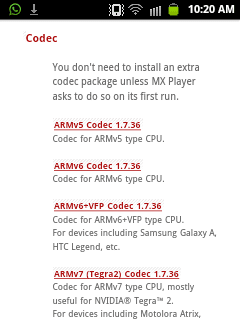
Thanks a lot i have tried openning the link from my android mobile. However no video codecs are shown. And this is the screen sthot below:


there are other codecs but not video codecs.
I need flv codecs to be installed. I don't find any video codecs at all.

https://sites.google.com/site/mxvpen/download
 

Attachments

  • SC20150126-102023.png
    SC20150126-102023.png
    6.8 KB · Views: 7
Last edited:

My Computer My Computer

At a glance

Windows 7 Home Premium 64BitIntel Core i5, 2.3GHzDDR3- 6GBIntel Graphics Family, Radeon HD 6770M
Computer type
Laptop
Computer Manufacturer/Model Number
HP, Pavilion
OS
Windows 7 Home Premium 64Bit
CPU
Intel Core i5, 2.3GHz
Motherboard
Hewlett-Packard- Model 1657
Memory
DDR3- 6GB
Graphics Card(s)
Intel Graphics Family, Radeon HD 6770M
Hard Drives
Toshiba 700GB
Antivirus
Microsot Secuirty Eessentials
Browser
MS IE, Google Chrom, and FireFox
Could you please address this problem if you have a solution?
 

My Computer My Computer

At a glance

Windows 7 Home Premium 64BitIntel Core i5, 2.3GHzDDR3- 6GBIntel Graphics Family, Radeon HD 6770M
Computer type
Laptop
Computer Manufacturer/Model Number
HP, Pavilion
OS
Windows 7 Home Premium 64Bit
CPU
Intel Core i5, 2.3GHz
Motherboard
Hewlett-Packard- Model 1657
Memory
DDR3- 6GB
Graphics Card(s)
Intel Graphics Family, Radeon HD 6770M
Hard Drives
Toshiba 700GB
Antivirus
Microsot Secuirty Eessentials
Browser
MS IE, Google Chrom, and FireFox
The codec packages for MX Player don't address specific video types like FLV, they are specified by the cpu type of your phone. If you weren't asked to install a codec when you first ran MX Player then the default codec should be all you need. I have no explanation as to why your phone cannot lay FLV files.

If you know the cpu of your phone and see a codec package listed for that cpu, then you could try to install it. Other than that, I don't know what elese you could do other than convert those FLV files to another video format you can play on your phone.
 

My Computer My Computer

At a glance

W10 Pro desktop, W11 laptop, W11 Pro tablet (...3.7Ghz 8700K i7, i7-11800H, i7-1065G716G desktop, 16G laptop, 4G tabletAMD Radeon RX580, RTX 3060, Intel Iris Plus
Computer type
PC/Desktop
Computer Manufacturer/Model Number
Home Built desktop, Dell G15 5511 Gaming laptop,MS Surface Pro 7 tablet
OS
W10 Pro desktop, W11 laptop, W11 Pro tablet (all 64-bit)
CPU
3.7Ghz 8700K i7, i7-11800H, i7-1065G7
Motherboard
ASUS TUF Z370-Pro Gaming in desktop
Memory
16G desktop, 16G laptop, 4G tablet
Graphics Card(s)
AMD Radeon RX580, RTX 3060, Intel Iris Plus
Sound Card
High Definition Audio (Built-in to mobo)
Monitor(s) Displays
Samsung U32J59 32" (2x), 15.6", 12"
Screen Resolution
3840x2160, 3840x2160, 1920x1080, 2160x1440
Hard Drives
500G SSD for OS; 2T, 10T & 15T HDDs for Data on Desktop, 1TB SSD laptop, 128G SSD tablet.
PSU
Corsair CX 750M
Case
Antec 100
Cooling
CM 212+
Keyboard
IBM Model M - used continuously since 1986
Mouse
Microsoft Pro IntelliMouse
Internet Speed
400M down 8M up
Antivirus
Windows Defender
Browser
FireFox
Other Info
Built my first computer (8Mhz 8088cpu, 640K RAM, 20MB HDD, 2 360K floppy drives) in 1985 and have been building them for myself, relatives and friends ever since.
The codec packages for MX Player don't address specific video types like FLV, they are specified by the cpu type of your phone. If you weren't asked to install a codec when you first ran MX Player then the default codec should be all you need. I have no explanation as to why your phone cannot lay FLV files.

If you know the cpu of your phone and see a codec package listed for that cpu, then you could try to install it. Other than that, I don't know what elese you could do other than convert those FLV files to another video format you can play on your phone.
Thanks a lot. I really don't know the cpu of my android device since i don't have much knowleage with mobile phones. Even if i had known it, what would this do as long as there no thing related to cpu on that codecs downloafs. Have you seen my screen shot
some memeber at MX player forum told me
Flv video files should be played if they are coipied to MX player. But this is impossible since there are not on xm player .however they are accessed from my windows media player network server. I don't why such users suggist such things not reasnable, although they know that i am accessing video files from media streaming. Do they only want to post without concentrating.
 

My Computer My Computer

At a glance

Windows 7 Home Premium 64BitIntel Core i5, 2.3GHzDDR3- 6GBIntel Graphics Family, Radeon HD 6770M
Computer type
Laptop
Computer Manufacturer/Model Number
HP, Pavilion
OS
Windows 7 Home Premium 64Bit
CPU
Intel Core i5, 2.3GHz
Motherboard
Hewlett-Packard- Model 1657
Memory
DDR3- 6GB
Graphics Card(s)
Intel Graphics Family, Radeon HD 6770M
Hard Drives
Toshiba 700GB
Antivirus
Microsot Secuirty Eessentials
Browser
MS IE, Google Chrom, and FireFox
... I really don't know the cpu of my android device since i don't have much knowleage with mobile phones. Even if i had known it, what would this do as long as there no thing related to cpu on that codecs downloafs. Have you seen my screen shot ...
On your screen shot, each codec states something like "ARMv5" or "Tegra2" or something like that. That is the cpu that codec package is for.
 

My Computer My Computer

At a glance

W10 Pro desktop, W11 laptop, W11 Pro tablet (...3.7Ghz 8700K i7, i7-11800H, i7-1065G716G desktop, 16G laptop, 4G tabletAMD Radeon RX580, RTX 3060, Intel Iris Plus
Computer type
PC/Desktop
Computer Manufacturer/Model Number
Home Built desktop, Dell G15 5511 Gaming laptop,MS Surface Pro 7 tablet
OS
W10 Pro desktop, W11 laptop, W11 Pro tablet (all 64-bit)
CPU
3.7Ghz 8700K i7, i7-11800H, i7-1065G7
Motherboard
ASUS TUF Z370-Pro Gaming in desktop
Memory
16G desktop, 16G laptop, 4G tablet
Graphics Card(s)
AMD Radeon RX580, RTX 3060, Intel Iris Plus
Sound Card
High Definition Audio (Built-in to mobo)
Monitor(s) Displays
Samsung U32J59 32" (2x), 15.6", 12"
Screen Resolution
3840x2160, 3840x2160, 1920x1080, 2160x1440
Hard Drives
500G SSD for OS; 2T, 10T & 15T HDDs for Data on Desktop, 1TB SSD laptop, 128G SSD tablet.
PSU
Corsair CX 750M
Case
Antec 100
Cooling
CM 212+
Keyboard
IBM Model M - used continuously since 1986
Mouse
Microsoft Pro IntelliMouse
Internet Speed
400M down 8M up
Antivirus
Windows Defender
Browser
FireFox
Other Info
Built my first computer (8Mhz 8088cpu, 640K RAM, 20MB HDD, 2 360K floppy drives) in 1985 and have been building them for myself, relatives and friends ever since.
... I really don't know the cpu of my android device since i don't have much knowleage with mobile phones. Even if i had known it, what would this do as long as there no thing related to cpu on that codecs downloafs. Have you seen my screen shot ...
On your screen shot, each codec states something like "ARMv5" or "Tegra2" or something like that. That is the cpu that codec package is for.

Thank you so much indeed.
NOTE: Strollin. My MX player on my phone can Play FLV files if I have copied the files into my Phone card. However, as said before, I was playing the Video files via ANDLAN client, and when prompted as to which player can play them, I chose 'MX player' . In this case MX player couldn't play the FLV files at all.

You have said in one post of yours that you have tried using MX Player to watch a FLV video and it worked fine for yoiu with no additional codecs.

I would like you to kindly confirm for me if you watched a FLV video file via Media streaming(I.e. you have used ANDLNA client to get access for video files, and then you prompted as to which player can play them? Or you copied those FLV files to you device and them watch them using MX player.

Yes, as I was told that MX player:
a) do these FLV files play properly in MX if you copy them to the device?
b) SW, HW, or HW+ mode?
c) What device and ROM?

Finally: Do you have any program or steps to how to know the CPU of my android device?
 

My Computer My Computer

At a glance

Windows 7 Home Premium 64BitIntel Core i5, 2.3GHzDDR3- 6GBIntel Graphics Family, Radeon HD 6770M
Computer type
Laptop
Computer Manufacturer/Model Number
HP, Pavilion
OS
Windows 7 Home Premium 64Bit
CPU
Intel Core i5, 2.3GHz
Motherboard
Hewlett-Packard- Model 1657
Memory
DDR3- 6GB
Graphics Card(s)
Intel Graphics Family, Radeon HD 6770M
Hard Drives
Toshiba 700GB
Antivirus
Microsot Secuirty Eessentials
Browser
MS IE, Google Chrom, and FireFox
I can confirm that I used AnDLNA to locate an FLV file on my DLNA server and then selected MX Player as the player and watched the video on my phone. I did not copy the video to my phone.

Google your phone, go to the phone's mfr's website and you should be able to determine which cpu is in your phone.
 

My Computer My Computer

At a glance

W10 Pro desktop, W11 laptop, W11 Pro tablet (...3.7Ghz 8700K i7, i7-11800H, i7-1065G716G desktop, 16G laptop, 4G tabletAMD Radeon RX580, RTX 3060, Intel Iris Plus
Computer type
PC/Desktop
Computer Manufacturer/Model Number
Home Built desktop, Dell G15 5511 Gaming laptop,MS Surface Pro 7 tablet
OS
W10 Pro desktop, W11 laptop, W11 Pro tablet (all 64-bit)
CPU
3.7Ghz 8700K i7, i7-11800H, i7-1065G7
Motherboard
ASUS TUF Z370-Pro Gaming in desktop
Memory
16G desktop, 16G laptop, 4G tablet
Graphics Card(s)
AMD Radeon RX580, RTX 3060, Intel Iris Plus
Sound Card
High Definition Audio (Built-in to mobo)
Monitor(s) Displays
Samsung U32J59 32" (2x), 15.6", 12"
Screen Resolution
3840x2160, 3840x2160, 1920x1080, 2160x1440
Hard Drives
500G SSD for OS; 2T, 10T & 15T HDDs for Data on Desktop, 1TB SSD laptop, 128G SSD tablet.
PSU
Corsair CX 750M
Case
Antec 100
Cooling
CM 212+
Keyboard
IBM Model M - used continuously since 1986
Mouse
Microsoft Pro IntelliMouse
Internet Speed
400M down 8M up
Antivirus
Windows Defender
Browser
FireFox
Other Info
Built my first computer (8Mhz 8088cpu, 640K RAM, 20MB HDD, 2 360K floppy drives) in 1985 and have been building them for myself, relatives and friends ever since.
I can confirm that I used AnDLNA to locate an FLV file on my DLNA server and then selected MX Player as the player and watched the video on my phone. I did not copy the video to my phone.

Google your phone, go to the phone's mfr's website and you should be able to determine which cpu is in your phone.

Hmm!. Thank you for your continue repies.

I would be saying that this is most strange thing. Could you confirm these last things for me
  • You use the Windows Media player as DLNA server.
  • You use AnDLNA client V: 1.0
  • You use MX player V1.7.36a(ARMV6 VFP)
  • You checked all these options in MX player under the settings> decode these : +H/W(Local), + H/W(Network), - H/W. I checked all these options.
  • You checked all extensions of video files available at MX player under in the settings> video codes......, I checked all of them.
 

My Computer My Computer

At a glance

Windows 7 Home Premium 64BitIntel Core i5, 2.3GHzDDR3- 6GBIntel Graphics Family, Radeon HD 6770M
Computer type
Laptop
Computer Manufacturer/Model Number
HP, Pavilion
OS
Windows 7 Home Premium 64Bit
CPU
Intel Core i5, 2.3GHz
Motherboard
Hewlett-Packard- Model 1657
Memory
DDR3- 6GB
Graphics Card(s)
Intel Graphics Family, Radeon HD 6770M
Hard Drives
Toshiba 700GB
Antivirus
Microsot Secuirty Eessentials
Browser
MS IE, Google Chrom, and FireFox
Strollin, could you please confirm for me those points posted previously?
 

My Computer My Computer

At a glance

Windows 7 Home Premium 64BitIntel Core i5, 2.3GHzDDR3- 6GBIntel Graphics Family, Radeon HD 6770M
Computer type
Laptop
Computer Manufacturer/Model Number
HP, Pavilion
OS
Windows 7 Home Premium 64Bit
CPU
Intel Core i5, 2.3GHz
Motherboard
Hewlett-Packard- Model 1657
Memory
DDR3- 6GB
Graphics Card(s)
Intel Graphics Family, Radeon HD 6770M
Hard Drives
Toshiba 700GB
Antivirus
Microsot Secuirty Eessentials
Browser
MS IE, Google Chrom, and FireFox
Could you please reply to my finl post?
 

My Computer My Computer

At a glance

Windows 7 Home Premium 64BitIntel Core i5, 2.3GHzDDR3- 6GBIntel Graphics Family, Radeon HD 6770M
Computer type
Laptop
Computer Manufacturer/Model Number
HP, Pavilion
OS
Windows 7 Home Premium 64Bit
CPU
Intel Core i5, 2.3GHz
Motherboard
Hewlett-Packard- Model 1657
Memory
DDR3- 6GB
Graphics Card(s)
Intel Graphics Family, Radeon HD 6770M
Hard Drives
Toshiba 700GB
Antivirus
Microsot Secuirty Eessentials
Browser
MS IE, Google Chrom, and FireFox
Hmm!. Thank you for your continue repies.

I would be saying that this is most strange thing. Could you confirm these last things for me
  • You use the Windows Media player as DLNA server.
  • You use AnDLNA client V: 1.0
  • You use MX player V1.7.36a(ARMV6 VFP)
  • You checked all these options in MX player under the settings> decode these : +H/W(Local), + H/W(Network), - H/W. I checked all these options.
  • You checked all extensions of video files available at MX player under in the settings> video codes......, I checked all of them.

#1 - No
#2 - Yes
#3 - V1.7.37 (ARMv7 NEON)
#4 - Just "H/W+ audio on S/W video" checked
#5 - Don't see settings> video codes in MX player
 

My Computer My Computer

At a glance

W10 Pro desktop, W11 laptop, W11 Pro tablet (...3.7Ghz 8700K i7, i7-11800H, i7-1065G716G desktop, 16G laptop, 4G tabletAMD Radeon RX580, RTX 3060, Intel Iris Plus
Computer type
PC/Desktop
Computer Manufacturer/Model Number
Home Built desktop, Dell G15 5511 Gaming laptop,MS Surface Pro 7 tablet
OS
W10 Pro desktop, W11 laptop, W11 Pro tablet (all 64-bit)
CPU
3.7Ghz 8700K i7, i7-11800H, i7-1065G7
Motherboard
ASUS TUF Z370-Pro Gaming in desktop
Memory
16G desktop, 16G laptop, 4G tablet
Graphics Card(s)
AMD Radeon RX580, RTX 3060, Intel Iris Plus
Sound Card
High Definition Audio (Built-in to mobo)
Monitor(s) Displays
Samsung U32J59 32" (2x), 15.6", 12"
Screen Resolution
3840x2160, 3840x2160, 1920x1080, 2160x1440
Hard Drives
500G SSD for OS; 2T, 10T & 15T HDDs for Data on Desktop, 1TB SSD laptop, 128G SSD tablet.
PSU
Corsair CX 750M
Case
Antec 100
Cooling
CM 212+
Keyboard
IBM Model M - used continuously since 1986
Mouse
Microsoft Pro IntelliMouse
Internet Speed
400M down 8M up
Antivirus
Windows Defender
Browser
FireFox
Other Info
Built my first computer (8Mhz 8088cpu, 640K RAM, 20MB HDD, 2 360K floppy drives) in 1985 and have been building them for myself, relatives and friends ever since.
Hmm!. Thank you for your continue repies.


I would be saying that this is most strange thing. Could you confirm these last things for me
  • You use the Windows Media player as DLNA server.
  • You use AnDLNA client V: 1.0
  • You use MX player V1.7.36a(ARMV6 VFP)
  • You checked all these options in MX player under the settings> decode these : +H/W(Local), + H/W(Network), - H/W. I checked all these options.
  • You checked all extensions of video files available at MX player under in the settings> video codes......, I checked all of them.

#1 - No
#2 - Yes
#3 - V1.7.37 (ARMv7 NEON)
#4 - Just "H/W+ audio on S/W video" checked
#5 - Don't see settings> video codes in MX player


Thank you so much indeed,
First of all: NOTE, when the video files are saved on my phone, then MX player played all Video formats without any exclusion at all.

First: When I said that 'You use the Windows Media player as DLNA server.' I meant from where you get access(watch) your video files(i.e. you used Windows 7 Windows Medial Player as DLNA compliant video server on your laptop, and then you watch the video files on your mobile via AnDLNA client.
As you siad in your very first reply below
Here's a tutorial on how to setup Win 7 Windows Media Player as a DLNA compliant video server: http://www.pcworld.com/article/24588...dows_7_pc.html

Second: I really updated my MX player into V1.7.37, but it was not V1.7.37 (ARMv7 NEON). It is stilll V1.7.37(ARMV6 VFP). Do you think it is realted to the CPU kind of my mobile phone? Yours is ARMV7 NEON, however, mine is ARMV6 VFP, although I update MX into V1.7.37???

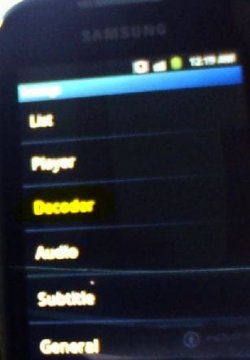
Thirdly: Once opened 'Decoder' option, there were three section , one is 'hardware decoder', one is software decoder', the third is 'general'. Each of them have some options. You mean that Just "H/W+ audio on S/W video" checked on both 'hardware decoder, and software decoder'???? ---- I have only let '"H/W+ audio on S/W video" checked' in hardware decoder

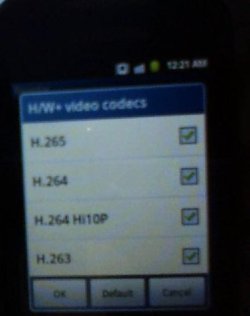
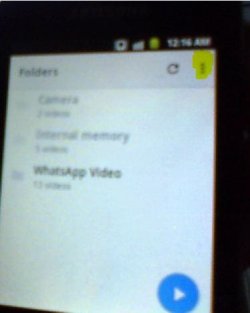
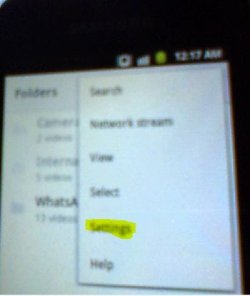
Fourthly: I meant with settings> video codes......, , with the following, I opened the MX player, then on the top-right hand side, there were three full-stops(points) each of them was located over the one below(I don't know the word in English indicates about that). When clicking on it, a drop-down menu wouldl be listed with options. Take 'settings', then chosen 'decoder', finally: H/W +Vidoe codecs. ---- I let them as default.
0.JPG
1.JPG
2.JPG
3.JPG


You checked all extensions of video files available at MX player under in the settings> video codes......, I checked all of them.


Fifthly, when clicking on 'list' option in the third screen shot above, another options show, there is 'file extenstions' option, when chosing it, there are a lot of file extenstions. do you modify anything at it

Capture.JPG

Sixthly: When opening some video files which are not FLV, However, there is 'AVI', the video file was played well, however, there was no audio, and I received 'This audio format (AC3) isn't supported.' once that video file opened.

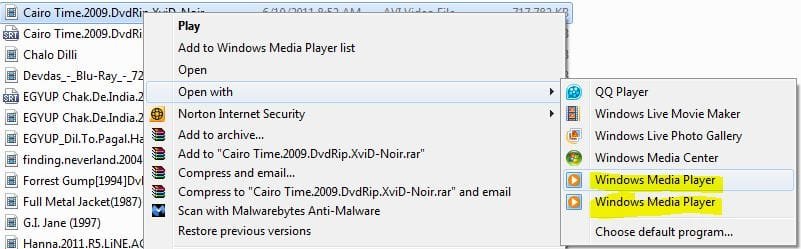
Seventhly: Note when installed K-Lite_Codec_Pack_1095_Basic on my Windows 7 with laptop, then two Windows Media Player were there once when cliking 'right-click' on a video file, and chose 'open with', there were two Windows Media Player shown. Why???( screen shot below)
WMP.JPG

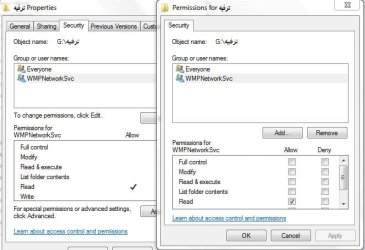
Finally: Where Win 7 Windows Media Player as a DLNA compliant video server, could you please confirm whether there is 'WMP Network Svc(Windows 7 Media Player Network Sharing Service (wmpnetwk)) is taken ownership on the folder shared on the library in Windows Media Player. As shown in this screen shot. In my case 'WMP Network Svc' was added on all folder included on the library.
WMP Network Svc(Windows 7 Media Player Network Sharing Service (wmpnetwk)).JPG


In conclusion, I am afraid that I messed the MX defult settings? However, even if so, I have clicked on 'reset default settings.
Maybe your mobile phone is different than mine. My mobile phone is Samsung Galaxy Mini GT-S5570I. What brand is your mobile?

 
Last edited:

My Computer My Computer

At a glance

Windows 7 Home Premium 64BitIntel Core i5, 2.3GHzDDR3- 6GBIntel Graphics Family, Radeon HD 6770M
Computer type
Laptop
Computer Manufacturer/Model Number
HP, Pavilion
OS
Windows 7 Home Premium 64Bit
CPU
Intel Core i5, 2.3GHz
Motherboard
Hewlett-Packard- Model 1657
Memory
DDR3- 6GB
Graphics Card(s)
Intel Graphics Family, Radeon HD 6770M
Hard Drives
Toshiba 700GB
Antivirus
Microsot Secuirty Eessentials
Browser
MS IE, Google Chrom, and FireFox
This will be my last reply in this thread.

First - I have never said I used Windows Media Player as my DLNA server. I merely told you how YOU could use it

Second - Which version of MX Player you have depends on what cpu you have in your phone.

Third & fourth - Since I do not have the "Use H/W+ Decoder" option checked, I don't have any of those codec options checked.

Fifth - None are selected

Sixth - Have not had issues with video but no audio for any filetype I have played.

Seventh - I have no idea

Conclusion - I have an LG G2 phone
 

My Computer My Computer

At a glance

W10 Pro desktop, W11 laptop, W11 Pro tablet (...3.7Ghz 8700K i7, i7-11800H, i7-1065G716G desktop, 16G laptop, 4G tabletAMD Radeon RX580, RTX 3060, Intel Iris Plus
Computer type
PC/Desktop
Computer Manufacturer/Model Number
Home Built desktop, Dell G15 5511 Gaming laptop,MS Surface Pro 7 tablet
OS
W10 Pro desktop, W11 laptop, W11 Pro tablet (all 64-bit)
CPU
3.7Ghz 8700K i7, i7-11800H, i7-1065G7
Motherboard
ASUS TUF Z370-Pro Gaming in desktop
Memory
16G desktop, 16G laptop, 4G tablet
Graphics Card(s)
AMD Radeon RX580, RTX 3060, Intel Iris Plus
Sound Card
High Definition Audio (Built-in to mobo)
Monitor(s) Displays
Samsung U32J59 32" (2x), 15.6", 12"
Screen Resolution
3840x2160, 3840x2160, 1920x1080, 2160x1440
Hard Drives
500G SSD for OS; 2T, 10T & 15T HDDs for Data on Desktop, 1TB SSD laptop, 128G SSD tablet.
PSU
Corsair CX 750M
Case
Antec 100
Cooling
CM 212+
Keyboard
IBM Model M - used continuously since 1986
Mouse
Microsoft Pro IntelliMouse
Internet Speed
400M down 8M up
Antivirus
Windows Defender
Browser
FireFox
Other Info
Built my first computer (8Mhz 8088cpu, 640K RAM, 20MB HDD, 2 360K floppy drives) in 1985 and have been building them for myself, relatives and friends ever since.
This will be my last reply in this thread.

First - I have never said I used Windows Media Player as my DLNA server. I merely told you how YOU could use it

Thanks a lot,
I know that you said that would your last reply in this thread

But could you please Strollin, reply to this point to elminate your contradiction here?
You previously said I can confirm that I used AnDLNA to locate an FLV file on my DLNA server and then selected MX Player as the player and watched the video on my phone. I did not copy the video to my phone.

How could you use ANDNA to ocated an FLV on your DLNA server, and then slectected MX player as the player and wathced the video on your phone as long as you never used Windows Media Player as your DLNA server, What was your DLNA server, as opposed to my Windows Media player which is my DLNA server.
You absolutely have two devices, one is LG G2 phone on which AnDLNA client is installed and with it, you located FLV saved on DLNA server. The other device has a DLNA server which have FLV file.
However, I have Smart phone on which AnDLNA installed, and with it I located the FLV files saved on DLNA server which is Windows medial player.

I think the key of this issue is around DLNA server you using is different than Windows Media Player I using it as DLNA server.
 

My Computer My Computer

At a glance

Windows 7 Home Premium 64BitIntel Core i5, 2.3GHzDDR3- 6GBIntel Graphics Family, Radeon HD 6770M
Computer type
Laptop
Computer Manufacturer/Model Number
HP, Pavilion
OS
Windows 7 Home Premium 64Bit
CPU
Intel Core i5, 2.3GHz
Motherboard
Hewlett-Packard- Model 1657
Memory
DDR3- 6GB
Graphics Card(s)
Intel Graphics Family, Radeon HD 6770M
Hard Drives
Toshiba 700GB
Antivirus
Microsot Secuirty Eessentials
Browser
MS IE, Google Chrom, and FireFox
Could you please reply to me to finis this, and re- marked it as solved.
 

My Computer My Computer

At a glance

Windows 7 Home Premium 64BitIntel Core i5, 2.3GHzDDR3- 6GBIntel Graphics Family, Radeon HD 6770M
Computer type
Laptop
Computer Manufacturer/Model Number
HP, Pavilion
OS
Windows 7 Home Premium 64Bit
CPU
Intel Core i5, 2.3GHz
Motherboard
Hewlett-Packard- Model 1657
Memory
DDR3- 6GB
Graphics Card(s)
Intel Graphics Family, Radeon HD 6770M
Hard Drives
Toshiba 700GB
Antivirus
Microsot Secuirty Eessentials
Browser
MS IE, Google Chrom, and FireFox
My NAS has it's own built-in DLNA server.

I assumed you didn't have a NAS but knew you had Windows Media Player which is why I suggested you could use it to do what you wanted. Here is a page that lists 14 free DLNA servers you could try instead: 14 Free Windows Media Server Downloads
 

My Computer My Computer

At a glance

W10 Pro desktop, W11 laptop, W11 Pro tablet (...3.7Ghz 8700K i7, i7-11800H, i7-1065G716G desktop, 16G laptop, 4G tabletAMD Radeon RX580, RTX 3060, Intel Iris Plus
Computer type
PC/Desktop
Computer Manufacturer/Model Number
Home Built desktop, Dell G15 5511 Gaming laptop,MS Surface Pro 7 tablet
OS
W10 Pro desktop, W11 laptop, W11 Pro tablet (all 64-bit)
CPU
3.7Ghz 8700K i7, i7-11800H, i7-1065G7
Motherboard
ASUS TUF Z370-Pro Gaming in desktop
Memory
16G desktop, 16G laptop, 4G tablet
Graphics Card(s)
AMD Radeon RX580, RTX 3060, Intel Iris Plus
Sound Card
High Definition Audio (Built-in to mobo)
Monitor(s) Displays
Samsung U32J59 32" (2x), 15.6", 12"
Screen Resolution
3840x2160, 3840x2160, 1920x1080, 2160x1440
Hard Drives
500G SSD for OS; 2T, 10T & 15T HDDs for Data on Desktop, 1TB SSD laptop, 128G SSD tablet.
PSU
Corsair CX 750M
Case
Antec 100
Cooling
CM 212+
Keyboard
IBM Model M - used continuously since 1986
Mouse
Microsoft Pro IntelliMouse
Internet Speed
400M down 8M up
Antivirus
Windows Defender
Browser
FireFox
Other Info
Built my first computer (8Mhz 8088cpu, 640K RAM, 20MB HDD, 2 360K floppy drives) in 1985 and have been building them for myself, relatives and friends ever since.
Back
Top