Can anyone help me remove the entries from context menus?

alishibaz

New member
Member
Local time
5:50 PM
Messages
41
I recently installed Winrar and it added a great many entries to my context menus.

When using many apps, for example Windows Explorer, and I right-click on a file name in order to move or copy it, a large number of items appear in the context menu that were not present before I installed Winrar.

Can anyone tell me how to remove these items short of uninstalling Winrar? I would like to keep Winrar installed. But these extra items in the context menus cause me a real serious pain in the neck.
 

My Computer My Computer

At a glance

Windows 7 Home Premium 32bit
OS
Windows 7 Home Premium 32bit
Easiest way to deal with this is to full uninstall and then do a selective install. You should be queried as to if you want the context menu feature or not. That is how it works with 7zip which is my preferred utility. You might even be offered to change the setup in options or at the uninstall/change portion.
 

My Computer My Computer

At a glance

Home Premium 7 64biti5 4690s (picked for low power consumption)8GB (Will change to 16GB in the near future)HIS IceQX HD 6850
Computer type
PC/Desktop
Computer Manufacturer/Model Number
Spec'd and built by me.
OS
Home Premium 7 64bit
CPU
i5 4690s (picked for low power consumption)
Motherboard
AsRock z97m ITX (Great features)
Memory
8GB (Will change to 16GB in the near future)
Graphics Card(s)
HIS IceQX HD 6850
Monitor(s) Displays
Samsung & Acer
Hard Drives
Mixed Seagate/WD HDD
PSU
Thermaltake 500 Watt
Case
CoolerMaster 130 Mini ITX (Very impressed with this case)
Cooling
Stock
Keyboard
Logitech
Mouse
Kensington Expert Trackball
Internet Speed
ADSL
Antivirus
Me!
Browser
Firefox
OK. I will give that a try.

Thank you very much for your advice.

It's interesting. But I have enough experience that I should have known that. However, I was so close to the problem that I just could not see that solution.

Thanks again!
 

My Computer My Computer

At a glance

Windows 7 Home Premium 32bit
OS
Windows 7 Home Premium 32bit
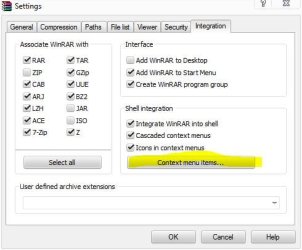
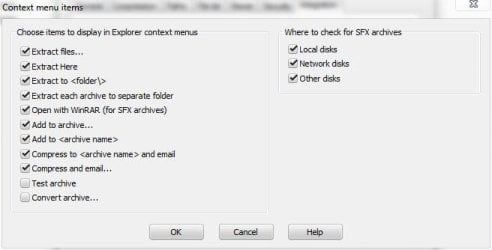
You can also try removing them by going to the menu bar, options, settings, integration tab, then choosing what you do or don't want in the context menu button.
 

Attachments

  • winrar1.JPG
    winrar1.JPG
    34.4 KB · Views: 8
  • winrar2.JPG
    winrar2.JPG
    27.7 KB · Views: 8

My Computer My Computer

At a glance

Win 10 Pro x64Intel I5-2500K @3.3GHz16GB G.Skill Ripjaws X (4x4GB)EVGA GeForce 750 Ti SC 2GB
Computer type
PC/Desktop
Computer Manufacturer/Model Number
Self Built
OS
Win 10 Pro x64
CPU
Intel I5-2500K @3.3GHz
Motherboard
Asrock P67 Extreme4
Memory
16GB G.Skill Ripjaws X (4x4GB)
Graphics Card(s)
EVGA GeForce 750 Ti SC 2GB
Sound Card
ASUS Xonar DG 5.1 Channels 24-bit 96KHz PCI Interface Sound
Monitor(s) Displays
auria eq2367
Screen Resolution
1920 x 1080
Hard Drives
250GB Samsung 850 EVO SSD
1TB WD Blue
1TB Hitachi
PSU
SeaSonic X 650W 80 Plus Gold
Case
Corsair Obsidian 750D
Cooling
Corsair H60, Three 140mm case fans
Keyboard
Logitech Wireless Keyboard K520
Mouse
Logitech Wireless Mouse M310
Internet Speed
Wave Broadband ~ 100 dn 5 up
Antivirus
Windows Defender, Malwarebytes Premium
Browser
Edge, IE11, Chrome
Other Info
Laptop specs: HP g7-1365dx /
CPU: AMD A6-3420M APU with Radeon(tm) HD Graphics /
RAM: Crucial 8Gb (2x4Gb) /
SSD: Crucial M4-CT128M4SSD2 ATA Device/ FW 000F /
GFX: AMD Radeon HD 6520G /
OS: Windows 10 Pro x64
Back
Top