Can connect to internet, or to the server, but not both

kateb99

New member
Local time
10:52 PM
Messages
3
Hi. I'm not particularly tech-savvy, so forgive me if I missed giving you any important information.

My office has a wireless network that we use to connect to the server; it uses a Belkin router. We had to get a new lapop (a Dell Inspiron 14R) running Windows 7 Professional (upgraded from Windows 7 Home Premium, which was factory installed).

If the laptop is wired to the router, it can find the server, but cannot get to the internet. If the laptop is running on wireless, it can get to the internet, but not the server.

I've been through a bunch of forums, but most people had the opposite problem - they were unable to connect to the internet.

Our IT guy was here almost all day, and couldn't figure it out, but he hasn't had much experience with Windows 7. Any assistance would be appreciated.

Thanks,
Kate
 

My Computer My Computer

At a glance

Windows 7 Professional
Computer Manufacturer/Model Number
Dell Inspiron 14R
OS
Windows 7 Professional
Hi. I'm not particularly tech-savvy, so forgive me if I missed giving you any important information.

My office has a wireless network that we use to connect to the server; it uses a Belkin router. We had to get a new lapop (a Dell Inspiron 14R) running Windows 7 Professional (upgraded from Windows 7 Home Premium, which was factory installed).

If the laptop is wired to the router, it can find the server, but cannot get to the internet. If the laptop is running on wireless, it can get to the internet, but not the server.

I've been through a bunch of forums, but most people had the opposite problem - they were unable to connect to the internet.

Our IT guy was here almost all day, and couldn't figure it out, but he hasn't had much experience with Windows 7. Any assistance would be appreciated.

Thanks,
Kate

Kate Hi and welcome


I am assuming that your office has older machine (vista, XP) because of the comment about the "new" machine.

Win 7 introduced a new networking feature (ugh) called IPv6. It is used in "homegroup" and sometimes it has connectivity issues on mixed networks.

Can you (or your IT guy) type cmd in search>right click and run as admin>
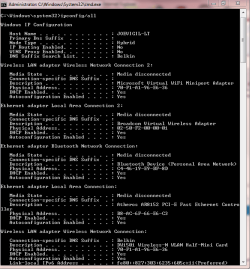
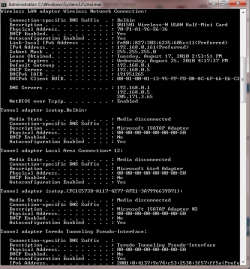
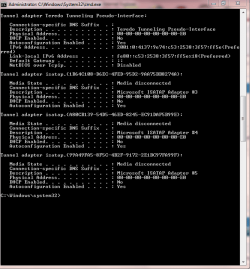
ipconfig /all and using the built in snipping tool (type snipping in search) make a screen shot and upload it to us.

Let us know if you need help with this

Ken
 

My Computer My Computer

At a glance

Win 8 Release candidate 8400[email protected]4 gigsNvidia 9600M
Computer Manufacturer/Model Number
HP Pavillion dv-7 1005 Tx
OS
Win 8 Release candidate 8400
CPU
[email protected]
Memory
4 gigs
Graphics Card(s)
Nvidia 9600M
Sound Card
HD built-in
Monitor(s) Displays
17" Wxga
Screen Resolution
1440x900
Cooling
none
Internet Speed
45Mb down 5Mb up
Hi Ken - Thanks for the welcome. The dialogue box is really long, so it's attached in three parts.

Two of the other computers on the network are running Vista.

Kate
 

Attachments

  • snip1.PNG
    snip1.PNG
    20.3 KB · Views: 15
  • snip2.PNG
    snip2.PNG
    20.9 KB · Views: 12
  • snip3.PNG
    snip3.PNG
    18.6 KB · Views: 12

My Computer My Computer

At a glance

Windows 7 Professional
Computer Manufacturer/Model Number
Dell Inspiron 14R
OS
Windows 7 Professional
So, the above picture is the laptop, correct?
First let's connect the laptop to a wired connection:
Do you know the IP address of the server? if so, in cmd type ping Ip address of server hit enter. (Example: ping 192.168.0.1) What are the results?

Also let's ping google as well, in cmd type ping
Code:
www.google.com
hit enter, What are the results?
 

My Computer My Computer

At a glance

Windows Seven x642.2 GHz Dual Core4GBATI Mobility RADEON HD 3470
Computer Manufacturer/Model Number
HP Pavilion dv5 Notebook PC
OS
Windows Seven x64
CPU
2.2 GHz Dual Core
Motherboard
Quanta 3600
Memory
4GB
Graphics Card(s)
ATI Mobility RADEON HD 3470
Sound Card
ATI
Monitor(s) Displays
Laptop
Hard Drives
ATA Hitachi HTS543215 (5400RPM)
Case
Laptop
Cooling
Fan
Internet Speed
Basic DSL 1.5 up and Down
Um. I'm now unable to get back to the Internet on the wireless connection. It says it's there, but when I try to go to a page, it loses the connection, so I can't upload the snippings. In any event, here are the result of the wired pinging.

To the server - each ping contained 32 bytes of dara. The reply from the server was less than 1 ms (TTL=128). It sent 4 packets, received 4, lost 0. Approximate roundtrip time in milli-seconds was 0ms.
To google - the reply time varied (120ms, 72 ms, 108ms, 68ms). TTL=55. The ping statistics - sent 4, received 4, lost 0. Average roundtrip time = 92ms.
 

My Computer My Computer

At a glance

Windows 7 Professional
Computer Manufacturer/Model Number
Dell Inspiron 14R
OS
Windows 7 Professional
Um. I'm now unable to get back to the Internet on the wireless connection. It says it's there, but when I try to go to a page, it loses the connection, so I can't upload the snippings. In any event, here are the result of the wired pinging.

To the server - each ping contained 32 bytes of dara. The reply from the server was less than 1 ms (TTL=128). It sent 4 packets, received 4, lost 0. Approximate roundtrip time in milli-seconds was 0ms.
To google - the reply time varied (120ms, 72 ms, 108ms, 68ms). TTL=55. The ping statistics - sent 4, received 4, lost 0. Average roundtrip time = 92ms.

Ok, this information tells me that you can (according to the ping's) get to the server, and go out of your network to google with an wired connection..

Are you still unable to connect to the server or google, with a wired connection?
If so what are you using to connect to the server, and what browser are you using to connect to the internet?
 

My Computer My Computer

At a glance

Windows Seven x642.2 GHz Dual Core4GBATI Mobility RADEON HD 3470
Computer Manufacturer/Model Number
HP Pavilion dv5 Notebook PC
OS
Windows Seven x64
CPU
2.2 GHz Dual Core
Motherboard
Quanta 3600
Memory
4GB
Graphics Card(s)
ATI Mobility RADEON HD 3470
Sound Card
ATI
Monitor(s) Displays
Laptop
Hard Drives
ATA Hitachi HTS543215 (5400RPM)
Case
Laptop
Cooling
Fan
Internet Speed
Basic DSL 1.5 up and Down
One problem I see in your IPv4 properties window is that the default gateway and DHCP server are using two different IP's. Plus your DNS is sharing those IP's instead of using just one of them. You need to be using 192.168.0.1 only for those. It's like you have two routers in the system or something.

Not to mention you have way too many tunnel adaptors going on there. I would go into Device manager>view> "show hidden devices" and delate all those extra tunnel adaptor entries.

You might try to input the IPv4 info manually into your IPv4 properties because the Default gateway's, and DNS the router is giving you aren't correct.
 

My Computer My Computer

At a glance

Windows 7 Ult, Windows 8.1 Pro,Q9650-4.275GHz, E8600 4.5GHz, E6750-3.8GHzG.Skill PC2 9600 1200Mhz 5 5 5 15 2TGTX480
Computer type
PC/Desktop
Computer Manufacturer/Model Number
Home built
OS
Windows 7 Ult, Windows 8.1 Pro,
CPU
Q9650-4.275GHz, E8600 4.5GHz, E6750-3.8GHz
Motherboard
Evga 780i FTW
Memory
G.Skill PC2 9600 1200Mhz 5 5 5 15 2T
Graphics Card(s)
GTX480
Sound Card
Asus Xonar D2
Monitor(s) Displays
HannsG
Screen Resolution
1680X1050
Hard Drives
GSkill Phoenix Pro 120GB SSD
PSU
ThermalTake Toughpower 1000Watt modular
Case
ThermalTake XaserV
Cooling
Xigmatek S1283
Keyboard
Logitech G15
Mouse
Logitech G9
Internet Speed
T1
Back
Top