Can DEP crash, freeze comp?

praeambulus

New member
Member
Local time
11:39 PM
Messages
91
Should i turn it on or off?? what to do?? is it normal with Windows 7 to have many,many BEX, DEP crashes????????:cry:
 

My Computer My Computer

At a glance

Windows 7Intel Core2 Quad 2.664GBGTX 560Ti
OS
Windows 7
CPU
Intel Core2 Quad 2.66
Memory
4GB
Graphics Card(s)
GTX 560Ti
Monitor(s) Displays
HPL2208w
Case
Gigabyte Sumo
Should i turn it on or off?? what to do?? is it normal with Windows 7 to have many,many BEX, DEP crashes????????:cry:

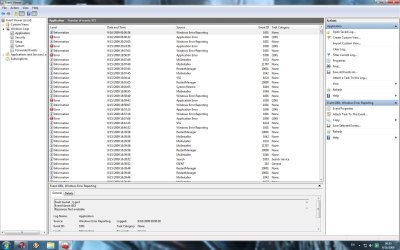
DEP can cause crashes. It normally should be on for max protections, but some apps may need exceptions. if you look in event viewr (type eventvwr in search) a DEP crash will say event ID 1000 source 100 and give the app data.

Take a look let us know what you see and tell us what hardware you have

Ken
 

My Computer My Computer

At a glance

Win 8 Release candidate 8400[email protected]4 gigsNvidia 9600M
Computer Manufacturer/Model Number
HP Pavillion dv-7 1005 Tx
OS
Win 8 Release candidate 8400
CPU
[email protected]
Memory
4 gigs
Graphics Card(s)
Nvidia 9600M
Sound Card
HD built-in
Monitor(s) Displays
17" Wxga
Screen Resolution
1440x900
Cooling
none
Internet Speed
45Mb down 5Mb up
Should i turn it on or off?? what to do?? is it normal with Windows 7 to have many,many BEX, DEP crashes????????:cry:

DEP can cause crashes. It normally should be on for max protections, but some apps may need exceptions. if you look in event viewr (type eventvwr in search) a DEP crash will say event ID 1000 source 100 and give the app data.

Take a look let us know what you see and tell us what hardware you have

Ken

u mean this?

hardware:

CPU: Core2 Quad 2.66
Mainboard: EP43C-DS3
VGA: Gigabyte 9800GT

is it?
 

Attachments

  • Untitled-1.jpg
    Untitled-1.jpg
    200.3 KB · Views: 149

My Computer My Computer

At a glance

Windows 7Intel Core2 Quad 2.664GBGTX 560Ti
OS
Windows 7
CPU
Intel Core2 Quad 2.66
Memory
4GB
Graphics Card(s)
GTX 560Ti
Monitor(s) Displays
HPL2208w
Case
Gigabyte Sumo
Yep thats what you have there. can you go to control panel>systems>advanced system settings>performance system settings>data execution prevention. It should be on like this picture. if it is then you may have to start making exceptions for the apps that are crashing. If it isn't then click on for all apps.

Ken

edit: you can see which apps are causing this by looking at the details tab for each error
 
Last edited:

My Computer My Computer

At a glance

Win 8 Release candidate 8400[email protected]4 gigsNvidia 9600M
Computer Manufacturer/Model Number
HP Pavillion dv-7 1005 Tx
OS
Win 8 Release candidate 8400
CPU
[email protected]
Memory
4 gigs
Graphics Card(s)
Nvidia 9600M
Sound Card
HD built-in
Monitor(s) Displays
17" Wxga
Screen Resolution
1440x900
Cooling
none
Internet Speed
45Mb down 5Mb up
yeah..i turned it off only for Assassin's Creed..and now I think it doesn't crash anymore..i looked at the details tab as u said, there are Explorer.exe errors too..should i exclude explorer from DEP too?
 

My Computer My Computer

At a glance

Windows 7Intel Core2 Quad 2.664GBGTX 560Ti
OS
Windows 7
CPU
Intel Core2 Quad 2.66
Memory
4GB
Graphics Card(s)
GTX 560Ti
Monitor(s) Displays
HPL2208w
Case
Gigabyte Sumo
only had one crash from DEP, that was playing GTA:SA Multiplayer. And that was a once off, never saw it again.
 

My Computer My Computer

At a glance

Windows 7 build 7100 x86Intel Core 2 Duo 2.1GHz3GBIntel(TM) Graphics Media Accelerator X4500HD
Computer Manufacturer/Model Number
Dell Inspiron 1545
OS
Windows 7 build 7100 x86
CPU
Intel Core 2 Duo 2.1GHz
Motherboard
GM45 chipset
Memory
3GB
Graphics Card(s)
Intel(TM) Graphics Media Accelerator X4500HD
Sound Card
Realtek HD
Monitor(s) Displays
15.6" WLED 720p
Screen Resolution
1366x768
Hard Drives
320GB 5400rpm hard drive
Back
Top