
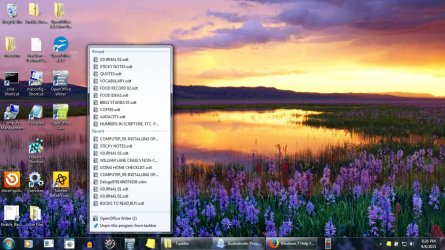
I'm wondering if there is a way to batch delete all the user-pinned items that show up when I right-click, say, the OOffice Writer user-pinned icon on the task bar, revealing all my user-pinned documents (as well all the recently opened non-pinned docs)?
I know I can delete them individually, one-by-one, but I'm wondering where they're listed, say, in the registry or in appdata, or something, that would allow me to delete them all at once.
Clear as mud? Here's a pic:
I know I can delete them individually, one-by-one, but I'm wondering where they're listed, say, in the registry or in appdata, or something, that would allow me to delete them all at once.
Clear as mud? Here's a pic:
Attachments
Last edited:
My Computer
- Computer type
- Laptop
- OS
- Microsoft Windows 7 Home Premium 64-bit 7601 Multiprocessor Free Service Pack 1
- CPU
- Pentium(R) Dual-Core CPU T4400 @ 2.20GHz
- Motherboard
- eMachines eMachines E725
- Memory
- 4.00 GB
- Graphics Card(s)
- (1) Mobile Intel(R) 4 Series Express Chipset Family (2) Mo
- Sound Card
- Realtek High Definition Audio
- Screen Resolution
- 1366 x 768 x 32 bits (4294967296 colors) @ 59 Hz
- Hard Drives
- (1) WDC WD2500BEVT-22A23T0 (2) Msft Virtual Disk SCSI Disk Device (3) Seagate BUP Slim BK USB Device


