JavaScript is disabled. For a better experience, please enable JavaScript in your browser before proceeding.
You are using an out of date browser. It may not display this or other websites correctly.
You should upgrade or use an
alternative browser .
Can I change displayed Mfr and Model in the msinfo32 screen?
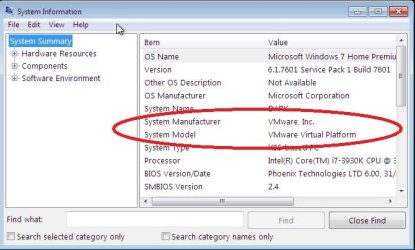
Attached is a screenshot of what I currently see.
sysinfo.jpg
50 KB
· Views: 29
Windows 7 Ultimate x64 Intel Core i7 3930K 16GB PC/Desktop custom build Windows 7 Ultimate x64 Intel Core i7 3930K Gigabyte GA-X79-UD5 16GB
New member
Guru
Gold Member
VIP
Open regedit and look for VMWARE, change what you find to something else.HKEY_LOCAL_MACHINE\HARDWARE\DESCRIPTION\System
Windows 10 Pro X64 Intel Quad Core i7-4770 @ 3.4Ghz 16.0GB PC3-12800 DDR3 SDRAM 1600 MHz Intel Integrated HD Graphics PC/Desktop Lenovo IdeaCenter 450 Windows 10 Pro X64 Intel Quad Core i7-4770 @ 3.4Ghz 16.0GB PC3-12800 DDR3 SDRAM 1600 MHz Intel Integrated HD Graphics Realtek HD Audio HP 22" LCD 1680 x 1050 250GB Samsung EVO SATA-3 SSD Dell USB Lenovo USB Cable via Road Runner 3MB Upload, 30MB Download Windows Defender, MBAM Pro, MBAE Seamonkey UEFI/GPT
New member
Thread Starter
Thanks for the quick replyHKEY_LOCAL_MACHINE\HARDWARE\DESCRIPTION\System\BIOS HKEY_LOCAL_MACHINE\System\ControlSet001\Control\SystemInformation HKEY_LOCAL_MACHINE\System\CurrentControlSet\Control\SystemInformation When I reboot all the values revert back to their VMWare settings so it seems that at boot windows refreshes these values from the systems BIOS.
Windows 7 Ultimate x64 Intel Core i7 3930K 16GB PC/Desktop custom build Windows 7 Ultimate x64 Intel Core i7 3930K Gigabyte GA-X79-UD5 16GB
R.I.P.
Guru
Gold Member
VIP
Trying it and doing it are 2 different things, as you`ve found out, it doesn`t work.
This is what mine shows, and you know what ? I don`t even care
I built it, I know what I`ve got
Capture.JPG
13.2 KB
· Views: 21
Windows 10 Pro x64 Intel Core i7 6700K GSkill TridentZ RGB 16GB 3600 16-16-16-36 EVGA GTX 980 Ti SC x2 PC/Desktop Skylake Special #666 Windows 10 Pro x64 Intel Core i7 6700K Asus Sabertooth Z170 Mark 1 GSkill TridentZ RGB 16GB 3600 16-16-16-36 EVGA GTX 980 Ti SC x2 Realtek High Definition AOC G2460PG 1920 x 1080 144Hz Samsung 860 Pro 256GB, Seagate Barracuda 4TB x2 EVGA 1000 P2, EVGA White Custom Braided Cables Corsair Vengeance C70 Gunmetal Black Corsair H100i v2, Corsair ML120 x2, Thermal Grizzly Kryonaut Logitech G910 Orion Spectrum Logitech G700s Verizon Fios Quantum Gateway 75/75 Windows Defender, Malwarebytes Free 3.8.3 Chrome Corsair SP120 x4, LG Blu-ray Drive, Durabrand HT-395 100 Watt Dolby Digital Amp, Corsair H2100 Wireless 7.1 Headset
slightly off center
Guru
Gold Member
VIP
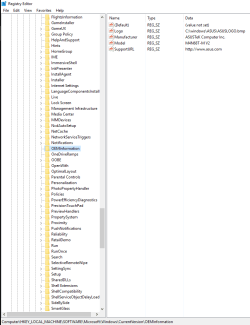
Have a look at this. This is a reg file I use to set the info for the system page on my PC.
Windows Registry Editor Version 5.00
[HKEY_LOCAL_MACHINE\Software\Microsoft\Windows\CurrentVersion\OEMInformation]
"Model"="M4N68T-M V2"
"Logo"="C:\\windows\\ASUS\\ASUSLOGO.bmp"
"Manufacturer"="ASUSTeK Computer Inc."
"SupportURL"="
ASUS USA "
Last edited: Nov 26, 2015
Windows 10 Education 64 bit AMD Phenom II X4 980 Black Edition Deneb 3.7GHz 8GB 4GBx2 Kingston PC10600 DDR3 1333 Memory Zotac NVIDIA Geforce GT640 2 Gig DDR3 PCIe PC/Desktop Home Built Windows 10 Education 64 bit AMD Phenom II X4 980 Black Edition Deneb 3.7GHz Asus M4N68T-M V2 µATX Motherboard 8GB 4GBx2 Kingston PC10600 DDR3 1333 Memory Zotac NVIDIA Geforce GT640 2 Gig DDR3 PCIe VIA VT1708s High Definition Audio 8-channel Onboard 22" LG E2242 1080p and 2 19" I-INC AG191D 1280x1024 - 1920x1080 - 1280x1024 Crucial M100 256 GB SSD and 500 GB WD Blue SATA Thermaltake TR 620 Power Up Black ATX Mid-Tower Case Stock heatsink and fan Logitech Wireless K350 Wave Logitech Wireless M570 Trackman Wheel 80 Mbps Down 30 Mbps Up Windows Defender Internet Explorer 11 HP DVD1040e Lightscribe - External USB2
slightly off center
Guru
Gold Member
VIP
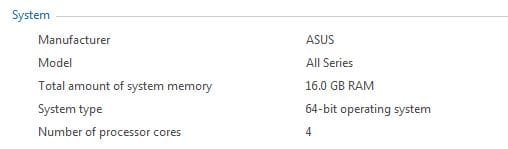
This from my desktop PC.
Windows 10 Education 64 bit AMD Phenom II X4 980 Black Edition Deneb 3.7GHz 8GB 4GBx2 Kingston PC10600 DDR3 1333 Memory Zotac NVIDIA Geforce GT640 2 Gig DDR3 PCIe PC/Desktop Home Built Windows 10 Education 64 bit AMD Phenom II X4 980 Black Edition Deneb 3.7GHz Asus M4N68T-M V2 µATX Motherboard 8GB 4GBx2 Kingston PC10600 DDR3 1333 Memory Zotac NVIDIA Geforce GT640 2 Gig DDR3 PCIe VIA VT1708s High Definition Audio 8-channel Onboard 22" LG E2242 1080p and 2 19" I-INC AG191D 1280x1024 - 1920x1080 - 1280x1024 Crucial M100 256 GB SSD and 500 GB WD Blue SATA Thermaltake TR 620 Power Up Black ATX Mid-Tower Case Stock heatsink and fan Logitech Wireless K350 Wave Logitech Wireless M570 Trackman Wheel 80 Mbps Down 30 Mbps Up Windows Defender Internet Explorer 11 HP DVD1040e Lightscribe - External USB2
New member
Guru
Gold Member
VIP
The idea behind System Information was to provide accurate information that could not be changed by some registry entry. Most likely the information is obtained with WMI and where it gets the information from is undocumented. Most likely it ultimately comes from the BIOS.
Windows 7 Pro 64 bit Xeon W3520 8 GB Nvidia Geforce 210 PC/Desktop HP Windows 7 Pro 64 bit Xeon W3520 8 GB Nvidia Geforce 210



 I built it, I know what I`ve got