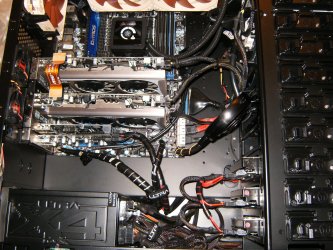
can I change my motherboard

james cullen

New member
Member
VIP
Local time
4:54 AM
Messages
102
Hello all,

I have a machine with a Gigabyte X58A Ud3 in, because I think that it's faulty I'd like to upgrade it to the X58a UD5.

Can I do this without grief? Is it a simple matter of swapping it out, plug in original devices update bios, MB drivers and go, boot up with original c drive?

Am I being optimistic? Could I trash my existing setup?

Thanks

James
 

My Computer My Computer

At a glance

Win pro 64biti7-980XCorsair Dominator CMP12GX3M3A1600C9 9-9-9-24 X2Asus Geforce GTX 560 Ti
Computer type
PC/Desktop
OS
Win pro 64bit
CPU
i7-980X
Motherboard
X58A-UD3R
Memory
Corsair Dominator CMP12GX3M3A1600C9 9-9-9-24 X2
Graphics Card(s)
Asus Geforce GTX 560 Ti
Sound Card
none
Monitor(s) Displays
Eizo x 2
Screen Resolution
1200x1600
Hard Drives
Revo 240gb,
Samsung 840 pro OS
Samsung 840 Scratch
WD 1TB x 3.
PSU
Siverstone
Case
Corsair 700d
Cooling
Noctua 140
James, Yes it is most likely possible to change your motherboard out BUT. It does require a bit of technical knowhow as the memory and the cpu will have to be moved to the new motherboard and moving the cpu and cooler is not for the faint of heart. Unless your young and have steady hands and good eyes. It can get sticky uninstalling and moving the cpu to the new motherboad. Damn those pins on the cpu are small :geek:

Regarding your hard disk, That could be a problem as the new motherboard has different drivers and such.

But I have seen the hard disk moved to a new mb with a minimum of fuss. First you must backup all of your data and save any install programs with the validation codes or serial numbers.

Also, according to the OEM license. when you change the mb on an oem computer, you need a new copy of windows but if you have a regular copy of windows ie.. full version then you can install it on the new mb.

The most important thing is good backups...

Good luck and may the force be with you :)

Rich
 

My Computer My Computer

At a glance

Windows 7 Pro x64 SP1Intel Core I716 GigsNVIDIA GeForce GTX 670M
Computer type
Laptop
Computer Manufacturer/Model Number
Toshiba Laptop Qosimo X870
OS
Windows 7 Pro x64 SP1
CPU
Intel Core I7
Motherboard
Toshiba Qosmio
Memory
16 Gigs
Graphics Card(s)
NVIDIA GeForce GTX 670M
Monitor(s) Displays
17.7" laptop
Screen Resolution
1600 x 900
Hard Drives
256 Gig SanDisk SSD for C
256 Gig Intel SSD for D
Internet Speed
50/25 FIOS
Antivirus
Vipre (all you can eat for 10 machines)
Browser
IE and FF
Other Info
I have dos 6.22, wfwg 3.11, win98, 2000 and xp VHD's available for testing. MS's Virtual PC works great.
Good advice from rich.

Personally, I think it's always better to go for a clean install when you replace your motherboard.

Providing you have a retail version of Windows you can use it for the fresh install.

If you have an OEM version of Windows you may encounter activation difficulties, but that can be overcome.

You can also use your OEM product key to clean install Windows, as explained in this tutorial.

http://www.sevenforums.com/tutorials/219487-clean-reinstall-factory-oem-windows-7-a.html#post1839164
 

My Computer My Computer

At a glance

Windows 7 Ultimate SP1 64-BitIntel Core i7 870 @ 2.93GHz8Gb Dual-Channel DDR3 @ 664MHznVidia GeForce GTX 460 1024MB dedicated RAM
Computer Manufacturer/Model Number
HP Pavilion Elite 495UK
OS
Windows 7 Ultimate SP1 64-Bit
CPU
Intel Core i7 870 @ 2.93GHz
Motherboard
MSI 2A9C (CPU1)
Memory
8Gb Dual-Channel DDR3 @ 664MHz
Graphics Card(s)
nVidia GeForce GTX 460 1024MB dedicated RAM
Sound Card
Realtek HD Audio
Monitor(s) Displays
HP2310i
Screen Resolution
1920 x 1080
Hard Drives
1x1954GB Hitachi HDS22020ALA 330 (RAID), 1x1954GB Hitachi External for backup and storage
PSU
460W
Case
HP Elite
Cooling
Air cooled
Keyboard
Logitech K750 solar-powered keyboard
Mouse
Logitech Wireless M180 mouse
Internet Speed
2Mb
Other Info
Pure Avanti Flow Internet Radio with iPod Dock, 64Gb iPod, HP USB Speakers, Sony MDR-V500 Headphones, Sony Vaio F-Series Laptop
If your system is running fine and you have a lot of time invested in getting it set up right:
http://www.sevenforums.com/tutorials/135077-windows-7-installation-transfer-new-computer.html
That will keep your system as it is, except for some minor change in the accounts, and you might have to install some drivers that come with the new motherboard, and you will have to re-activate.
Try this is you're confident your Win 7 is running well.
Nothing to lose, because even if it doesn't work, you can always just reinstall.
It worked for me.
Like always, make sure sure you back up anything important before you start, whether you sysprep, or just reinstall.

If your system is troublesome, and/or you don't mind reinstalling everything you currently have to get it back to what it was, just reinstall Win 7.
Your decision.
 

My Computer My Computer

At a glance

Windows 7 Ultimate x64QuadCore Intel Core i7 920, 2666 MHz (20 x 133)6134 MB (DDR3-1333 DDR3 SDRAM)(2 - SLI) NVIDIA GeForce GTS 250 (1024 MB)
Computer Manufacturer/Model Number
Home Built
OS
Windows 7 Ultimate x64
CPU
QuadCore Intel Core i7 920, 2666 MHz (20 x 133)
Motherboard
Asus P6T
Memory
6134 MB (DDR3-1333 DDR3 SDRAM)
Graphics Card(s)
(2 - SLI) NVIDIA GeForce GTS 250 (1024 MB)
Sound Card
Onboard Realtek ALC888/1200 @ Intel 82801JB IC
Monitor(s) Displays
HDMII
Screen Resolution
1280 x 800
Hard Drives
Crucial M4 (64 GB SSD)
WD Caviar Blacks
WD5001AALS-00J7B1 ATA Device (465 GB)
WD5001AALS-00L3B2 ATA Device (465 GB)
WD Elements USB External (250 GB)
PSU
Corsair 550
Case
iStarUSA S-10000BL Black
thanks for all the advice, it's very helpful.

Thanks Rich, all my data is backed up multiple times, been burned before and it really hurts.

I do have a retail copy of Win 7 so hopefully no trouble there, just a register if all goes well.

Thanks for the links guys, I'll have to do a bit of reading.

Cheers

James
 

My Computer My Computer

At a glance

Win pro 64biti7-980XCorsair Dominator CMP12GX3M3A1600C9 9-9-9-24 X2Asus Geforce GTX 560 Ti
Computer type
PC/Desktop
OS
Win pro 64bit
CPU
i7-980X
Motherboard
X58A-UD3R
Memory
Corsair Dominator CMP12GX3M3A1600C9 9-9-9-24 X2
Graphics Card(s)
Asus Geforce GTX 560 Ti
Sound Card
none
Monitor(s) Displays
Eizo x 2
Screen Resolution
1200x1600
Hard Drives
Revo 240gb,
Samsung 840 pro OS
Samsung 840 Scratch
WD 1TB x 3.
PSU
Siverstone
Case
Corsair 700d
Cooling
Noctua 140
If you are confident that your data is backed up, you can't really do any harm. You also could give Sysprep a try as well. I'm with the others, though, as I prefer a clean install.
 

My Computer My Computer

At a glance

Windows 7 Ultimate x64 SP1Intel Core i7-260012 GB Patriot Extreme DDR3-1333Nvidia GTX 470
OS
Windows 7 Ultimate x64 SP1
CPU
Intel Core i7-2600
Motherboard
Gigabyte GA-P67A-UD3P-B3
Memory
12 GB Patriot Extreme DDR3-1333
Graphics Card(s)
Nvidia GTX 470
Monitor(s) Displays
Dell UltraSharp 2209WA
Hard Drives
OCZ Agility3 240 GB, WD5001AALS, WD7501AALS
PSU
OCZ ModStream 700W
Case
CoolerMaster HAF 912 Advanced
Cooling
CoolerMaster Hyper 212 Plus
james cullen,
As the others have mentioned this is very doable but it's like building the system over again from a connection standpoint. If you have a good camera with a close up setting then snap some pictures with as much light and detail as you can get on all the wires and this can be a reference tool if you get a bit overwhelmed. Also take detailed pictures throughout the process and after completion. Anyone with a bit of patience can do this and I trust that anyone with as nice a rig as yours will have little issue. Also remember this is a great time to re-think cable management, also please don't forget to clean the CPU and the Cooler completely and re-apply the thermal compound of your choice. Don't hesitate to ask us for advice.
HPIM1215.JPG

HPIM1214.JPG

HPIM2092.jpg
 

My Computer My Computer

At a glance

Windows 7 Ultimate 64i7 3770k OC'd 4.6 @ 1.17v, also FX 8120 & i5 ...32 gb G.Skill Sniper DDR3 10-12-12-31 @ 2133XFX Radeon 7870 2GB DDR5
Computer type
PC/Desktop
Computer Manufacturer/Model Number
A blend of brains, brawn and dumb luck.
OS
Windows 7 Ultimate 64
CPU
i7 3770k OC'd 4.6 @ 1.17v, also FX 8120 & i5 miniITX
Motherboard
MSI P67A-GD80 b3
Memory
32 gb G.Skill Sniper DDR3 10-12-12-31 @ 2133
Graphics Card(s)
XFX Radeon 7870 2GB DDR5
Sound Card
Sound Blaster Z Series Card
Monitor(s) Displays
(2) LG LED 23" 1920 x 1080 2ms Monitors via mini d-port
Screen Resolution
1680 X 1050 p
Hard Drives
Samsung 256 gb 830 SSD sata III
(1) 1 tb WD Black
(2) 1 tb Hitachi deskmates/sata II
(2) 1 tb WD green/sata II
(2) 3 tb Seagate Barracuda
(1) 120 gb OCZ Vertex SS
(1) Drobo 5N w/5 Seagate 3tb
PSU
EVGA modular 1000G2 80% gold rating & APC 1200 RS
Case
CoolerMaster Storm Styker
Cooling
7 case fans 140mm & 120mm, NZXT Kraken X60
Keyboard
(2) Logitech Illuminated Keyboards (1) usb (1) wireless
Mouse
Logitech G700 & T-BC21 - nano nx for the laptop
Internet Speed
Basic 120mbps down
Antivirus
Trend Micro Titanium Max Security & Malwarebytes Premium
Browser
Chrome and IE 10
Other Info
5 Noctua case fans + 3 Noctua in p/p on NZXT cooler
Integrated hot swap drive bays for 2.5" Drives
(2) Lite-on dvd/cd/Blu Ray optical 22X
Integrated fan controller and led on/off
HP Officejet Pro 8630 all-n-one
Hot-swappable 3.5" hard drive bay
Netgear Nighthawk router
Asus USB 3 & sata 6 PCIe card
Vantec IDE to sata adptr./Ultra sata adptr
Lenovo L420 i5 lappy with m sata
Drobo 5N advanced NAS
I have built quite a few computers. But, my first endeavor into working on computers was to replace a motherboard. Like you I was worried whether I could do it. I printed a detailed view of my motherboard out and labeled all cables. As I removed a cable from the motherboard, I wrote on the diagram, the cable number and where I removed it from. That way I knew where all cables went. It gave me confidence that I could reconnect all cables. In the end, I never needed to use it, and replaced the board without any problem. If I can do it anyone can. But, I have to warn you. Once you do it and find how easy it is, you will become addicted. You will anxiously await the time you can build your own and have to do it yourself. And, every time you build one, as you are putting the finishing touches on it, you begin thinking of the next build.
 

My Computers My Computers

  • At a glance

    Windows 11 ProRyzen 9 5900X32GB G Skill DDR4-3600EVGA RTX 3080 FTW 3 Ultra
    Computer type
    PC/Desktop
    Computer Manufacturer/Model Number
    ALWAYS UNDER CONSTRUCTION
    OS
    Windows 11 Pro
    CPU
    Ryzen 9 5900X
    Motherboard
    Asus X570 Crosshair Viii Hero
    Memory
    32GB G Skill DDR4-3600
    Graphics Card(s)
    EVGA RTX 3080 FTW 3 Ultra
    Sound Card
    On Board/Sennheiser PC37X Headset
    Monitor(s) Displays
    3 X Asus 27"
    Screen Resolution
    2560x1440
    Hard Drives
    2 X 1 TB NVME drives
    PSU
    EVGA 850
    Case
    Phanteks Eclipse P400A
    Cooling
    EVGA 280 AIO
    Keyboard
    Logitech G510s/ Logitech G13
    Mouse
    Logitech G502
    Internet Speed
    24/1
    Antivirus
    ESET/MBAM Pro/SAS Pro
    Browser
    Chrome/ Firefox/ Edge
  • At a glance

    Windows 11 ProIntel Ultra 9 288V32 GB LPDDR5X 8533
    Computer type
    Laptop
    System Manufacturer/Model Number
    Dell 16 Plus
    OS
    Windows 11 Pro
    CPU
    Intel Ultra 9 288V
    Memory
    32 GB LPDDR5X 8533
    Monitor(s) Displays
    16" Mini-LED HDR600 Touch 90 Hz
    Screen Resolution
    2560X1600
    Hard Drives
    1 TB NVME
Back
Top