Can I change the taskbar to a single image?

SomeoneTwo

New member
Local time
12:38 AM
Messages
2
Hi, iv'e looked through sevenforums for quite some time now looking for an explanation (as well as the rest of the internet).
To explain, I'm creating a custom theme for windows 7... A simple steampunk styled theme... And I'm trying to edit the .msstyles file to show the taskbar as a full image (my current test is a simple wood sample, 40 pixels high, a few hundred long), but problem the problem is I can't seem to find the file to edit, I manually searched and found resource 1010 under IMAGE is the top few pixels of the taskbar... So I replaced it, but it makes no difference?
(I know the system works, as I already replaced the "Show Desktop" (Aero peek) button...

And now the question.
How does the fitting system work on windows 7 themes? if I create an image the width of the screen resolution minus 17 pixels for the aero peek button, will that work properly?

Thanks in advance.

P.S. I use:
ResHack (Resource Hacker)
Paint.NET
Windows 7 Home Premium SP1
screen resolution (on my test computer): 1366X768
 

My Computer My Computer

At a glance

Windows 7 Home Premium 64 bit
Computer type
PC/Desktop
OS
Windows 7 Home Premium 64 bit
Welcome to the Seven Forums

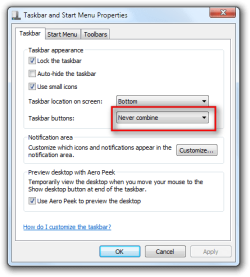
For the bottom taskbar that image numbers are 845, 1028. This depends on how you have your taskbar button set. See screenshots #845 is green and #1028 is blue.
1.png

2.PNG

3.png

4.PNG

It doesn't have to be the width of your screen resolution, my current theme is 25 pixels high 48 pixels long, I also have one that is 40 pixels high and 200 pixels long it will be probably trial and error to make it look good.

If you are using a theme someone else already customize those numbers may be wrong post a link to the custom theme if that is what has happened.

Jerry
 

My Computer My Computer

At a glance

Win 7 Pro x64 / Win 10 ProIntel(R) Core(TM) i7-3630QM CPU @ 2.40GHz12 GB(1) Intel(R) HD Graphics 4000 (2) NVIDIA GeFo...
Computer type
Laptop
Computer Manufacturer/Model Number
Sager NP9170
OS
Win 7 Pro x64 / Win 10 Pro
CPU
Intel(R) Core(TM) i7-3630QM CPU @ 2.40GHz
Motherboard
CLEVO P170EM
Memory
12 GB
Graphics Card(s)
(1) Intel(R) HD Graphics 4000 (2) NVIDIA GeForce GTX 675M
Sound Card
(1) Realtek High Definition Audio (2) Intel(R) Display Aud
Monitor(s) Displays
17.3
Screen Resolution
1920x1080
Hard Drives
(1) Samsung 860 EVO 500GB(OS) (1) Samsung 860 EVO 500GB(Data)
Keyboard
Backlite
Antivirus
MSE, Malwarebytes Pro
Browser
Firefox
Other Info
DESKTOP: Custom-built.
OS: Win 10 Pro x64.
CASE: Rosewill R5.
CPU: Intel I5 4670K CPU @ 3.40GHz.
CPU COOLER: Cool Master Hyper 212 EVO.
MOTHERBOARD: Asus Z87-A.
MEMORY: Kingston HyperX 2x4 GB.
GPU: Nvidia Geforce 650 TI.
PSU: Corsair TX750.
DRIVES: (1) Samsung 840 120 GB SSD (2) Western Digital blue 500 GB 7200 RPM.
Thanks, I'll try that later...

As for the image used, is there any way for me to use a single image without it being distorted to fit the screen? I don't intend to distribute the theme, and i know the resolutions of the screens I'll be using it on, so will using images the width of my screens (take 17 pixels for the aero peek button) prevent distortion?

Thanks in advance
 

My Computer My Computer

At a glance

Windows 7 Home Premium 64 bit
Computer type
PC/Desktop
OS
Windows 7 Home Premium 64 bit
You'll just have to try it and see, trial and error is it only way you'll get it there is some stretching that goes on with the taskbar images.

Jerry
 

My Computer My Computer

At a glance

Win 7 Pro x64 / Win 10 ProIntel(R) Core(TM) i7-3630QM CPU @ 2.40GHz12 GB(1) Intel(R) HD Graphics 4000 (2) NVIDIA GeFo...
Computer type
Laptop
Computer Manufacturer/Model Number
Sager NP9170
OS
Win 7 Pro x64 / Win 10 Pro
CPU
Intel(R) Core(TM) i7-3630QM CPU @ 2.40GHz
Motherboard
CLEVO P170EM
Memory
12 GB
Graphics Card(s)
(1) Intel(R) HD Graphics 4000 (2) NVIDIA GeForce GTX 675M
Sound Card
(1) Realtek High Definition Audio (2) Intel(R) Display Aud
Monitor(s) Displays
17.3
Screen Resolution
1920x1080
Hard Drives
(1) Samsung 860 EVO 500GB(OS) (1) Samsung 860 EVO 500GB(Data)
Keyboard
Backlite
Antivirus
MSE, Malwarebytes Pro
Browser
Firefox
Other Info
DESKTOP: Custom-built.
OS: Win 10 Pro x64.
CASE: Rosewill R5.
CPU: Intel I5 4670K CPU @ 3.40GHz.
CPU COOLER: Cool Master Hyper 212 EVO.
MOTHERBOARD: Asus Z87-A.
MEMORY: Kingston HyperX 2x4 GB.
GPU: Nvidia Geforce 650 TI.
PSU: Corsair TX750.
DRIVES: (1) Samsung 840 120 GB SSD (2) Western Digital blue 500 GB 7200 RPM.
Back
Top