How to change the taskbar color?

melannie

Banned
Local time
3:01 PM
Messages
12
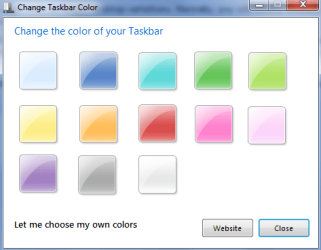
Can anyone plz tell me how to change the color of taskbar from bule-grey to any other?
my windows have no aero\transperancy.
when i go to personalization and windows colour it appears like the one which is supposed to be in winXP.
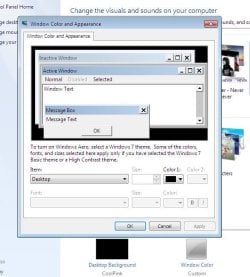
g.JPG
instead of this
AeroTaskbarColorChanger.png


so i need help,in easy words,to change my taskbar color.
 

My Computer

OS
If U.S.win7 built 7600(ultimate) 32 bit
Wow it should have it, try typing in start "troubleshooting" then selecting "appearance and personalization" Then Select "Aero" troubleshooter and follow it.
 

My Computer

Computer type
Laptop
Computer Manufacturer/Model Number
Lenovo Y560 Laptop
OS
Microsoft Windows 7 Ultimate 64-bit 7601 Multiprocessor Free Service Pack 1
CPU
Intel(R) Core(TM) i7 CPU Q [email protected] (Turbo boost 2.93ghz)
Motherboard
Lenovo KL3
Memory
4.00 GB
Graphics Card(s)
ATI Mobility Radeon HD 5730
Sound Card
(1) ATI HDMI Audio (2) Realtek High Definition Audio
Monitor(s) Displays
1024 x 768 x 32 bits (4294967296 colors) @ 60 Hz
Screen Resolution
1366 x 768 x 32 bits (4294967296 colors) @ 60 Hz
Hard Drives
WDC WD5000BEVT-24A0RT0
Mouse
Logitech M305
Internet Speed
10 Mbps
Antivirus
My brain
Browser
Google Chrome
Other Info
Trying my best to learn.
Hello Melannie, and welcome to Seven Forums.

What edition of Windows 7 do you have installed?

The Windows 7 Starter or Home Basic editions do not have the Personalization and Aero features included in them. :(

If you do have either edition, then you might see if using the free program in OPTION TWO in the tutorial below may be able to help with this.
If you do have Ultimate installed as listed in your specs, then double check the items in the red warning box at the top of the tutorial below to see if they all check out.

Hope this helps, :)
Shawn
 

My Computer

Computer type
PC/Desktop
Computer Manufacturer/Model Number
Self built custom
OS
64-bit Windows 11 Pro for Workstations
CPU
Intel i7-8700K OC'd to 5 GHz
Motherboard
ASUS ROG Maximus XI Formula Z390
Memory
64 GB (4x16GB) G.SKILL TridentZ RGB DDR4 3600 MHz
Graphics Card(s)
ASUS ROG-STRIX-GTX1080TI-O11G-GAMING
Sound Card
Integrated
Monitor(s) Displays
2 x Samsung Odyssey G7 27"
Screen Resolution
2560x1440
Hard Drives
1TB Samsung 990 PRO M.2,
4TB Samsung 990 PRO PRO M.2,
TerraMaster F8 SSD Plus NAS
PSU
Seasonic Prime Titanium 850W
Case
Thermaltake Core P3
Cooling
Corsair Hydro H115i
Keyboard
Logitech wireless K800
Mouse
Logitech MX Master 4
Internet Speed
2 Gb/s Download and 100 Mb/s Upload
Antivirus
Malwarebyte Anti-Malware Premium
Browser
Google Chrome
Other Info
Logitech Z625 speaker system,
Logitech BRIO 4K Pro webcam,
HP Color LaserJet Pro MFP M477fdn,
APC SMART-UPS RT 1000 XL - SURT1000XLI,
Galaxy S23 Plus phone
Wow it should have it, try typing in start " troubleshooting" then selecting "appearance and personalization" Then Select "Aero" troubleshooter and follow it.

hh.JPG

that's all i've got :(
 

My Computer

OS
If U.S.win7 built 7600(ultimate) 32 bit
Hello Melannie, and welcome to Seven Forums.

What edition of Windows 7 do you have installed?

The Windows 7 Starter or Home Basic editions do not have the Personalization and Aero features included in them. :(

If you do have either edition, then you might see if using the free program in OPTION TWO in the tutorial below may be able to help with this.
If you do have Ultimate installed as listed in your specs, then double check the items in the red warning box at the top of the tutorial below to see if they all check out.

Hope this helps, :)
Shawn

Thanks....
it might help :)
 

My Computer

OS
If U.S.win7 built 7600(ultimate) 32 bit

My Computer

Computer type
Laptop
Computer Manufacturer/Model Number
Lenovo Y560 Laptop
OS
Microsoft Windows 7 Ultimate 64-bit 7601 Multiprocessor Free Service Pack 1
CPU
Intel(R) Core(TM) i7 CPU Q [email protected] (Turbo boost 2.93ghz)
Motherboard
Lenovo KL3
Memory
4.00 GB
Graphics Card(s)
ATI Mobility Radeon HD 5730
Sound Card
(1) ATI HDMI Audio (2) Realtek High Definition Audio
Monitor(s) Displays
1024 x 768 x 32 bits (4294967296 colors) @ 60 Hz
Screen Resolution
1366 x 768 x 32 bits (4294967296 colors) @ 60 Hz
Hard Drives
WDC WD5000BEVT-24A0RT0
Mouse
Logitech M305
Internet Speed
10 Mbps
Antivirus
My brain
Browser
Google Chrome
Other Info
Trying my best to learn.
hey melannie :D if your using a Windows 7 starter/ basic, i have a solution to enable aero effects and apply theme. :) i still need to find the files to tweak it . Il post it later. Thanks.
 
Last edited by a moderator:

My Computer

OS
windows 7 32 bit build 7600
Motherboard
emx mcp61m2 icafe
Graphics Card(s)
NVIDIA GEforce 8400GS super
Monitor(s) Displays
Samsung LD190

My Computer

OS
If U.S.win7 built 7600(ultimate) 32 bit
hey melannie :D if your using a Windows 7 starter/ basic, i have a solution to enable aero effects and apply theme. :) i still need to find the files to tweak it . Il post it later. Thanks.


M using win7 ultimate built 7600...n alryt i'll be lookin' forward to u... :)
 

My Computer

OS
If U.S.win7 built 7600(ultimate) 32 bit
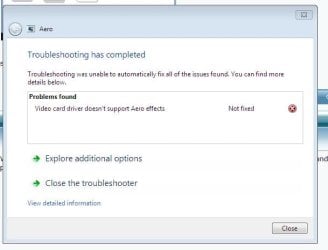
If your using windows 7 ultimate then aero should be on there. Now the troubleshooter said your g card does not support it. So what i want you to do is go into "device manager" and under display adapters tell me whats there.
 

My Computer

Computer type
Laptop
Computer Manufacturer/Model Number
Lenovo Y560 Laptop
OS
Microsoft Windows 7 Ultimate 64-bit 7601 Multiprocessor Free Service Pack 1
CPU
Intel(R) Core(TM) i7 CPU Q [email protected] (Turbo boost 2.93ghz)
Motherboard
Lenovo KL3
Memory
4.00 GB
Graphics Card(s)
ATI Mobility Radeon HD 5730
Sound Card
(1) ATI HDMI Audio (2) Realtek High Definition Audio
Monitor(s) Displays
1024 x 768 x 32 bits (4294967296 colors) @ 60 Hz
Screen Resolution
1366 x 768 x 32 bits (4294967296 colors) @ 60 Hz
Hard Drives
WDC WD5000BEVT-24A0RT0
Mouse
Logitech M305
Internet Speed
10 Mbps
Antivirus
My brain
Browser
Google Chrome
Other Info
Trying my best to learn.
Back
Top