Solved Can I change the user's Name and completely remove the old user name?

CountryBumkin

New member
Power User
VIP
Local time
1:43 PM
Messages
120
I installed Win 7 x32 with a user name "user1" a long time ago. At some point I changed the User's name to "Karen" to make it easier to spot on the home network, etc. The Computer Name ("Dell3100") has not changed.

Today I wanted to connect to the computer "Karen" using my workgroup (not a homegroup). All of my other computers now share with workgroup. However, the computer "Karen" does not require a password to logon so when I tried to connect via the workgroup, I got a popup box asking for the Credentials to Connect. I need to enter the User Name and Password to connect to "Dell3100". And I and wife don't know the password.

Anyways, I reset the password using the "Reset Forgotten Password" tutorial going into registry etc.. That worked, but I still could not access the computer Karen - windows would not accept the password.

Running "net users" I see that I don't have a User "Karen", I have a user "user1". So i used that user name with the new password and I'm connected. All is good.

But how do I get rid of "user1" and replace with "Karen"? Can this be done?
 

My Computer My Computer

At a glance

Windows 7 Home Premiumi3 2100T
OS
Windows 7 Home Premium
CPU
i3 2100T
Motherboard
ASRock H67M-ITX
But how do I get rid of "user1" and replace with "Karen"? Can this be done?

When a new user is created in Windows, either the first user when Windows is installed or any user later on, and the new user has signed in to Windows first time, the user profile is created and named. Any later username change does not change the name of the user profile.

An example, if my ex-wife had created a user account for me on a Windows computer she had most probably named it as "Idiot". If I then later on changed my username on that computer from "Idiot" to "Kari", my profile had remained as "Idiot".

Basically, the easiest way to change this is to create a new user account and profile with the preferred name, copy the personal files and folders from C:\Users\Wrong_Username folder to C:\Users\New_Username, and delete the user Wrong_Username completely.

In your case now you can try the method told in this tutorial: http://www.sevenforums.com/tutorials/147545-user-profile-folder-change-user-account-folder-name.html

Kari
 

My Computer My Computer

At a glance

Windows 10 Pro x64 EN-GB1.6 GHz Intel Core i7-720QM Processor6 GBATI Mobility Radeon HD 5850 Graphics
Computer type
Laptop
Computer Manufacturer/Model Number
HP ENVY 17-1150eg
OS
Windows 10 Pro x64 EN-GB
CPU
1.6 GHz Intel Core i7-720QM Processor
Memory
6 GB
Graphics Card(s)
ATI Mobility Radeon HD 5850 Graphics
Sound Card
Beats sound system with integrated subwoofer
Monitor(s) Displays
17" laptop display, 22" LED and 32" Full HD TV through HDMI
Screen Resolution
1600*900 (1), 1920*1080 (2&3)
Hard Drives
Internal: 2 x 500 GB SATA Hard Disk Drive 7200 rpm
External: 2TB for backups, 3TB USB3 network drive for media
Cooling
As Envy runs a bit warm, I have it on a Cooler Master pad
Keyboard
Logitech diNovo Media Desktop Laser (bluetooth)
Mouse
Logitech Performance Mouse MX
Internet Speed
50/10 Mbps VDSL
Antivirus
Windows Defender 4.3.9431.0
Browser
Maxthon 3.5.2., IE11
Thanks for your informative and humorous reply. I'll apply your advice/solution when I get home tonight.

I know you assist on the other Windows forums too. Thanks for taking the time to assist us newbies.
 

My Computer My Computer

At a glance

Windows 7 Home Premiumi3 2100T
OS
Windows 7 Home Premium
CPU
i3 2100T
Motherboard
ASRock H67M-ITX
You are welcome :)
 

My Computer My Computer

At a glance

Windows 10 Pro x64 EN-GB1.6 GHz Intel Core i7-720QM Processor6 GBATI Mobility Radeon HD 5850 Graphics
Computer type
Laptop
Computer Manufacturer/Model Number
HP ENVY 17-1150eg
OS
Windows 10 Pro x64 EN-GB
CPU
1.6 GHz Intel Core i7-720QM Processor
Memory
6 GB
Graphics Card(s)
ATI Mobility Radeon HD 5850 Graphics
Sound Card
Beats sound system with integrated subwoofer
Monitor(s) Displays
17" laptop display, 22" LED and 32" Full HD TV through HDMI
Screen Resolution
1600*900 (1), 1920*1080 (2&3)
Hard Drives
Internal: 2 x 500 GB SATA Hard Disk Drive 7200 rpm
External: 2TB for backups, 3TB USB3 network drive for media
Cooling
As Envy runs a bit warm, I have it on a Cooler Master pad
Keyboard
Logitech diNovo Media Desktop Laser (bluetooth)
Mouse
Logitech Performance Mouse MX
Internet Speed
50/10 Mbps VDSL
Antivirus
Windows Defender 4.3.9431.0
Browser
Maxthon 3.5.2., IE11
Kari is correct, I learned that I cannot really change an account from nameX to nameY, only the "surface" changes, however, the account is the first name it become self-aware with. Kari offered what I had to do: create an account with the name I wanted, after copying, migrating, etc. everything over from nameX to nameY, I deleted nameX account.
 

My Computer My Computer

At a glance

Windows 7 Professional 64-bitDesktop i5; Acers i5 & i7desktop 16GB; 1 Acer 8GB & 1 Acer 16GB
Computer type
PC/Desktop
Computer Manufacturer/Model Number
Antec desktop; Acer Aspire laptops
OS
Windows 7 Professional 64-bit
CPU
Desktop i5; Acers i5 & i7
Memory
desktop 16GB; 1 Acer 8GB & 1 Acer 16GB
Hard Drives
1TB split into 2 equal partitions [OS and data] usable by RJS
Internet Speed
AT&T DSL
Browser
FF, GChrome, msIE
Other Info
Windows 7 Firewall, Emsisoft AM/AV, MSE [scan-only], SpywareBlaster, Ruiware/BillP combine
In Windows 8 and later when signing in with a so called Microsoft Account this behavior is quite practical, Windows user profile keeping its name even when the username is changed.

In Windows 8 or later if you set it up with an MS Account (a user account connected to an email) instead of a local account, your username will be [email protected], but Windows creates a profile acronym of five letters for this user. For instance if a user Larry Laffer with an MS Account [email protected] creates a new user account in Windows 10 as an MS Account, his sign in name would be [email protected] but his user profile folder would be C:\Users\LarLa or C:\Users\LarrL or anything similar; if the part of the MS Account email before the @ sign is six characters or longer, Windows creates a five character acronym of that and uses it as the name for the profile folder. Only if the first part of the email is five characters or less will the user profile folder be named correctly.

I always create my user account first as a local account naming it Kari, then switch it to an MS Account after I have signed in first time. This gives me the profile folder name I prefer even when using an MS Account to sign in.
 

My Computer My Computer

At a glance

Windows 10 Pro x64 EN-GB1.6 GHz Intel Core i7-720QM Processor6 GBATI Mobility Radeon HD 5850 Graphics
Computer type
Laptop
Computer Manufacturer/Model Number
HP ENVY 17-1150eg
OS
Windows 10 Pro x64 EN-GB
CPU
1.6 GHz Intel Core i7-720QM Processor
Memory
6 GB
Graphics Card(s)
ATI Mobility Radeon HD 5850 Graphics
Sound Card
Beats sound system with integrated subwoofer
Monitor(s) Displays
17" laptop display, 22" LED and 32" Full HD TV through HDMI
Screen Resolution
1600*900 (1), 1920*1080 (2&3)
Hard Drives
Internal: 2 x 500 GB SATA Hard Disk Drive 7200 rpm
External: 2TB for backups, 3TB USB3 network drive for media
Cooling
As Envy runs a bit warm, I have it on a Cooler Master pad
Keyboard
Logitech diNovo Media Desktop Laser (bluetooth)
Mouse
Logitech Performance Mouse MX
Internet Speed
50/10 Mbps VDSL
Antivirus
Windows Defender 4.3.9431.0
Browser
Maxthon 3.5.2., IE11
Kari, was that a Microsoft Account? I need to read better! A MS acct is obviously different than a regular Win7 or Win8, thanks for the info -- I'll remember that next time. :)
 

My Computer My Computer

At a glance

Windows 7 Professional 64-bitDesktop i5; Acers i5 & i7desktop 16GB; 1 Acer 8GB & 1 Acer 16GB
Computer type
PC/Desktop
Computer Manufacturer/Model Number
Antec desktop; Acer Aspire laptops
OS
Windows 7 Professional 64-bit
CPU
Desktop i5; Acers i5 & i7
Memory
desktop 16GB; 1 Acer 8GB & 1 Acer 16GB
Hard Drives
1TB split into 2 equal partitions [OS and data] usable by RJS
Internet Speed
AT&T DSL
Browser
FF, GChrome, msIE
Other Info
Windows 7 Firewall, Emsisoft AM/AV, MSE [scan-only], SpywareBlaster, Ruiware/BillP combine
Yes, an MS (Microsoft) Account. In Windows 8 and later you can sign in and use a traditional account, called a local account, or with an MS Account.

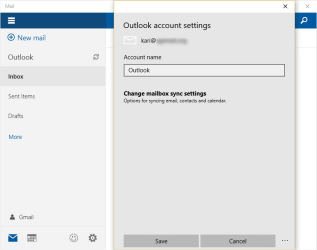
A local account is what you use in Windows 7. Using it in Windows 8 or later your user account is not automatically signed in and connected to various Microsoft services like OneDrive, Skype, email and so on. Using an MS Account as a Windows user account you will be automatically connected, for instance in Windows 8 and later you have an email app which automatically connects you to your email when signing in with an MS Account. The screenshot below showing my free Windows 10 Mail App, mail settings correctly set as soon as I sign in:

2015-06-08_15h40_18.png

When you set your various email accounts up on one PC, they will be automatically set up on other computers. Also, the MS Account allows you to sync your settings. I sign in to one Windows 8 or later computer using my MS Account, set the desktop background and colors, then sign in with the same MS Account to another PC and these settings, as well as my login credentials to the third party sites, browser favorites and so on, everything will be synced. Even the WiFi networks; If I sign in to a WiFi network in let's say a hotel with free WiFi with a laptop running Windows 8 or later using an MS Account, and come back months later with another laptop using the same MS Account, the WiFi settings and credentials are there already.
 

My Computer My Computer

At a glance

Windows 10 Pro x64 EN-GB1.6 GHz Intel Core i7-720QM Processor6 GBATI Mobility Radeon HD 5850 Graphics
Computer type
Laptop
Computer Manufacturer/Model Number
HP ENVY 17-1150eg
OS
Windows 10 Pro x64 EN-GB
CPU
1.6 GHz Intel Core i7-720QM Processor
Memory
6 GB
Graphics Card(s)
ATI Mobility Radeon HD 5850 Graphics
Sound Card
Beats sound system with integrated subwoofer
Monitor(s) Displays
17" laptop display, 22" LED and 32" Full HD TV through HDMI
Screen Resolution
1600*900 (1), 1920*1080 (2&3)
Hard Drives
Internal: 2 x 500 GB SATA Hard Disk Drive 7200 rpm
External: 2TB for backups, 3TB USB3 network drive for media
Cooling
As Envy runs a bit warm, I have it on a Cooler Master pad
Keyboard
Logitech diNovo Media Desktop Laser (bluetooth)
Mouse
Logitech Performance Mouse MX
Internet Speed
50/10 Mbps VDSL
Antivirus
Windows Defender 4.3.9431.0
Browser
Maxthon 3.5.2., IE11
Back
Top