Can i download latest version of Win7, to reduce the number of updates

Angus94

New member
Member
Local time
9:05 AM
Messages
67
Hi all,
my computer has become slow and is badly in need of a fresh install, i have a genuine OEM version of win7 and to save the number of updates i will need to do after the initial install, can i download a latest version that will still be compatible with my serial number.

is this possible

just asking....thanks
 

My Computer My Computer

At a glance

Windows 7 Professional x64 (6.1, Build 7601)Core i5-4460 3.2GHz4 x 8GB 1333 DDR3nVidia GeForce GTX760 4GB
Computer type
PC/Desktop
Computer Manufacturer/Model Number
Computer Retailer
OS
Windows 7 Professional x64 (6.1, Build 7601)
CPU
Core i5-4460 3.2GHz
Motherboard
Gigabyte H97M-D3H
Memory
4 x 8GB 1333 DDR3
Graphics Card(s)
nVidia GeForce GTX760 4GB
Sound Card
on board
Monitor(s) Displays
Samsung 23" LCD & Acer 22" LCD
Hard Drives
250GB SSD
WD 1TB SATA
PSU
Thermaltake 850w
Case
Thermaltake Versa H22
Mouse
Logitech
Internet Speed
ADSL2+
Antivirus
Norton 360
Browser
Mozilla Firefox

My Computer My Computer

At a glance

Windows 10, Home Clean InstallIntel Core2 processsor Q8200(2.33Ghz 1333FSB)...6 gbATI Radeon 256MB HD3650
Computer type
PC/Desktop
Computer Manufacturer/Model Number
Dell XPS 420
OS
Windows 10, Home Clean Install
CPU
Intel Core2 processsor Q8200(2.33Ghz 1333FSB) Quad Core Tech
Motherboard
Dell
Memory
6 gb
Graphics Card(s)
ATI Radeon 256MB HD3650
Sound Card
Intergrated 7.1 Channel Audio
Monitor(s) Displays
Dell SP2009W 20"
Hard Drives
640 GB Serial ATA Hard drive
Cooling
Fan
Keyboard
Dell USB Keyboard
Mouse
Dell Premium Optical USB
Internet Speed
DSL 2.85
hope ive done the right thing here, i chose this one.

Windows 7 and Windows Server 2008 R2 Service Pack 1 (KB976932)


then clicked the DVD.iso file to download
 

My Computer My Computer

At a glance

Windows 7 Professional x64 (6.1, Build 7601)Core i5-4460 3.2GHz4 x 8GB 1333 DDR3nVidia GeForce GTX760 4GB
Computer type
PC/Desktop
Computer Manufacturer/Model Number
Computer Retailer
OS
Windows 7 Professional x64 (6.1, Build 7601)
CPU
Core i5-4460 3.2GHz
Motherboard
Gigabyte H97M-D3H
Memory
4 x 8GB 1333 DDR3
Graphics Card(s)
nVidia GeForce GTX760 4GB
Sound Card
on board
Monitor(s) Displays
Samsung 23" LCD & Acer 22" LCD
Hard Drives
250GB SSD
WD 1TB SATA
PSU
Thermaltake 850w
Case
Thermaltake Versa H22
Mouse
Logitech
Internet Speed
ADSL2+
Antivirus
Norton 360
Browser
Mozilla Firefox
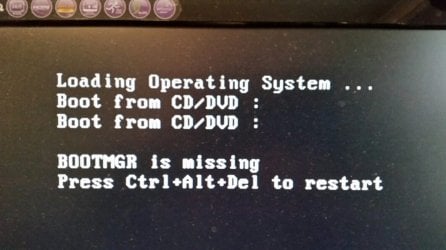
Can anyone please tell me how to fix this......

ive followed 1 guide that said to put my disc in the drive and when install starts choose repair, then startup repair. I did this but the software didnt find any errors to fix

Ive lived with this for about 6 months now, i have my win disc in the dvd drive permanantly.

about 6 months ago i started running out of room on my existing c:\drive, so i cloned the complete drive to a larger one, since then i had this issue
 

Attachments

  • 20141018_142226.jpg
    20141018_142226.jpg
    55.4 KB · Views: 0

My Computer My Computer

At a glance

Windows 7 Professional x64 (6.1, Build 7601)Core i5-4460 3.2GHz4 x 8GB 1333 DDR3nVidia GeForce GTX760 4GB
Computer type
PC/Desktop
Computer Manufacturer/Model Number
Computer Retailer
OS
Windows 7 Professional x64 (6.1, Build 7601)
CPU
Core i5-4460 3.2GHz
Motherboard
Gigabyte H97M-D3H
Memory
4 x 8GB 1333 DDR3
Graphics Card(s)
nVidia GeForce GTX760 4GB
Sound Card
on board
Monitor(s) Displays
Samsung 23" LCD & Acer 22" LCD
Hard Drives
250GB SSD
WD 1TB SATA
PSU
Thermaltake 850w
Case
Thermaltake Versa H22
Mouse
Logitech
Internet Speed
ADSL2+
Antivirus
Norton 360
Browser
Mozilla Firefox
So I'm assuming since you said that you must keep your DVD in the drive permanently that it is booting from that disk.

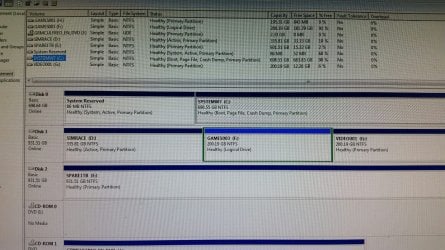
So please post back a screenshot of http://www.sevenforums.com/tutorial...nt-post-screen-capture-image.html#post2261610

If you've now got more than the cloned hard drive installed is it set as Primary HD and/or as first HD to boot in BIOS setup?

It could also be that both the System and Active flags were not transferred to the larger drive. This will be evident from the picture and the fix is relatively easy.
 
yes that is correct


image coming shortly
 

My Computer My Computer

At a glance

Windows 7 Professional x64 (6.1, Build 7601)Core i5-4460 3.2GHz4 x 8GB 1333 DDR3nVidia GeForce GTX760 4GB
Computer type
PC/Desktop
Computer Manufacturer/Model Number
Computer Retailer
OS
Windows 7 Professional x64 (6.1, Build 7601)
CPU
Core i5-4460 3.2GHz
Motherboard
Gigabyte H97M-D3H
Memory
4 x 8GB 1333 DDR3
Graphics Card(s)
nVidia GeForce GTX760 4GB
Sound Card
on board
Monitor(s) Displays
Samsung 23" LCD & Acer 22" LCD
Hard Drives
250GB SSD
WD 1TB SATA
PSU
Thermaltake 850w
Case
Thermaltake Versa H22
Mouse
Logitech
Internet Speed
ADSL2+
Antivirus
Norton 360
Browser
Mozilla Firefox
Heres the pic
 

Attachments

  • 20141018_163604.jpg
    20141018_163604.jpg
    231.5 KB · Views: 5

My Computer My Computer

At a glance

Windows 7 Professional x64 (6.1, Build 7601)Core i5-4460 3.2GHz4 x 8GB 1333 DDR3nVidia GeForce GTX760 4GB
Computer type
PC/Desktop
Computer Manufacturer/Model Number
Computer Retailer
OS
Windows 7 Professional x64 (6.1, Build 7601)
CPU
Core i5-4460 3.2GHz
Motherboard
Gigabyte H97M-D3H
Memory
4 x 8GB 1333 DDR3
Graphics Card(s)
nVidia GeForce GTX760 4GB
Sound Card
on board
Monitor(s) Displays
Samsung 23" LCD & Acer 22" LCD
Hard Drives
250GB SSD
WD 1TB SATA
PSU
Thermaltake 850w
Case
Thermaltake Versa H22
Mouse
Logitech
Internet Speed
ADSL2+
Antivirus
Norton 360
Browser
Mozilla Firefox
in the BIOS, if i have the first boot device as the hard drive i get the BOOTMGR error, if i have the CDROM as the first boot device the system just reads the cdrom and continues on
 

My Computer My Computer

At a glance

Windows 7 Professional x64 (6.1, Build 7601)Core i5-4460 3.2GHz4 x 8GB 1333 DDR3nVidia GeForce GTX760 4GB
Computer type
PC/Desktop
Computer Manufacturer/Model Number
Computer Retailer
OS
Windows 7 Professional x64 (6.1, Build 7601)
CPU
Core i5-4460 3.2GHz
Motherboard
Gigabyte H97M-D3H
Memory
4 x 8GB 1333 DDR3
Graphics Card(s)
nVidia GeForce GTX760 4GB
Sound Card
on board
Monitor(s) Displays
Samsung 23" LCD & Acer 22" LCD
Hard Drives
250GB SSD
WD 1TB SATA
PSU
Thermaltake 850w
Case
Thermaltake Versa H22
Mouse
Logitech
Internet Speed
ADSL2+
Antivirus
Norton 360
Browser
Mozilla Firefox
the drive that the clone was taken from was removed once the clone had completed, and has since been formatted and is now in another machine
 

My Computer My Computer

At a glance

Windows 7 Professional x64 (6.1, Build 7601)Core i5-4460 3.2GHz4 x 8GB 1333 DDR3nVidia GeForce GTX760 4GB
Computer type
PC/Desktop
Computer Manufacturer/Model Number
Computer Retailer
OS
Windows 7 Professional x64 (6.1, Build 7601)
CPU
Core i5-4460 3.2GHz
Motherboard
Gigabyte H97M-D3H
Memory
4 x 8GB 1333 DDR3
Graphics Card(s)
nVidia GeForce GTX760 4GB
Sound Card
on board
Monitor(s) Displays
Samsung 23" LCD & Acer 22" LCD
Hard Drives
250GB SSD
WD 1TB SATA
PSU
Thermaltake 850w
Case
Thermaltake Versa H22
Mouse
Logitech
Internet Speed
ADSL2+
Antivirus
Norton 360
Browser
Mozilla Firefox
The only thing I see that could be a problem in picture is that D is Active when only the System partition should be Active. So mark it Inactive now: http://www.sevenforums.com/tutorials/197157-partition-mark-inactive.html and try restarting without disk.

If DISK1 is set as Primary under BIOS storage section or BIOS Boot order, then it might have been trying to boot it since the BIOS queries any Active drives to boot.

In the past with this issue where the DVD is required to fully boot an OS already labeled System, we have normally resolved it by unplugging all other drives except Win7, then run http://www.sevenforums.com/tutorials/105541-startup-repair-run-3-separate-times.html with reboots, remove the DVD, try to start it again.

But if the data drive is somehow setting itself as Primary in BIOS, or taking the first to boot HD postiion away from Win7, then it will continue to get the unbootable message.

If this is not the case in BIOS, try removing each other drive until you find the one blocking Win7 boot without DVD. If you're sure it is not set as Primary HD under Storage section of BIOS, and not set as First to boot under Boot Order of BIOS, then ask yourself if it has ever been used to boot an OS before because it may have boot code on it that is interfering, requiring moving the data off to wipe it with Diskpart Clean Command. Merely formatting does not do this.
 
ok understand thanks, give me some time to do some checks etc and i'll get back to you
 

My Computer My Computer

At a glance

Windows 7 Professional x64 (6.1, Build 7601)Core i5-4460 3.2GHz4 x 8GB 1333 DDR3nVidia GeForce GTX760 4GB
Computer type
PC/Desktop
Computer Manufacturer/Model Number
Computer Retailer
OS
Windows 7 Professional x64 (6.1, Build 7601)
CPU
Core i5-4460 3.2GHz
Motherboard
Gigabyte H97M-D3H
Memory
4 x 8GB 1333 DDR3
Graphics Card(s)
nVidia GeForce GTX760 4GB
Sound Card
on board
Monitor(s) Displays
Samsung 23" LCD & Acer 22" LCD
Hard Drives
250GB SSD
WD 1TB SATA
PSU
Thermaltake 850w
Case
Thermaltake Versa H22
Mouse
Logitech
Internet Speed
ADSL2+
Antivirus
Norton 360
Browser
Mozilla Firefox
ok.....

i made the SYSTEMW7 drive as active, rebooted and got the same bootmgr error.


then i followed the guide to make the d-drive "ínactive''

took the win7 disc out of the dvd drive and rebooted.

i didnt get the bootmgr error and the computer continued to boot as it should........

i then shut the computer down and waited for all sound to stop, waited 30 seconds then hit the start button and everything started as it should, no errors no nothing

gregrocker, thank you very very much, as i said i have been putting up with this for 6 months or so, now its fixed.

thanks heaps man, very much appreciated.

cheers
 

My Computer My Computer

At a glance

Windows 7 Professional x64 (6.1, Build 7601)Core i5-4460 3.2GHz4 x 8GB 1333 DDR3nVidia GeForce GTX760 4GB
Computer type
PC/Desktop
Computer Manufacturer/Model Number
Computer Retailer
OS
Windows 7 Professional x64 (6.1, Build 7601)
CPU
Core i5-4460 3.2GHz
Motherboard
Gigabyte H97M-D3H
Memory
4 x 8GB 1333 DDR3
Graphics Card(s)
nVidia GeForce GTX760 4GB
Sound Card
on board
Monitor(s) Displays
Samsung 23" LCD & Acer 22" LCD
Hard Drives
250GB SSD
WD 1TB SATA
PSU
Thermaltake 850w
Case
Thermaltake Versa H22
Mouse
Logitech
Internet Speed
ADSL2+
Antivirus
Norton 360
Browser
Mozilla Firefox
Glad to hear it.

The System drive was already Active. It was the secondary data being marked Active that was causing your problems.

If there are any further problems and that drive has been an OS drive but has only been formatted, I would move the data off to wipe it per above.
 
Back
Top