Solved Can I Reduce the Number of Primary Partitions?

paoiue

New member
Local time
11:37 AM
Messages
6
Hi,
I am trying to install Fedora OS on my laptop for dual booting because I need to use Linux for work. However, from what I found on the internet, I am only allowed to have 4 primary partitions on a hard drive.

Currently, I have four primary partitions ( my laptop came with two partitions C:\ and D:\ and two hidden partitions. A 16 Gb recovery partition and 200 Mb partition. See attached. )

I am tryin to install Fedora on the unallocated space at the end of the hard drive, but am pretty sure I can't because I already have four primary partitions.

Is it possible to maybe combine the 200 Mb and 16 Gb partitions?
Or is it possible to change the D:\ drive into an extended partition and install Fedora as a logical partition in the D:\ drive?
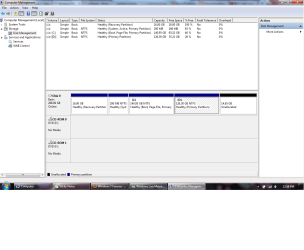
disc managemen.png

Thanks,

Paoiue
 
Last edited by a moderator:

My Computer My Computer

At a glance

Windows 7 Home Premium x64intel i34.00 Gb
Computer Manufacturer/Model Number
Fujitsu America, Inc. / LifeBook Series (Build: 23CUR--MS--1)
OS
Windows 7 Home Premium x64
CPU
intel i3
Memory
4.00 Gb
I have no idea if Linux will run from an extended partition.

But you can get rid of that recovery partition if you have no intention of ever using it or if you have made a set of recovery disks that serve the same purpose.

And you can get rid of that system reserved partition if you first move your boot files from it to C.
 

My Computer My Computer

At a glance

Windows 7 Home Premium SP1, 64-bitIntel Skylake i5-6600K, not overclocked8 GB HyperX DDR4-2666 (2 x 4 GB)none; graphics are integrated on CPU
Computer type
PC/Desktop
Computer Manufacturer/Model Number
Ignatz Special; 4 speed manual gearbox; factory air conditioning; one of one
OS
Windows 7 Home Premium SP1, 64-bit
CPU
Intel Skylake i5-6600K, not overclocked
Motherboard
AsRock Z170M Extreme 4, micro ATX
Memory
8 GB HyperX DDR4-2666 (2 x 4 GB)
Graphics Card(s)
none; graphics are integrated on CPU
Sound Card
onboard: Realtek ALC1150; external: USB Behringer UF0-202
Monitor(s) Displays
Dell S2340M 23 inch IPS
Screen Resolution
1600 x 900
Hard Drives
System: Crucial MX100 series SSD, 128 GB;
Data: Samsung Spinpoint 103SJ, 1 TB;
Backup: WD Caviar Green WD30EZRX-00D8PB0, 3 TB
PSU
Rosewill SilentNight 500 watt fanless, semi-modular
Case
Antec Solo II
Cooling
Noctua NH-U12S; Noctua F12 intake, Noctua S12A exhaust
Keyboard
Microsoft 200 6JH-00001 USB
Mouse
Dell or Microsoft optical wired; USB
Antivirus
Microsoft Security Essentials and Malwarebytes Premium
Browser
Pale Moon
Other Info
All fans PWM; speeds at idle: CPU circa 500 rpm; intake circa 600 rpm; exhaust circa 600 rpm; CPU temps 27 idle and 47 C load in a warm room (27 C/81 F) when running Intel Extreme Tuning Utility stress test.
Thanks for the reply. I plan to back my system up once again before removing the recovery partition at the beginning of the drive. Now a new question arises.

Can I install Linux in the empty space infront of system reserve partition or does the system reserve have to come before any other data partition ( I think I read somewhere it does or usually does, but am not too sure if it is a must )?
This way I can reclaim the unallocated space at the end my hard drive, and not have two seperate partitions.

I have no idea if Linux will run from an extended partition.
I've read on other forums that it is possible.
 

My Computer My Computer

At a glance

Windows 7 Home Premium x64intel i34.00 Gb
Computer Manufacturer/Model Number
Fujitsu America, Inc. / LifeBook Series (Build: 23CUR--MS--1)
OS
Windows 7 Home Premium x64
CPU
intel i3
Memory
4.00 Gb
Thanks for the reply. I plan to back my system up once again before removing the recovery partition at the beginning of the drive. Now a new question arises.

Can I install Linux in the empty space infront of system reserve partition or does the system reserve have to come before any other data partition

As far as I know, the system reserved does not have to be first.

At any rate, you could use a program such as Partition Wizard bootable disk to get all of that unallocated space in one spot and generally manipulate partitions as needed.

I don't think that Disk Management is necessarily an accurate representation of where stuff is located on your hard drive anyway.
 

My Computer My Computer

At a glance

Windows 7 Home Premium SP1, 64-bitIntel Skylake i5-6600K, not overclocked8 GB HyperX DDR4-2666 (2 x 4 GB)none; graphics are integrated on CPU
Computer type
PC/Desktop
Computer Manufacturer/Model Number
Ignatz Special; 4 speed manual gearbox; factory air conditioning; one of one
OS
Windows 7 Home Premium SP1, 64-bit
CPU
Intel Skylake i5-6600K, not overclocked
Motherboard
AsRock Z170M Extreme 4, micro ATX
Memory
8 GB HyperX DDR4-2666 (2 x 4 GB)
Graphics Card(s)
none; graphics are integrated on CPU
Sound Card
onboard: Realtek ALC1150; external: USB Behringer UF0-202
Monitor(s) Displays
Dell S2340M 23 inch IPS
Screen Resolution
1600 x 900
Hard Drives
System: Crucial MX100 series SSD, 128 GB;
Data: Samsung Spinpoint 103SJ, 1 TB;
Backup: WD Caviar Green WD30EZRX-00D8PB0, 3 TB
PSU
Rosewill SilentNight 500 watt fanless, semi-modular
Case
Antec Solo II
Cooling
Noctua NH-U12S; Noctua F12 intake, Noctua S12A exhaust
Keyboard
Microsoft 200 6JH-00001 USB
Mouse
Dell or Microsoft optical wired; USB
Antivirus
Microsoft Security Essentials and Malwarebytes Premium
Browser
Pale Moon
Other Info
All fans PWM; speeds at idle: CPU circa 500 rpm; intake circa 600 rpm; exhaust circa 600 rpm; CPU temps 27 idle and 47 C load in a warm room (27 C/81 F) when running Intel Extreme Tuning Utility stress test.
You could install VMWare or Oracle Virtual Box and run Linux as a guest under either, right on the same desktop with Win 7. I use Oracle VB but VMWare is also very good.
 

My Computer My Computer

At a glance

Windows 10 Pro X64Intel Quad Core i7-4770 @ 3.4Ghz16.0GB PC3-12800 DDR3 SDRAM 1600 MHzIntel Integrated HD Graphics
Computer type
PC/Desktop
Computer Manufacturer/Model Number
Lenovo IdeaCenter 450
OS
Windows 10 Pro X64
CPU
Intel Quad Core i7-4770 @ 3.4Ghz
Memory
16.0GB PC3-12800 DDR3 SDRAM 1600 MHz
Graphics Card(s)
Intel Integrated HD Graphics
Sound Card
Realtek HD Audio
Monitor(s) Displays
HP 22" LCD
Screen Resolution
1680 x 1050
Hard Drives
250GB Samsung EVO SATA-3 SSD
2TB Seagate ST2000DM001 SATA-2
1.5TB Seagate ST3150041AS SATA
Keyboard
Dell USB
Mouse
Lenovo USB
Internet Speed
Cable via Road Runner 3MB Upload, 30MB Download
Antivirus
Windows Defender, MBAM Pro, MBAE
Browser
Seamonkey
Other Info
UEFI/GPT
PLDS DVD-RW DH16AERSH
I run several Linux Distributions in VirtualBox it works well and with Linux doesn't take too much in the way of resources. I have to say however that I had problems with the latest version of Fedora in VirtualBox. Maybe VMWare Payer would be better.
 

My Computer My Computer

At a glance

Microsoft Windows 7 Home Premium 64-bit Servi...Intel(R) Core(TM) i3 CPU M 330 @ 2.13GHz8 GB DDR3Intel(R) HD Graphics
Computer type
Laptop
Computer Manufacturer/Model Number
Hewlett-Packard/G62-107SA Notebook
OS
Microsoft Windows 7 Home Premium 64-bit Service Pack 1
CPU
Intel(R) Core(TM) i3 CPU M 330 @ 2.13GHz
Motherboard
Hewlett-Packard 1425
Memory
8 GB DDR3
Graphics Card(s)
Intel(R) HD Graphics
Sound Card
Realtek High Definition Audio
Monitor(s) Displays
Builtin
Screen Resolution
1366 x 768 x 32 bits (4294967296 colors) @ 60 Hz
Hard Drives
250 GB SATA Hard Disk Drive 7200 rpm
2TB Seagate GoFlex USB 2 Drive
1TB Iomega Prestige USB 2 Drive
1.5TB Iomega Prestige USB 2 Drive (Samsung)
2TB WD MyBook Live NAS.
Mouse
Logitech Anywhere MX
Internet Speed
152 Mbs download 10 Mbs upload
Antivirus
Norton 360
Browser
Chrome
I have already looked into using VirtualBox. I tried running Fedora on VB, but I experienced a lot of lag. When I checked task manager, 76% of my RAM was being used. When I close VB, it drops back down to about 45%-50%. Having it run at a constant 76% is higher than I'm comfortable with. Also, a friend told me that he has seen computers fry because it was running a virutal OS. Since I will be using it for extended periods of time each day, I didn't really want to risk frying my laptop.
 

My Computer My Computer

At a glance

Windows 7 Home Premium x64intel i34.00 Gb
Computer Manufacturer/Model Number
Fujitsu America, Inc. / LifeBook Series (Build: 23CUR--MS--1)
OS
Windows 7 Home Premium x64
CPU
intel i3
Memory
4.00 Gb
It will only use the amount of RAM you assign to the VM, but as I said I had problems with Fedora or more probably with Gnome 3 freezing.
 

My Computer My Computer

At a glance

Microsoft Windows 7 Home Premium 64-bit Servi...Intel(R) Core(TM) i3 CPU M 330 @ 2.13GHz8 GB DDR3Intel(R) HD Graphics
Computer type
Laptop
Computer Manufacturer/Model Number
Hewlett-Packard/G62-107SA Notebook
OS
Microsoft Windows 7 Home Premium 64-bit Service Pack 1
CPU
Intel(R) Core(TM) i3 CPU M 330 @ 2.13GHz
Motherboard
Hewlett-Packard 1425
Memory
8 GB DDR3
Graphics Card(s)
Intel(R) HD Graphics
Sound Card
Realtek High Definition Audio
Monitor(s) Displays
Builtin
Screen Resolution
1366 x 768 x 32 bits (4294967296 colors) @ 60 Hz
Hard Drives
250 GB SATA Hard Disk Drive 7200 rpm
2TB Seagate GoFlex USB 2 Drive
1TB Iomega Prestige USB 2 Drive
1.5TB Iomega Prestige USB 2 Drive (Samsung)
2TB WD MyBook Live NAS.
Mouse
Logitech Anywhere MX
Internet Speed
152 Mbs download 10 Mbs upload
Antivirus
Norton 360
Browser
Chrome
With VB, Gnome3 doesn't work properly, so instead I'm using XFCE. I tried using both Virtual Box and VMware player, but both times it was a lot smoother when I ran the live CD off a usb. It also uses atleast 70% of my RAM even when pretty much idle. I have tried leaving the amount of RAM at the default 700 something Mb after setting it to 1Gb the first few times I tried ( I was following some tutorials ), but it remains over 70%. I'm not sure if I should be going under 700Mb of RAM because I will be running a few other programs when I get it to work. That's why I would prefer to be able to dual boot and just run one OS at a time.

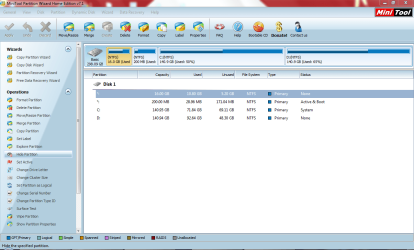
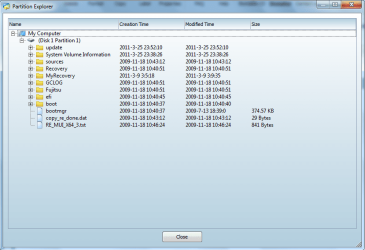
Also after using Partition Wizard, I found that that 16Gb space actually has 10Gb of data in it (see below).:shock:

partition wizard.PNG
This is what the partiton contained.
part wiz in partition1.PNG

The data in there looks important, so I don't know if I can delete that now.
If I were to move my boot files to my C:\ drive, how would I accomplish that?
Or would changing my D:\ to a logical partition and installing Linux there be a better option? Assuming that it will not affect my system.
 

My Computer My Computer

At a glance

Windows 7 Home Premium x64intel i34.00 Gb
Computer Manufacturer/Model Number
Fujitsu America, Inc. / LifeBook Series (Build: 23CUR--MS--1)
OS
Windows 7 Home Premium x64
CPU
intel i3
Memory
4.00 Gb
I have already looked into using VirtualBox. I tried running Fedora on VB, but I experienced a lot of lag.
Yes, your computer has to have enough resources to run 2 OS's well as the same time.

When I checked task manager, 76% of my RAM was being used. When I close VB, it drops back down to about 45%-50%. Having it run at a constant 76% is higher than I'm comfortable with.
You can adjust the amount of RAM you give to a VM to lower your overall ram usage.

Also, a friend told me that he has seen computers fry because it was running a virutal OS. Since I will be using it for extended periods of time each day, I didn't really want to risk frying my laptop.
Ok, this is simply false. I run VM's all day long. I have physical servers that run nothing but VM's 24x7x365. Your friend doesn't have any idea what he/she is talking about.
 

My Computer My Computer

At a glance

Windows 7 Ultimate x64Intel Q9550 2.83Ghz OC'd to 3.40Ghz8GB G.Skill PI DDR2-800, 4-4-4-12 timingsEVGA 1280MB Nvidia GeForce GTX570
Computer Manufacturer/Model Number
Self-Built in July 2009
OS
Windows 7 Ultimate x64
CPU
Intel Q9550 2.83Ghz OC'd to 3.40Ghz
Motherboard
Gigabyte GA-EP45-UD3R rev. 1.1, F12 BIOS
Memory
8GB G.Skill PI DDR2-800, 4-4-4-12 timings
Graphics Card(s)
EVGA 1280MB Nvidia GeForce GTX570
Sound Card
Realtek ALC899A 8 channel onboard audio
Monitor(s) Displays
23" Acer x233H
Screen Resolution
1920x1080
Hard Drives
Intel X25-M 80GB Gen 2 SSD
Western Digital 1TB Caviar Black, 32MB cache. WD1001FALS
PSU
Corsair 620HX modular
Case
Antec P182
Cooling
stock
Keyboard
ABS M1 Mechanical
Mouse
Logitech G9 Laser Mouse
Internet Speed
15/2 cable modem
Other Info
Windows and Linux enthusiast. Logitech G35 Headset.
The data in that partition is your factory recovery software.

If you have created a set of recovery discs you can go ahead and delete the partition.

The hidden 200 MB System Reserved partition holds the active flag and boot files, but to be absolutely certain you may want to backup the files in the recovery partition before your delete the partition.
 

My Computer My Computer

At a glance

Windows 7 Ultimate SP1 64-BitIntel Core i7 870 @ 2.93GHz8Gb Dual-Channel DDR3 @ 664MHznVidia GeForce GTX 460 1024MB dedicated RAM
Computer Manufacturer/Model Number
HP Pavilion Elite 495UK
OS
Windows 7 Ultimate SP1 64-Bit
CPU
Intel Core i7 870 @ 2.93GHz
Motherboard
MSI 2A9C (CPU1)
Memory
8Gb Dual-Channel DDR3 @ 664MHz
Graphics Card(s)
nVidia GeForce GTX 460 1024MB dedicated RAM
Sound Card
Realtek HD Audio
Monitor(s) Displays
HP2310i
Screen Resolution
1920 x 1080
Hard Drives
1x1954GB Hitachi HDS22020ALA 330 (RAID), 1x1954GB Hitachi External for backup and storage
PSU
460W
Case
HP Elite
Cooling
Air cooled
Keyboard
Logitech K750 solar-powered keyboard
Mouse
Logitech Wireless M180 mouse
Internet Speed
2Mb
Other Info
Pure Avanti Flow Internet Radio with iPod Dock, 64Gb iPod, HP USB Speakers, Sony MDR-V500 Headphones, Sony Vaio F-Series Laptop
Hello paoiue,

It is definitely possible to put Linux before the System Reserved partition as a friend of mine has done it on his HP machine. He said he wouldn't use the recovery partition as he preferred to do clean install windows from disk instead. I did the same with my Dell the first day I bought it. Although it came with Vista Ultimate pre-installed so didn't have System Reserved partition. I've since replaced it all with 7 pro.
 

My Computer My Computer

At a glance

Win 7 Ultimate, Win 8.1 Pro, Linux Mint 19 Ci...Intel i5 4690KCorsair Vengeance LP 32GB DDR3MSI GTX 1060 GAMING X 6GB
Computer type
PC/Desktop
Computer Manufacturer/Model Number
Custom Build
OS
Win 7 Ultimate, Win 8.1 Pro, Linux Mint 19 Cinnamon (All 64-Bit)
CPU
Intel i5 4690K
Motherboard
Gigabyte Z97X-UD3H
Memory
Corsair Vengeance LP 32GB DDR3
Graphics Card(s)
MSI GTX 1060 GAMING X 6GB
Sound Card
Onboard
Hard Drives
Samsung 850 EVO 250GB SSD (x2)
Samsung 860 EVO 1TB SSD (x2)
Crucial MX300 525GB SSD
WD Blue 2TB 5400rpm Intellipark Disabled (x2)
PSU
Corsair HX750i
Case
Phanteks Enthoo Pro
Cooling
CM Hyper 212 EVO on CPU, Noctua Redux NF-P14S 1500rpm (x6)
Keyboard
Corsair K70 RGB LUX
Mouse
Corsair Sabre RGB
Antivirus
Avast Free, MalwareBytes, SAS & CryptoPrevent
Browser
Chrome
Other Info
StarTech PEXESAT322I 2 Port PCI-E SATA Card
ASUS PCE-AC56 Dual-band AC1300 Wireless Card
Akasa FC.Six Manual Fan Controller
And a Partridge in a Pear Tree!
What you should do is simple and doesn't involve messing with any of your factory recovery or tools partitions:

Convert D to Logical, Resize it from the right to make a partition the size you want for Fedora (including the Unallocated space) using Partition Wizard bootable CD.

For future reference and best performance look over these steps for Clean Reinstall - Factory OEM Windows 7.

Until then you can also Clean Up Factory Bloatware
 
Thanks Burdus32 for letting me know, but I think I'll stick with Greg's idea as it seems safer and requires less work. Also thanks for the links to the tutorials.
 

My Computer My Computer

At a glance

Windows 7 Home Premium x64intel i34.00 Gb
Computer Manufacturer/Model Number
Fujitsu America, Inc. / LifeBook Series (Build: 23CUR--MS--1)
OS
Windows 7 Home Premium x64
CPU
intel i3
Memory
4.00 Gb
Back
Top