Can I Edit URL Names in Jumplist?

bug67

Hazard Avoidance
Pro User
VIP
Local time
12:04 AM
Messages
262
Location
Eagle River, AK
I have several URLs pinned to the Firefox icon on the taskbar. Is it at all possible to edit the names of those URLs? I.E. instead of the entire URL "http://www.sevenforums.com/," can I edit it to just be "Seven Forums?" This would make things much easier to navigate. TIA.:cool:

On another note, how come sometimes when I pin a URL, they show a favicon and sometimes they don't. Is there a way to always get them to show a favicon?
 

My Computer My Computer

At a glance

Windows 7 X64 ProfessionalIntel® Pentium D Dual Core 3.6GHZ4GB DDR2 PC2-5300GeForce GT 440 (Fermi) 2GB 128-bit DDR3 PCI E...
Computer Manufacturer/Model Number
Dell XPS 400
OS
Windows 7 X64 Professional
CPU
Intel® Pentium D Dual Core 3.6GHZ
Motherboard
DELL Dimension 9150 MotherBoard DXP051 XPS400 FJ030
Memory
4GB DDR2 PC2-5300
Graphics Card(s)
GeForce GT 440 (Fermi) 2GB 128-bit DDR3 PCI Express 2.0 x16
Sound Card
ASUS XONAR DG 5.1 Channels PCI Interface Xonar DG
Monitor(s) Displays
2 X 23" Apple Cinema Display
Screen Resolution
1920 X 1200p
Hard Drives
250GB Intel® 510 Series SSD SATA 6G (w/TRIM) [500MB/s Reads]
1.0TB Western Digital Caviar Black SATA 6G 7200rpm 64MB Cache
PSU
375 Watt Dell
Case
Dell XPS 400 BTX Case
Cooling
Dell XPS 400 Air Cooling
Keyboard
Logitech Illuminated Keyboard
Mouse
Logitech M705 Marathon
Internet Speed
+/- 9929 Kbps
Other Info
This machine was given to me when my dad bought a new computer. I keep throwing upgrades at it and it keeps on ticking. Think I've done everything to it that can be done outside a PSU upgrade so I can run an even BETTER GPU.
In response to your first question I have found a silly way to achieve such. As to your second question, maybe answering your first question will gives us a bit of insight?

Anyway, you are asking about the pinned item in your jumplist. I use minefield but Firefox should be the same.

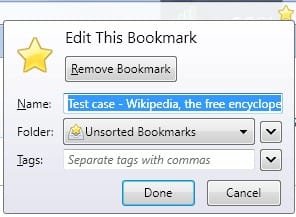
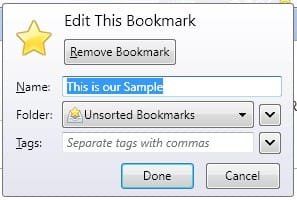
First of all, save a link you want to pin to your favorites and rename it whilst doing so (note: the site used in this post is merely for instructional purposes and no endorsement by this poster should be construed ;)):
Screenshot_1.jpg Screenshot_2.jpg

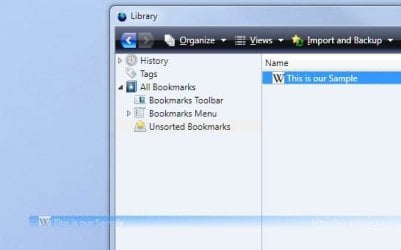
Next open your bookmarks and drag and drop the site you just renamed and added to your bookmarks (if you're going to pin it, it might as well be in your favorites, right? :)) to your desktop (I call this the "Desktop Step"). It's an odd step, granted, but it was the only way I found to preserve the name it's been given in the above step:
Screenshot_3.jpg Screenshot_4.jpg

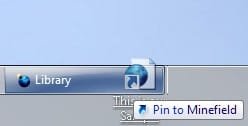
Then drag it from your desktop to your Firefox Start Menu item (remember, I'm using Minefield but yours should be no different):
Screenshot_5.jpg

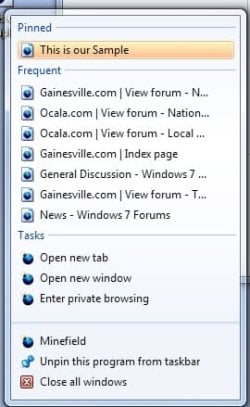
And there you have it. A link named the way you want it to be named. (It is now permissible to delete the icon created on your desktop during the aforementioned interim step. Heck, you can even delete it from your bookmarks if you so desire.):
Screenshot_6.jpg

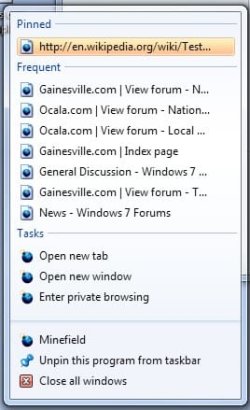
Note when I tried to skip the intermediate "Desktop Step," the name reverted to the url name:
Screenshot_7.jpg Screenshot_8.jpg

Unfortunately, although the above helps with your first question, I guess it sheds little light on your second question. Sorry. :(
 

My Computer My Computer

At a glance

Windows 7 Ultimate x64 SP1Core2 Duo4 GBGM965 on-board
Computer Manufacturer/Model Number
Toshiba L355D
OS
Windows 7 Ultimate x64 SP1
CPU
Core2 Duo
Motherboard
Intel
Memory
4 GB
Graphics Card(s)
GM965 on-board
Sound Card
RealTek on-board
Monitor(s) Displays
19"+17"(laptop)
Screen Resolution
1440x900 (x 2)
Hard Drives
500GB Ext. 200GB Internal
PSU
N/A
Case
N/A
Cooling
N/A
mikedl,

Thank you! Your tutorial worked like a charm and did exactly what I wanted. :D
 

My Computer My Computer

At a glance

Windows 7 X64 ProfessionalIntel® Pentium D Dual Core 3.6GHZ4GB DDR2 PC2-5300GeForce GT 440 (Fermi) 2GB 128-bit DDR3 PCI E...
Computer Manufacturer/Model Number
Dell XPS 400
OS
Windows 7 X64 Professional
CPU
Intel® Pentium D Dual Core 3.6GHZ
Motherboard
DELL Dimension 9150 MotherBoard DXP051 XPS400 FJ030
Memory
4GB DDR2 PC2-5300
Graphics Card(s)
GeForce GT 440 (Fermi) 2GB 128-bit DDR3 PCI Express 2.0 x16
Sound Card
ASUS XONAR DG 5.1 Channels PCI Interface Xonar DG
Monitor(s) Displays
2 X 23" Apple Cinema Display
Screen Resolution
1920 X 1200p
Hard Drives
250GB Intel® 510 Series SSD SATA 6G (w/TRIM) [500MB/s Reads]
1.0TB Western Digital Caviar Black SATA 6G 7200rpm 64MB Cache
PSU
375 Watt Dell
Case
Dell XPS 400 BTX Case
Cooling
Dell XPS 400 Air Cooling
Keyboard
Logitech Illuminated Keyboard
Mouse
Logitech M705 Marathon
Internet Speed
+/- 9929 Kbps
Other Info
This machine was given to me when my dad bought a new computer. I keep throwing upgrades at it and it keeps on ticking. Think I've done everything to it that can be done outside a PSU upgrade so I can run an even BETTER GPU.
My pleasure. I'm glad it worked! :D
 

My Computer My Computer

At a glance

Windows 7 Ultimate x64 SP1Core2 Duo4 GBGM965 on-board
Computer Manufacturer/Model Number
Toshiba L355D
OS
Windows 7 Ultimate x64 SP1
CPU
Core2 Duo
Motherboard
Intel
Memory
4 GB
Graphics Card(s)
GM965 on-board
Sound Card
RealTek on-board
Monitor(s) Displays
19"+17"(laptop)
Screen Resolution
1440x900 (x 2)
Hard Drives
500GB Ext. 200GB Internal
PSU
N/A
Case
N/A
Cooling
N/A
Back
Top