
Can I edit the Type column on Windows Explorer?

Twoboots

New member
Local time
6:16 AM
Messages
4
Hi!
I just updated VLC player to 3.0.3 and I noticed that all associated files now appear as VLC media file, whereas before they would appear as what they were (mp4, mpg,etc). I want them to be associated, but to appear as exactly what they are. Nothing else has changed, it's related to this upgrading. I've always had all those video files associated with VLC, but they've always shown their right type (but all with a VLC icon). I need explorer to tell me what they are and not have to see properties on each file.
Can this be done?

Thank you
 

Attachments
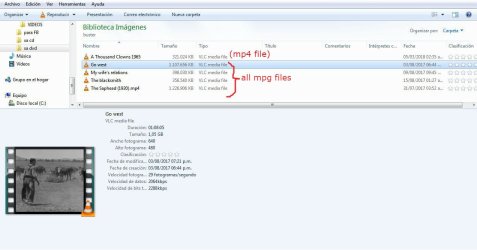
  • Clipboard01.jpg
    Clipboard01.jpg
    69.1 KB · Views: 3

My Computer My Computer

Computer type
Laptop
Computer Manufacturer/Model Number
dell
OS
Windows 7 Ultimate x64
Hi Twoboots, welcome to Seven Forums,

I also updated VLC [which I have used for years as you can pretty much throw anything at it and it will play] and found exactly as you described. I too like to know what each file type is associated with a particular file. I know that you can unhide the file extensions in the folder options [I know this is a Windows solution as opposed to a VLC solution] but that makes the files names messy and harder to read in my opinion.

I know an alternative is to downgrade to the version prior to v3.0.3 [v2.2.8] but that is not really the answer.

Anyway, I have emailed VideoLAN asking them if it can be changed within the program to show the suffixes. I will post the answer here when they reply.

I hope this helps!
 

My Computer My Computer

Computer type
Laptop
Computer Manufacturer/Model Number
Fujitsu LIFEBOOK
OS
Win 7 HP SP1 64-bit Vista HB SP2 32-bit Linux Mint 18.3
CPU
Intel(R) Pentium(R) CPU P6200 @ 2.13GHz
Motherboard
FUJITSU FJNBB06
Memory
4.00 GB
Graphics Card(s)
Intel(R) Graphics Media Accelerator HD
Sound Card
[1] Realtek High Definition Audio [2] Intel(R) Display Audio
Screen Resolution
1366 x 768 x 32 bits (4294967296 colors) @ 59 Hz
Hard Drives
TOSHIBA MK5076GSX
Antivirus
AVG FREE
This is a bad practice many programs engage in, and I totally agree that's simply better to see the real file type.

That column comes from the file association stored in the registry. Up to Windows XP you can directly edit those in a nice dialog in Explorer, but it was removed in Vista, leaving direct registry edition the only built-in choice. Some software attempt to recreate the same removed function, one of my favorite being FileTypesMan, it can edit many properties of file association, including the type description you're mentioning.

Editing the registry by hand is still a superior alternative, but more difficult. Tell me if you want to do it that way and I'll post the required changes.

Also, I've noted in your screenshots that your Explorer is configured to hide file extensions. A quick and dirty solution is to just enable it (as easy as changing a setting in Explorer) and the files will reflect their "type" right away, showing something like "video.mpg" or "video.avi" instead of just "video".
In addition, having extensions hidden is a serious security vulnerability.
 

My Computer My Computer

Computer type
Laptop
Computer Manufacturer/Model Number
Toshiba Sattelite A665-S6092
OS
Windows 7 Ultimate x64
CPU
Intel Core i7-740QM
Memory
8 GB DDR3
Graphics Card(s)
NVIDIA GeForce 330GT
Screen Resolution
1366x768
Hard Drives
Samsung 840 SSD 500GB
1TB USB3 external HD
Cooling
Coolermaster Notepal U3 notebook cooling pad
Internet Speed
3mbps ASDL
Antivirus
ClamWin 0.98.7
Browser
Opera 12.17 x86 (main), Firefox 38 (sec), IE11 (last resort)
Hi Alejandro85,

Thanks for the detailed information, it is appreciated.
I would certainly be interested in the editing the registry [after doing a full registry backup of course!] to accomplish getting back the actual suffixes.

Thanks in advance.
 

My Computer My Computer

Computer type
Laptop
Computer Manufacturer/Model Number
Fujitsu LIFEBOOK
OS
Win 7 HP SP1 64-bit Vista HB SP2 32-bit Linux Mint 18.3
CPU
Intel(R) Pentium(R) CPU P6200 @ 2.13GHz
Motherboard
FUJITSU FJNBB06
Memory
4.00 GB
Graphics Card(s)
Intel(R) Graphics Media Accelerator HD
Sound Card
[1] Realtek High Definition Audio [2] Intel(R) Display Audio
Screen Resolution
1366 x 768 x 32 bits (4294967296 colors) @ 59 Hz
Hard Drives
TOSHIBA MK5076GSX
Antivirus
AVG FREE
On my computer, most files that has a associate program to open with has this program on the type. So *.doc is MS Word 97-2003, *.docx is MS Word, *.xls is Excel 97-2003.

For safety reasons, you should set Explorer to show all extensions. For example, girl.jpg.exe is shown as girl.jpg when in fact is a executable file.
Open Control Panel\All Control Panel Items\Folder Options - View tab and un mark Hide extensions of known types.
Than you'll see the extension on the name.
 

My Computers My Computers

System One System Two

  • Computer type
    PC/Desktop
    Computer Manufacturer/Model Number
    custom build
    OS
    Windows 7 HP 64
    CPU
    i5 6600K - 800MHz to 4200MHz
    Motherboard
    GA-Z170-HD3P
    Memory
    4+4G GSkill DDR4 3000
    Graphics Card(s)
    IG - Intel 530
    Monitor(s) Displays
    Samsung 226BW
    Screen Resolution
    1680x1050
    Hard Drives
    (1) -1 SM951 – 128GB M.2 AHCI PCIe SSD drive for Windows 7 and Lubuntu
    (2) -1 WD SATA 3 - 1T for Data
    (3) -1 WD SATA 3 - 1T for backup
    PSU
    Thermaltake 450W TR2 gold
    Keyboard
    Old and good Chicony mechanical keyboard
    Mouse
    Logitech mX performance - 9 buttons (had to disable some)
    Internet Speed
    500Mb/s
    Browser
    Firefox 64
    Other Info
    TinyWall firewall
  • Computer type
    Laptop
    System Manufacturer/Model Number
    Asus Q550LF
    OS
    Windows 7 Pro
    CPU
    i7-4500U 800MHz to 3.0GHz
    Motherboard
    Asus Q550LF
    Memory
    (4+4)G DDR3 1600
    Graphics Card(s)
    IG intel 4400 + NVIDIA GeForce GT 745M
    Sound Card
    Realtek
    Monitor(s) Displays
    LG Display LP156WF4-SPH1
    Screen Resolution
    1920 x 1080
    Hard Drives
    BX500 120G SSD for Windows and programs +
    1T HDD for data
    Internet Speed
    500 Mb/s
    Browser
    Firefox
    Other Info
    TinyWall firewall
Thank you all for your replies. First of all, it's nice knowing I'm not alone in this and also that I was understood (that's always a concern for me when I enter a forum like this one).
I don't feel confident enough to mess with the registry to be honest. Should I hope the next VLC update changes this?... Maybe.
I didn't know hiding extensions was a vulnerability, but I get it now. I guess I rely on my Antivirus way too much. As Paul Black says, it's messy an harder to read. But I guess it's my way out for now, so thank you.
I won't mark as solved for now in case Paul wants instructions...?
 

My Computer My Computer

Computer type
Laptop
Computer Manufacturer/Model Number
dell
OS
Windows 7 Ultimate x64
I am using Daum Pot Player as default player and it has different icons for every multimedia file so You at a glance can see it.
 

My Computer My Computer

OS
Win 7 Ult 64-bit
CPU
AMD Athlon 455 3core
Memory
6 Gb 1333Mhz
Graphics Card(s)
GForce 545 1,5Gb 192-bit
Monitor(s) Displays
LG IPS234
Hard Drives
1tb
Case
Acer Predator
I have emailed VideoLAN asking them if it can be changed within the program to show the suffixes. I will post the answer here when they reply.

Just an update to say that I have not received a reply from VideoLAN as of yet but I will post their reply when I eventually do.

As Twoboots has also mentioned I am interested in Alejandro85 offer to post the required changes when he has time.
 

My Computer My Computer

Computer type
Laptop
Computer Manufacturer/Model Number
Fujitsu LIFEBOOK
OS
Win 7 HP SP1 64-bit Vista HB SP2 32-bit Linux Mint 18.3
CPU
Intel(R) Pentium(R) CPU P6200 @ 2.13GHz
Motherboard
FUJITSU FJNBB06
Memory
4.00 GB
Graphics Card(s)
Intel(R) Graphics Media Accelerator HD
Sound Card
[1] Realtek High Definition Audio [2] Intel(R) Display Audio
Screen Resolution
1366 x 768 x 32 bits (4294967296 colors) @ 59 Hz
Hard Drives
TOSHIBA MK5076GSX
Antivirus
AVG FREE
I am using Daum Pot Player as default player and it has different icons for every multimedia file so You at a glance can see it.

I've heard good things about it. As you can imagine, a creature of habits will find it difficult to change programs, but I will keep it in mind.There are a few things I absolutely want and I know VLC does.


Just an update to say that I have not received a reply from VideoLAN as of yet but I will post their reply when I eventually do.

Thank you, I'll appreciate that!
 

My Computer My Computer

Computer type
Laptop
Computer Manufacturer/Model Number
dell
OS
Windows 7 Ultimate x64
VideoLAN Update.

I have just received a reply to my email from VideoLAN [VLC] saying that it can be changed and they will look into it :thumbsup: .
 

My Computer My Computer

Computer type
Laptop
Computer Manufacturer/Model Number
Fujitsu LIFEBOOK
OS
Win 7 HP SP1 64-bit Vista HB SP2 32-bit Linux Mint 18.3
CPU
Intel(R) Pentium(R) CPU P6200 @ 2.13GHz
Motherboard
FUJITSU FJNBB06
Memory
4.00 GB
Graphics Card(s)
Intel(R) Graphics Media Accelerator HD
Sound Card
[1] Realtek High Definition Audio [2] Intel(R) Display Audio
Screen Resolution
1366 x 768 x 32 bits (4294967296 colors) @ 59 Hz
Hard Drives
TOSHIBA MK5076GSX
Antivirus
AVG FREE
I have just received a reply to my email from VideoLAN [VLC] saying that it can be changed and they will look into it :thumbsup: .

That is GREAT news! Showing the file extensions is not useful to me as they cannot be sorted accordingly. They still get sorted as one and the same type of file. Thank you Paul!
 

My Computer My Computer

Computer type
Laptop
Computer Manufacturer/Model Number
dell
OS
Windows 7 Ultimate x64
Hi Twoboots,

That is GREAT news! Thank you Paul!

You're welcome.

I wouldn't like to hazard a guess of how many people use VLC and have done so for years.
I must admit that I am suprised that after the new version was released nobody had questioned the change in file type. Perhaps people haven't noticed it [I don't see how though] or just accept the fact that it is the way the software now works.
As my old man always said to me, "If you don't ask you don't get!".
If they do manage to find a solution, I know that I will welcome it, as I am sure many others will too.
If they notify me that a new release is available that accommodates the change I will post the update and reply here.
 

My Computer My Computer

Computer type
Laptop
Computer Manufacturer/Model Number
Fujitsu LIFEBOOK
OS
Win 7 HP SP1 64-bit Vista HB SP2 32-bit Linux Mint 18.3
CPU
Intel(R) Pentium(R) CPU P6200 @ 2.13GHz
Motherboard
FUJITSU FJNBB06
Memory
4.00 GB
Graphics Card(s)
Intel(R) Graphics Media Accelerator HD
Sound Card
[1] Realtek High Definition Audio [2] Intel(R) Display Audio
Screen Resolution
1366 x 768 x 32 bits (4294967296 colors) @ 59 Hz
Hard Drives
TOSHIBA MK5076GSX
Antivirus
AVG FREE
Strange thing is that the first thing I do in any new windows install is to switch on file extensions view, I come from an industrial background where files would be created in many formats with the same main body name so the extensions being visible were an essential, and have kept with the system - the main reason is the the extension appears in all the views possible in Windows file manager.

The main use these days is due to the way I name my Images - the file name is always the full date and time of capture EG 2018-06-11.12-30-59-3.DNG The -3 means its the third image taken in that second ;) .DNG is a digital Negative format from Adobe.

The internal metadata allows me to totally control how I look at the file in Lightroom, (even windows shows the metadata in the details tab), so I can group the files by hundreds Millions of different combinations, and find any particular file quickly using a layered search of Metadata

I will often process the one image into different formats for their final use, these retain the filename as some formats do not retain the full metadata, and I can include the filename in searches to collect files together as a group

I also use MediaMonkey to store my media which allows you to add internal metadata to Video and Music files, this can be manipulated far more efficiently than file manager allows, it comes with it's own built-in playback tools but may be set-up to play in your favourite players
 

My Computers My Computers

System One System Two

  • Computer type
    PC/Desktop
    Computer Manufacturer/Model Number
    ChillBlast - Custom to my design
    OS
    Windows 11 Pro x64 [Latest Release and Release Preview]
    CPU
    Ryzen 9 5950X, 3.8 - 5.2 MHz
    Motherboard
    Asus Prime X570-Pro
    Memory
    64GB [2 x 32GB] DDR4 3200MHz
    Graphics Card(s)
    4GB NVIDIA GEFORCE GTX 1650 Ti
    Sound Card
    On-board SPDIF to 5.1 System + HDMI [5.1 system]
    Monitor(s) Displays
    32" UHD 32 Bit HDR Monitor + 43" UHD 4K 32Bit HDR TV
    Screen Resolution
    2 x 3840 x 2160 @60Hz
    Hard Drives
    1TB M2 SSD OS, 500GB Fast Access SSD, 2 x 8TB Data + Various Externals from 1TB to 4TB, 10TB NAS
    PSU
    NZXT C750 80 PLUS Gold 750W Modular PSU
    Case
    Workstation Case [Matt Black]
    Cooling
    NZXT Kraken X63 280mm CPU Cooler +2x Quiet Case fans
    Keyboard
    Logitech Wireless MX Keys & K400 + others
    Mouse
    Logitech Wireless MX Master 3S
    Internet Speed
    920 MB Down 50 MB Up
    Antivirus
    BitDefender Total Security Pro
    Browser
    Chrome (always run latest Non-Beta)
    Other Info
    Also run ...
    Laptop - Quad 8GB - Windows 10 Pro x64
    Nexus 7 Android tablet x2
    Samsung 10.2" tablet
    Blackview TAB 8 4G Android Tablet c/w Keyboard
    Wacom Intuos Pro Medium Pen Pad
    Wacom Intuos Pro Small Pen Pad
    Wacom Expresskeys Remote
    Loopdeck+ Graphics Controller
    Shuttle Pro v2 Control
  • Computer type
    Laptop
    System Manufacturer/Model Number
    Dell XPS 17 10750H
    OS
    Windows 11 Pro x64 Latest RP
    CPU
    Intel I7 10750H 5.0GHz
    Motherboard
    Dell XPS
    Memory
    32GB [2x16GB] DDR4 2933 MHz
    Graphics Card(s)
    nVidia GTX1650Ti 4 GB GDDR6
    Sound Card
    Stock [Realtek] 4 Speaker
    Monitor(s) Displays
    17" IPS UHD+ Infinity Edge Touchscreen
    Screen Resolution
    3840 x 2400
    Hard Drives
    2TB M2 NVMe, 4TB External + various 500GB & 1TB External NVMe (also have access to spinner HDD from
    PSU
    Stock
    Case
    Stock XPS Aluminium & Carbon Fibre
    Cooling
    Stock - Active Fan Control
    Keyboard
    Backlit + Various Logitech
    Mouse
    Stock Track Pad + Logitech MX Trackball
    Internet Speed
    72 MB Down 18MB Up
    Browser
    Chrome
    Other Info
    Also run ...
    Laptop - Quad 8GB - Windows 10 Pro x64
    Nexus 7 Android tablet x2
    10.2" tablet
    Sony Z3 Android Smartphone
    Wacom Intuos Pro Medium Pen Pad
    Wacom Intuos Pro Small Pen Pad
    Wacom Expresskeys Remote
    Loopdeck+ Graphics Controller
    Shuttle Pro v2 Control Pad
    10TB NAS
Back
Top