can i get rid of my C:\boot on my xp

drugo

New member
Member
VIP
Local time
12:40 AM
Messages
476
Hi
i have an hard disk with xp sp3 32bit

and a second hard disk (was empty)
in the second hard disk i installed w7

edit the bios and setup boot dvd after the hardware for w7

my xp boots normally
and my windows 7 boots normally

in my xp now i have a folder Boot that i can not delete
and i have in my xp root
Code:
AUTOEXEC.BAT
Boot.BAK
boot.ini
Bootfont.bin
bootmgr
BOOTSECT.BAK
CONFIG.SYS
IO.SYS
MSDOS.SYS
NTDETECT.COM
ntldr
and inside my xp
a c:\boot
with

Code:
cs-CZ\
da-DK\
de-DE\
el-GR\
en-US\
es-ES\
fi-FI\
Fonts\
fr-FR\
hu-HU\
it-IT\
ja-JP\
ko-KR\
nb-NO\
nl-NL\
pl-PL\
pt-BR\
pt-PT\
ru-RU\
sv-SE\
tr-TR\
zh-CN\
zh-HK\
zh-TW\
BCD.Backup.0002
BCD.LOG
BCD.Backup.0001
BOOTSTAT.DAT
BCD.LOG1
BCD.LOG2
memtest.exe
can i delete this c: in my xp ?
i would love to have the original xp boot mbr and files
i haven't installed a dual managaer on my xp

the dual manager is in my windows 7 hardisk


i follow this step
Boot up and log on to Windows XP desktop.
Insert the Windows Vista or Windows 7 DVD installation disc into CD-ROM or DVD-ROM optical drive. Alternatively, mount the Windows 7 or Windows Vista DVD ISO image on any virtual drive.
Run Command Prompt, or click directly to Start menu -> Run command.
In the command prompt or the Run text box, issue the following command and hit Enter: [DVD Drive Letter]:\boot\bootsect.exe /nt52 ALL /force
For example,
If the DVD drive path is D:, then enter the following:
D:\boot\bootsect.exe /nt52 ALL /force


but the files are still in my xp
thanks
have a great day mates
 

My Computer My Computer

At a glance

windows 7 ultimate 64bit
Computer type
PC/Desktop
OS
windows 7 ultimate 64bit
If you post back a screenshot of your full Disk Management drive map, using Snipping Tool in start menu, attaching file using paper clip in reply box, we can help you better.

Tell us exactly what you want to do.

Do you want to remove windows-managed Dual boot so your HD's boot independently via the BIOS, with one set to boot by default, or the other able to interrupt that by booting it using the F key for Boot Menu?

It sounds like Windows 7 correctly configured a windows-managed dual boot when it was installed last, which will occur if you don't unplug the XP drive during install. Is this what you want to change?
 
The boot folder is part of the Win 7 install.... Do not delete if you want to keep your current setup.
 

My Computer My Computer

At a glance

Windows 7 x64i7-2600K8 GGTX 480
Computer Manufacturer/Model Number
Homebuilt
OS
Windows 7 x64
CPU
i7-2600K
Motherboard
Asus P8Z77-v Pro
Memory
8 G
Graphics Card(s)
GTX 480
Sound Card
Onboard
Monitor(s) Displays
LG W2753V
Screen Resolution
1920x1080
Hard Drives
Crucial M4 128 G SSD
full Disk Management drive map, using Snipping Tool in start menu, attaching file using paper clip in reply box, we can help you better.

i will do as soon as i can ,now i'm at work and i can't

It sounds like Windows 7 correctly configured a windows-managed dual boot when it was installed last, which will occur if you don't unplug the XP drive during install. Is this what you want to change?
i guess so

windows 7 has a folder C:\boot
and my windows xp has a folder C:\boot
i want to delete the xp folder C:\boot and leave the folder C:\boot in windows 7 hard disk

thanks
 

My Computer My Computer

At a glance

windows 7 ultimate 64bit
Computer type
PC/Desktop
OS
windows 7 ultimate 64bit
Why do you want to do that?

If you are satisfied with the dual boot the way Windows configured it, and don't wish to use a BIOS-managed boot (where the HD's are not interlinked and can come and go as you please) then I would leave it as it is, unless you have a reason not to.
 
Why do you want to do that?

If you are satisfied with the dual boot the way Windows configured it, and don't wish to use a BIOS-managed boot (where the HD's are not interlinked and can come and go as you please) then I would leave it as it is, unless you have a reason not to.
well
the c:\boot in my xp was a mine mistake during the install process
is there a way to delete it on my xp?
i keep it on my 7 for sure
i want to delete in my xp
 

My Computer My Computer

At a glance

windows 7 ultimate 64bit
Computer type
PC/Desktop
OS
windows 7 ultimate 64bit
You need to keep the boot folder in the System partition. If you attach a snipping tool picture of your disk management, maybe we could tell what you need.

It is sometimes hard to understand how a system is set up without seeing the details, and we wouldn't want to tell you something that might mess up your boot.
 

My Computer My Computer

At a glance

Windows 7 x64i7-2600K8 GGTX 480
Computer Manufacturer/Model Number
Homebuilt
OS
Windows 7 x64
CPU
i7-2600K
Motherboard
Asus P8Z77-v Pro
Memory
8 G
Graphics Card(s)
GTX 480
Sound Card
Onboard
Monitor(s) Displays
LG W2753V
Screen Resolution
1920x1080
Hard Drives
Crucial M4 128 G SSD
You need to keep the boot folder in the System partition. If you attach a snipping tool picture of your disk management, maybe we could tell what you need.

It is sometimes hard to understand how a system is set up without seeing the details, and we wouldn't want to tell you something that might mess up your boot.

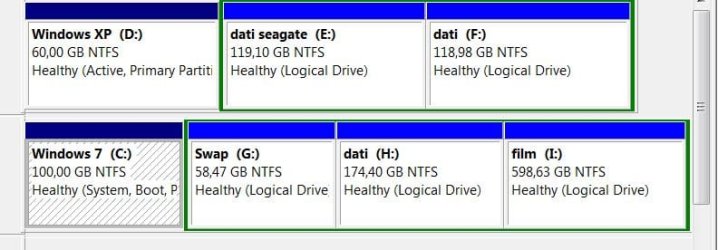
here there is the screenshot
i taken under xp
thanks
 

Attachments

  • screnshot 153.jpg
    screnshot 153.jpg
    25.3 KB · Views: 259

My Computer My Computer

At a glance

windows 7 ultimate 64bit
Computer type
PC/Desktop
OS
windows 7 ultimate 64bit
Looks like the XP partition is the one the boot files need to be in. If you want to get rid of XP, reverse the order of the drives in the bios so the Win 7 partition is seen first during boot. Then it will be system and you can do whatever you want with the XP partition. Just make sure the Windows 7 partition shows System first.

If, for some reason, it will not boot to the Win 7 partition after you change the drive order, you might have to do a startup repair.

I am assuming Attivo means Active :D
 

My Computer My Computer

At a glance

Windows 7 x64i7-2600K8 GGTX 480
Computer Manufacturer/Model Number
Homebuilt
OS
Windows 7 x64
CPU
i7-2600K
Motherboard
Asus P8Z77-v Pro
Memory
8 G
Graphics Card(s)
GTX 480
Sound Card
Onboard
Monitor(s) Displays
LG W2753V
Screen Resolution
1920x1080
Hard Drives
Crucial M4 128 G SSD
Looks like the XP partition is the one the boot files need to be in. If you want to get rid of XP, reverse the order of the drives in the bios so the Win 7 partition is seen first during boot. Then it will be system and you can do whatever you want with the XP partition. Just make sure the Windows 7 partition shows System first.

If, for some reason, it will not boot to the Win 7 partition after you change the drive order, you might have to do a startup repair.

I am assuming Attivo means Active :D
i do it
this is w7 screenshot
but again i can't delete c:\boot in the xp hard disk
i want to keep c:\boot only in my w7 hard disk

in the d:\boot where is my xp
d:\boot have full permission ony for Trustedinstaller (special permission)
 

Attachments

  • Capture.JPG
    Capture.JPG
    43.1 KB · Views: 73

My Computer My Computer

At a glance

windows 7 ultimate 64bit
Computer type
PC/Desktop
OS
windows 7 ultimate 64bit
To get rid of the boot folder and bootmgr, you might try moving them to the desktop and delete from there. If you can't, you will have to take ownership of them and possibly assign yourself full control.

There are tutorials on how to do this, but I will go through it if you wish.
 

My Computer My Computer

At a glance

Windows 7 x64i7-2600K8 GGTX 480
Computer Manufacturer/Model Number
Homebuilt
OS
Windows 7 x64
CPU
i7-2600K
Motherboard
Asus P8Z77-v Pro
Memory
8 G
Graphics Card(s)
GTX 480
Sound Card
Onboard
Monitor(s) Displays
LG W2753V
Screen Resolution
1920x1080
Hard Drives
Crucial M4 128 G SSD
Last edited:

My Computer My Computer

At a glance

windows 7 ultimate 64bit
Computer type
PC/Desktop
OS
windows 7 ultimate 64bit
I am in Vista right now, but Win 7 is similar.

Right click file and select properties.

Select Security Tab

Select Advanced

Owner Tab

Edit button

Select your user in the window, check the Replace owner on subcontainers for a folder (like boot) and OK your way back out of properties.

Try to delete. If you can't, go back to properties-security and give yourself full control and OK back out and try again.

You may also be able to delete if from Safe Mode, the Command Prompt, or by moving it.

There are many tutorials on the net about taking ownership or gaining access to a file/folder.
 

My Computer My Computer

At a glance

Windows 7 x64i7-2600K8 GGTX 480
Computer Manufacturer/Model Number
Homebuilt
OS
Windows 7 x64
CPU
i7-2600K
Motherboard
Asus P8Z77-v Pro
Memory
8 G
Graphics Card(s)
GTX 480
Sound Card
Onboard
Monitor(s) Displays
LG W2753V
Screen Resolution
1920x1080
Hard Drives
Crucial M4 128 G SSD
I am in Vista right now, but Win 7 is similar.

Right click file and select properties.

Select Security Tab

Select Advanced

Owner Tab

Edit button

Select your user in the window, check the Replace owner on subcontainers for a folder (like boot) and OK your way back out of properties.

Try to delete. If you can't, go back to properties-security and give yourself full control and OK back out and try again.

You may also be able to delete if from Safe Mode, the Command Prompt, or by moving it.

There are many tutorials on the net about taking ownership or gaining access to a file/folder.

You were right in your first post where you said: don't delete the boot folder, or you won't be able to boot Win7 anymore.

Don't know why you changed into helping him deleting it??
 

My Computer My Computer

At a glance

W7
OS
W7
I am in Vista right now, but Win 7 is similar.

Right click file and select properties.

Select Security Tab

Select Advanced

Owner Tab

Edit button

Select your user in the window, check the Replace owner on subcontainers for a folder (like boot) and OK your way back out of properties.

Try to delete. If you can't, go back to properties-security and give yourself full control and OK back out and try again.

You may also be able to delete if from Safe Mode, the Command Prompt, or by moving it.

There are many tutorials on the net about taking ownership or gaining access to a file/folder.

You were right in your first post where you said: don't delete the boot folder, or you won't be able to boot Win7 anymore.

Don't know why you changed into helping him deleting it??
no no
i have c:\boot in windows 7
and i can boot
the C:boot in my windows partition is a mine install mistake
 

My Computer My Computer

At a glance

windows 7 ultimate 64bit
Computer type
PC/Desktop
OS
windows 7 ultimate 64bit
I found that without the xp partition holding the boot, the repair couldnt even find an OS. I just did a repair install and its all dandy. Yes I had to reinstall stuff, but its better than losing everything you have.


The reason no one has boot manager stuff on their windows 7 is because it keeps them in a hidden partition sized at 100MB and letterless. If you get a partition program like easeus, which is free, it shows a 100mb partition you cannot access. this contains the boot information.
 

My Computer My Computer

At a glance

Windows 7 ProAthlon II x4 6202gb ddr2 800mhz 6-6-6-16Radeon HD 4850
Computer Manufacturer/Model Number
Me
OS
Windows 7 Pro
CPU
Athlon II x4 620
Motherboard
Gigabyte
Memory
2gb ddr2 800mhz 6-6-6-16
Graphics Card(s)
Radeon HD 4850
Sound Card
Onboard
Monitor(s) Displays
1366 x 768
Hard Drives
WDC Black 500gb
PSU
OCZ ceritified SLI ready 500w
Case
Cool Master Mid tower
Cooling
Stock
I found that without the xp partition holding the boot, the repair couldnt even find an OS. I just did a repair install and its all dandy. Yes I had to reinstall stuff, but its better than losing everything you have.


The reason no one has boot manager stuff on their windows 7 is because it keeps them in a hidden partition sized at 100MB and letterless. If you get a partition program like easeus, which is free, it shows a 100mb partition you cannot access. this contains the boot information.

To recover the MBR into Win7 7, you must first mark the Win7 (or 100mb System Reserved partition if you have it) ACTIVE using Diskpart or partition manager.

Then boot Win7 DVD Repair console or Repair CD, click through to Recovery Tools list to run Startup Repair up to 3 separate times to write the MBR to Win7.

If it is marked Active, it will work.
 
Back
Top