Solved Can I hide "Owner" folder in Windows Explorer?

bawldiggle

GrayGhost2 ret.
Pro User
VIP
Local time
12:38 PM
Messages
895
Location
Australia
I am trying to simplify Navigation "pain" in Win7 Windows Explorer.
Can "DeskTop | Owner" be hidden in Windows Explorer ?
I dont use Libraries, so if I can get to just listing "Desktop > (C:) Local Disc" ... I will be a very happy camper.
I am trying to setup a new PC for a disabled user.
Trying for as simple as XP.

Thank you
 
Last edited:

My Computer My Computer

Computer type
PC/Desktop
Computer Manufacturer/Model Number
Toshiba, Lenovo (laptops) + 4 rigs
OS
XP Pro (x86) | 7 HP (x86) & (x64) | 7 Pro (x64)
why do u want to do so??
can u explain more?
 

My Computer My Computer

OS
Windows 7 Ultimate x64
CPU
core i7.
Thank you "mmkarimi" for such a prompt reply
My wife is physically disabled.
I am trying to minimize the risk of "stuff" being lost.
She is very used to using C:\Diana as her folder
Also makes backing up to an external hard drive very simple.
She freaked when she saw the native Win7 Navigation pane, her minor motor mobility is somewhat challenged.

I have installed Explorer++ on her laptop -- it lists Owner at the bottom of the Navigation pane
but common dialogs still show "Owner" folder at the top of the nav-pane. (I think)

Hope this all makes sence.
(I have just closed down her new WIN7 laptop (i am in the process of setting up for her requirements.)
(This reply is being made via WinXP on another PC)

Thanks again
 

My Computer My Computer

Computer type
PC/Desktop
Computer Manufacturer/Model Number
Toshiba, Lenovo (laptops) + 4 rigs
OS
XP Pro (x86) | 7 HP (x86) & (x64) | 7 Pro (x64)
about being worry of loosing data, you may use deepfreez software which will freeze your windows and restore it after each restart, so she can make change only to the folder she has permissions to. it can be a big help for you.
about hiding the owner folder, i just missed. what do you mean

http://deep-freeze.en.malavida.com/
 

Attachments

  • 12-28-2012 1-04-56 PMa.jpg
    12-28-2012 1-04-56 PMa.jpg
    28.1 KB · Views: 7

My Computer My Computer

OS
Windows 7 Ultimate x64
CPU
core i7.
Virtual "Owner" drive on "Desktop" in Windows Explorer

Windows Explorer in Windows 7
- single user PC -- no network
I want to hide the virtual "Owner" drive/folder on Desktop... NOT .. the "C:\Users\Owner" folder

Contents of the virtual Desktop\Owner folder are identical to "C:\Users\Owner"
I dont want to go thru the side gate, around the island, over the back fence, thru the back door just to get to the front-door

I run several script files to run my own EXE files and shortcuts in "Startup"
So if "Desktop\Owner" is hidden and that also hides "C:\Users\Owner\", I can live with that
(I rarely need to access "Startup" only to tweak admin scripts and shortcuts-to-exe-files)

I would like to get all the duplicated junk out of the navigation pane and hopefully be left with just "C:\"
I have already hidden "Libraries" ... so I am part way there.
And by using "Explorer++" in place of "Windows Explorer" dialog I am almost there.
(Explorer++ moves the junk to the bottom of its navigation pane)
But common docs are saved thru MS "Commmon dlg" -- with all the navigation-pane junk at the top

"C:\" is the heart of all simple PCs, I cannot see the point in creating complexity.

I can hide "C:\Users\Owner\" via attributes but that does not hide the virtual version "Desktop\Owner".
and there is no "Properties" on context menu for Desktop\Owner (virtual drive)

I do not want to complicate using this one-user PC with "Deep Freeze", but thank you for the tip.

Would appreciate anyones help, thank you.
 

My Computer My Computer

Computer type
PC/Desktop
Computer Manufacturer/Model Number
Toshiba, Lenovo (laptops) + 4 rigs
OS
XP Pro (x86) | 7 HP (x86) & (x64) | 7 Pro (x64)
I'm not entirely sure what this "Owner" folder is, but if I guessed right have you tried doing the following?:
1. Open Control Panel
2. Open Display
3. Click "Personalization" near bottom-left of the window
4. Click "Change desktop icons" near top-left of the window
5. Uncheck "User's Files"

If I guessed wrong, I'm really sorry. Could you post a screenshot of the folder and navigation pane area in question so we can get a solid idea on the subject?
 

My Computer My Computer

Computer type
PC/Desktop
Computer Manufacturer/Model Number
N/A (custom-built)
OS
Windows 7 Ultimate x64 SP1
CPU
Intel Core i7 2700K @ 3.5GHz (TurboBoost disabled)
Motherboard
ASUS P8Z68-V/GEN3
Memory
16GB (4x4GB) Kingston HyperX DDR3 1600MHz @ 1333MHz
Graphics Card(s)
Nvidia EVGA GeForce GTX 1060 6GB
Sound Card
Realtek High Definition Audio (motherboard integrated)
Monitor(s) Displays
NEC Multisync EX231W
Screen Resolution
1920x1080 @ 60Hz via DVI-D
Hard Drives
2x Western Digital 1TB SATA3 Caviar Black Internal HDD // 1x WD 500GB USB 3.0 "My Passport Essential" External HDD // 1x WD 1TB USB 3.0 "My Passport Essential" External HDD // 2x WD 2TB USB 3.0 "My Passport Essential" External HDD
PSU
Corsair Professional Series Gold AX850
Case
Antec 300
Cooling
Air-cooling
Keyboard
Steelseries 6Gv2
Mouse
Steelseries Sensei RAW Glossy, Logitech M500
Internet Speed
DSL (AT&T)
Antivirus
Microsoft Security Essentials
Browser
Pale Moon, Mozilla Firefox 12, Opera 12, Chromium, IE9
Other Info
Virtual Machines (VirtualBox):
* Japanese Windows XP Professional SP3
* Japanese Windows 7 Professional SP1
Thank you "King Arthur" for your response.
My problem PC is Win_7 "Home" (OEM) -- preloaded Toshiba laptop.

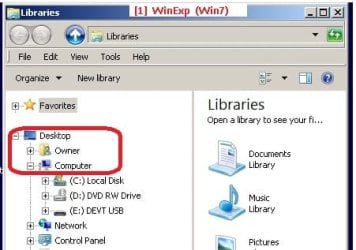
I want to hide the generic "Owner" on "Windows Explorer" (red outlined on this screen shot --Fig[1]).
Not the "User's files" icon on the Desktop
1_WinExp Desk-owner.jpg

There are several items I want to remove from the Win7-WinExp navigation-panel.

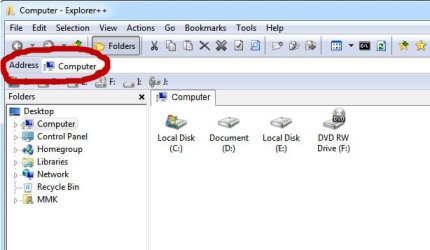
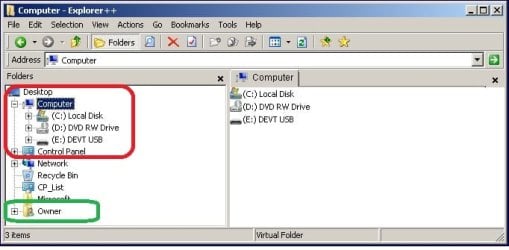
My workaround for WinExp is to use "Explorer++" which is (after my tweaks) a perfect nav-panel layout (red hilite)
- note "Owner" is at the bottom of the nav-panel (green hilite)
2_Exp++ dlg.jpg

In Win7 native WinExp window "Owner" is near the top of the nav-panel tree,
- and that "Owner" cannot be "locked" because there is no "Properties" item when "Owner" is selected.
- (in WinXP "MyDocuments" (Win7 equivalent for "Libraries") MyDocs can be sort-of crippled but not hidden
- (via MyDocuments > Properties "Hidden" attribute

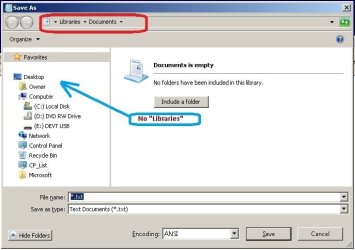
My problem (for another thread) is that when saving a new doc "SaveAs" dialog defaults to "Libraries | Documents"
- but I have hidden "Libraries" -- Fig [3]
3_SaveAs.jpg

My guess is that WinExp is the mother ship for "SaveAs" dialog, and maybe hiding (or relocating) "Owner" on WinExp
might contribute to resolving "SaveAs" dialog's schizophrenic behavior.
 

My Computer My Computer

Computer type
PC/Desktop
Computer Manufacturer/Model Number
Toshiba, Lenovo (laptops) + 4 rigs
OS
XP Pro (x86) | 7 HP (x86) & (x64) | 7 Pro (x64)
I took a careful look on my own Windows 7 installation and I couldn't find an "Owner" folder anywhere in the locations you described; I don't ever recall (to the best my memories can muster) seeing the folder on any installation of Windows 7 I've used/come across either, so I don't know what's up over there.

Could it be possible this "Owner" folder (and the Libraries thing) is something specific to WinExp and Explorer++? From what I could gather in your posts, they are both some sort of Explorer shell replacement/augmentation, correct?
 

My Computer My Computer

Computer type
PC/Desktop
Computer Manufacturer/Model Number
N/A (custom-built)
OS
Windows 7 Ultimate x64 SP1
CPU
Intel Core i7 2700K @ 3.5GHz (TurboBoost disabled)
Motherboard
ASUS P8Z68-V/GEN3
Memory
16GB (4x4GB) Kingston HyperX DDR3 1600MHz @ 1333MHz
Graphics Card(s)
Nvidia EVGA GeForce GTX 1060 6GB
Sound Card
Realtek High Definition Audio (motherboard integrated)
Monitor(s) Displays
NEC Multisync EX231W
Screen Resolution
1920x1080 @ 60Hz via DVI-D
Hard Drives
2x Western Digital 1TB SATA3 Caviar Black Internal HDD // 1x WD 500GB USB 3.0 "My Passport Essential" External HDD // 1x WD 1TB USB 3.0 "My Passport Essential" External HDD // 2x WD 2TB USB 3.0 "My Passport Essential" External HDD
PSU
Corsair Professional Series Gold AX850
Case
Antec 300
Cooling
Air-cooling
Keyboard
Steelseries 6Gv2
Mouse
Steelseries Sensei RAW Glossy, Logitech M500
Internet Speed
DSL (AT&T)
Antivirus
Microsoft Security Essentials
Browser
Pale Moon, Mozilla Firefox 12, Opera 12, Chromium, IE9
Other Info
Virtual Machines (VirtualBox):
* Japanese Windows XP Professional SP3
* Japanese Windows 7 Professional SP1
The folder named "Owner" in the OP's screenshots is a virtual representation of the OP's user's file folder.

If you are logged on as "Owner" then you should see this folder below "Desktop" - below Libraries - in the native Windows (file) Explorer [which the OP is calling WinExp]. Installing Explorer++ just moves that folder to the bottom (as shown in the OP's screenshot).

I do not know of a way to get rid of that folder in Explorer++; you might ask the developers for that option.
 

My Computer My Computer

Computer type
Laptop
Computer Manufacturer/Model Number
Employer provided Dell Latitude
OS
W7 Pro SP1 64bit
CPU
i7
Memory
8GB
Graphics Card(s)
Intel HD Graphics
Hard Drives
crappy SSD
Antivirus
Employer mandated Symantec Endpoint Protection
Browser
Pale Moon 64bit, IE11 64bit & Chrome 64bit
about being worry of loosing data, you may use deepfreez software which will freeze your windows and restore it after each restart, so she can make change only to the folder she has permissions to. it can be a big help for you.
about hiding the owner folder, i just missed. what do you mean

Download Deep Freeze free
247517d1356687511t-can-i-hide-owner-folder-windows-explorer-12-28-2012-1-04-56-pma.jpg

The folder named "Owner" in the OP's screenshots is a virtual representation of the OP's user's file folder.

If you are logged on as "Owner" then you should see this folder below "Desktop" - below Libraries - in the native Windows (file) Explorer [which the OP is calling WinExp]. Installing Explorer++ just moves that folder to the bottom (as shown in the OP's screenshot).

I do not know of a way to get rid of that folder in Explorer++; you might ask the developers for that option.

Thank you "King Arthur" for your response.
My problem PC is Win_7 "Home" (OEM) -- preloaded Toshiba laptop.

I want to hide the generic "Owner" on "Windows Explorer" (red outlined on this screen shot --Fig[1]).
Not the "User's files" icon on the Desktop
View attachment 247918

There are several items I want to remove from the Win7-WinExp navigation-panel.

My workaround for WinExp is to use "Explorer++" which is (after my tweaks) a perfect nav-panel layout (red hilite)
- note "Owner" is at the bottom of the nav-panel (green hilite)
View attachment 247920

In Win7 native WinExp window "Owner" is near the top of the nav-panel tree,
- and that "Owner" cannot be "locked" because there is no "Properties" item when "Owner" is selected.
- (in WinXP "MyDocuments" (Win7 equivalent for "Libraries") MyDocs can be sort-of crippled but not hidden
- (via MyDocuments > Properties "Hidden" attribute

My problem (for another thread) is that when saving a new doc "SaveAs" dialog defaults to "Libraries | Documents"
- but I have hidden "Libraries" -- Fig [3]
View attachment 247921

My guess is that WinExp is the mother ship for "SaveAs" dialog, and maybe hiding (or relocating) "Owner" on WinExp
might contribute to resolving "SaveAs" dialog's schizophrenic behavior.
let me describe it this way, Owner is your user ID as UsernameIssues said, like i have MMK in my computer, it contains some predefined folder in your windows architecture. you can not hide it as it exists. the explorer, show you the folders that exist in a place.you should deal with that.

for the next threat, the library is inside the user folder as "Owner" in your PC or "MMK" in mine. you can find those in Owner-->My document or simply go to Start-->Documents

247920d1356917607t-can-i-hide-owner-folder-windows-explorer-2_exp-dlg.jpg


247517d1356687511t-can-i-hide-owner-folder-windows-explorer-12-28-2012-1-04-56-pma.jpg
 

My Computer My Computer

OS
Windows 7 Ultimate x64
CPU
core i7.
You could simply change the Explorer.exe shortcut to:

Code:
%SystemRoot%\explorer.exe /n,c:\Diana
or
Code:
%SystemRoot%\explorer.exe /n,c:\
 
Last edited:

My Computer My Computer

Computer type
PC/Desktop
Computer Manufacturer/Model Number
Dell OP7010
OS
Windows 7 Enterprise (x64); Windows Server 2008 R2 (x64)
Memory
16GB
Monitor(s) Displays
4 Dell 24" LCD
Screen Resolution
1280x1024
Keyboard
Dell
Mouse
Dell Optical
Internet Speed
40meg
also you can open Diana folder automatically with windows start up, by making a shortcut of the desired folder in the start up folder in the start menu:

As in your computer would be HERE:
C:\Users\Owner\AppData\Roaming\Microsoft\Windows\Start Menu\Programs
 

My Computer My Computer

OS
Windows 7 Ultimate x64
CPU
core i7.

My Computer My Computer

Computer type
Laptop
Computer Manufacturer/Model Number
Toshiba Sattelite A665-S6092
OS
Windows 7 Ultimate x64
CPU
Intel Core i7-740QM
Memory
8 GB DDR3
Graphics Card(s)
NVIDIA GeForce 330GT
Screen Resolution
1366x768
Hard Drives
Samsung 840 SSD 500GB
1TB USB3 external HD
Cooling
Coolermaster Notepal U3 notebook cooling pad
Internet Speed
3mbps ASDL
Antivirus
ClamWin 0.98.7
Browser
Opera 12.17 x86 (main), Firefox 38 (sec), IE11 (last resort)
Hello "UserName" issues
- thank you for your comment
- virtual folders really drive me crazy, because they are just more clutter/bloat.
- WinXP:- MyDocs, MyMusic, MyCrap .. are all buried in "C:\Documents and Settings\"
- and now in Win7 more of the same crud
- it is ALL in "C:\" anyway -- why did MS have to complicate something that is simple?
- since Win95 I have always used "C:\1_MyStuff" and "C:\Programs2" -- simple and easy to back up.
- come the revolution !!

Hello "Windows Star"
- thank you for your response
- I have almost dumped Win7-Explorer because it cannot search for file contents. (I have over 400 TXT files of code snippets)
- Win7-Explorer will remain on Start-menu for emergencies
- Explorer++ saves me having multiple Win7-Exp open AND all the virtual crud is at the bottom of the navigation pane (away from the top)
. See images in thread entry #7
. EXP++ also has favorites(Bookmarks) on the EXP++ toolbar. (not at the top of the nav-pane as in WinExp)
- saving TXT files in the default Win7 "SaveAs" dlg takes some drilling down to save stuff and WinExp Favorites + Libraries get in the way
. with a lot of scrolling and clicking.
. I always have EXP++ open at the target folder -- copy the folder path then paste into SaveAs file-name field.
. (ClipX helps with stored path-strings, which is quicker than "WinExp Favorites" and "Exp++ Bookmarks"
- EXP++ does not recognise "switches" -- instead it has one available setting in its config -- "C:\" is good enough for me
WinExplorer
- with "Libraries" hidden, WinExp "SaveAs" (common-dialog) defaults to "Libraries\Documents" with "Favorties" selected in the nav-pane.
. when there is no libraries in the nav pane
- if I can find a way to default "SaveAs" to my preferred folder -- but could never find how in WinXP,
. I doubt MS will fix that one, considering they have barely improved Notepad in over 23 years.
- At least MS have finally given MS Paint a folder memory.

Hello "Alejandro85"
- thank you for your response
- I will give your http://www.sevenforums.com/tutorials/48123-user-folder-add-remove-navigation-pane.html a try
- Libraries are (thankfully) hidden -- but thanks for your info

To all helpers:
- I have given up on Win7-Explorer -- Explorer++ is a better alternative with all clutter at the bottom of the navigation pane.
- FileSearchEX -- finds my file contents
- SaveAs default folder will be logged on another thread.

Thanks to everyone for your contributions

 

My Computer My Computer

Computer type
PC/Desktop
Computer Manufacturer/Model Number
Toshiba, Lenovo (laptops) + 4 rigs
OS
XP Pro (x86) | 7 HP (x86) & (x64) | 7 Pro (x64)
Back
Top