Windows Explorer: how can I hide. . . that which is already hidden??

Phil314

New member
Local time
10:01 PM
Messages
20
Location
Northwest England.
OK. I admit to being baffled about this. And nothing on the 'Net seems of any help.

I'm fairly new to Windows 7 though not to computers. I loathed the "Libraries" feature which to me seemed yet more unwanted Microsoft clutter so have deployed established registry hacks to get rid of 'Favorites', 'Libraries' and 'Homegroup'. Now I'm back to something simple and straightforward the way it used to be in Vista. Except:

The left pane of my Windows Explorer now shows a blue colored oblong folder entitled 'Desktop' with the familiar folder beneath it with the name of this computer. Let's call it, um, Arthur.

Opening Arthur reveals the following in this order of sequence:
AppData
Contacts
Desktop
Documents

Well I sure as heck don't want to see AppData there. Nor Contacts. And as for this second 'Desktop' . .. why? So-oo. . . I've repeatedly used the folder viewing optioins choice to ensure that system files are hidden and that hidden files, folders and drives stay hidden.

But AppData is still there. Still showing.

I've roamed around the 'Net looking for a solution but every post I've read is from users wanting to *find* their AppData folder. Me, I just want to hide it. Help appreciated!

PS: The registry hacks may have caused this. But I don't see how. There are likely many thousands of Windows 7 users who don't want Microsoft bloat making life more complex, more cluttered, than it needs to be and none of them have reported the appearance of AppData, Contacts and a second Desktop in the named computer folder.
 

My Computer My Computer

At a glance

Windows 7 Home Premium x64
Computer type
PC/Desktop
OS
Windows 7 Home Premium x64
Hi Phil314 :)

Like you I don't use the libraries.

hidden libraries.PNG

And I only have Win7 32bit, maybe 64-bit is structured differently
My Win8 is in mothballs awaiting downgrade to Win7

From experience ...

Desktop:
- if you hide the "first" Desktop you also hide C: drive

AppData:
- on my Win7 Home Premium 32bit "AppData" is buried in ... C:\Users\Owner\AppData
- when you open your AppData what is the full path

Libraries:
Tutorial: http://www.sevenforums.com/tutorials/35627-libraries-folder-add-remove-navigation-pane.html

Favorites:
Tutorial http://www.sevenforums.com/tutorials/38933-favorites-add-remove-navigation-pane.html

Hope this helps, even if just to check your already-made changes :)
 

My Computer My Computer

At a glance

XP Pro (x86) | 7 HP (x86) & (x64) | 7 Pro (x64)
Computer type
PC/Desktop
Computer Manufacturer/Model Number
Toshiba, Lenovo (laptops) + 4 rigs
OS
XP Pro (x86) | 7 HP (x86) & (x64) | 7 Pro (x64)
Hi GrayGhost2: Many, many thanks for riding to the rescue!

Yup, your reporting of the App Data location is exactly where I'd expect to find it. But for some unfathomable reason, the location of the folder on this Windows 7 x64 computer is:

C:\Users\User

3.15Gb in size containing 9,077 files in 1,542 folders. Iyi yiyiyiyi . . .

For which reason, I want to hide it; I'd hate the thought of somehow losing the folder (and with it, the computer's functionality.) But as noted, it won't. . . Hide.

I'm wondering whether to move it to a safer location, such as the one you mentioned -- but then, I've no idea if the move will be terminally disruptive. . . nor have I the foggiest notion as to how it came to be where it is anyway. Unless Win7 x64 locates it there. But that makes no sense to me either (well, it makes about as much sense as everything else Microsoft has done with Windows 7. I do wish I'd stuck to Windows 3.1.)

I'm going to follow the links you kindly provided because it may very well be that I've messed up somehow on my registry changes (they're all reversible; I exported the keys before doing anything else.)
I'll let you know how I get on. Meantime: very sincere thanks again for helping like this -- much appreciated! :)
 

My Computer My Computer

At a glance

Windows 7 Home Premium x64
Computer type
PC/Desktop
OS
Windows 7 Home Premium x64
AppData appears when you show hidden folders, files and drives in Folder Options View tab of Control Panel.
 

My Computer My Computer

At a glance

Windows 10 Pro X64Intel Quad Core i7-4770 @ 3.4Ghz16.0GB PC3-12800 DDR3 SDRAM 1600 MHzIntel Integrated HD Graphics
Computer type
PC/Desktop
Computer Manufacturer/Model Number
Lenovo IdeaCenter 450
OS
Windows 10 Pro X64
CPU
Intel Quad Core i7-4770 @ 3.4Ghz
Memory
16.0GB PC3-12800 DDR3 SDRAM 1600 MHz
Graphics Card(s)
Intel Integrated HD Graphics
Sound Card
Realtek HD Audio
Monitor(s) Displays
HP 22" LCD
Screen Resolution
1680 x 1050
Hard Drives
250GB Samsung EVO SATA-3 SSD
2TB Seagate ST2000DM001 SATA-2
1.5TB Seagate ST3150041AS SATA
Keyboard
Dell USB
Mouse
Lenovo USB
Internet Speed
Cable via Road Runner 3MB Upload, 30MB Download
Antivirus
Windows Defender, MBAM Pro, MBAE
Browser
Seamonkey
Other Info
UEFI/GPT
PLDS DVD-RW DH16AERSH
Hi Atrucker :)
My 32bit Win7 has both "hide" settings to "True", but AppData is always visible.
I notice (my) C:\Users\Owner folder has a padlock. At first Win7 was so exasperating I went in all guns blazing at security settings, and I did not document anything much at all.
So maybe (my) AppData is caught up in my early slash-and-burn approach to Security settings ?

I wonder if Phil's AppData is a shortcut ? I am no expert, my curiosity is piqued.
 

My Computer My Computer

At a glance

XP Pro (x86) | 7 HP (x86) & (x64) | 7 Pro (x64)
Computer type
PC/Desktop
Computer Manufacturer/Model Number
Toshiba, Lenovo (laptops) + 4 rigs
OS
XP Pro (x86) | 7 HP (x86) & (x64) | 7 Pro (x64)
Hi Phil314 :)
My PC experience started with Amstrad then Win-3.1 > Win-95.
I vaguely remember WinXP was a shock .. days/weeks of frustration ... up until 12 months ago she was my mistress (till death us do part)

My first Win-7 came very late (2012) on a new laptop to replace a sick XP laptop
In disgust I left Win-7 in the box for about 10 months and struggled on with the crippled XP beast.
Eventually I just had to tackle Win-7 again ... so frustrating ... wife banished me to my cave. I had invented a new dictionary.

This forum saved my sanity. At first I was CONVINCED XP was the pinnacle of MS Windows, and that Win-7 was the end.
It took about 6 months before I conceded Win-7 is a vast improvement on XP.

One thing I cannot let go of is the simplicity of the XP start menu :cool:
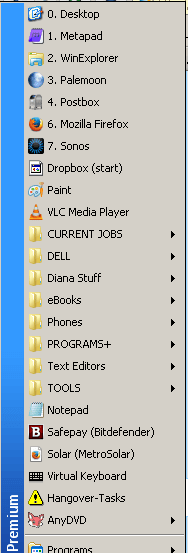
With ClassicShell (free) installed ... my beloved XP wrinkles are back. See image below

To start with I really missed the Quick Start toolbar ... on Win-7 you can recreate it (but it is no longer an embedded toolbar)
Personally I have abandoned the QuickStart toolbar and adopted the start-menu coupled with keyboard shortcuts. (XP limited short-cut keys to the Start menu only ... Win-7 allows Shortcut-keys on any sub-menu on the start menu

The most frustrating Win-7 challenge for me was the security.
In hind sight my XP laptop had to be clean installed about every 6 to 8 months.
This Win-7 laptop has been in service for 15 months, I have given it a hiding with experimental programs.
(I was not smart enough to know about restore points) and it is still stable ... light years ahead of XP.

I do have an XP rig 2003 that has never seen an internet connection, and it still works a treat (with AutoCad)

Now that I have had a Win-7 epiphany the XP rig AND the comatose XP laptop are to be clean installed with Win-7, when I make the time (as well as downgrading a Win-8 rig to Win-7)

From one Luddite to another ... I highly recommend ...

  • Classic Shell (for an XP style Start + menu)
  • This sevenforums.com forum is brilliant ... there are some very clever contributors with a lot of expertise.
  • a trial-separation from XP (ouch)
  • Embrace Win-7 (as best you can), it will be a gradual process
  • Win-7 security is excellent
  • Invest in decent AV (some on this forum will disagree with me). I use Bitdefender
    - check out Anti virus comparisons
  • Malwarebytes (free)
  • Kari's An old geeks approach to setting up a windows PC ... his bark is worse than his bite.
  • Tutorials on this forum are endless
Regards
the-bald-one

my-start-menu.png
 

My Computer My Computer

At a glance

XP Pro (x86) | 7 HP (x86) & (x64) | 7 Pro (x64)
Computer type
PC/Desktop
Computer Manufacturer/Model Number
Toshiba, Lenovo (laptops) + 4 rigs
OS
XP Pro (x86) | 7 HP (x86) & (x64) | 7 Pro (x64)
You could give Tweaking.com's Windows repair All-In-One a try. Run just the first two fixes,

Reset Registry Permissions
Reset File Permissions
 

My Computer My Computer

At a glance

Windows 10 Pro X64Intel Quad Core i7-4770 @ 3.4Ghz16.0GB PC3-12800 DDR3 SDRAM 1600 MHzIntel Integrated HD Graphics
Computer type
PC/Desktop
Computer Manufacturer/Model Number
Lenovo IdeaCenter 450
OS
Windows 10 Pro X64
CPU
Intel Quad Core i7-4770 @ 3.4Ghz
Memory
16.0GB PC3-12800 DDR3 SDRAM 1600 MHz
Graphics Card(s)
Intel Integrated HD Graphics
Sound Card
Realtek HD Audio
Monitor(s) Displays
HP 22" LCD
Screen Resolution
1680 x 1050
Hard Drives
250GB Samsung EVO SATA-3 SSD
2TB Seagate ST2000DM001 SATA-2
1.5TB Seagate ST3150041AS SATA
Keyboard
Dell USB
Mouse
Lenovo USB
Internet Speed
Cable via Road Runner 3MB Upload, 30MB Download
Antivirus
Windows Defender, MBAM Pro, MBAE
Browser
Seamonkey
Other Info
UEFI/GPT
PLDS DVD-RW DH16AERSH
Maybe I missed something. Why do you want these files hidden? They will, and should, still be there whether or not you can see them.
 

My Computer My Computer

At a glance

Windows 7 Ultimate X64 SP1Intel i5-2550K, Differing ~4.4-4.8GHz No buil...16GB G.Skill Sniper 1866MHz @ 2133MHz 2x8GBASUS GTX650TIB-DC2OC-2GD5, (650TI Boost)
Computer type
PC/Desktop
Computer Manufacturer/Model Number
Home Built Desktop By DataTech
OS
Windows 7 Ultimate X64 SP1
CPU
Intel i5-2550K, Differing ~4.4-4.8GHz No built in GPU
Motherboard
ASUS P8Z68-V PRO/GEN3
Memory
16GB G.Skill Sniper 1866MHz @ 2133MHz 2x8GB
Graphics Card(s)
ASUS GTX650TIB-DC2OC-2GD5, (650TI Boost)
Sound Card
Onboard Realtek 5-1
Monitor(s) Displays
Samsung P2570HD
Screen Resolution
1920x1080
Hard Drives
Samsung 840 Pro 256GB SSD for OS, 500GB Seagate Constellation (Enterprise drive) for Data
PSU
Corsair HX650W
Case
Inwin Dragon Rider
Cooling
Hyper 212 EVO w/two Noctua fans, push-pull, @1300 RPM
Keyboard
E-Z Eyes, bright yellow keys with large characters
Mouse
steelseries SENSEI Laser Pro Gaming
Internet Speed
48-51Mbs Mbs down, 11 Mbs up Xfinity Cable
Antivirus
Norton Internet Security 2013
Browser
IE 10, Opera, Pale Moon if needed
Other Info
4 case fans, LG BluRay-RE, ASUS DVD-RW, Mr. Fusion power supply, 1.21 gigawatts.
AppData appears when you show hidden folders, files and drives in Folder Options View tab of Control Panel.

Hi Zucker: Er, I've already made that point clear . . . Whichever way one gets into folder options, be it via the Control Panel or using the 'Organize' tab and drop-down menu in Windows Explorer itself, AppData appears when you don't show hidden folders, files and drives. I know. I'm staring at the set-up right now: "Don't show hidden files, folders or drives" and "Hide protected operating system files 'Recommended'." The check boxes for both are ticked. . .

. . . But AppData continues to be just as visible as if those boxes were unticked -- hence why I posted in the first place.
 

My Computer My Computer

At a glance

Windows 7 Home Premium x64
Computer type
PC/Desktop
OS
Windows 7 Home Premium x64
Maybe I missed something. Why do you want these files hidden? They will, and should, still be there whether or not you can see them.

Hi Britton30: I take the view (inapposite but unintended pun) that the reason for creating folder hiding options in the first place was to prevent system critical stuff from being visible and therefore vulnerable to accidental loss. I don't want my AppData folder to be erased through some currently unthinkable yet always possible cock-up -- a cock-up which somehow, in some way, may already have occurred, because what the heck this folder is doing in its current bonkers location (a location that perhaps, though only *perhaps*, explains why folder hiding simply isn't working) I don't know.

Hiding critical files and folders from a user is the first stage in idiot-proofing a computer. And me, shameful though it is to admit, I'm an idiot.
 

My Computer My Computer

At a glance

Windows 7 Home Premium x64
Computer type
PC/Desktop
OS
Windows 7 Home Premium x64
Hi Atrucker :)
My 32bit Win7 has both "hide" settings to "True", but AppData is always visible.
I notice (my) C:\Users\Owner folder has a padlock. At first Win7 was so exasperating I went in all guns blazing at security settings, and I did not document anything much at all.
So maybe (my) AppData is caught up in my early slash-and-burn approach to Security settings ?
I wonder if Phil's AppData is a shortcut ? I am no expert, my curiosity is piqued.

Hi GrayGhost: Well I'm very relieved to know I'm not the only one with something as critically important as AppData evading all efforts to hide it. I can definitely confirm that what I'm looking at is not a shortcut. It's the real McCoy, stuck there, in its entirety, in C:\Users\User. . . with all my Contacts info in the folder immediately beneath. (And yes, that's the real McCoy, tool: I temporarily renamed it to test out and of course, Windows Mail couldn't then find a single name and email address anywhere on this 'pooter.)
 

My Computer My Computer

At a glance

Windows 7 Home Premium x64
Computer type
PC/Desktop
OS
Windows 7 Home Premium x64

My Computer My Computer

At a glance

64-bit Windows 11 Pro for WorkstationsIntel i7-8700K OC'd to 5 GHz64 GB (4x16GB) G.SKILL TridentZ RGB DDR4 3600...ASUS ROG-STRIX-GTX1080TI-O11G-GAMING
Computer type
PC/Desktop
Computer Manufacturer/Model Number
Self built custom
OS
64-bit Windows 11 Pro for Workstations
CPU
Intel i7-8700K OC'd to 5 GHz
Motherboard
ASUS ROG Maximus XI Formula Z390
Memory
64 GB (4x16GB) G.SKILL TridentZ RGB DDR4 3600 MHz
Graphics Card(s)
ASUS ROG-STRIX-GTX1080TI-O11G-GAMING
Sound Card
Integrated
Monitor(s) Displays
2 x Samsung Odyssey G7 27"
Screen Resolution
2560x1440
Hard Drives
1TB Samsung 990 PRO M.2,
4TB Samsung 990 PRO PRO M.2,
TerraMaster F8 SSD Plus NAS
PSU
Seasonic Prime Titanium 850W
Case
Thermaltake Core P3
Cooling
Corsair Hydro H115i
Keyboard
Logitech wireless K800
Mouse
Logitech MX Master 4
Internet Speed
2 Gb/s Download and 100 Mb/s Upload
Antivirus
Malwarebyte Anti-Malware Premium
Browser
Google Chrome
Other Info
Logitech Z625 speaker system,
Logitech BRIO 4K Pro webcam,
HP Color LaserJet Pro MFP M477fdn,
APC SMART-UPS RT 1000 XL - SURT1000XLI,
Galaxy S23 Plus phone
Hi Phil314 :)
My PC experience started with Amstrad then Win-3.1 > Win-95.
I vaguely remember WinXP was a shock .. days/weeks of frustration ... up until 12 months ago she was my mistress (till death us do part) . . . My first Win-7 came very late (2012) on a new laptop to replace a sick XP laptop . . .

Ye Gods, GrayGhost: an almost identical experience to mine! I started with Amstrad and then wound up with a x386 running Windows for Workgroups (I think, or was there an earlier version?) and then successively 'pooters with Windows 95, then '98 and -- thankfully bypassing Windows Millennium or 2000 or whatever it was -- finally into XP. The sheer unadulterated joy of Windows XP.

I fairly hammer my computers with work so when the XP desktop gave up I really had no choice but to go to Vista. That was. . . Horrendous. Not only did it take ages to even understand it, the OS never worked properly anyway (there was a serious systemic flaw in Vista's ability to deal with Internet connections. Not that Microsoft cared or anything. . .)

I've now acquired a replacement rig with Windows 7 on account of reading so much praise for, er, Windows 7. Certainly seemed preferable to Windows 8. Of course, I then find that Microsoft's arrogance hasn't changed in the slightest and I'm suddenly confronting a baffling screen which says My Libraries has 3,650 or maybe even 36,500 files to view. Well, um, right. Just what I want in my fuss-free uncluttered structured environment. I get rid of the Libraries / Favorites / Homeboy or whatever the heck it is and start over. QuickLaunch, which I actually came to rely on in Vista, is of course anything but apparent in Windows 7, so I have to bring it back. Windows Mail has gone to be replaced by the ludicrous nonsense of Windows Live Mail and every email account I have is splashed up on screen. Thanks, Microsoft. Another stunningly sensational idea: just the thing to help ensure personal privacy. So I had to install Vista's Windows Mail again. Viewing images through Windows Photoviewer in Vista, or whatever it was called, was always a joy because the righthand panel showed the image properties and you could rename in a second or two's right-clicking. But Microsoft decided nah, you're not having that in Windows 7, you need to go into Properties and select a tab and mess about re-naming there, so now I use Irfanview as default and F2 to achieve in seconds what I likewise achieved in seconds in Vista.

All in all, my experience of Windows 7 so far has been what experience told me to expect yet naively hoped not to find: another example of far-off Redmond telling me that actually, you really can drive much further and more smoothly if only you'll trouble yourself to learn how to use the steering wheel in the back seat (which is where we've relocated it) and the brakes in the boot (which is where we've moved them).

As to this forum: it's a gem, as are the people in it. I briefly encountered another forum where arrogance reigned supreme and anyone who wasn't wholeheartedly passionate about Windows 7 was either a moronic Luddite incapable and/or fearful of learning anything new or "should've bought a Mac if that's what you think". That kind of philosophy doesn't hold true here. We all know we're fallible. We all know that different individuals on different computers have different needs, different tastes. As Thurber put it, when speaking of mermaids, one man's mate is another man's poisson.

Oh, re security. From what I've seen so far, the OS's system is excellent. Me, I run the utterly invisible, non-intrusive Panda Cloud AV freeware in tandem with WinPatrol Pro (paid for) and Malwarebytes Pro (paid-for) and all three play happily and simultaneously together with no resource drain at all.

I'm sure I'll get on with Windows 7. Now that I've moved the steering wheel and brakes back to where I want them, not where they were placed by Microsoft diktat. :D Meantime though, I seem to have done. . . something stupid and finished up with AppData where it shouldn't be. Mea Culpa!
 

My Computer My Computer

At a glance

Windows 7 Home Premium x64
Computer type
PC/Desktop
OS
Windows 7 Home Premium x64
You could give Tweaking.com's Windows repair All-In-One a try. Run just the first two fixes,

Reset Registry Permissions
Reset File Permissions

Hi Ztruker: you're a star. I mean no, I haven't yet had time to chase up those links but will do so now. Whether or not it works for me, your kindness in taking the time to mention 'em is greatly appreciated. Will advise of the outcome in due course. Seriously: many thanks again.
 

My Computer My Computer

At a glance

Windows 7 Home Premium x64
Computer type
PC/Desktop
OS
Windows 7 Home Premium x64
Maybe I missed something. Why do you want these files hidden? They will, and should, still be there whether or not you can see them.

Hi Britton30: I take the view (inapposite but unintended pun) that the reason for creating folder hiding options in the first place was to prevent system critical stuff from being visible and therefore vulnerable to accidental loss. I don't want my AppData folder to be erased through some currently unthinkable yet always possible cock-up -- a cock-up which somehow, in some way, may already have occurred, because what the heck this folder is doing in its current bonkers location (a location that perhaps, though only *perhaps*, explains why folder hiding simply isn't working) I don't know.

Hiding critical files and folders from a user is the first stage in idiot-proofing a computer. And me, shameful though it is to admit, I'm an idiot.
I understand, I once went deleting files on an old Win95 machine. Why? I'd click them and nothing happened, so I reasoned in my idiot brain, they aren't needed. The drive was only 480 MEGAbytes and I needed space. :rolleyes:
Newer OSes do have some idiot proofing feature and won't let some critical files be deleted.
 

My Computer My Computer

At a glance

Windows 7 Ultimate X64 SP1Intel i5-2550K, Differing ~4.4-4.8GHz No buil...16GB G.Skill Sniper 1866MHz @ 2133MHz 2x8GBASUS GTX650TIB-DC2OC-2GD5, (650TI Boost)
Computer type
PC/Desktop
Computer Manufacturer/Model Number
Home Built Desktop By DataTech
OS
Windows 7 Ultimate X64 SP1
CPU
Intel i5-2550K, Differing ~4.4-4.8GHz No built in GPU
Motherboard
ASUS P8Z68-V PRO/GEN3
Memory
16GB G.Skill Sniper 1866MHz @ 2133MHz 2x8GB
Graphics Card(s)
ASUS GTX650TIB-DC2OC-2GD5, (650TI Boost)
Sound Card
Onboard Realtek 5-1
Monitor(s) Displays
Samsung P2570HD
Screen Resolution
1920x1080
Hard Drives
Samsung 840 Pro 256GB SSD for OS, 500GB Seagate Constellation (Enterprise drive) for Data
PSU
Corsair HX650W
Case
Inwin Dragon Rider
Cooling
Hyper 212 EVO w/two Noctua fans, push-pull, @1300 RPM
Keyboard
E-Z Eyes, bright yellow keys with large characters
Mouse
steelseries SENSEI Laser Pro Gaming
Internet Speed
48-51Mbs Mbs down, 11 Mbs up Xfinity Cable
Antivirus
Norton Internet Security 2013
Browser
IE 10, Opera, Pale Moon if needed
Other Info
4 case fans, LG BluRay-RE, ASUS DVD-RW, Mr. Fusion power supply, 1.21 gigawatts.
Hello Phil, Please post a screenshot of Windows Explorer showing AppData in it to see if it may help to ID what the issue could be. :)
If the AppData folder is not faded while showing, then type the command below in an elevated command prompt, and press Enter to set the hide attribute for the folder.

ATTRIB +H "%UserProfile%\AppData" /S /D

http://www.sevenforums.com/tutorials/56005-file-folder-hide-unhide.html
Hope this helps, :) Shawn

Hi Shawn: oh ye gods, I do hope I'm not wasting folks's time here. Thank you so much for your interest though! Not sure if the following is of any help but it seems to demonstrate that I may not have rid myself of the irritants previously thought. .. but in the process have made a pig's ear of everything.

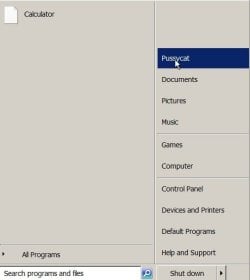
I have 3 ways of getting to my Documents folder, 2 of which I don't use. The first (not used) is to go to Start and then click on the computer's name:

Image 1

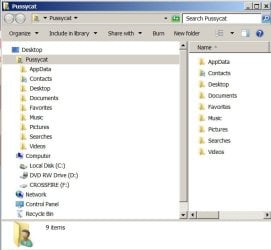
Which results in this:

Image 2


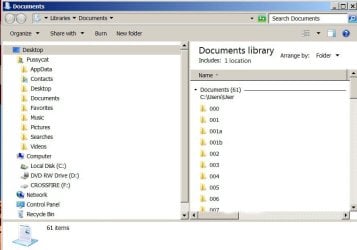
Alternatively, instead of clicking on the computer's name, I can instead click on 'Documents' below it. Which results in this:

Image 3

But I don't bother going the Start / Documents route. Instead, I have a QuickLaunch shortcut to my Documents folder which I simply click on to get this:

Image 4

As will be seen, the different routes actually produce slightly different results [NB: personally identifying info has been deleted from the screenshots in post processing]. As will also be seen, I've clearly not been anything like as successful as I'd thought at dumping Favorites etc et al. But whichever screen is viewed -- be it Image 2, Pussycat (computer name folder), Image 3 (Libraries/Documents) or Image 4 (Pussycat Documents, reached from my WQL shortcut) every one of 'em is showing AppData and Contacts, two folders that I really do not want visible because it renders 'em vulnerable to any further blundering on my part. Neither, however, can be hidden -- I mean, er, they're obviously still there.

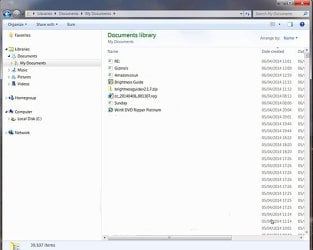
This all started off with me originally confronting this:

Image 5

and a content of 39,107 items . . . As will be seen, there's no sign of AppData or Contacts or even two Desktops, though I suppose one desktop would've emerged when clicking on My Documents.

Not sure if any of the above helps . . . :o


Oh, bummer! The images aren't in the order uploaded. Ah well. . . I may possibly get the hang of this computing stuff by the time I'm old and grey. Oh. I am old and grey.
 

Attachments

  • Image 1.jpg
    Image 1.jpg
    15.2 KB · Views: 16
  • Image 2.jpg
    Image 2.jpg
    39.5 KB · Views: 16
  • Image 3.jpg
    Image 3.jpg
    74.4 KB · Views: 0
  • Image 4.jpg
    Image 4.jpg
    73 KB · Views: 16
  • Image 5.jpg
    Image 5.jpg
    68 KB · Views: 0
Last edited:

My Computer My Computer

At a glance

Windows 7 Home Premium x64
Computer type
PC/Desktop
OS
Windows 7 Home Premium x64
Phil,

Did using the command I posted hide your AppData folder?
 

My Computer My Computer

At a glance

64-bit Windows 11 Pro for WorkstationsIntel i7-8700K OC'd to 5 GHz64 GB (4x16GB) G.SKILL TridentZ RGB DDR4 3600...ASUS ROG-STRIX-GTX1080TI-O11G-GAMING
Computer type
PC/Desktop
Computer Manufacturer/Model Number
Self built custom
OS
64-bit Windows 11 Pro for Workstations
CPU
Intel i7-8700K OC'd to 5 GHz
Motherboard
ASUS ROG Maximus XI Formula Z390
Memory
64 GB (4x16GB) G.SKILL TridentZ RGB DDR4 3600 MHz
Graphics Card(s)
ASUS ROG-STRIX-GTX1080TI-O11G-GAMING
Sound Card
Integrated
Monitor(s) Displays
2 x Samsung Odyssey G7 27"
Screen Resolution
2560x1440
Hard Drives
1TB Samsung 990 PRO M.2,
4TB Samsung 990 PRO PRO M.2,
TerraMaster F8 SSD Plus NAS
PSU
Seasonic Prime Titanium 850W
Case
Thermaltake Core P3
Cooling
Corsair Hydro H115i
Keyboard
Logitech wireless K800
Mouse
Logitech MX Master 4
Internet Speed
2 Gb/s Download and 100 Mb/s Upload
Antivirus
Malwarebyte Anti-Malware Premium
Browser
Google Chrome
Other Info
Logitech Z625 speaker system,
Logitech BRIO 4K Pro webcam,
HP Color LaserJet Pro MFP M477fdn,
APC SMART-UPS RT 1000 XL - SURT1000XLI,
Galaxy S23 Plus phone
Back
Top