Can I if need be copy the file back to C:\Outlook\Outlook.pst

TonyMen

New member
Local time
2:43 AM
Messages
22
Tell me if I save the Outlook.pst file to another drive and call it backup or something.

Can I if need be copy the file back to C:\Outlook\Outlook.pst Of course moving or renaming the currant one, and then have access to the old backup Outlook.pst ?

I am using Windows 7 ultimate x64 I am using Outlook 2007
 

My Computer My Computer

At a glance

Windows 7 Ultimate x64
OS
Windows 7 Ultimate x64
Make a copy of it and save where you like while leaving the original. I don't understand what you are trying to accomplish.
 

My Computer My Computer

At a glance

Windows 7 Ultimate X64 SP1Intel i5-2550K, Differing ~4.4-4.8GHz No buil...16GB G.Skill Sniper 1866MHz @ 2133MHz 2x8GBASUS GTX650TIB-DC2OC-2GD5, (650TI Boost)
Computer type
PC/Desktop
Computer Manufacturer/Model Number
Home Built Desktop By DataTech
OS
Windows 7 Ultimate X64 SP1
CPU
Intel i5-2550K, Differing ~4.4-4.8GHz No built in GPU
Motherboard
ASUS P8Z68-V PRO/GEN3
Memory
16GB G.Skill Sniper 1866MHz @ 2133MHz 2x8GB
Graphics Card(s)
ASUS GTX650TIB-DC2OC-2GD5, (650TI Boost)
Sound Card
Onboard Realtek 5-1
Monitor(s) Displays
Samsung P2570HD
Screen Resolution
1920x1080
Hard Drives
Samsung 840 Pro 256GB SSD for OS, 500GB Seagate Constellation (Enterprise drive) for Data
PSU
Corsair HX650W
Case
Inwin Dragon Rider
Cooling
Hyper 212 EVO w/two Noctua fans, push-pull, @1300 RPM
Keyboard
E-Z Eyes, bright yellow keys with large characters
Mouse
steelseries SENSEI Laser Pro Gaming
Internet Speed
48-51Mbs Mbs down, 11 Mbs up Xfinity Cable
Antivirus
Norton Internet Security 2013
Browser
IE 10, Opera, Pale Moon if needed
Other Info
4 case fans, LG BluRay-RE, ASUS DVD-RW, Mr. Fusion power supply, 1.21 gigawatts.
What Im trying to do is save all my relivant emails for say one year then save them as you sugest. THEN Start fresh for the next year (so my email file wont get to big)

But I will want to reference say an email saved in the 2009 batch, what I'm after is to say rename the currant Outlook.pst file and then paste in the 2009 Outlook.pst file

1. Can this be done
2. If it can be done would the 2009 folder structure come with it.
\Hope I explained that ok ?
 

My Computer My Computer

At a glance

Windows 7 Ultimate x64
OS
Windows 7 Ultimate x64
Outlook has an 'Archive' feature that does just this AFAIK, never used archive myself.

Also, consider Microsoft's pfbackup utility that keeps a backup of all data according to your set schedule.

Another consideration is to make use of the 'Personal Folders' facility where you could drag and drop your emails and backup the Personal Folders file annually, delete them all and start again.

If your feeling adventurous you could experiment with calling your Personal Folder file something like Outlook2011 and at year end remove it from the Outlook data structure and introduce a new one Outlook2012.
 

My Computer My Computer

At a glance

MSDN Home PremiumIntel i54GbATI Radeon HD 5770
Computer Manufacturer/Model Number
Novatech (UK) iRush Pro
OS
MSDN Home Premium
CPU
Intel i5
Motherboard
Intel DP55WB
Memory
4Gb
Graphics Card(s)
ATI Radeon HD 5770
Sound Card
On Board
Monitor(s) Displays
Philips 170B
Hard Drives
1 x 1Tb
(7 Partitions)
PSU
750W
Case
Antec 300
Cooling
Tricool Fans
Keyboard
Microsoft 3000 Wireless
Mouse
Microsoft 5000 Wireless BlueTrack
Internet Speed
6.1 Mbps
Hi Tony,

What you are proposing is absolutely possible, without any problem. In fact, you can attach several .PST files similtaneously without having to copy backwards and forwards. See the image below - note 3 years worth of PST's attached similtaneously, organised by year. Simply create a new PST for each year, then cut emails/folder out of existing PST into new PST - voila!

Capture.JPG

You can also use the Archive route as suggested by Kremmen.

Regards,
Golden
 
Last edited:

My Computer My Computer

At a glance

Windows 10 Pro x64 ; Xubuntu x64Intel i7 860 @ 2.80 GHz O/C'ed to 4.0GHz16GB Corsair Vengance DDR3 @ 661 MHz Dual Cha...EVGA NVidia GTX 560 1024MB
Computer type
PC/Desktop
Computer Manufacturer/Model Number
Golden Mk. I.4
OS
Windows 10 Pro x64 ; Xubuntu x64
CPU
Intel i7 860 @ 2.80 GHz O/C'ed to 4.0GHz
Motherboard
Gigabyte P55A-UD3R Rev.1. Award BIOS F13
Memory
16GB Corsair Vengance DDR3 @ 661 MHz Dual Channel (9-9-9-24)
Graphics Card(s)
EVGA NVidia GTX 560 1024MB
Sound Card
Realtek Integrated
Monitor(s) Displays
Dual Samsung SyncMaster 2494HS
Screen Resolution
1920*1080 and 1920*1080
Hard Drives
1*Samsung 840 EVO 120GB SSD;
1*OCZ Vertex 2 60GB SSD;
2*Samsung F3 SpinPoint 1TB in RAID0;
1*Samsung F1 SpinPoint 1TB;
2*Western Digital 1TB External USB 3.0
1*Western Digital 500GB External USB 3.0
1*Seagate 500GB External USB 2.0
PSU
Thermaltake ToughPower QFan 750W
Case
Thermaltake Element S VK60001W2Z
Cooling
Corsair H60 Water Cooling, 2*230mm and 2*80mm case fans
Keyboard
Logitech G110
Mouse
Logitech MX518
An image is worth a 1000 words. I like your idea.
I missed one important thing Ooops out of my initial query.
The set up you suggest is all on the C;\ drive, I wanted to save the
emails say as per your layout on a different drive so if ever I have a
c:\ drive failure again, I can bring all my emails back from my other drive.
Thats what I ment by renaming/replacing the new Outlook.pst file and replacing it with
the one from my other drive.
 

My Computer My Computer

At a glance

Windows 7 Ultimate x64
OS
Windows 7 Ultimate x64
It doesn't make a difference which drive you do it on, the basic approach is still the same. In fact, my 2010 and 2011 PST is on C: drive, whilst the 2009 is on E: drive.

Regards,
Golden
 

My Computer My Computer

At a glance

Windows 10 Pro x64 ; Xubuntu x64Intel i7 860 @ 2.80 GHz O/C'ed to 4.0GHz16GB Corsair Vengance DDR3 @ 661 MHz Dual Cha...EVGA NVidia GTX 560 1024MB
Computer type
PC/Desktop
Computer Manufacturer/Model Number
Golden Mk. I.4
OS
Windows 10 Pro x64 ; Xubuntu x64
CPU
Intel i7 860 @ 2.80 GHz O/C'ed to 4.0GHz
Motherboard
Gigabyte P55A-UD3R Rev.1. Award BIOS F13
Memory
16GB Corsair Vengance DDR3 @ 661 MHz Dual Channel (9-9-9-24)
Graphics Card(s)
EVGA NVidia GTX 560 1024MB
Sound Card
Realtek Integrated
Monitor(s) Displays
Dual Samsung SyncMaster 2494HS
Screen Resolution
1920*1080 and 1920*1080
Hard Drives
1*Samsung 840 EVO 120GB SSD;
1*OCZ Vertex 2 60GB SSD;
2*Samsung F3 SpinPoint 1TB in RAID0;
1*Samsung F1 SpinPoint 1TB;
2*Western Digital 1TB External USB 3.0
1*Western Digital 500GB External USB 3.0
1*Seagate 500GB External USB 2.0
PSU
Thermaltake ToughPower QFan 750W
Case
Thermaltake Element S VK60001W2Z
Cooling
Corsair H60 Water Cooling, 2*230mm and 2*80mm case fans
Keyboard
Logitech G110
Mouse
Logitech MX518
Golden,
Great idea. I like it very much. Will appreciate your help how to build Mail folder.
1. First I build Folder Mail in desktop
2. Build folder 2010 Mail inside there
3. How to copy list of my files located in "[email protected]" ?
4. How to start each folder for specific year?
Thanks so much.
Best regards
 

My Computer My Computer

At a glance

Windows 7
OS
Windows 7
Tell me if I save the Outlook.pst file to another drive and call it backup or something.

Can I if need be copy the file back to C:\Outlook\Outlook.pst Of course moving or renaming the currant one, and then have access to the old backup Outlook.pst ?

I am using Windows 7 ultimate x64 I am using Outlook 2007

EDIT: This reply post is best for Outlook 2003. Outlook 2010 (maybe 2007, too - can someone verify?) is even EASIER. See my additional post further down this topic thread.


I've been doing this for nine years! This is what I do...

> Creat a new PST file in Outlook, name it (for example) Jan-Jun-2011 (for emails from January through June of 2011 - note: older versions of Outlook , not sure about 2010, have a MAX file size of 2GB total).
>> In Outlook 2010: Home tab > New Items droplist > More Items > Outlook Data File​
> Click on the new folder in Outlook
> Right click on the new PST then click on "New Folder..."
> Creat new folder "2011 Received" (or whatever name you desire)
> Repeat to create new folder "2011 Sent"
> In the Outlook "default" PST select all received (Inbox) emails and copy or move to the new PST "2011 Received" folder
> Repeat for "Sent Items" emails (to new "2011 Sent" folder)

You get the idea...adjust/expand as desired.

You can then close the new PST and move it wherever you want, even a removable drive. To open it, navigate Outlook to the location and open the file - all will be there.

I have over a dozen different PST files based on date and project sort criteria.

Regards,
GEWB
 
Last edited:

My Computer My Computer

At a glance

Linux Mint / XP / Win7 Home, Pro, Ultimate / ...
Computer type
PC/Desktop
Computer Manufacturer/Model Number
(7 different computers booting up to 10 systems)
OS
Linux Mint / XP / Win7 Home, Pro, Ultimate / Win8.1 / Win10
Other Info
Four desktops, two laptops, one notebook and one tablet
Golden,
Great idea. I like it very much. Will appreciate your help how to build Mail folder.
1. First I build Folder Mail in desktop
2. Build folder 2010 Mail inside there
3. How to copy list of my files located in "[email protected]" ?
4. How to start each folder for specific year?
Thanks so much.
Best regards

See GEWB's post - thats excatly the steps to use.
 

My Computer My Computer

At a glance

Windows 10 Pro x64 ; Xubuntu x64Intel i7 860 @ 2.80 GHz O/C'ed to 4.0GHz16GB Corsair Vengance DDR3 @ 661 MHz Dual Cha...EVGA NVidia GTX 560 1024MB
Computer type
PC/Desktop
Computer Manufacturer/Model Number
Golden Mk. I.4
OS
Windows 10 Pro x64 ; Xubuntu x64
CPU
Intel i7 860 @ 2.80 GHz O/C'ed to 4.0GHz
Motherboard
Gigabyte P55A-UD3R Rev.1. Award BIOS F13
Memory
16GB Corsair Vengance DDR3 @ 661 MHz Dual Channel (9-9-9-24)
Graphics Card(s)
EVGA NVidia GTX 560 1024MB
Sound Card
Realtek Integrated
Monitor(s) Displays
Dual Samsung SyncMaster 2494HS
Screen Resolution
1920*1080 and 1920*1080
Hard Drives
1*Samsung 840 EVO 120GB SSD;
1*OCZ Vertex 2 60GB SSD;
2*Samsung F3 SpinPoint 1TB in RAID0;
1*Samsung F1 SpinPoint 1TB;
2*Western Digital 1TB External USB 3.0
1*Western Digital 500GB External USB 3.0
1*Seagate 500GB External USB 2.0
PSU
Thermaltake ToughPower QFan 750W
Case
Thermaltake Element S VK60001W2Z
Cooling
Corsair H60 Water Cooling, 2*230mm and 2*80mm case fans
Keyboard
Logitech G110
Mouse
Logitech MX518
Making a new Outlook data file (PST) is even easier in Outlook 2010 than in Outlook 2003 (maybe 2007 as well?). You can store the new PST in any location: new folder on local drive, different local drive, removable drive, network drive, etc.

Here I will create a new Outlook 2010 data file, save in a new folder on my desktop, then copy an existing SENT and RECEIVED folders (from a different data file) to the new data file.

Regards,
GEWB

________________________________

Create New Desktop Folder

1. Right click on the desktop.
2. Select New then select Folder.
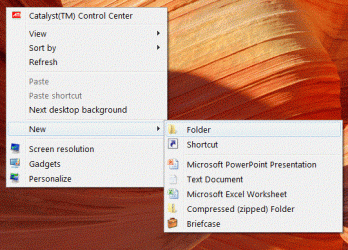
MakeDesktopFolder.GIF

3. A new desktop folder is created - give it a label (name). Here I named it MyOutlook.

NameDTFolder.GIF

4. Launch (start) Outlook. Here I have the default Outlook Data File folders and I've opened a data file called "archive2003."

Outlook-step1.GIF


Create a New Outlook Data File (PST file)

Select the Outlook Home tab if it isn't already selected.

1. Click the New Items drop list icon
2. Scroll down to More Items
3. Slide over then scroll down and select Outlook Data File...
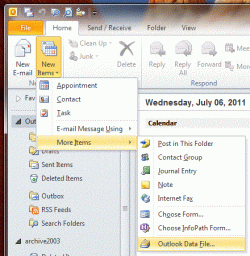
Outlook-step2.GIF

4. The Create or Open Outlook Data File window opens to the default location with the default name highlighted.
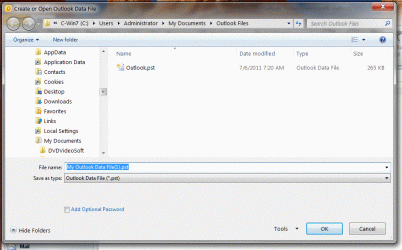
Outlook-step3.GIF

5. Begin typing your desired new name. In this sample below I named the new data file My 2010 TEST PST.

6. In the left tree pane, navigate to your new desktop folder and click on it.
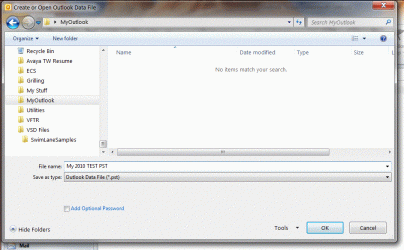
Outlook-step5.GIF

7. Click the OK button.

Outlook creates the new data file in the selected location and displays it in Outlook.
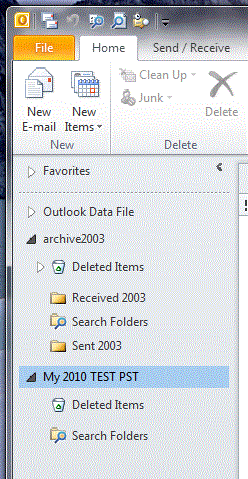
Outlook-step6.GIF

(Windows Explorer view of new PST file in newly created desktop folder.)

Outlook-newfilecopied.GIF


Copy (or Move) Folders Between Data Files (PST files)

To copy or move folders (all emails, attachments and statuses):

1. Right click on the desired existing folder to copy/move.
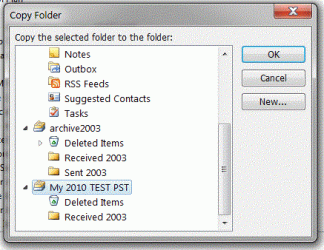
2. Select (click on) Copy Folder. The Copy Folder window opens.
Here I've selected my "archive2003" data file "Received 2003" folder which has all of my old "Inbox" emails; I'll copy that folder to the new My 2010 Test PST data file.
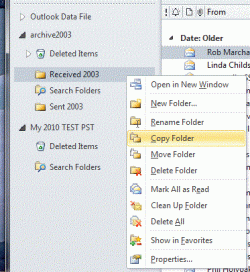
Outlook-copy1.GIF

3. Navigate to your new data file (PST) folder, select it (click on it) then click the OK button.
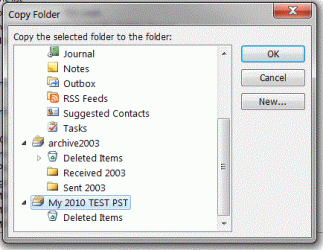
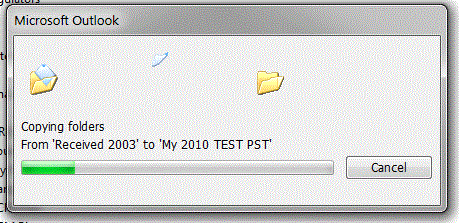
Outlook-copy2.GIF

Outlook-copy3.GIF

New copied folder in the My 2010 Test PST data file.
Note: it has the original (source) folder name!
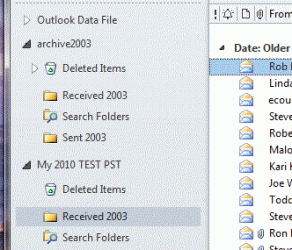
Outlook-copy4.GIF

4. Repeat the copy (or move) steps above for the Sent folder emails.
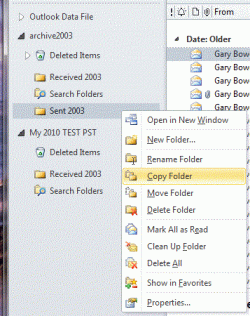
Outlook-copyrepeat.GIF

Outlook-copyrepeat2.GIF


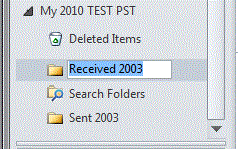
Rename Copied (or Moved) Folders

Rename the copied (or moved) folders as desired.

1. Select (click on) the new copied (or moved) folder.
2. Right click on the folder and select (click on) Rename Folder.
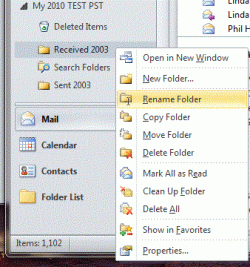
Outlook-rename1.GIF

3. The folder name is selected and editable - type in the new name.
Outlook-rename2.GIF

Outlook-rename3.GIF

4. Press the Enter key (on keyboard) to complete the renaming.
5. Repeat the renaming steps for all other desired folders.

Outlook-rename4.GIF


Done!
 
Last edited:

My Computer My Computer

At a glance

Linux Mint / XP / Win7 Home, Pro, Ultimate / ...
Computer type
PC/Desktop
Computer Manufacturer/Model Number
(7 different computers booting up to 10 systems)
OS
Linux Mint / XP / Win7 Home, Pro, Ultimate / Win8.1 / Win10
Other Info
Four desktops, two laptops, one notebook and one tablet
Wow thanks for taking the time to prepare such a detailed explanation. I must save this link
explaining it with images just did it for me, I dont think even I could go astray.

I will follow through on it to morrow when I have more time.

JUST ONE QUESTION.
I KEEP GETTING MESSAGES ASKING ME IF I WANT TO ARCHIVE SAVED EMAILS THAT HAVE NOT BEEN USED FOR A WHILE. IF I SAY YES WILL THE ARCHIVE ACTION REMOVE THE PST FILES IT DECIDES I HAVENT USED FOR A WHILE ?

IF I JOIN A FORUM I WILL SEND AN EMAIL TO MYSELF WITH THE USERNAME AND PASSWORD, SOMETIMES THE EMAIL WILL SIT THERE FOR OVER A YEAR BUT WHEN I FORGET THE UN AND PW I CAN REFER TO IT THERE.

MY FEAR IS IF I ARCHIVE WILL THESE FOLDERS / EMAIS BE REMOVED TO AN ARCHIVE FOLDER IF SO HOW WOULD I THEN GAIN ACCESS TO THEM ?
 

My Computer My Computer

At a glance

Windows 7 Ultimate x64
OS
Windows 7 Ultimate x64

My Computer My Computer

At a glance

Windows 7 Ultimate SP1 64-BitIntel Core i7 870 @ 2.93GHz8Gb Dual-Channel DDR3 @ 664MHznVidia GeForce GTX 460 1024MB dedicated RAM
Computer Manufacturer/Model Number
HP Pavilion Elite 495UK
OS
Windows 7 Ultimate SP1 64-Bit
CPU
Intel Core i7 870 @ 2.93GHz
Motherboard
MSI 2A9C (CPU1)
Memory
8Gb Dual-Channel DDR3 @ 664MHz
Graphics Card(s)
nVidia GeForce GTX 460 1024MB dedicated RAM
Sound Card
Realtek HD Audio
Monitor(s) Displays
HP2310i
Screen Resolution
1920 x 1080
Hard Drives
1x1954GB Hitachi HDS22020ALA 330 (RAID), 1x1954GB Hitachi External for backup and storage
PSU
460W
Case
HP Elite
Cooling
Air cooled
Keyboard
Logitech K750 solar-powered keyboard
Mouse
Logitech Wireless M180 mouse
Internet Speed
2Mb
Other Info
Pure Avanti Flow Internet Radio with iPod Dock, 64Gb iPod, HP USB Speakers, Sony MDR-V500 Headphones, Sony Vaio F-Series Laptop
Got to ask a silly question but if I want to view my archived emails how would I do it ?
 

My Computer My Computer

At a glance

Windows 7 Ultimate x64
OS
Windows 7 Ultimate x64

My Computer My Computer

At a glance

Windows 7 Ultimate SP1 64-BitIntel Core i7 870 @ 2.93GHz8Gb Dual-Channel DDR3 @ 664MHznVidia GeForce GTX 460 1024MB dedicated RAM
Computer Manufacturer/Model Number
HP Pavilion Elite 495UK
OS
Windows 7 Ultimate SP1 64-Bit
CPU
Intel Core i7 870 @ 2.93GHz
Motherboard
MSI 2A9C (CPU1)
Memory
8Gb Dual-Channel DDR3 @ 664MHz
Graphics Card(s)
nVidia GeForce GTX 460 1024MB dedicated RAM
Sound Card
Realtek HD Audio
Monitor(s) Displays
HP2310i
Screen Resolution
1920 x 1080
Hard Drives
1x1954GB Hitachi HDS22020ALA 330 (RAID), 1x1954GB Hitachi External for backup and storage
PSU
460W
Case
HP Elite
Cooling
Air cooled
Keyboard
Logitech K750 solar-powered keyboard
Mouse
Logitech Wireless M180 mouse
Internet Speed
2Mb
Other Info
Pure Avanti Flow Internet Radio with iPod Dock, 64Gb iPod, HP USB Speakers, Sony MDR-V500 Headphones, Sony Vaio F-Series Laptop
GEWB,
Thanks so much. I do not remember when I get so clear and so well organized Outlook project.
Best regards and all the best,
stasioau
 

My Computer My Computer

At a glance

Windows 7
OS
Windows 7
Hi all
Much easier method

download pfbackup.exe from MS site -- does all this easily -- although it says 2003 and 2007 it works fine for office 2010 too.

In 2003 and 2007 an extra item is added to the file menu ===>Backup.

in Office 2010 it appears in the ADDINS section.

When run copies all folders etc to any file you want including external usb sticks etc.

Then on another computer you can just OPEN this backup file and copy the folders to your main outlook folders.

Much easier than trying to find out where all the MS internal stuff is hidden. This tool was designed for the job.

Note IT DOES work with 2010 inspite of the download logo

Download Details - Microsoft Download Center - Outlook 2007/2003/2002 Add-in: Personal Folders Backup

cheers
jimbo
 

My Computer My Computer

At a glance

Linux CENTOS 7 / various Windows OS'es and se...Intel i7 Intel i58GB, 16GBOn Motherboard
Computer type
PC/Desktop
Computer Manufacturer/Model Number
Custom built, several laptops HP/ASUS
OS
Linux CENTOS 7 / various Windows OS'es and servers
CPU
Intel i7 Intel i5
Memory
8GB, 16GB
Graphics Card(s)
On Motherboard
Sound Card
Realtek HD audio
Monitor(s) Displays
Apple Cinema display, Samsung LCD
Screen Resolution
1920 X 1080
Hard Drives
4 X 1TB SATA
Mouse
Toshiba wireless laser
Internet Speed
> 20MB up
Hi Jimbo45
I have downloaded the pfbackup.exe file and installed it. I followed the install instruction below.
After starting Outlook / File there was no BACKUP to choose from ??
I have win7 64bit ultimate.

Instructions

To install this download:

  1. Download the file by clicking the Download button (above) and saving the file to your hard disk.
  2. Double-click the pfbackup.exe program file on your hard disk to start the setup program.
  3. Follow the instructions on the screen to complete the installation.
Instructions for use:

Once you have installed this download, complete the following:
  1. Start Outlook.
  2. On the File menu, choose Backup.
  3. To change the backup options, such as which .PST files to back up, click Options.
 

My Computer My Computer

At a glance

Windows 7 Ultimate x64
OS
Windows 7 Ultimate x64
Just found my problem. It does not support win7 x64bit
Is there a file that does. ?

System requirements

Supported Operating Systems: Windows 2000 Service Pack 3, Windows 98 Second Edition, Windows ME, Windows Vista, Windows XP

  • This download works with the following Office programs:
    • Microsoft Office Outlook 2007
    • Microsoft Outlook 2003
    • Microsoft Outlook 2002
 

My Computer My Computer

At a glance

Windows 7 Ultimate x64
OS
Windows 7 Ultimate x64
Back
Top