Solved Can I move a HDD image to another HDD? And a few more questions...

Macrium images can be moved. Windows images can also be moved, but you cannot find them any more because there is no browse function during the recovery. And you can make an image of an image. Just mount the VHD. See here how it's done...

Thanks, that answers just about all of my questions.

Are Drive D and Drive F actually separate Hard drives, or partitions on one disk?

Sorry, I did not realise that this was important information. Drive C is an SSD. Drive D, E and F are partitions on a separate internal hard drive (5400 rpm, 2 TB). I also have external hard drives that I can use (USB 3).

The reason why I originally created the image on drive D was because I thought it would take much longer on drive F, and it was 5 AM after no sleep at all that night. But after taking a nap, I realised that I'm wasting valuable space on drive D (the fast end of the drive) and that it would actually make more sense to store the image on drive F (or... on an external drive).

I wonder if creating an image directly onto the external drive (USB 3) will be noticeably slower (or faster?) than creating it on the internal hard drive. I always thought that internal is faster than external.

EDIT: whs was posting whilst I was typing. Follow his advice.

Yes, I think that's a good call.
 

My Computer My Computer

At a glance

Windows 7 Home Premium 64 bitAMD A6 36204 x 4 GBAMD Radeon HD 6530D
Computer type
PC/Desktop
Computer Manufacturer/Model Number
Acer Aspire X3470
OS
Windows 7 Home Premium 64 bit
CPU
AMD A6 3620
Memory
4 x 4 GB
Graphics Card(s)
AMD Radeon HD 6530D
Sound Card
AMD, Realtek
Monitor(s) Displays
iiyama ProLite B2209HDS full HD in portrait mode
Screen Resolution
1920x1080 or 1080x1920
Hard Drives
SSD 250 GB
WD Green 2 TB 5400 rpm
Antivirus
Avast
Browser
Opera (Blink)
I do have two more questions:

Is the Macrium recovery disk generic, or does it fit a specific image? In other words, do I need to create a recovery disk for every image, or can I use a single recovery disk for all images?

And: can I create a recovery disk later (or again, if I've lost my original recovery disk)?

Thanks.
 

My Computer My Computer

At a glance

Windows 7 Home Premium 64 bitAMD A6 36204 x 4 GBAMD Radeon HD 6530D
Computer type
PC/Desktop
Computer Manufacturer/Model Number
Acer Aspire X3470
OS
Windows 7 Home Premium 64 bit
CPU
AMD A6 3620
Memory
4 x 4 GB
Graphics Card(s)
AMD Radeon HD 6530D
Sound Card
AMD, Realtek
Monitor(s) Displays
iiyama ProLite B2209HDS full HD in portrait mode
Screen Resolution
1920x1080 or 1080x1920
Hard Drives
SSD 250 GB
WD Green 2 TB 5400 rpm
Antivirus
Avast
Browser
Opera (Blink)
I do have two more questions:

Is the Macrium recovery disk generic, or does it fit a specific image? In other words, do I need to create a recovery disk for every image, or can I use a single recovery disk for all images?

And: can I create a recovery disk later (or again, if I've lost my original recovery disk)?

Thanks.
The Macrium Recovery disc will restore from any Macrium backup but the latest version of Macrium requires the latest version of the Restore disc. Older restore discs are not compatible with the latest version of the backup software.
You can create a new Restore disc at any time, just check the "other tasks" tag in Macrium
 

My Computer My Computer

At a glance

Microsoft Windows 7 Home Premium 64-bit 7601 ...Intel(R) Core(TM) i7-3770 CPU @ 3.40GHz8.00 GBIntel(R) HD Graphics 4000
Computer type
PC/Desktop
OS
Microsoft Windows 7 Home Premium 64-bit 7601 Multiprocessor Free Service Pack 1
CPU
Intel(R) Core(TM) i7-3770 CPU @ 3.40GHz
Motherboard
ASUSTeK COMPUTER INC. P8H77-M
Memory
8.00 GB
Graphics Card(s)
Intel(R) HD Graphics 4000
Sound Card
On Board
Monitor(s) Displays
Dell 24"
Screen Resolution
1920 x 1080
Hard Drives
(1) INTEL SSDSC2CT180A3 ATA Device (2) ST500DM002-1BD142 ATA Device (3) WDC WD3200AAKS-75L9A0 ATA Device (4) Generic- Compact Flash USB Device (5) Generic- MS/MS-Pro USB Device (6) Generic- SD/MMC USB Device (7) Generic- SM/xD-Picture USB
PSU
500w Corsair
Case
Cooler Master
Cooling
3 Fans
Keyboard
Logitech MK300
Mouse
Logitech WOM
Internet Speed
75Mb
Antivirus
Norton 360
Browser
Firefox, Opera, IE
The Macrium Recovery disc will restore from any Macrium backup, but the latest version of Macrium requires the latest version of the Restore disc. Older restore discs are not compatible with the latest version of the backup software. You can create a new Restore disc at any time, just check the "other tasks" tag in Macrium.

Thanks for this helpful answer.
 

My Computer My Computer

At a glance

Windows 7 Home Premium 64 bitAMD A6 36204 x 4 GBAMD Radeon HD 6530D
Computer type
PC/Desktop
Computer Manufacturer/Model Number
Acer Aspire X3470
OS
Windows 7 Home Premium 64 bit
CPU
AMD A6 3620
Memory
4 x 4 GB
Graphics Card(s)
AMD Radeon HD 6530D
Sound Card
AMD, Realtek
Monitor(s) Displays
iiyama ProLite B2209HDS full HD in portrait mode
Screen Resolution
1920x1080 or 1080x1920
Hard Drives
SSD 250 GB
WD Green 2 TB 5400 rpm
Antivirus
Avast
Browser
Opera (Blink)
Just one other point. When you create a backup you have the opportunity of veryfying the image. This is well worth doing just in case the backup gets corrupted during compilation.
Incidently I have one restore disc that I use on four different Win 7 machines.
I think reading through this thread again that we can safely say that overall Macrium Reflect is the favoured backup software.
 

My Computer My Computer

At a glance

Microsoft Windows 7 Home Premium 64-bit 7601 ...Intel(R) Core(TM) i7-3770 CPU @ 3.40GHz8.00 GBIntel(R) HD Graphics 4000
Computer type
PC/Desktop
OS
Microsoft Windows 7 Home Premium 64-bit 7601 Multiprocessor Free Service Pack 1
CPU
Intel(R) Core(TM) i7-3770 CPU @ 3.40GHz
Motherboard
ASUSTeK COMPUTER INC. P8H77-M
Memory
8.00 GB
Graphics Card(s)
Intel(R) HD Graphics 4000
Sound Card
On Board
Monitor(s) Displays
Dell 24"
Screen Resolution
1920 x 1080
Hard Drives
(1) INTEL SSDSC2CT180A3 ATA Device (2) ST500DM002-1BD142 ATA Device (3) WDC WD3200AAKS-75L9A0 ATA Device (4) Generic- Compact Flash USB Device (5) Generic- MS/MS-Pro USB Device (6) Generic- SD/MMC USB Device (7) Generic- SM/xD-Picture USB
PSU
500w Corsair
Case
Cooler Master
Cooling
3 Fans
Keyboard
Logitech MK300
Mouse
Logitech WOM
Internet Speed
75Mb
Antivirus
Norton 360
Browser
Firefox, Opera, IE
Well that's news I thought the WinPE recovery media was only good for the machine it was created on :/
 

My Computer My Computer

At a glance

Win-7-Pro64bit 7-H-Prem-64biti7-5930K 2nd i9-9940x both water blocked VRM'...Trident-z 3200C14 2nd Trident-z 3600C16EVGA 1080ti ftw3 2nd Titan Xp both water blocked
Computer type
PC/Desktop
Computer Manufacturer/Model Number
Custom assembled by me :}
OS
Win-7-Pro64bit 7-H-Prem-64bit
CPU
i7-5930K 2nd i9-9940x both water blocked VRM's too
Motherboard
ASUS SABERTOOTH X99 2nd ASUS x299 Apex
Memory
Trident-z 3200C14 2nd Trident-z 3600C16
Graphics Card(s)
EVGA 1080ti ftw3 2nd Titan Xp both water blocked
Sound Card
Built-in Realtek
Monitor(s) Displays
1-AOC G2460PG 24"G-Sync 144Hz/ 2nd 1-ASUS VG248QE 24" 144Hz
Screen Resolution
1920 x 1080 144Hz
Hard Drives
2-Samsung M.2 Evo & Evo Plus
2-Samsung 850 EVO 500GB SSD's/ 3-2.5 W.D. Black 1tb-&3-1tb/3-3.5 WD Black 1tb hdd's
PSU
EVGA SuperNOVA 1000-P2 2nd 1200-P2
Case
2-Corsair Obsidian Series 450D Black ATX Mid Tower
Cooling
Custom water loops
Keyboard
Logitech G710+/ 2nd Logitech G910
Mouse
2-RedDragon M901 Perdition 16400 dpi Gaming mouse = wired
Internet Speed
Comcast Ping 19ms 89.31mbps download speed 6.12mbps upload
Antivirus
Malwarebytes Pro/ Superantispyware Pro
Browser
FireFox & Pale moon
Other Info
2nd ASUS X299 Apex/Intel i9-9940x with Custom water loop/7H-Prem-x64/Corsair 450D case/Ram Trident-z 3600C16 4x8gb / Samsung970Evo plus 500gb SSD/Dual ssd EZ swap evo/PSU EVGA SuperNova 1200w-P2 80+Platinum/GPU Titan Xp /8-ML-140 on push-pull on 2-280GTX rads
You had me worried there for a minute or two! I was sure that I had used the same recovery disc on all my machines but thought I would double check.
I keep a dedicated Ext HD for all my backups. It has the dedicated drive letter "Y". This is recognised on all four machines as the Y Drive. I tend to give external HD's a dedicated letter near the end of the alphabet to save Windows changing the letter everytime I have a card reader in use. This way it can have the same drive letter on all machines. The Y Drive has four folders one for each of the machines. I tried the recovery disc in my main machine with the Y drive attached and the recovery disc found the backup folder and files for the main machine. I then attached the Y drive to my laptop and used the same recovery disc. This time it found the folder and backup files for the laptop.
So I was happy that it did work OK. The only point I would make is that all four machines have the latest version of Macrium Reflect and the recovery disc is the new version that is compatible to that version! I don't know if the same applies to the older versions.
 
Last edited:

My Computer My Computer

At a glance

Microsoft Windows 7 Home Premium 64-bit 7601 ...Intel(R) Core(TM) i7-3770 CPU @ 3.40GHz8.00 GBIntel(R) HD Graphics 4000
Computer type
PC/Desktop
OS
Microsoft Windows 7 Home Premium 64-bit 7601 Multiprocessor Free Service Pack 1
CPU
Intel(R) Core(TM) i7-3770 CPU @ 3.40GHz
Motherboard
ASUSTeK COMPUTER INC. P8H77-M
Memory
8.00 GB
Graphics Card(s)
Intel(R) HD Graphics 4000
Sound Card
On Board
Monitor(s) Displays
Dell 24"
Screen Resolution
1920 x 1080
Hard Drives
(1) INTEL SSDSC2CT180A3 ATA Device (2) ST500DM002-1BD142 ATA Device (3) WDC WD3200AAKS-75L9A0 ATA Device (4) Generic- Compact Flash USB Device (5) Generic- MS/MS-Pro USB Device (6) Generic- SD/MMC USB Device (7) Generic- SM/xD-Picture USB
PSU
500w Corsair
Case
Cooler Master
Cooling
3 Fans
Keyboard
Logitech MK300
Mouse
Logitech WOM
Internet Speed
75Mb
Antivirus
Norton 360
Browser
Firefox, Opera, IE
Nothing wrong with having extra copies :)
After my disk burner eat my 7 pro disk I don't trust it anymore or disks for that matter as the only way to recover or install anything.
 

My Computer My Computer

At a glance

Win-7-Pro64bit 7-H-Prem-64biti7-5930K 2nd i9-9940x both water blocked VRM'...Trident-z 3200C14 2nd Trident-z 3600C16EVGA 1080ti ftw3 2nd Titan Xp both water blocked
Computer type
PC/Desktop
Computer Manufacturer/Model Number
Custom assembled by me :}
OS
Win-7-Pro64bit 7-H-Prem-64bit
CPU
i7-5930K 2nd i9-9940x both water blocked VRM's too
Motherboard
ASUS SABERTOOTH X99 2nd ASUS x299 Apex
Memory
Trident-z 3200C14 2nd Trident-z 3600C16
Graphics Card(s)
EVGA 1080ti ftw3 2nd Titan Xp both water blocked
Sound Card
Built-in Realtek
Monitor(s) Displays
1-AOC G2460PG 24"G-Sync 144Hz/ 2nd 1-ASUS VG248QE 24" 144Hz
Screen Resolution
1920 x 1080 144Hz
Hard Drives
2-Samsung M.2 Evo & Evo Plus
2-Samsung 850 EVO 500GB SSD's/ 3-2.5 W.D. Black 1tb-&3-1tb/3-3.5 WD Black 1tb hdd's
PSU
EVGA SuperNOVA 1000-P2 2nd 1200-P2
Case
2-Corsair Obsidian Series 450D Black ATX Mid Tower
Cooling
Custom water loops
Keyboard
Logitech G710+/ 2nd Logitech G910
Mouse
2-RedDragon M901 Perdition 16400 dpi Gaming mouse = wired
Internet Speed
Comcast Ping 19ms 89.31mbps download speed 6.12mbps upload
Antivirus
Malwarebytes Pro/ Superantispyware Pro
Browser
FireFox & Pale moon
Other Info
2nd ASUS X299 Apex/Intel i9-9940x with Custom water loop/7H-Prem-x64/Corsair 450D case/Ram Trident-z 3600C16 4x8gb / Samsung970Evo plus 500gb SSD/Dual ssd EZ swap evo/PSU EVGA SuperNova 1200w-P2 80+Platinum/GPU Titan Xp /8-ML-140 on push-pull on 2-280GTX rads
I have in fact got three copies of the Restore disc, I just had to be sure that it didn't matter which one I used, they would all be interchangeable!
 

My Computer My Computer

At a glance

Microsoft Windows 7 Home Premium 64-bit 7601 ...Intel(R) Core(TM) i7-3770 CPU @ 3.40GHz8.00 GBIntel(R) HD Graphics 4000
Computer type
PC/Desktop
OS
Microsoft Windows 7 Home Premium 64-bit 7601 Multiprocessor Free Service Pack 1
CPU
Intel(R) Core(TM) i7-3770 CPU @ 3.40GHz
Motherboard
ASUSTeK COMPUTER INC. P8H77-M
Memory
8.00 GB
Graphics Card(s)
Intel(R) HD Graphics 4000
Sound Card
On Board
Monitor(s) Displays
Dell 24"
Screen Resolution
1920 x 1080
Hard Drives
(1) INTEL SSDSC2CT180A3 ATA Device (2) ST500DM002-1BD142 ATA Device (3) WDC WD3200AAKS-75L9A0 ATA Device (4) Generic- Compact Flash USB Device (5) Generic- MS/MS-Pro USB Device (6) Generic- SD/MMC USB Device (7) Generic- SM/xD-Picture USB
PSU
500w Corsair
Case
Cooler Master
Cooling
3 Fans
Keyboard
Logitech MK300
Mouse
Logitech WOM
Internet Speed
75Mb
Antivirus
Norton 360
Browser
Firefox, Opera, IE
I was also surprised back when, to find the Macrium WinPE recovery (which I created on a memory stick) worked on both my laptops (Toshiba and Acer) and not just on the one it was created on. Incidentally, it was the same for my Paragon recovery stick... so I get the feeling that's how they are in general.

IAC I can't believe older recovery media won't work with BU images made from newer versions of the program! Not coding in backwards compatibility seems ridiculously stupid for a BU program!! How many people are going to discover this at the worst possible time!?!! Guess I better find out if I updated MR after I created my last recovery sticks!

(And herein lies the benefit of reading threads even when you don't think there is anything new for you to learn.) :D
 

My Computer My Computer

At a glance

Win 7 Ultimate 64-bit
OS
Win 7 Ultimate 64-bit
Macrium images can be moved, Windows images can also be moved but you cannot find them any more because there is no browse function during the recovery. http://www.sevenforums.com/tutorials/210195-system-image-recover-broken-windows-7-system-image.html
For users of Windows inbuilt imaging this is not strictly correct. So in case you need to use it, the "browse" capability is a little clunky but doable. Say you have renamed the image folder to "WindowsImageBackup_date" and moved it into a folder called "images" then you open the attach driver option and you are present with a Windows explorer type screen. Forget that it's there primarily to load drivers. Just browse to the image in folder "images". Then perform 2 steps. 1) move the image to the root using right click cut/paste (NOT copy). 2) Right click Rename to WindowsImageBackup. Exit and refresh and the image should be picked up.

Again, Macrium is a superior product and you don't have to jump through hoops.
 

My Computer My Computer

At a glance

Windows 7x64 Home Premium SP1Intel i7 2600kG.Skill Ripjaws (DDR3-1600) 2x4GBNvidia GeForce GTS 450; Intel HD Graphics 300...
Computer type
PC/Desktop
Computer Manufacturer/Model Number
Own build
OS
Windows 7x64 Home Premium SP1
CPU
Intel i7 2600k
Motherboard
ASUS P8Z68 Deluxe
Memory
G.Skill Ripjaws (DDR3-1600) 2x4GB
Graphics Card(s)
Nvidia GeForce GTS 450; Intel HD Graphics 3000(GT2+)
Monitor(s) Displays
Dell Ultrasharp IPS panel U2311H, Samsung SyncMaster P2350
Screen Resolution
1920x1080
Hard Drives
Samsung 850 Pro SSD 256GB, Samsung SSD 840 120GB, Seagates 1TB Barracuda ST31000528AS x2
PSU
Seasonic M12II 520W
Case
Lian Li Lancool PC-K60
Cooling
Case: 1x120mm, 3x140mm CPU: Hyper 212+
Keyboard
Logitech MK520 (wireless)
Mouse
Logitech MK520
Internet Speed
6-7 Mbps
Antivirus
Norton Security Premium, Malwarebytes on 2 (MSE on 3rd PC)
Browser
FireFox
Other Info
Audio: Logitech Z523 2.1
You said clunky - and that's what it is. I want to see Joe normal jumping thru all these hoops - if he even knows where to jump.
 

My Computer My Computer

At a glance

Vista, Windows7, Mint Mate, Zorin, Windows 8from 1.6GHz Duo to i7
Computer Manufacturer/Model Number
HP, Dell, Gateway, Toshiba - 4 laptops and 2 desktops
OS
Vista, Windows7, Mint Mate, Zorin, Windows 8
CPU
from 1.6GHz Duo to i7
Monitor(s) Displays
2x HP w2207
Hard Drives
5x HDD, 7x SSD, 12x Externals
Keyboard
with trackball - no mices
Mouse
Trackball mice
Internet Speed
DSL 6000
I wouldn't dismiss the abilities of "Joe Normal". History has shown that to be a big mistake.
Admittedly Joe Normal didn't wear Hugo Boss.
 
Last edited:

My Computer My Computer

At a glance

Windows 7x64 Home Premium SP1Intel i7 2600kG.Skill Ripjaws (DDR3-1600) 2x4GBNvidia GeForce GTS 450; Intel HD Graphics 300...
Computer type
PC/Desktop
Computer Manufacturer/Model Number
Own build
OS
Windows 7x64 Home Premium SP1
CPU
Intel i7 2600k
Motherboard
ASUS P8Z68 Deluxe
Memory
G.Skill Ripjaws (DDR3-1600) 2x4GB
Graphics Card(s)
Nvidia GeForce GTS 450; Intel HD Graphics 3000(GT2+)
Monitor(s) Displays
Dell Ultrasharp IPS panel U2311H, Samsung SyncMaster P2350
Screen Resolution
1920x1080
Hard Drives
Samsung 850 Pro SSD 256GB, Samsung SSD 840 120GB, Seagates 1TB Barracuda ST31000528AS x2
PSU
Seasonic M12II 520W
Case
Lian Li Lancool PC-K60
Cooling
Case: 1x120mm, 3x140mm CPU: Hyper 212+
Keyboard
Logitech MK520 (wireless)
Mouse
Logitech MK520
Internet Speed
6-7 Mbps
Antivirus
Norton Security Premium, Malwarebytes on 2 (MSE on 3rd PC)
Browser
FireFox
Other Info
Audio: Logitech Z523 2.1
This "Joe Normal" had to Google "Hugo Boss" to find out who he was :o
You learn something new every day!
 

My Computer My Computer

At a glance

Microsoft Windows 7 Home Premium 64-bit 7601 ...Intel(R) Core(TM) i7-3770 CPU @ 3.40GHz8.00 GBIntel(R) HD Graphics 4000
Computer type
PC/Desktop
OS
Microsoft Windows 7 Home Premium 64-bit 7601 Multiprocessor Free Service Pack 1
CPU
Intel(R) Core(TM) i7-3770 CPU @ 3.40GHz
Motherboard
ASUSTeK COMPUTER INC. P8H77-M
Memory
8.00 GB
Graphics Card(s)
Intel(R) HD Graphics 4000
Sound Card
On Board
Monitor(s) Displays
Dell 24"
Screen Resolution
1920 x 1080
Hard Drives
(1) INTEL SSDSC2CT180A3 ATA Device (2) ST500DM002-1BD142 ATA Device (3) WDC WD3200AAKS-75L9A0 ATA Device (4) Generic- Compact Flash USB Device (5) Generic- MS/MS-Pro USB Device (6) Generic- SD/MMC USB Device (7) Generic- SM/xD-Picture USB
PSU
500w Corsair
Case
Cooler Master
Cooling
3 Fans
Keyboard
Logitech MK300
Mouse
Logitech WOM
Internet Speed
75Mb
Antivirus
Norton 360
Browser
Firefox, Opera, IE
IAC I can't believe older recovery media won't work with BU images made from newer versions of the program! Not coding in backwards compatibility seems ridiculously stupid for a BU program!! How many people are going to discover this at the worst possible time!?!! Guess I better find out if I updated MR after I created my last recovery sticks!

(And herein lies the benefit of reading threads even when you don't think there is anything new for you to learn.) :D
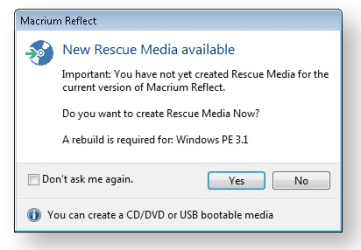
When I first updated the Backup software, I'm certain I saw a message that said "Create a new Restore Disc as an old RD will not work with the latest edition of the BU software". I can't now find that exact message but I have found this
Capture.PNG
Whether the new RD will work with older images I know not as I haven't tried it!
 

My Computer My Computer

At a glance

Microsoft Windows 7 Home Premium 64-bit 7601 ...Intel(R) Core(TM) i7-3770 CPU @ 3.40GHz8.00 GBIntel(R) HD Graphics 4000
Computer type
PC/Desktop
OS
Microsoft Windows 7 Home Premium 64-bit 7601 Multiprocessor Free Service Pack 1
CPU
Intel(R) Core(TM) i7-3770 CPU @ 3.40GHz
Motherboard
ASUSTeK COMPUTER INC. P8H77-M
Memory
8.00 GB
Graphics Card(s)
Intel(R) HD Graphics 4000
Sound Card
On Board
Monitor(s) Displays
Dell 24"
Screen Resolution
1920 x 1080
Hard Drives
(1) INTEL SSDSC2CT180A3 ATA Device (2) ST500DM002-1BD142 ATA Device (3) WDC WD3200AAKS-75L9A0 ATA Device (4) Generic- Compact Flash USB Device (5) Generic- MS/MS-Pro USB Device (6) Generic- SD/MMC USB Device (7) Generic- SM/xD-Picture USB
PSU
500w Corsair
Case
Cooler Master
Cooling
3 Fans
Keyboard
Logitech MK300
Mouse
Logitech WOM
Internet Speed
75Mb
Antivirus
Norton 360
Browser
Firefox, Opera, IE
A few years ago I visited the Hugo Boss factory in Metzingen. They have a very large shop there where you get their products for good prices. I bought a jacket that I still wear.
 

My Computer My Computer

At a glance

Vista, Windows7, Mint Mate, Zorin, Windows 8from 1.6GHz Duo to i7
Computer Manufacturer/Model Number
HP, Dell, Gateway, Toshiba - 4 laptops and 2 desktops
OS
Vista, Windows7, Mint Mate, Zorin, Windows 8
CPU
from 1.6GHz Duo to i7
Monitor(s) Displays
2x HP w2207
Hard Drives
5x HDD, 7x SSD, 12x Externals
Keyboard
with trackball - no mices
Mouse
Trackball mice
Internet Speed
DSL 6000
Back
Top