can I move virtualXP install from C: to D:?

bfromxp

New member
Local time
6:25 PM
Messages
7
I built a machine for work with a 60GB SSD for the boot drive and 750GB drive for d:. Normally 60GB would be more than enough for our OS and app installs, but VirtualXP seems to take quite a bit too. If possible I would like to move it to D:.
 

My Computer My Computer

OS
xp
Yes, you can.

Do this:
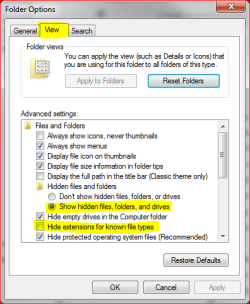
  • Go to Folder options, choose Show hidden files, uncheck Hide extensions for known file types
    hidden.PNG
  • Go to C:\Users\Your_Username\Virtual Machines
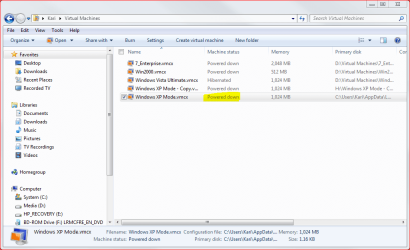
  • Check the status of XP Mode. If it is hibernating, reboot it and then turn it off. XP Mode must be powered down before changing settings!
    PoweredDown.PNG
  • Go to C:\Users\Your_Username\AppData\Local\Microsoft\Windows Virtual PC\Virtual Machines
  • Copy or move virtual machine file Windows XP Mode.vhd to a new location
  • Go back to C:\Users\Your_Username\Virtual Machines
  • Click Windows XP Mode and then Settings in the menu bar
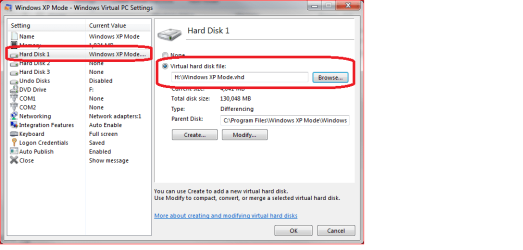
  • Choose Hard Disk 1 on the left pane
  • On the right pane browse to new location of Windows XP Mode.vhd
    vhd_location.png
  • Click OK

Your XP Mode virtual machine is now moved.

Kari
 

My Computer My Computer

Computer type
Laptop
Computer Manufacturer/Model Number
HP ENVY 17-1150eg
OS
Windows 10 Pro x64 EN-GB
CPU
1.6 GHz Intel Core i7-720QM Processor
Memory
6 GB
Graphics Card(s)
ATI Mobility Radeon HD 5850 Graphics
Sound Card
Beats sound system with integrated subwoofer
Monitor(s) Displays
17" laptop display, 22" LED and 32" Full HD TV through HDMI
Screen Resolution
1600*900 (1), 1920*1080 (2&3)
Hard Drives
Internal: 2 x 500 GB SATA Hard Disk Drive 7200 rpm
External: 2TB for backups, 3TB USB3 network drive for media
Cooling
As Envy runs a bit warm, I have it on a Cooler Master pad
Keyboard
Logitech diNovo Media Desktop Laser (bluetooth)
Mouse
Logitech Performance Mouse MX
Internet Speed
50/10 Mbps VDSL
Antivirus
Windows Defender 4.3.9431.0
Browser
Maxthon 3.5.2., IE11
Thanks for the help, I'll be making the move Monday morning.
 

My Computer My Computer

OS
xp
Back
Top