Can I restore back to Factory Settings Vista?

SusanHC

New member
Member
Local time
5:02 PM
Messages
87
Location
UK
I did a clean installation of Windows 7 three weeks ago but I am now having all sorts of problems and just want to revert back to my original Vista.

I have an Acer laptop and when I purchased it I made Recovery discs as recoimmended. However I believe these should be used with Acer's eRecovery which is not compatible with Windows 7. F12 has be disabled so I cannoit use that route either.

Can anyone telll me what I have to do please?
 

My Computer My Computer

At a glance

Windows 7 and VistaIntel Core 2 Quad Processor Q90004 GB DDR3 MemoryATI Mobility Radeon HD 4670
Computer Manufacturer/Model Number
Acer Aspire 8935G
OS
Windows 7 and Vista
CPU
Intel Core 2 Quad Processor Q9000
Memory
4 GB DDR3 Memory
Graphics Card(s)
ATI Mobility Radeon HD 4670
Sound Card
ATI HDMI Audio Realtek
Screen Resolution
1920x1080
I did a clean installation of Windows 7 three weeks ago but I am now having all sorts of problems and just want to revert back to my original Vista.

I have an Acer laptop and when I purchased it I made Recovery discs as recoimmended. However I believe these should be used with Acer's eRecovery which is not compatible with Windows 7. F12 has be disabled so I cannoit use that route either.

Can anyone telll me what I have to do please?
Is the recovery partition still available?
Have you tried posting your issues on the forum so we can resolve them?
 

My Computer My Computer

At a glance

Windows 7 Home Premium x64 - Mac OS X 10.6.4 x64Intel Core 2 Duo T9300 2.5 GHz4GB Kingston DDR2-800NVIDIA Geforce 8600M GT (512MB Model)
Computer Manufacturer/Model Number
Compal JFT02 (Custom Build Laptop)
OS
Windows 7 Home Premium x64 - Mac OS X 10.6.4 x64
CPU
Intel Core 2 Duo T9300 2.5 GHz
Motherboard
JFT02
Memory
4GB Kingston DDR2-800
Graphics Card(s)
NVIDIA Geforce 8600M GT (512MB Model)
Sound Card
Realtek HD Audio
Monitor(s) Displays
WUXGA Standard Laptop Display
Screen Resolution
1680*1050
Hard Drives
Toshiba 320GB 5400RPM Laptop HD
PSU
Standard Laptop Power Supply
Case
Standard Laptop Case
Cooling
Standard Laptop Cooling
Keyboard
Standard Laptop 105 Key-Keyboard
Mouse
Synaptics Touchpad
Internet Speed
Verizion Online DSL 3360/864 kbs (dl/up)
I did a clean installation of Windows 7 three weeks ago but I am now having all sorts of problems and just want to revert back to my original Vista.

I have an Acer laptop and when I purchased it I made Recovery discs as recoimmended. However I believe these should be used with Acer's eRecovery which is not compatible with Windows 7. F12 has be disabled so I cannoit use that route either.

Can anyone telll me what I have to do please?
Is the recovery partition still available?
Have you tried posting your issues on the forum so we can resolve them?

I dont know about the recovery partition , how can I f\ind out?

Laptop has ground almost to a halt after I was trying to recover a file which \i did when it was Vista. I really don;t kniw what has happened
 
Last edited by a moderator:

My Computer My Computer

At a glance

Windows 7 and VistaIntel Core 2 Quad Processor Q90004 GB DDR3 MemoryATI Mobility Radeon HD 4670
Computer Manufacturer/Model Number
Acer Aspire 8935G
OS
Windows 7 and Vista
CPU
Intel Core 2 Quad Processor Q9000
Memory
4 GB DDR3 Memory
Graphics Card(s)
ATI Mobility Radeon HD 4670
Sound Card
ATI HDMI Audio Realtek
Screen Resolution
1920x1080
Hello Susan,

You should be able to boot from your Acer Vista recovery disc to do a factory restore of Vista with instead.
 

My Computer My Computer

At a glance

64-bit Windows 11 Pro for WorkstationsIntel i7-8700K OC'd to 5 GHz64 GB (4x16GB) G.SKILL TridentZ RGB DDR4 3600...ASUS ROG-STRIX-GTX1080TI-O11G-GAMING
Computer type
PC/Desktop
Computer Manufacturer/Model Number
Self built custom
OS
64-bit Windows 11 Pro for Workstations
CPU
Intel i7-8700K OC'd to 5 GHz
Motherboard
ASUS ROG Maximus XI Formula Z390
Memory
64 GB (4x16GB) G.SKILL TridentZ RGB DDR4 3600 MHz
Graphics Card(s)
ASUS ROG-STRIX-GTX1080TI-O11G-GAMING
Sound Card
Integrated
Monitor(s) Displays
2 x Samsung Odyssey G7 27"
Screen Resolution
2560x1440
Hard Drives
1TB Samsung 990 PRO M.2,
4TB Samsung 990 PRO PRO M.2,
TerraMaster F8 SSD Plus NAS
PSU
Seasonic Prime Titanium 850W
Case
Thermaltake Core P3
Cooling
Corsair Hydro H115i
Keyboard
Logitech wireless K800
Mouse
Logitech MX Master 4
Internet Speed
2 Gb/s Download and 100 Mb/s Upload
Antivirus
Malwarebyte Anti-Malware Premium
Browser
Google Chrome
Other Info
Logitech Z625 speaker system,
Logitech BRIO 4K Pro webcam,
HP Color LaserJet Pro MFP M477fdn,
APC SMART-UPS RT 1000 XL - SURT1000XLI,
Galaxy S23 Plus phone
Hello Susan,

You should be able to boot from your Acer Vista recovery disc to do a factory restore of Vista with instead.

it wont boot from disc and when I go into F2 SEtup Utility it says I cant change order of boot without consulting my system supervisor which is me!! so how do I change boot order?


I have just noticed below F12 Boot Menu Disabled it says D2D Recovery enabled - what does that mean?
 

My Computer My Computer

At a glance

Windows 7 and VistaIntel Core 2 Quad Processor Q90004 GB DDR3 MemoryATI Mobility Radeon HD 4670
Computer Manufacturer/Model Number
Acer Aspire 8935G
OS
Windows 7 and Vista
CPU
Intel Core 2 Quad Processor Q9000
Memory
4 GB DDR3 Memory
Graphics Card(s)
ATI Mobility Radeon HD 4670
Sound Card
ATI HDMI Audio Realtek
Screen Resolution
1920x1080
"D2D Recovery enabled" is a indicator that says you shoud be able to press Alt+F10 to boot from the recovery partition to do a factory restore of Vista with.
 

My Computer My Computer

At a glance

64-bit Windows 11 Pro for WorkstationsIntel i7-8700K OC'd to 5 GHz64 GB (4x16GB) G.SKILL TridentZ RGB DDR4 3600...ASUS ROG-STRIX-GTX1080TI-O11G-GAMING
Computer type
PC/Desktop
Computer Manufacturer/Model Number
Self built custom
OS
64-bit Windows 11 Pro for Workstations
CPU
Intel i7-8700K OC'd to 5 GHz
Motherboard
ASUS ROG Maximus XI Formula Z390
Memory
64 GB (4x16GB) G.SKILL TridentZ RGB DDR4 3600 MHz
Graphics Card(s)
ASUS ROG-STRIX-GTX1080TI-O11G-GAMING
Sound Card
Integrated
Monitor(s) Displays
2 x Samsung Odyssey G7 27"
Screen Resolution
2560x1440
Hard Drives
1TB Samsung 990 PRO M.2,
4TB Samsung 990 PRO PRO M.2,
TerraMaster F8 SSD Plus NAS
PSU
Seasonic Prime Titanium 850W
Case
Thermaltake Core P3
Cooling
Corsair Hydro H115i
Keyboard
Logitech wireless K800
Mouse
Logitech MX Master 4
Internet Speed
2 Gb/s Download and 100 Mb/s Upload
Antivirus
Malwarebyte Anti-Malware Premium
Browser
Google Chrome
Other Info
Logitech Z625 speaker system,
Logitech BRIO 4K Pro webcam,
HP Color LaserJet Pro MFP M477fdn,
APC SMART-UPS RT 1000 XL - SURT1000XLI,
Galaxy S23 Plus phone
"D2D Recovery enabled" is a indicator that says you shoud be able to press Alt+F10 to boot from the recovery partition to do a factory restore of Vista with.

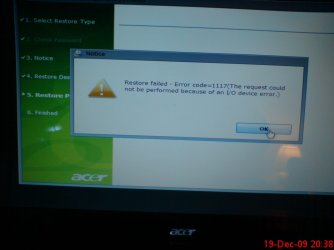
I have just done this and got in an even bigger muddle!! ALT+F10 started the recovery but didn't get far - it said "restore failed error code 1117. the request could not be performed because of an I/O device error".

It now wont boot up at all

BOOTMGR is missing
Press CTRL+ALT+DEl to restart

which I do but it just comes back to "BOOTMGR is missing" again

Do I have to put in Recovery Disc 1?
 

My Computer My Computer

At a glance

Windows 7 and VistaIntel Core 2 Quad Processor Q90004 GB DDR3 MemoryATI Mobility Radeon HD 4670
Computer Manufacturer/Model Number
Acer Aspire 8935G
OS
Windows 7 and Vista
CPU
Intel Core 2 Quad Processor Q9000
Memory
4 GB DDR3 Memory
Graphics Card(s)
ATI Mobility Radeon HD 4670
Sound Card
ATI HDMI Audio Realtek
Screen Resolution
1920x1080
Susan,

If you have anything connected (other than keyboard and mouse) to the computer, go ahead and disconnect it until you are through installing to help avoid possible conflicts with it.

You can try doing the factory restore from the DVD instead to see if it may work better.
 

My Computer My Computer

At a glance

64-bit Windows 11 Pro for WorkstationsIntel i7-8700K OC'd to 5 GHz64 GB (4x16GB) G.SKILL TridentZ RGB DDR4 3600...ASUS ROG-STRIX-GTX1080TI-O11G-GAMING
Computer type
PC/Desktop
Computer Manufacturer/Model Number
Self built custom
OS
64-bit Windows 11 Pro for Workstations
CPU
Intel i7-8700K OC'd to 5 GHz
Motherboard
ASUS ROG Maximus XI Formula Z390
Memory
64 GB (4x16GB) G.SKILL TridentZ RGB DDR4 3600 MHz
Graphics Card(s)
ASUS ROG-STRIX-GTX1080TI-O11G-GAMING
Sound Card
Integrated
Monitor(s) Displays
2 x Samsung Odyssey G7 27"
Screen Resolution
2560x1440
Hard Drives
1TB Samsung 990 PRO M.2,
4TB Samsung 990 PRO PRO M.2,
TerraMaster F8 SSD Plus NAS
PSU
Seasonic Prime Titanium 850W
Case
Thermaltake Core P3
Cooling
Corsair Hydro H115i
Keyboard
Logitech wireless K800
Mouse
Logitech MX Master 4
Internet Speed
2 Gb/s Download and 100 Mb/s Upload
Antivirus
Malwarebyte Anti-Malware Premium
Browser
Google Chrome
Other Info
Logitech Z625 speaker system,
Logitech BRIO 4K Pro webcam,
HP Color LaserJet Pro MFP M477fdn,
APC SMART-UPS RT 1000 XL - SURT1000XLI,
Galaxy S23 Plus phone
If you are still getting the Bootmgr is missing error, then boot from the Win7 DVD, select Repair my Computer, and run Startup Repair repeatedly to get it started up. If this fails, you'll need to boot from the Recovery Disks to reinstall Vista.

Susan, you had said earlier during the external drive problem that you have a windows.old folder. I believe you were able to recover your files there.

That folder can be used to roll back the Upgrade to Vista.

How to restore a Windows 7-based computer to a previous Windows installation by using the Windows.old folder

If this fails, then try to run the Recovery disks from the desktop, or by booting from them. They may autostart upon reboot of the computer.

If not, you need to trigger the DVD drive using F10 Boot Menu key, or enter the BIOS setup (normally F2) to set DVD first to boot.
 
Last edited:
It may just be me, But the first thing I would do is run HDD Diags.
 

My Computer My Computer

At a glance

Win 7 Ultimate 32bitC2D E6600 2.4Ghz4G Kingston KHX5400D2EVGA GTX 570 HD SC (012-P3-1573-KR)
Computer Manufacturer/Model Number
Self Built
OS
Win 7 Ultimate 32bit
CPU
C2D E6600 2.4Ghz
Motherboard
Intel D965WH
Memory
4G Kingston KHX5400D2
Graphics Card(s)
EVGA GTX 570 HD SC (012-P3-1573-KR)
Sound Card
On-Board
Monitor(s) Displays
Samsung 226BW
Screen Resolution
1680 x 1050
Hard Drives
2 x 250 Seagate Barracuda
2 x 500 Seagate Barracuda (Raid1)
PSU
Corsair TX750W
Case
In-Win C589
Cooling
Stock Intel Cooling
If you are still getting the Bootmgr is missing error, then boot from the Win7 DVD, select Repair my Computer, and run Startup Repair repeatedly to get it started up. If this fails, you'll need to boot from the Recovery Disks to reinstall Vista.

Susan, you had said earlier during the external drive problem that you have a windows.old folder. I believe you were able to recover your files there.

That folder can be used to roll back the Upgrade to Vista.

How to restore a Windows 7-based computer to a previous Windows installation by using the Windows.old folder

If this fails, then try to run the Recovery disks from the desktop, or by booting from them. They may autostart upon reboot of the comp

If not, you need to trigger the DVD drive using F10 Boot Menu key, or enter the BIOS setup (normally F2) to set DVD first to boot.

I cant get past "Bootmgr missing" so am trying to get it to boot from DVD - have entered BIOS setup and selected DVD drive but when I press + or - to move it to top it just beeps and doesn't move up - how do I get it to move please?
 

My Computer My Computer

At a glance

Windows 7 and VistaIntel Core 2 Quad Processor Q90004 GB DDR3 MemoryATI Mobility Radeon HD 4670
Computer Manufacturer/Model Number
Acer Aspire 8935G
OS
Windows 7 and Vista
CPU
Intel Core 2 Quad Processor Q9000
Memory
4 GB DDR3 Memory
Graphics Card(s)
ATI Mobility Radeon HD 4670
Sound Card
ATI HDMI Audio Realtek
Screen Resolution
1920x1080
What happens when you boot from your original Vista/Acer DVD?
 

My Computer My Computer

At a glance

Windows 7 / Windows 8.1Devils Canyon i7-4790K @ 4.8 GHz ~ 1.33vCorsair Vengeance Pro PC3-19200 DDR3 2400MHzEVGA GeForce GTX 980 SuperClocked ACX 2.0
Computer type
PC/Desktop
Computer Manufacturer/Model Number
Custom Desktop PC
OS
Windows 7 / Windows 8.1
CPU
Devils Canyon i7-4790K @ 4.8 GHz ~ 1.33v
Motherboard
Asus Z97 Deluxe
Memory
Corsair Vengeance Pro PC3-19200 DDR3 2400MHz
Graphics Card(s)
EVGA GeForce GTX 980 SuperClocked ACX 2.0
Sound Card
Realtek ALC1150 8 channels
Monitor(s) Displays
BenQ XL2720Z 27"
Screen Resolution
1920 x 1080 @ 144Hz
Hard Drives
SSD1: 512GB Samsung 850 Pro
SSD2: 1TB Samsung 850 EVO
SSD3: 1TB Samsung 850 EVO
HDD: 4TB Western Digital Black
Backup: Western Digital My Book Duo 8TB
PSU
Corsair HX1000i / CyberPower CP1500PFCLCD PFC Sinewave UPS 1
Case
Corsair Graphite 780T
Cooling
Custom single loop liquid; CPU delidded; Aerocool DS Fans
Keyboard
Logitech G710 Cherry MX Blue
Mouse
LogitechG502 Proteus Core
Internet Speed
Download: 119MBs /Upload 39.12MBs via Optimum 101 Ultra
Antivirus
MYOB
Browser
Firefox
Other Info
Cooling: EK-Supremecy MX Waterblock, XSPC AX360 Radiator, Swiftech MCP655 Series 12VDC D5 Pump, EK-RES x3 250 Reservoir, Primochill Ice Intensified Coolant, 11x AerocoolDS fans, Primochill Primoflex Avanced LRT Tubing
What happens when you boot from your original Vista/Acer DVD?


i can;t get it to boot from the cd that'S why I need to change boot order but when I hit the + or - keys to move the CD drive to top it just beeps so how can I get it t
o boot straight frolm cd?
 

My Computer My Computer

At a glance

Windows 7 and VistaIntel Core 2 Quad Processor Q90004 GB DDR3 MemoryATI Mobility Radeon HD 4670
Computer Manufacturer/Model Number
Acer Aspire 8935G
OS
Windows 7 and Vista
CPU
Intel Core 2 Quad Processor Q9000
Memory
4 GB DDR3 Memory
Graphics Card(s)
ATI Mobility Radeon HD 4670
Sound Card
ATI HDMI Audio Realtek
Screen Resolution
1920x1080
use the one-time boot menu F-key given on first bootup screen, often F-10 or F12, maybe escape.

Otherwise, You may have other BIOS settings scrambled which needs them set to default first.
 
The only way I was able to change the boot order was to highlight each of the items in turn, press x which excluded each from boot order and then press x again to put the item back in to boot order, until I had the CD drive at the top, followed by C) Drive, then D) drive etc.
Then I put in the Windows 7 disc and tried to repair it but that failed so using my Recovery discs I tried to reinstalll Vista - all three discs went in OK the data was taken off discs and then it began to restore it and got stuck at 20 seconds and said “Restore failed- error code 1117 (the request could not be performed because of an I/O error). L have uploaded a photo of this. I have been trying all day to get it to go in, Once it even got to 30 seconds but then it stops and says failed.
I am now in a real mess - just goes from bad to worse!


Attachments

  • DSC01658.JPG
    DSC01658.JPG
    144.6 KB · Views: 98

My Computer My Computer

At a glance

Windows 7 and VistaIntel Core 2 Quad Processor Q90004 GB DDR3 MemoryATI Mobility Radeon HD 4670
Computer Manufacturer/Model Number
Acer Aspire 8935G
OS
Windows 7 and Vista
CPU
Intel Core 2 Quad Processor Q9000
Memory
4 GB DDR3 Memory
Graphics Card(s)
ATI Mobility Radeon HD 4670
Sound Card
ATI HDMI Audio Realtek
Screen Resolution
1920x1080
You need to run full Hard Drive Diags on that Hard Drive.

Also,, the Recovery Disks you created may be corrupted, or bad, etc.

You will need to contact Acer for replacement, they may (probably will) charge you for them.
 

My Computer My Computer

At a glance

Win 7 Ultimate 32bitC2D E6600 2.4Ghz4G Kingston KHX5400D2EVGA GTX 570 HD SC (012-P3-1573-KR)
Computer Manufacturer/Model Number
Self Built
OS
Win 7 Ultimate 32bit
CPU
C2D E6600 2.4Ghz
Motherboard
Intel D965WH
Memory
4G Kingston KHX5400D2
Graphics Card(s)
EVGA GTX 570 HD SC (012-P3-1573-KR)
Sound Card
On-Board
Monitor(s) Displays
Samsung 226BW
Screen Resolution
1680 x 1050
Hard Drives
2 x 250 Seagate Barracuda
2 x 500 Seagate Barracuda (Raid1)
PSU
Corsair TX750W
Case
In-Win C589
Cooling
Stock Intel Cooling

My Computer My Computer

At a glance

Windows 7 and VistaIntel Core 2 Quad Processor Q90004 GB DDR3 MemoryATI Mobility Radeon HD 4670
Computer Manufacturer/Model Number
Acer Aspire 8935G
OS
Windows 7 and Vista
CPU
Intel Core 2 Quad Processor Q9000
Memory
4 GB DDR3 Memory
Graphics Card(s)
ATI Mobility Radeon HD 4670
Sound Card
ATI HDMI Audio Realtek
Screen Resolution
1920x1080
Hi Susan,

First, boot the partition Wizard Boot disc - free from here ( when it asks about screen resolution - make sure NUM LOCK is on, press1, then press Enter).

Partition Wizard Bootable CD allows user to boot computer directly to manage partition.

Which partition does PW say is Active - post back everything PW says.


( PW includes a Surface test - rt click the Disk1 at the top of the screen and select surface test. Since that may take a while - report back what the main window says about the partitions, before running it)

EDIT: You need to burn the PW .iso to a cd - do not format the cd. You can use this isoburner:

View attachment isoburner.zip
 

My Computers My Computers

  • At a glance

    7 X64i5 84002x8gb 3200mhz
    Computer type
    PC/Desktop
    OS
    7 X64
    CPU
    i5 8400
    Motherboard
    gigabyte b365m ds3h
    Memory
    2x8gb 3200mhz
    Hard Drives
    various
    PSU
    pure power 11 400w cm
    Case
    Coolermaster
    Cooling
    cryorig m9i
  • At a glance

    7x64g54008gb ddr4 2400
    Computer type
    PC/Desktop
    OS
    7x64
    CPU
    g5400
    Motherboard
    ga b365m ds3h
    Memory
    8gb ddr4 2400
    PSU
    xfx pro 450w
Is your PC still under warranty?

If yes,, contact Acer for help.

If no...

You will need to find out the manufacturer of the hard Drive and download their diags....

Use PC Wizard when you open it,, on the left you will see a Drives Icon
Click that
On the right you will see C: drive
Click that
Down below you should see Model

What does it say?
 

My Computer My Computer

At a glance

Win 7 Ultimate 32bitC2D E6600 2.4Ghz4G Kingston KHX5400D2EVGA GTX 570 HD SC (012-P3-1573-KR)
Computer Manufacturer/Model Number
Self Built
OS
Win 7 Ultimate 32bit
CPU
C2D E6600 2.4Ghz
Motherboard
Intel D965WH
Memory
4G Kingston KHX5400D2
Graphics Card(s)
EVGA GTX 570 HD SC (012-P3-1573-KR)
Sound Card
On-Board
Monitor(s) Displays
Samsung 226BW
Screen Resolution
1680 x 1050
Hard Drives
2 x 250 Seagate Barracuda
2 x 500 Seagate Barracuda (Raid1)
PSU
Corsair TX750W
Case
In-Win C589
Cooling
Stock Intel Cooling
Is your PC still under warranty?

If yes,, contact Acer for help.

If no...

You will need to find out the manufacturer of the hard Drive and download their diags....

Use PC Wizard when you open it,, on the left you will see a Drives Icon
Click that
On the right you will see C: drive
Click that
Down below you should see Model

What does it say?


Yes its still under warranty - I;ll contac Acer - thanks
 

My Computer My Computer

At a glance

Windows 7 and VistaIntel Core 2 Quad Processor Q90004 GB DDR3 MemoryATI Mobility Radeon HD 4670
Computer Manufacturer/Model Number
Acer Aspire 8935G
OS
Windows 7 and Vista
CPU
Intel Core 2 Quad Processor Q9000
Memory
4 GB DDR3 Memory
Graphics Card(s)
ATI Mobility Radeon HD 4670
Sound Card
ATI HDMI Audio Realtek
Screen Resolution
1920x1080
Back
Top