How can I restore backed up files when I have updated some originals?

stanhilliard

New member
Member
Local time
10:33 AM
Messages
97
How can I restore files from a backup set when I have subsequently updated some of the originals and want to keep them?
 

My Computer My Computer

At a glance

Windows 7 x644 MB, 16 MB
Computer type
PC/Desktop
Computer Manufacturer/Model Number
Dell Studio 15, HP Spectre
OS
Windows 7 x64
Memory
4 MB, 16 MB
I am missing something. If your updated files work, why would you want to restore from the backup.
 

My Computer My Computer

At a glance

Vista, Windows7, Mint Mate, Zorin, Windows 8from 1.6GHz Duo to i7
Computer Manufacturer/Model Number
HP, Dell, Gateway, Toshiba - 4 laptops and 2 desktops
OS
Vista, Windows7, Mint Mate, Zorin, Windows 8
CPU
from 1.6GHz Duo to i7
Monitor(s) Displays
2x HP w2207
Hard Drives
5x HDD, 7x SSD, 12x Externals
Keyboard
with trackball - no mices
Mouse
Trackball mice
Internet Speed
DSL 6000
I am missing something. If your updated files work, why would you want to restore from the backup.
I had a large number of files backed up when my computer failed and I lost all. That was 6 months ago. Meanwhile I have been working with a new computer. I have created new documents, many with the same name as those backed up. They are continuations of the same work/writing. The majority of files in the backed up folders are unique, but some likely match the file names of my current work. I want to re-create my original file configuration from the backed up files but I don't want to destroy anything I created in the last six months.
 

My Computer My Computer

At a glance

Windows 7 x644 MB, 16 MB
Computer type
PC/Desktop
Computer Manufacturer/Model Number
Dell Studio 15, HP Spectre
OS
Windows 7 x64
Memory
4 MB, 16 MB
When you attempt to copy the new files back to the same folder as the older files with the same names, you should get an onscreen notice that will ask you if you want to keep both files or overwrite.

Choose keep both files.

You'd end up with names like this:

moby dick.doc

moby dick(2).doc

2015 income tax.xls

2015 income tax(2).xls

Unless I am misunderstanding you entirely.
 

My Computer My Computer

At a glance

Windows 7 Home Premium SP1, 64-bitIntel Skylake i5-6600K, not overclocked8 GB HyperX DDR4-2666 (2 x 4 GB)none; graphics are integrated on CPU
Computer type
PC/Desktop
Computer Manufacturer/Model Number
Ignatz Special; 4 speed manual gearbox; factory air conditioning; one of one
OS
Windows 7 Home Premium SP1, 64-bit
CPU
Intel Skylake i5-6600K, not overclocked
Motherboard
AsRock Z170M Extreme 4, micro ATX
Memory
8 GB HyperX DDR4-2666 (2 x 4 GB)
Graphics Card(s)
none; graphics are integrated on CPU
Sound Card
onboard: Realtek ALC1150; external: USB Behringer UF0-202
Monitor(s) Displays
Dell S2340M 23 inch IPS
Screen Resolution
1600 x 900
Hard Drives
System: Crucial MX100 series SSD, 128 GB;
Data: Samsung Spinpoint 103SJ, 1 TB;
Backup: WD Caviar Green WD30EZRX-00D8PB0, 3 TB
PSU
Rosewill SilentNight 500 watt fanless, semi-modular
Case
Antec Solo II
Cooling
Noctua NH-U12S; Noctua F12 intake, Noctua S12A exhaust
Keyboard
Microsoft 200 6JH-00001 USB
Mouse
Dell or Microsoft optical wired; USB
Antivirus
Microsoft Security Essentials and Malwarebytes Premium
Browser
Pale Moon
Other Info
All fans PWM; speeds at idle: CPU circa 500 rpm; intake circa 600 rpm; exhaust circa 600 rpm; CPU temps 27 idle and 47 C load in a warm room (27 C/81 F) when running Intel Extreme Tuning Utility stress test.
Maybe you can merge them.
 

My Computer My Computer

At a glance

Vista, Windows7, Mint Mate, Zorin, Windows 8from 1.6GHz Duo to i7
Computer Manufacturer/Model Number
HP, Dell, Gateway, Toshiba - 4 laptops and 2 desktops
OS
Vista, Windows7, Mint Mate, Zorin, Windows 8
CPU
from 1.6GHz Duo to i7
Monitor(s) Displays
2x HP w2207
Hard Drives
5x HDD, 7x SSD, 12x Externals
Keyboard
with trackball - no mices
Mouse
Trackball mice
Internet Speed
DSL 6000
When you attempt to copy the new files back to the same folder as the older files with the same names, you should get an onscreen notice that will ask you if you want to keep both files or overwrite.

Choose keep both files.

You'd end up with names like this:

moby dick.doc

moby dick(2).doc

2015 income tax.xls

2015 income tax(2).xls

Unless I am misunderstanding you entirely.
That would be good. Can I do that for all files or do I have to specify one at a time? I have a lot of files.
(I Have windows 7 Pro.)
 

My Computer My Computer

At a glance

Windows 7 x644 MB, 16 MB
Computer type
PC/Desktop
Computer Manufacturer/Model Number
Dell Studio 15, HP Spectre
OS
Windows 7 x64
Memory
4 MB, 16 MB
When you attempt to copy the new files back to the same folder as the older files with the same names, you should get an onscreen notice that will ask you if you want to keep both files or overwrite.

Choose keep both files.

You'd end up with names like this:

moby dick.doc

moby dick(2).doc

2015 income tax.xls

2015 income tax(2).xls

Unless I am misunderstanding you entirely.
That would be good. Can I do that for all files or do I have to specify one at a time?
(I Have windows 7 Pro.)

In my experience, you can do it for any file.

You can do a bunch at one time. Dozens or hundreds.

I do it all the time.

Just drag and drop with the mouse.

Practice with a file or two.

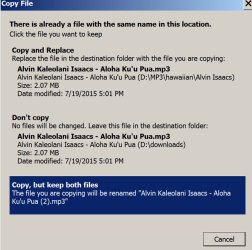
Here's the message that pops up.

Choose the bottom choice, like I've highlighted in blue.

The first choice would overwrite, which I assume you would NOT want.
 

Attachments

  • Untitled-1.jpg
    Untitled-1.jpg
    132.4 KB · Views: 0

My Computer My Computer

At a glance

Windows 7 Home Premium SP1, 64-bitIntel Skylake i5-6600K, not overclocked8 GB HyperX DDR4-2666 (2 x 4 GB)none; graphics are integrated on CPU
Computer type
PC/Desktop
Computer Manufacturer/Model Number
Ignatz Special; 4 speed manual gearbox; factory air conditioning; one of one
OS
Windows 7 Home Premium SP1, 64-bit
CPU
Intel Skylake i5-6600K, not overclocked
Motherboard
AsRock Z170M Extreme 4, micro ATX
Memory
8 GB HyperX DDR4-2666 (2 x 4 GB)
Graphics Card(s)
none; graphics are integrated on CPU
Sound Card
onboard: Realtek ALC1150; external: USB Behringer UF0-202
Monitor(s) Displays
Dell S2340M 23 inch IPS
Screen Resolution
1600 x 900
Hard Drives
System: Crucial MX100 series SSD, 128 GB;
Data: Samsung Spinpoint 103SJ, 1 TB;
Backup: WD Caviar Green WD30EZRX-00D8PB0, 3 TB
PSU
Rosewill SilentNight 500 watt fanless, semi-modular
Case
Antec Solo II
Cooling
Noctua NH-U12S; Noctua F12 intake, Noctua S12A exhaust
Keyboard
Microsoft 200 6JH-00001 USB
Mouse
Dell or Microsoft optical wired; USB
Antivirus
Microsoft Security Essentials and Malwarebytes Premium
Browser
Pale Moon
Other Info
All fans PWM; speeds at idle: CPU circa 500 rpm; intake circa 600 rpm; exhaust circa 600 rpm; CPU temps 27 idle and 47 C load in a warm room (27 C/81 F) when running Intel Extreme Tuning Utility stress test.
That works for me when I decide one file at a time.

When I copy a group of file and there is more than one conflict I get the checkbox:
* "Do this for the next # conflicts."

However, I don't see a way to distinguish two kinds of conflicts (except individually.)
1) The target's timestamp is the same or older than the source ---> replace the target.
2) The target is newer than the source ---> copy but rename the source.

Is there a way to apply multiple criteria without choosing each time there is a conflict.
1) The target's timestamp is the same or older than the source ---> replace the target.
2) The target is newer than the source ---> copy but rename the source.
3) When there is no target file ---> copy the source.
 

My Computer My Computer

At a glance

Windows 7 x644 MB, 16 MB
Computer type
PC/Desktop
Computer Manufacturer/Model Number
Dell Studio 15, HP Spectre
OS
Windows 7 x64
Memory
4 MB, 16 MB
Is there a way to apply multiple criteria without choosing each time there is a conflict.
1) The target's timestamp is the same or older than the source ---> replace the target.
2) The target is newer than the source ---> copy but rename the source.
3) When there is no target file ---> copy the source.

Not that I know of, in any "automated" fashion.

I think the best you could do with the method I use is just drag a bunch of files. Say you dragged 100.

If 27 of the 100 have no target with the same name, they will be copied with no interaction from you.

That leaves 73 uncopied.

You'd then immediately see the screen I posted above, asking you to make a choice for each pair of files that have matching names on the target and source.

You'd have to choose either the first choice or the second choice for each file, one at a time. You can look at the time stamp on each file pair as it's page comes up and decide accordingly--I'm assuming you'd be able to choose accurately since you are deciding ONLY on the basis of time stamp and the time stamps are shown with an accuracy of 1 second.

It might take you 3 or 4 seconds to read the time stamps for each pair of matching file names and make the appropriate choice, so maybe 5 minutes to page through the 73 remaining files.

There is probably some software that can do it in an automated fashion, but I've never looked for it.
 

My Computer My Computer

At a glance

Windows 7 Home Premium SP1, 64-bitIntel Skylake i5-6600K, not overclocked8 GB HyperX DDR4-2666 (2 x 4 GB)none; graphics are integrated on CPU
Computer type
PC/Desktop
Computer Manufacturer/Model Number
Ignatz Special; 4 speed manual gearbox; factory air conditioning; one of one
OS
Windows 7 Home Premium SP1, 64-bit
CPU
Intel Skylake i5-6600K, not overclocked
Motherboard
AsRock Z170M Extreme 4, micro ATX
Memory
8 GB HyperX DDR4-2666 (2 x 4 GB)
Graphics Card(s)
none; graphics are integrated on CPU
Sound Card
onboard: Realtek ALC1150; external: USB Behringer UF0-202
Monitor(s) Displays
Dell S2340M 23 inch IPS
Screen Resolution
1600 x 900
Hard Drives
System: Crucial MX100 series SSD, 128 GB;
Data: Samsung Spinpoint 103SJ, 1 TB;
Backup: WD Caviar Green WD30EZRX-00D8PB0, 3 TB
PSU
Rosewill SilentNight 500 watt fanless, semi-modular
Case
Antec Solo II
Cooling
Noctua NH-U12S; Noctua F12 intake, Noctua S12A exhaust
Keyboard
Microsoft 200 6JH-00001 USB
Mouse
Dell or Microsoft optical wired; USB
Antivirus
Microsoft Security Essentials and Malwarebytes Premium
Browser
Pale Moon
Other Info
All fans PWM; speeds at idle: CPU circa 500 rpm; intake circa 600 rpm; exhaust circa 600 rpm; CPU temps 27 idle and 47 C load in a warm room (27 C/81 F) when running Intel Extreme Tuning Utility stress test.
Back
Top