Can I restore back to Factory Settings Vista?

I'd install Win7 to the Acer partition after it has its file system checked and full GW Scan diagnostics/repair scan I uploaded above.

I would run the file checker and HD diagnostics/repair on data drive first, then unplug it until Win7 is installed.

Next run both tests on Acer HD, finish by writing zeroes to the Acer HD to get rid of that first partition which might also be interfering.

Then try installing Win7 there.

Ask if you have any questions.
thanks Greg yes Ill try tomorrow
 

My Computer My Computer

At a glance

Windows 7 and VistaIntel Core 2 Quad Processor Q90004 GB DDR3 MemoryATI Mobility Radeon HD 4670
Computer Manufacturer/Model Number
Acer Aspire 8935G
OS
Windows 7 and Vista
CPU
Intel Core 2 Quad Processor Q9000
Memory
4 GB DDR3 Memory
Graphics Card(s)
ATI Mobility Radeon HD 4670
Sound Card
ATI HDMI Audio Realtek
Screen Resolution
1920x1080
I would run the System File checker on all drives.

I'm also uploading for you the installation file for the best HD diagnostics I've found, GWScan which is Western Digital's Data Lifeguard. It works on almost every brand HD, not only diagnosing but fixing many problems. Certainly worth a try since it only costs a CD. Installer will place ISO in C root to burn to CD using ImgBurn. Boot it to run Full Scan on each HD, plugged in one at a time. I suggest you also use the feature to Zero the Acer HD as that first partition may be interfering with Win7 install and zeroing cleans the slate.

Is GW Scan easy to use?

Between SFC and Data Lifeguard I've saved several dozen HD's of all makes over the years, many still running.

Then try booting Win7 DVD to install it there. Use Custom Install, then Drive Tools to format the partition first.

not sure what " DRive Tools to format the partition first" means, I think I need sleep to get my brain going!:sleepy::D
 

My Computer My Computer

At a glance

Windows 7 and VistaIntel Core 2 Quad Processor Q90004 GB DDR3 MemoryATI Mobility Radeon HD 4670
Computer Manufacturer/Model Number
Acer Aspire 8935G
OS
Windows 7 and Vista
CPU
Intel Core 2 Quad Processor Q9000
Memory
4 GB DDR3 Memory
Graphics Card(s)
ATI Mobility Radeon HD 4670
Sound Card
ATI HDMI Audio Realtek
Screen Resolution
1920x1080
I would run the System File checker on all drives.

I'm also uploading for you the installation file for the best HD diagnostics I've found, GWScan which is Western Digital's Data Lifeguard. It works on almost every brand HD, not only diagnosing but fixing many problems. Certainly worth a try since it only costs a CD. Installer will place ISO in C root to burn to CD using ImgBurn. Boot it to run Full Scan on each HD, plugged in one at a time. I suggest you also use the feature to Zero the Acer HD as that first partition may be interfering with Win7 install and zeroing cleans the slate.

Is GW Scan easy to use?

Between SFC and Data Lifeguard I've saved several dozen HD's of all makes over the years, many still running.

Then try booting Win7 DVD to install it there. Use Custom Install, then Drive Tools to format the partition first.

not sure what " DRive Tools to format the partition first" means, I think I need sleep to get my brain going!:sleepy::D


meant to say - will GWscan repair the problems in Acer HD? magic if it does - is it easy to use? I had better sign off now as its 3,00 am here!:sleepy:
 

My Computer My Computer

At a glance

Windows 7 and VistaIntel Core 2 Quad Processor Q90004 GB DDR3 MemoryATI Mobility Radeon HD 4670
Computer Manufacturer/Model Number
Acer Aspire 8935G
OS
Windows 7 and Vista
CPU
Intel Core 2 Quad Processor Q9000
Memory
4 GB DDR3 Memory
Graphics Card(s)
ATI Mobility Radeon HD 4670
Sound Card
ATI HDMI Audio Realtek
Screen Resolution
1920x1080
GWScan/Data Lifeguard HD diagnostics/repair scan can fix many problems that kill a HD. That and the File System check are about as much as you can do for a HD before formatting, which itself locks out bad blocks.

Be sure to check the box to fix problems found in file checker. It also says it needs a drive letter assigned to run on a partition so you might need to rightclick and assign a drive letter to each partition before scanning.

The Drive Tools will be offered during Win7 install when you boot from DVD and select Custom install. You can see screenshots here of the process: http://www.sevenforums.com/tutorials/1649-clean-install-windows-7-a.html

We are pulling for you here, Susan, as you are due some good luck soon!
 
I would run the System File checker on all drives.

I'm also uploading for you the installation file for the best HD diagnostics I've found, GWScan which is Western Digital's Data Lifeguard. It works on almost every brand HD, not only diagnosing but fixing many problems. Certainly worth a try since it only costs a CD. Installer will place ISO in C root to burn to CD using ImgBurn. Boot it to run l Scan on each HD, plugged in one at a time. I suggest you also use the feature to Zero the Acer HD as that first partition may be interfering with Win7 install and zeroing cleans the slate.

Between SFC and Data Lifeguard I've saved several dozen HD's of all makes over the years, many still running.

Then try booting Win7 DVD to install it there. Use Custom Install, then Drive Tools to format the partition first.

good morning!
just burning gw scan to disc not quite sure about "boot it to run 1 scan on each Hd. shall i run it from external dvd drive wherre it has just burned
 

My Computer My Computer

At a glance

Windows 7 and VistaIntel Core 2 Quad Processor Q90004 GB DDR3 MemoryATI Mobility Radeon HD 4670
Computer Manufacturer/Model Number
Acer Aspire 8935G
OS
Windows 7 and Vista
CPU
Intel Core 2 Quad Processor Q9000
Memory
4 GB DDR3 Memory
Graphics Card(s)
ATI Mobility Radeon HD 4670
Sound Card
ATI HDMI Audio Realtek
Screen Resolution
1920x1080
hi susan i also have acer recovery disks (witch i made when i first got the PC - then threw in the drawer & installed vista ultimate & later windows 7 ultimate as i hate pre-installed windows) i did a little test last night as i have a complete PC backup of 7 so re-installing whole pc only takes about an hour anyway - what i did was to leave my partitions in plus my windows installation & tried to re-install using recovery disks & guess what `couldn`t be completed because of an i/o error` now on all my other pre-installed windows they usually just format the entire disk (partitions as well) & lay the recovery partition on the disk & install from it when its laid (witch is sometimes a hidden partition its self) anyway after re-formatting the entire drive (partitions as well) i re-installed using recovery disks without error (i know this isn't much help considering you need to recover data from a particular partition but at leased you can go back to vista if you want to) the only reason i can think of for this is with acer recovery disks they don't completely reformat the entire disk before laying the recovery partition & require the original layout of the disk or a clean one - just wondering what was your biggest problem with 7 ? was it wild & erratic processor usage making the system slow & unresponsive ? if so i can help you with this its a problem that you would not expect & is easy to solve (relatively) 7 is a great os (loads better than vista) i only had 2 issues one was the above mentioned witch i solved & a soundboard driver issue that i solved by making a hybrid xp/vista combination driver & installing in vista mode (in the troubleshooting section of 7) other than that its been like having xp back again with the nice look & feel of vista - i wouldn't be to quick to give up on 7 just yet - once you get used to it its great - its not perfect but its a real step up from vista - also what flavor of 7 do you have ? is it 32bit or 64bit ? i went back to 32bit as a lot of my software/hardware works better on 32bit plus one of my DVD drives is not compatible with 64bit even though it came with windows vista home premium 64bit -(NICE ONE ACER) same issue with the sata controller in the PC as well witch was designed for windows xp not vista (NICE ONE AGAIN ACER) so i had to remove it in the end completely as i couldn't get a driver to install during installation of vista or 7 witch meant bye bye to two of my hot-swap bays as i had to pull them out to put the DVD drives in my point is that it isn't always the fault of the OS as in my case they built the pc with two parts that were not compatible with the OS they supplied with it give 7 another try - good luck with it anyway if you do get the problem i mentioned above with 7 ill be glad to help with this
 
Last edited:
Place the GWScan in the built-in CD drive (if you have one) then restart computer. If prompted, boot from CD although it should autostart. Select Run GWScan, then on Next Screen Full Diagnostics scan.

You'll need to leave only one drive plugged in during scan of each. If not able to do this, then see what the results are of scan on DISK0.

As the last step after scanning both HD's, while leaving data drive unplugged I would use the feature to Write Zeros to the Acer HD to get it the cleanest possible for Win7 install. Be sure to create New partition to format using the Win7 DVD during install.
 
Place the GWScan in the built-in CD drive (if you have one) then restart computer. If prompted, boot from CD although it should autostart. Select Run GWScan, then on Next Screen Full Diagnostics scan.

You'll need to leave only one drive plugged in during scan of each. If not able to do this, then see what the results are of scan on DISK0.

As the last step after scanning both HD's, while leaving data drive unplugged I would use the feature to Write Zeros to the Acer HD to get it the cleanest possible for Win7 install. Be sure to create New partition to format using the Win7 DVD during install.
Am I to abandon Partition Wizard Bootable CD now?

Not sure what you mean by " leave only one drive plugged in" as they are both internal drives on laptop:confused:
 

My Computer My Computer

At a glance

Windows 7 and VistaIntel Core 2 Quad Processor Q90004 GB DDR3 MemoryATI Mobility Radeon HD 4670
Computer Manufacturer/Model Number
Acer Aspire 8935G
OS
Windows 7 and Vista
CPU
Intel Core 2 Quad Processor Q9000
Memory
4 GB DDR3 Memory
Graphics Card(s)
ATI Mobility Radeon HD 4670
Sound Card
ATI HDMI Audio Realtek
Screen Resolution
1920x1080
To Check File System using Partition Wizard you'll need to assign your HD's a letter.

This should be no problem with the data drive. Just rightclick it and assign a letter above C.

On the Acer HD, you'll likely need to rightclick>Delete each partition, then Create a New Primary partition formatted NTFS with drive letter C assigned. Apply all Steps.

Now Check File System on Acer HD.

Then boot the GW Scan CD which should autostart and default to Acer HD. As it is doing the full Diagnostics/Repair scan, observe that the size and name of the HD are the correct Acer HD, not the data drive.

Once Diagnostic scan is complete, it is then safe to Write Zeros to the Acer HD to get it the cleanest possible for Win7 install. Afterwards, boot the Win7 DVD, select Custom install, then Drive Tools to Create New partition, format and install.

If you'd rather not do this extra step of zeroing, then after Diagnostic test proceed directly to boot Win7 DVD and install to the partition you created.
 
I right clicked on DATA, was about to label it “(D) Data” when it just closed the box down and showed “unassigned” and appeared to have deleted everything in it!! Was able to recover it with the “undo” button. Is it essential that I file check DATA as I don’t want to delete the data in it?
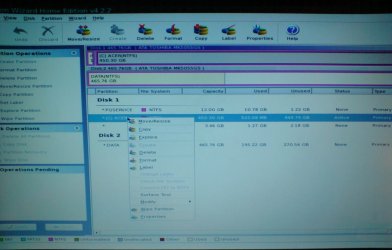
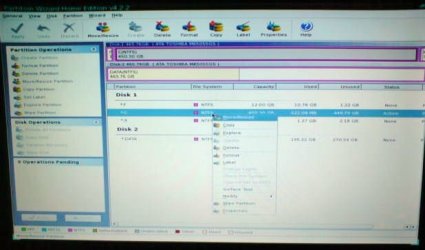
I have assigned ( C ) to ACER but cant open up “Check File System” as it is greyed out (see photo). What shall I do?
:eek:
 

Attachments

  • DSC01895.JPG
    DSC01895.JPG
    136 KB · Views: 23

My Computer My Computer

At a glance

Windows 7 and VistaIntel Core 2 Quad Processor Q90004 GB DDR3 MemoryATI Mobility Radeon HD 4670
Computer Manufacturer/Model Number
Acer Aspire 8935G
OS
Windows 7 and Vista
CPU
Intel Core 2 Quad Processor Q9000
Memory
4 GB DDR3 Memory
Graphics Card(s)
ATI Mobility Radeon HD 4670
Sound Card
ATI HDMI Audio Realtek
Screen Resolution
1920x1080
I'd just not do the file system check on data drive until you get Win7 installed.

To run chkdsk on C, boot Win7 DVD, select Repair on second screen, click through to Recovery Tools list to open a Command Line, type:

CHKDSK C:
CHKDISK /F

After chkdsik has scanned/repaired file system, boot GWScan CD to run full HD diag/repair scan on C, then boot Win7 DVD and install to C:
 
Hi Greg
Well I had hoped to be up and running with Windows 7 by now! Afraid not yet!
This is an update so far
1) PARTITION WIZARD
I assigned letters to all partitions in Disk 1 - F, C, X
But I stilI couldn't run "Check File System" (see pic 1)
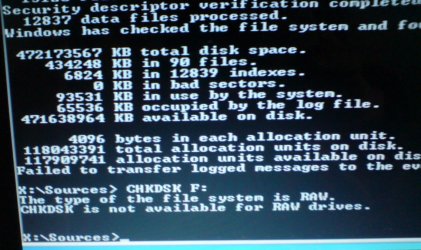
WINDOWS 7 REPAIR CONSOLE -
CHKDISK C:
See pic 2
CHKDISK F:
see pic 3
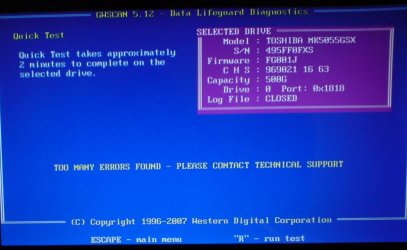
2) GWSCAN
It ran Ok but said it would take 300+ hours to complete and then it said
"Too many errors found please contact Technical Support"
pic 4
This speaks volumes I think!!
3) WINDOWS 7 DVD REPAIR CONSOLE
SELECT DISK 0 CLEAN ALL
pic 5

At the moment Windows Repair is trying to clean Disc 0 - it has been running for
nearly two hours now - I suppose there is a lot to clean!!
When its done I shall attempt to put Windows 7 in if you think its worth a try.
I think there has been a problem with that drive for a long while which is why I had so
much trouble installing Windows 7 and so next step will be RMA to retailers.
Susan
update
clean all finished ok
about to reboot windows 7 disc to start installing when i
had bad error message Hard drive about to fail see pic 6
so the problem is the hard drive
 

Attachments

  • pic 1.JPG
    pic 1.JPG
    41.9 KB · Views: 20
  • Pic 2.JPG
    Pic 2.JPG
    123.3 KB · Views: 18
  • pic 3.JPG
    pic 3.JPG
    131.2 KB · Views: 18
  • pic 4.JPG
    pic 4.JPG
    89.9 KB · Views: 25
  • pic 5.JPG
    pic 5.JPG
    97.3 KB · Views: 21
  • pic 6.JPG
    pic 6.JPG
    44 KB · Views: 21

My Computer My Computer

At a glance

Windows 7 and VistaIntel Core 2 Quad Processor Q90004 GB DDR3 MemoryATI Mobility Radeon HD 4670
Computer Manufacturer/Model Number
Acer Aspire 8935G
OS
Windows 7 and Vista
CPU
Intel Core 2 Quad Processor Q9000
Memory
4 GB DDR3 Memory
Graphics Card(s)
ATI Mobility Radeon HD 4670
Sound Card
ATI HDMI Audio Realtek
Screen Resolution
1920x1080
Last but definitely not least thanks so much to all who tried so hard to help

hopefully i will be back on Windows 7 soon


Susan
 

My Computer My Computer

At a glance

Windows 7 and VistaIntel Core 2 Quad Processor Q90004 GB DDR3 MemoryATI Mobility Radeon HD 4670
Computer Manufacturer/Model Number
Acer Aspire 8935G
OS
Windows 7 and Vista
CPU
Intel Core 2 Quad Processor Q9000
Memory
4 GB DDR3 Memory
Graphics Card(s)
ATI Mobility Radeon HD 4670
Sound Card
ATI HDMI Audio Realtek
Screen Resolution
1920x1080
Glad you've finally found the cause, Susan, and that you'll soon get to experience Win7 without the HD probs.
 
susan if you go to pc world & ask the tech guys for a brown box (no instructions or frills just hard drive unformatted) you will be able to get a 500gb hdd for £100-£120 cant remember exact price but its somewhere between these two prices as my friend got one for his ps3 not so long ago just make sure you get the right type for the laptop (SATA or PATA) connection (i would imagine its a SATA connection but i cant be sure as i don't know the age of the laptop) but if you take it in with you or the broken hard drive they can tell you this - only thing with this is im not sure if your acer backup disks will install to a new hdd as those recovery disks are specifically tailored to the hardware on the system they are to be installed to - but as i have read in the previous posts you are going to give windows 7 another try anyway so its a non issue -good luck with it i think you will be impressed with 7 the only problem you might run in to is the famous media player 12 processor hogging issue but this can be solved (if you don't mind going back to media player 11)
 
Back
Top