
dylanjhall
New member
- Local time
- 9:04 PM
- Messages
- 1
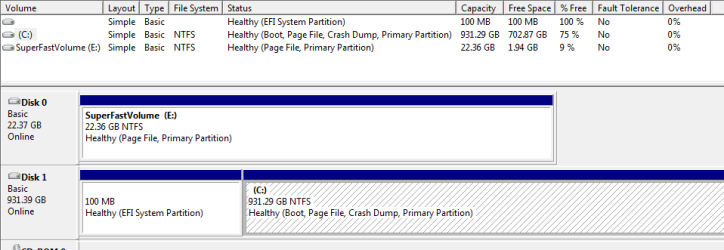
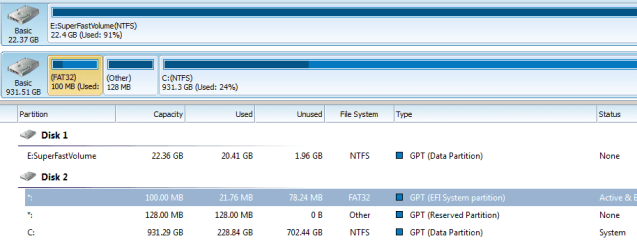
I think I mistakenly did 'create partion primary' on System Reserved Partion using Diskpart.
I was trying to repair a USB stick by using Diskpart. I did a 'create partion primary' without doing a select disk first. I read that if a disk is not selected that Dskpart selects the active/in focus disk. So I think I wiped out the reserved partion because the 100mb partion now says 'Healthy EFI partition'.
I have not Rebooted my laptop yet. I am afraid that if I do I will not be able to boot into Windows
Is there a way to restore the 100mb partion to what it was?
What should I do to verify/fix this situation?
DH
I was trying to repair a USB stick by using Diskpart. I did a 'create partion primary' without doing a select disk first. I read that if a disk is not selected that Dskpart selects the active/in focus disk. So I think I wiped out the reserved partion because the 100mb partion now says 'Healthy EFI partition'.
I have not Rebooted my laptop yet. I am afraid that if I do I will not be able to boot into Windows
Is there a way to restore the 100mb partion to what it was?
What should I do to verify/fix this situation?
DH
Attachments
My Computer
At a glance
64 Bit Windows 7 Professionali7-3537U8gnVidia GeForce
- Computer type
- Laptop
- Computer Manufacturer/Model Number
- Asus
- OS
- 64 Bit Windows 7 Professional
- CPU
- i7-3537U
- Memory
- 8g
- Graphics Card(s)
- nVidia GeForce
- Hard Drives
- 23g SSD
1TB HDD
- Antivirus
- McAfee
- Browser
- Chrome


