Solved Cleaned My ENTIRE Hard Drive. How can I restore it?

blunde

New member
Local time
9:53 AM
Messages
12
Please help me! I made a big mistake today and I have no clue how to fix it. I've been searching for a long time but can't find anything on the internet. I think this is the best place I could ask for help so here it goes:

I have an HP Pavilion desktop. It came factory default with Windows 7 Home Premium 64-bit and I've been using it for years. I saved all my important files and photos on it. Recently, I had the thought of dual-booting a Windows 8.1 OS on it. I watched quite a lot of videos and it seemed pretty straight forward. I also have a Windows 8.1 product key.

At the installation, there were so many issues. They were all relative to how my licence is not valid and such before I'm even given the option to enter one. I found out that I could create an EI.cfg file to get past it and install Windows 8.1 without a licence key and activate it later. Then for the last time, I got an issue saying that Windows can't be installed on my hard drive partition 3 (which was a 64 GB NTFS primary partition that I created with my Windows 7 operating system.) So, I couldn't install it. I even went back on my Windows 7 operating system to reformat the volume to NTFS but the problem remained.

Then, I found online an article about cleaning the volume using diskpart instead of disk management. I got lazy this time and decided to just follow the instructions on the Windows 8.1 installation disk. I pressed [shift] + [F10] to launch command prompt and got to disk part. Then I selected disk 0 and inside it, SELECTED partition 3. Then I [clean]ed it thinking that I will create a new primary partition later on (according to the tutorial.) But it turned out, diskpart deleted MY ENTIRE DISK, NOT JUST PARTITION 3.

I continued with the (custom) installation and found out that it's telling me I have just one disk (initially had 4) with 523 GB remaining. That's my entire hard disk. So I thought what the hell just happened, and decided to cancel the installation and go back to Windows 7 to recreate a volume for my 64 GB partition. But, when I turned on my computer, it gave me the following error, "Reboot and Select proper Boot device or Insert Boot Media in selected Boot device and press a key." It was not long until I realised that I didn't just [clean] partition 3 of disk 0, I deleted the entire disk 0 AKA THE WHOLE INTERNAL HARD DRIVE THAT HAD WINDOWS 7 HOME PREMIUM INSTALLED ON IT.

Is there any way I could undo that clean? Please save my butt. I had a restore point and made an image back up and all that good stuff, but I can't get access to those. When I select the troubleshoot option in the Windows 8.1 Installation, it tells me that there is no restore point for this system. Does that mean I deleted all my files and back ups as well?

I haven't done anything beyond that point. I don't want to do anything else on the hard drive that will not allow me to recover my data if that's possible. There has to be an expert here, please help me out. This is very critical.
 

My Computer My Computer

At a glance

Windows 7 Home PremiumAMD Athlon II x2 250 Dual-Core4GB DDR3NVIDIA GeForce 6150 SE
Computer type
PC/Desktop
Computer Manufacturer/Model Number
HP
OS
Windows 7 Home Premium
CPU
AMD Athlon II x2 250 Dual-Core
Memory
4GB DDR3
Graphics Card(s)
NVIDIA GeForce 6150 SE
Antivirus
Norton
Browser
Chrome
hi welcome to the forum. I just have a question for you. when you said you did an image backup where was the backup stored at? was it on an external drive or the same drive the OS is installed on? if was on same drive then you are most likely out of luck using the backup image.
 

My Computer My Computer

At a glance

win 10
Computer type
PC/Desktop
Computer Manufacturer/Model Number
dell xps 9000
OS
win 10
If you made a valid image and stored it on some entirely separate drive, you should be able to recover using that.

Otherwise---you need to concentrate on recovering your partitions--rather than recovering the individual files. Jumanji is the house guru on partition recovery and you can hope he sees this post.

You'll probably be asked to download and run Partition Wizard, but I wouldn't do anything until you can hear from Jumanji.

In particular--don't try to write anything to the drive.

Yes---Diskpart "clean" and "clean all" commands affect the entire disk, not just certain partitions.
 

My Computer My Computer

At a glance

Windows 7 Home Premium SP1, 64-bitIntel Skylake i5-6600K, not overclocked8 GB HyperX DDR4-2666 (2 x 4 GB)none; graphics are integrated on CPU
Computer type
PC/Desktop
Computer Manufacturer/Model Number
Ignatz Special; 4 speed manual gearbox; factory air conditioning; one of one
OS
Windows 7 Home Premium SP1, 64-bit
CPU
Intel Skylake i5-6600K, not overclocked
Motherboard
AsRock Z170M Extreme 4, micro ATX
Memory
8 GB HyperX DDR4-2666 (2 x 4 GB)
Graphics Card(s)
none; graphics are integrated on CPU
Sound Card
onboard: Realtek ALC1150; external: USB Behringer UF0-202
Monitor(s) Displays
Dell S2340M 23 inch IPS
Screen Resolution
1600 x 900
Hard Drives
System: Crucial MX100 series SSD, 128 GB;
Data: Samsung Spinpoint 103SJ, 1 TB;
Backup: WD Caviar Green WD30EZRX-00D8PB0, 3 TB
PSU
Rosewill SilentNight 500 watt fanless, semi-modular
Case
Antec Solo II
Cooling
Noctua NH-U12S; Noctua F12 intake, Noctua S12A exhaust
Keyboard
Microsoft 200 6JH-00001 USB
Mouse
Dell or Microsoft optical wired; USB
Antivirus
Microsoft Security Essentials and Malwarebytes Premium
Browser
Pale Moon
Other Info
All fans PWM; speeds at idle: CPU circa 500 rpm; intake circa 600 rpm; exhaust circa 600 rpm; CPU temps 27 idle and 47 C load in a warm room (27 C/81 F) when running Intel Extreme Tuning Utility stress test.
hi welcome to the forum. I just have a question for you. when you said you did an image backup where was the backup stored at? was it on an external drive or the same drive the OS is installed on? if was on same drive then you are most likely out of luck using the backup image.
Yeah it was on the same internal hard drive.

If you made a valid image and stored it on some entirely separate drive, you should be able to recover using that.

Otherwise---you need to concentrate on recovering your partitions--rather than recovering the individual files. Jumanji is the house guru on partition recovery and you can hope he sees this post.

You'll probably be asked to download and run Partition Wizard, but I wouldn't do anything until you can hear from Jumanji.

In particular--don't try to write anything to the drive.

Yes---Diskpart "clean" and "clean all" commands affect the entire disk, not just certain partitions.

The thing is, I don't have access to any operating system on the computer right now. I get an error after turning it on that tells me to install an operating system. So would I have to reinstall Win 7 and then get partition wizard or how will this work?
 

My Computer My Computer

At a glance

Windows 7 Home PremiumAMD Athlon II x2 250 Dual-Core4GB DDR3NVIDIA GeForce 6150 SE
Computer type
PC/Desktop
Computer Manufacturer/Model Number
HP
OS
Windows 7 Home Premium
CPU
AMD Athlon II x2 250 Dual-Core
Memory
4GB DDR3
Graphics Card(s)
NVIDIA GeForce 6150 SE
Antivirus
Norton
Browser
Chrome
If the information, the data folders are files are very important:
Write down everything you remember doing up to right now.
With proof of purchase of computer [which includes the originally installed Windows], take the computer and whatever usb and dvd boots you have, down to a business-oriented computer fixit place, let a trueblue computer guru well versed in partition and data recovery do his/her job. It will cost you.
While Jumanji is one of the finest forum techs in the world, if you are not familiar with partition and data recovery, you might accidentally miss-step with his detailed and expert instructions and do more accidental "logical" [not physical] damage to your partitions and your data.
And, going forward, make full image backups of your OS and data partitions onto available and trusted external media.
 

My Computer My Computer

At a glance

Windows 7 Professional 64-bitDesktop i5; Acers i5 & i7desktop 16GB; 1 Acer 8GB & 1 Acer 16GB
Computer type
PC/Desktop
Computer Manufacturer/Model Number
Antec desktop; Acer Aspire laptops
OS
Windows 7 Professional 64-bit
CPU
Desktop i5; Acers i5 & i7
Memory
desktop 16GB; 1 Acer 8GB & 1 Acer 16GB
Hard Drives
1TB split into 2 equal partitions [OS and data] usable by RJS
Internet Speed
AT&T DSL
Browser
FF, GChrome, msIE
Other Info
Windows 7 Firewall, Emsisoft AM/AV, MSE [scan-only], SpywareBlaster, Ruiware/BillP combine
Do you have a spare hard drive? I would take out the one you cleaned and replace it with the spare. Install Windows on the spare and then connect the original drive as a backup. Then wait for Jumanji to help you. Even if you don't activate Windows, I think they give you a 30 trial period. Hopefully that will be long enough to recover your files.

I just read RolandJS post and that is good advice. If you are not experienced with partitions, you could do more damage. I guess it's just a matter of how much your willing to spend.
 

My Computer My Computer

At a glance

Windows 7 Home Premium 64bitiNTEL Core i7 2630QM 2GHz8GBNVIDIA GeForce GT 555M
Computer type
Laptop
Computer Manufacturer/Model Number
Alienware
OS
Windows 7 Home Premium 64bit
CPU
iNTEL Core i7 2630QM 2GHz
Memory
8GB
Graphics Card(s)
NVIDIA GeForce GT 555M
Hard Drives
INTEL SSDSC2CW240A3
Antivirus
Windows Defender
Browser
Google Chrome
Do you have a spare hard drive? I would take out the one you cleaned and replace it with the spare. Install Windows on the spare and then connect the original drive as a backup. Then wait for Jumanji to help you. Even if you don't activate Windows, I think they give you a 30 trial period. Hopefully that will be long enough to recover your files.

I just read RolandJS post and that is good advice. If you are not experienced with partitions, you could do more damage. I guess it's just a matter of how much your willing to spend.
I do have a different computer so I'm not in any rush of trying to get that computer started again. But I still need to get those files back because I saved some important documents. I should've created a back up of them but my brain thought it wouldn't be necessary.

By the way is there any way I could contact Jumanji?
 

My Computer My Computer

At a glance

Windows 7 Home PremiumAMD Athlon II x2 250 Dual-Core4GB DDR3NVIDIA GeForce 6150 SE
Computer type
PC/Desktop
Computer Manufacturer/Model Number
HP
OS
Windows 7 Home Premium
CPU
AMD Athlon II x2 250 Dual-Core
Memory
4GB DDR3
Graphics Card(s)
NVIDIA GeForce 6150 SE
Antivirus
Norton
Browser
Chrome

My Computer My Computer

At a glance

Win-7-Pro64bit 7-H-Prem-64biti7-5930K 2nd i9-9940x both water blocked VRM'...Trident-z 3200C14 2nd Trident-z 3600C16EVGA 1080ti ftw3 2nd Titan Xp both water blocked
Computer type
PC/Desktop
Computer Manufacturer/Model Number
Custom assembled by me :}
OS
Win-7-Pro64bit 7-H-Prem-64bit
CPU
i7-5930K 2nd i9-9940x both water blocked VRM's too
Motherboard
ASUS SABERTOOTH X99 2nd ASUS x299 Apex
Memory
Trident-z 3200C14 2nd Trident-z 3600C16
Graphics Card(s)
EVGA 1080ti ftw3 2nd Titan Xp both water blocked
Sound Card
Built-in Realtek
Monitor(s) Displays
1-AOC G2460PG 24"G-Sync 144Hz/ 2nd 1-ASUS VG248QE 24" 144Hz
Screen Resolution
1920 x 1080 144Hz
Hard Drives
2-Samsung M.2 Evo & Evo Plus
2-Samsung 850 EVO 500GB SSD's/ 3-2.5 W.D. Black 1tb-&3-1tb/3-3.5 WD Black 1tb hdd's
PSU
EVGA SuperNOVA 1000-P2 2nd 1200-P2
Case
2-Corsair Obsidian Series 450D Black ATX Mid Tower
Cooling
Custom water loops
Keyboard
Logitech G710+/ 2nd Logitech G910
Mouse
2-RedDragon M901 Perdition 16400 dpi Gaming mouse = wired
Internet Speed
Comcast Ping 19ms 89.31mbps download speed 6.12mbps upload
Antivirus
Malwarebytes Pro/ Superantispyware Pro
Browser
FireFox & Pale moon
Other Info
2nd ASUS X299 Apex/Intel i9-9940x with Custom water loop/7H-Prem-x64/Corsair 450D case/Ram Trident-z 3600C16 4x8gb / Samsung970Evo plus 500gb SSD/Dual ssd EZ swap evo/PSU EVGA SuperNova 1200w-P2 80+Platinum/GPU Titan Xp /8-ML-140 on push-pull on 2-280GTX rads
Hi,
As stated recovering the partitions would be the first step
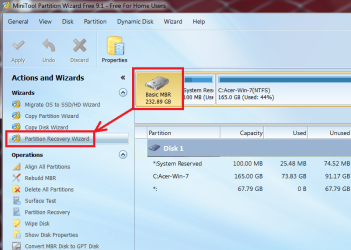
Free mini tool has that feature.
Best Free Partition Manager for Windows | MiniTool Partition Free
View attachment 392234

Sounds proper but my question is, how do I download the software? I don't have any operating system on the pc. It tells me to "Reboot and Select proper Boot device or Insert Boot Media in selected Boot device and press a key". Should I reinstall Windows 7? That will mean I have to write on the disk though. Or is there a way I could get that program without having an operating system (this thought is weird but just thought I might ask.)
 

My Computer My Computer

At a glance

Windows 7 Home PremiumAMD Athlon II x2 250 Dual-Core4GB DDR3NVIDIA GeForce 6150 SE
Computer type
PC/Desktop
Computer Manufacturer/Model Number
HP
OS
Windows 7 Home Premium
CPU
AMD Athlon II x2 250 Dual-Core
Memory
4GB DDR3
Graphics Card(s)
NVIDIA GeForce 6150 SE
Antivirus
Norton
Browser
Chrome
You have to go to a working PC, a library perhaps, or a friend.

What are you using to talk to us now ?
 

My Computer My Computer

At a glance

Windows 10 Pro x64Intel Core i7 6700KGSkill TridentZ RGB 16GB 3600 16-16-16-36EVGA GTX 980 Ti SC x2
Computer type
PC/Desktop
Computer Manufacturer/Model Number
Skylake Special #666
OS
Windows 10 Pro x64
CPU
Intel Core i7 6700K
Motherboard
Asus Sabertooth Z170 Mark 1
Memory
GSkill TridentZ RGB 16GB 3600 16-16-16-36
Graphics Card(s)
EVGA GTX 980 Ti SC x2
Sound Card
Realtek High Definition
Monitor(s) Displays
AOC G2460PG
Screen Resolution
1920 x 1080 144Hz
Hard Drives
Samsung 860 Pro 256GB, Seagate Barracuda 4TB x2
PSU
EVGA 1000 P2, EVGA White Custom Braided Cables
Case
Corsair Vengeance C70 Gunmetal Black
Cooling
Corsair H100i v2, Corsair ML120 x2, Thermal Grizzly Kryonaut
Keyboard
Logitech G910 Orion Spectrum
Mouse
Logitech G700s
Internet Speed
Verizon Fios Quantum Gateway 75/75
Antivirus
Windows Defender, Malwarebytes Free 3.8.3
Browser
Chrome
Other Info
Corsair SP120 x4, LG Blu-ray Drive, Durabrand HT-395 100 Watt Dolby Digital Amp, Corsair H2100 Wireless 7.1 Headset
You have to go to a working PC, a library perhaps, or a friend.

What are you using to talk to us now ?

I'm using my Windows 10 laptop right now. So does that mean I could download the software on this laptop and connect that hard drive? I'm pretty sure it doesn't connect via usb, so I'll probably need clearance on that.
 
Last edited:

My Computer My Computer

At a glance

Windows 7 Home PremiumAMD Athlon II x2 250 Dual-Core4GB DDR3NVIDIA GeForce 6150 SE
Computer type
PC/Desktop
Computer Manufacturer/Model Number
HP
OS
Windows 7 Home Premium
CPU
AMD Athlon II x2 250 Dual-Core
Memory
4GB DDR3
Graphics Card(s)
NVIDIA GeForce 6150 SE
Antivirus
Norton
Browser
Chrome

My Computer My Computer

At a glance

Win-7-Pro64bit 7-H-Prem-64biti7-5930K 2nd i9-9940x both water blocked VRM'...Trident-z 3200C14 2nd Trident-z 3600C16EVGA 1080ti ftw3 2nd Titan Xp both water blocked
Computer type
PC/Desktop
Computer Manufacturer/Model Number
Custom assembled by me :}
OS
Win-7-Pro64bit 7-H-Prem-64bit
CPU
i7-5930K 2nd i9-9940x both water blocked VRM's too
Motherboard
ASUS SABERTOOTH X99 2nd ASUS x299 Apex
Memory
Trident-z 3200C14 2nd Trident-z 3600C16
Graphics Card(s)
EVGA 1080ti ftw3 2nd Titan Xp both water blocked
Sound Card
Built-in Realtek
Monitor(s) Displays
1-AOC G2460PG 24"G-Sync 144Hz/ 2nd 1-ASUS VG248QE 24" 144Hz
Screen Resolution
1920 x 1080 144Hz
Hard Drives
2-Samsung M.2 Evo & Evo Plus
2-Samsung 850 EVO 500GB SSD's/ 3-2.5 W.D. Black 1tb-&3-1tb/3-3.5 WD Black 1tb hdd's
PSU
EVGA SuperNOVA 1000-P2 2nd 1200-P2
Case
2-Corsair Obsidian Series 450D Black ATX Mid Tower
Cooling
Custom water loops
Keyboard
Logitech G710+/ 2nd Logitech G910
Mouse
2-RedDragon M901 Perdition 16400 dpi Gaming mouse = wired
Internet Speed
Comcast Ping 19ms 89.31mbps download speed 6.12mbps upload
Antivirus
Malwarebytes Pro/ Superantispyware Pro
Browser
FireFox & Pale moon
Other Info
2nd ASUS X299 Apex/Intel i9-9940x with Custom water loop/7H-Prem-x64/Corsair 450D case/Ram Trident-z 3600C16 4x8gb / Samsung970Evo plus 500gb SSD/Dual ssd EZ swap evo/PSU EVGA SuperNova 1200w-P2 80+Platinum/GPU Titan Xp /8-ML-140 on push-pull on 2-280GTX rads
Why would you take out the HDD from the laptop, buy an external enclosure, put that HDD into that external enclosure and then try to recover the data?

Download the bootable CD Free version ISO from here https://www.partitionwizard.com/download.html

Note: Download the free version and not the server edition. If your Windows 7 was 32bit, download the 32 bit version. If 64 bit, download the 64bit version.

Create a bootable pendrive with that ISO using Rufus. https://rufus.akeo.ie/ ( Make sure your pendrive is empty. You should back up any data in it elsewhere before using Rufus on it.)

You can then boot your HP laptop from that pendrive and run Partition Wizard to check the HDD on your HP Laptop.

( Follow the procedure here http://www.sevenforums.com/hardware...ly-unrecognisable-hard-drive.html#post2936753 to create the bootable PW pendrive. You will be using the PW ISO instead of Lucid Puppy ISO in that post. During the creation process Rufus will ask your permission to download the new vesa menu. Say yes and it will do the job.)

One Important question: Did you use diskpart Clean or diskpart cleanall. If you had used diskpart cleanall, it would have written zeros to all sectors of the HDD and your data is lost irrecoverably. The data which has been zeroed cannot be recovered by any means.
 
Last edited:

My Computer My Computer

At a glance

Windows 7 Home Premium 32 bit
OS
Windows 7 Home Premium 32 bit
Why would you take out the HDD from the laptop, buy an external enclosure, put that HDD into that external enclosure and then try to recover the data?

Download the bootable CD Free version ISO from here https://www.partitionwizard.com/download.html

Note: Download the free version and not the server edition. If your Windows 7 was 32bit, download the 32 bit version. If 64 bit, download the 64bit version.

Create a bootable pendrive with that ISO using Rufus. https://rufus.akeo.ie/ ( Make sure your pendrive is empty. You should back up any data in it elsewhere before using Rufus on it.)

You can then boot your HP laptop from that pendrive and run Partition Wizard to check the HDD on your HP Laptop.

( Follow the procedure here http://www.sevenforums.com/hardware...ly-unrecognisable-hard-drive.html#post2936753 to create the bootable PW pendrive. You will be using the PW ISO instead of Lucid Puppy ISO in that post. During the creation process Rufus will ask your permission to download the new vesa menu. Say yes and it will do the job.)

One Important question: Did you use diskpart Clean or diskpart cleanall. If you had used diskpart cleanall, it would have written zeros to all sectors of the HDD and your data is lost irrecoverably. The data which has been zeroed cannot be recovered by any means.

I had used diskpart clean, not diskpart cleanall. Hopefully I'll be able to recover the data.

By the way the problem I have is with an HP Pavilion a4310f Desktop PC*, not an HP laptop, just thought I should clear this in case there is a difference.

So if I was to create a bootable pendrive of the Bootable Partition Manager using Rufus and boot from the pendrive on the PC, I will be able to use the Partition Manager software without having to take out my hard drive and connecting it to a different PC is that correct? Also, if I do this, I won't need to purchase an external enclosure right?

*This is exactly my product: HP Pavilion a4310f Desktop PC Product Specifications | HP® Customer Support
 

My Computer My Computer

At a glance

Windows 7 Home PremiumAMD Athlon II x2 250 Dual-Core4GB DDR3NVIDIA GeForce 6150 SE
Computer type
PC/Desktop
Computer Manufacturer/Model Number
HP
OS
Windows 7 Home Premium
CPU
AMD Athlon II x2 250 Dual-Core
Memory
4GB DDR3
Graphics Card(s)
NVIDIA GeForce 6150 SE
Antivirus
Norton
Browser
Chrome
........So if I was to create a bootable pendrive of the Bootable Partition Manager using Rufus and boot from the pendrive on the PC, I will be able to use the Partition Manager software without having to take out my hard drive and connecting it to a different PC is that correct? Also, if I do this, I won't need to purchase an external enclosure right?.......

You are right. You can use the bootable pendrive and run Partition Wizard.

Noted it is a desktop and not a laptop. It does not change the equation. Wherever it is mentioned as a laptop, you may read it as desktop :).

Please note that even if Partition Recovery Wizard is able to find the partitions of interest and shows the files, you may not be able to make your HDD bootable. You may have to use bootable Lucid Puppy to copy the files on your HDD to an external HDD.That only if Partition Wizard is able to recover the partitions successfully.
 

My Computer My Computer

At a glance

Windows 7 Home Premium 32 bit
OS
Windows 7 Home Premium 32 bit
........So if I was to create a bootable pendrive of the Bootable Partition Manager using Rufus and boot from the pendrive on the PC, I will be able to use the Partition Manager software without having to take out my hard drive and connecting it to a different PC is that correct? Also, if I do this, I won't need to purchase an external enclosure right?.......

You are right. You can use the bootable pendrive and run Partition Wizard.

Noted it is a desktop and not a laptop. It does not change the equation. Wherever it is mentioned as a laptop, you may read it as desktop :).

Please note that even if Partition Recovery Wizard is able to find the partitions of interest and shows the files, you may not be able to make your HDD bootable. You may have to use bootable Lucid Puppy to copy the files on your HDD to an external HDD.That only if Partition Wizard is able to recover the partitions successfully.

Wow the Bootable Partition Manager software successfully restored my entire drive. I can see all my files are still there via the explore partition feature.

But I ran into an issue which I just want to see whether you can help fix it. After I exited the software and took out my usb, the computer booted and showed me this screen:

2j5o2f4.jpg

link to original picture: http://oi66.tinypic.com/2j5o2f4.jpg

This is normal, it shows this screen for five seconds every time I turn on the computer, then later continues to my booting device. But, it doesn't boot to my hard drive. As you said earlier that it may not be able to boot, I think this is the same issue. My computer doesn't pass this screen and a symptom is that I can't access the setup, boot menu, system recovery or diagnostics either.

I again plugged in my usb so it becomes the booting device, and it booted properly to the Minitool Partition Manager software. Upon exiting, I wanted to test if the functions displayed on the boot menu work now, and they did. I was able to access setup. So I thought there is an error with my boot disk (which is the 100 MB partition named "SYSTEM").

2lmqheg.jpg

Here is a picture of the software with my partitions so you could understand my preceding thoughts:
Link to original picture: http://oi64.tinypic.com/2lmqheg.jpg

I went back into the Partition Manager and saw that the status of the system partition was "None" so I changed it to Active. Still, the problem remained and I went back to the program to see that the HP partition (one where all my files are on) was automatically changed to "System" from "None."

I have some knowledge about hard drives and partitions so I thought that I may need to assign a drive letter to the HP partition, which was initially labelled as the C: drive which is default in Windows. But I just want to confirm if doing this will be safe. If it won't work, I might just use Lucid Puppy to copy all my files to an external hard drive. Or maybe if there is a way I could simply fix Windows 7 or reinstall it so all my files are intact.

This issue is almost solved so it'll be great help if you could tell me. It could save me a lot of time and money.
 
Last edited:

My Computer My Computer

At a glance

Windows 7 Home PremiumAMD Athlon II x2 250 Dual-Core4GB DDR3NVIDIA GeForce 6150 SE
Computer type
PC/Desktop
Computer Manufacturer/Model Number
HP
OS
Windows 7 Home Premium
CPU
AMD Athlon II x2 250 Dual-Core
Memory
4GB DDR3
Graphics Card(s)
NVIDIA GeForce 6150 SE
Antivirus
Norton
Browser
Chrome
I am glad that the bootable Partition Wizard was able restore the partitions.

As expected and told your drive is not bootable. You have done so many things in trying to make it dual boot, it is very difficult - atleast for me - to decipher what changes it would have done to the original boot records to be able to undo those changes. Merely assigning drive letters is not going to do it. May be other experts/Gurus ignatsatzonic / AddRAM / RolandJS / ThrashZone /DavidE can help you do the right corrections.

If you value your data, recovering the data is the first priority now. You are well advised to do that first using bootable Lucid Puppy.

Afterwards you can do anything to make your drive bootable. You are known to muck up things and do not do it again :) before you have all important data recovered and backed up.
 

My Computer My Computer

At a glance

Windows 7 Home Premium 32 bit
OS
Windows 7 Home Premium 32 bit
Haha thanks anyways. Just to be clear, I didn't install Windows 8.1 as I originally wanted to. As soon as I saw that my hard drive was empty, I immediately closed the installer. So I don't think there should've been any differences made in the original Windows 7 boot partition. I'll wait for a couple days to see if someone could reply, other wise I've backed up my important files and I'll just reinstall Windows and all my programs.
 

My Computer My Computer

At a glance

Windows 7 Home PremiumAMD Athlon II x2 250 Dual-Core4GB DDR3NVIDIA GeForce 6150 SE
Computer type
PC/Desktop
Computer Manufacturer/Model Number
HP
OS
Windows 7 Home Premium
CPU
AMD Athlon II x2 250 Dual-Core
Memory
4GB DDR3
Graphics Card(s)
NVIDIA GeForce 6150 SE
Antivirus
Norton
Browser
Chrome
I would run a Startup Repair and see if that gets Win 7 to bootup.
For this you need a Win 7 Installation media or System Repair disc.
Here is the tutorial:
http://www.sevenforums.com/tutorials/681-startup-repair.html

What I'm not sure of is if you need to assign the drive letter C to the HP partition using the bootable Partition Wizard CD for Startup Repair to work.
Perhaps someone else knows if that needs to be done for Startup Repair to work.
 

My Computer My Computer

At a glance

Multi-Boot W7_Pro_x64 W8.1_Pro_x64 W10_Pro_x6...AMD Athlon II x4 6206GB GSkill DDR2 800AMD 4670 GPU + AMD 4200 IGP
Computer type
PC/Desktop
Computer Manufacturer/Model Number
home built
OS
Multi-Boot W7_Pro_x64 W8.1_Pro_x64 W10_Pro_x64 +Linux_VMs +Chromium_VM
CPU
AMD Athlon II x4 620
Motherboard
Gigabyte GA-MA785G-UD3H
Memory
6GB GSkill DDR2 800
Graphics Card(s)
AMD 4670 GPU + AMD 4200 IGP
Sound Card
on board Realtek ALC889A
Monitor(s) Displays
RCA 40" LCD TV, Insignia 32" LCD TV, HP 15" LCD monitor
Screen Resolution
1680 x 1050
Hard Drives
OCZ Vertex 3 120GB,
Samsung F3 1TB (3),
Several others - WD, Seagate, Hitachi, ...
PSU
Corsair 500 W
Case
Rosewill mid tower
Cooling
CM 90mm rifle
Keyboard
Gyration wireless, Logitech wireless, Dell USB wired
Mouse
Gyration wireless, Logitech wireless, V7 USB wired
Internet Speed
Spectrum - 100Mbps D / 10Mbps U
Antivirus
Avast, MBAM3, EMET, WinPatrol
Browser
Pale Moon, Firefox, IE
Other Info
2 multi-boot PC's
Mainly HTPC/Office/Gen purpose (no gaming).
Trendnet USB KVM.
LG DVD burner/Blue Ray Player.
Tray system for removable SATA backup drives.

Not currently OCd, under-volted.
I use Hybrid sleep, rarely re-boot or shutdown.

Hauppauge HD-PVR, Avermedia PCIe TV Tuner, Hauppauge PCI TV Tuner.
Back
Top