

Hi all.
I just got my laptop's HDD replaced a couple weeks back, and I want to dual boot Windows XP. So first order of things is to create a new partition, right? My laptop only has one physical hdd so I thought it would just have two partitions. Turns out it's more complicated than that.
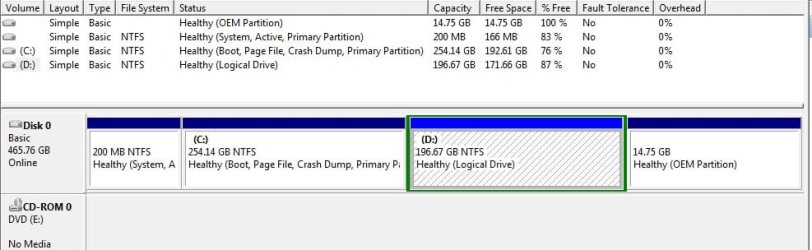
I only see C: and D: in Explorer - I'm aware of this Lenovo One Touch restore thingy and I figured that would explain having an additional partition. But two?
If I'm not mistaken, 4 is the maximum number of Windows-supported partitions, right? So I was thinking, no big deal, I'm not using D:, I could just format that. Which leads me to my problem. I've removed all my data from D: but there's still lots of things in it.
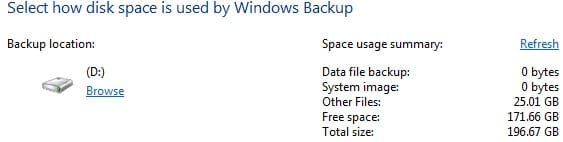
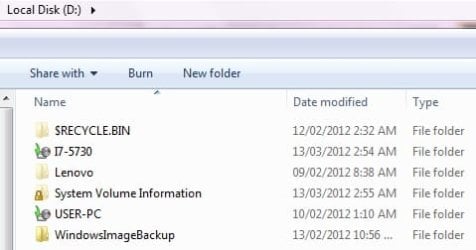
That's after turning off system restore and deleting all the backups. A little manual snooping around shows me that the Lenovo folder and that WindowsImageBackup folder both account for 12GB each, which explains the remaining usage of the D: partition.
1. Can I simply format the D: partition and turn it into a bootable WinXP x86 partition? I don't care about the backups in the two folders currently in it.
2. I have backups elsewhere and don't care about the stuff in the existing Win7 x64 boot partition ( C: ); what do I need to get up and running in the event something goes wrong and I render the computer unbootable? A Win7 repair disc? Will that allow me to boot from it and rebuild Win7 x64 on C: in case it becomes necessary?
Thanks.
I just got my laptop's HDD replaced a couple weeks back, and I want to dual boot Windows XP. So first order of things is to create a new partition, right? My laptop only has one physical hdd so I thought it would just have two partitions. Turns out it's more complicated than that.
I only see C: and D: in Explorer - I'm aware of this Lenovo One Touch restore thingy and I figured that would explain having an additional partition. But two?
If I'm not mistaken, 4 is the maximum number of Windows-supported partitions, right? So I was thinking, no big deal, I'm not using D:, I could just format that. Which leads me to my problem. I've removed all my data from D: but there's still lots of things in it.
That's after turning off system restore and deleting all the backups. A little manual snooping around shows me that the Lenovo folder and that WindowsImageBackup folder both account for 12GB each, which explains the remaining usage of the D: partition.
1. Can I simply format the D: partition and turn it into a bootable WinXP x86 partition? I don't care about the backups in the two folders currently in it.
2. I have backups elsewhere and don't care about the stuff in the existing Win7 x64 boot partition ( C: ); what do I need to get up and running in the event something goes wrong and I render the computer unbootable? A Win7 repair disc? Will that allow me to boot from it and rebuild Win7 x64 on C: in case it becomes necessary?
Thanks.
Last edited:
My Computer
At a glance
Win7 Pro x64Koa i5-2550K8 GBSapphire ATI 6870 1GB GDDR5
- Computer Manufacturer/Model Number
- Self-built rig
- OS
- Win7 Pro x64
- CPU
- Koa i5-2550K
- Memory
- 8 GB
- Graphics Card(s)
- Sapphire ATI 6870 1GB GDDR5
- Sound Card
- RealTek HD Audio / ATI HDMI Audio
- Monitor(s) Displays
- Samsung HDTV Monitor T23A350
- Screen Resolution
- 1920 x 1080
- Hard Drives
- - SSD (C:)
- HDD (D:)
- BD-ROM (E:)
- Keyboard
- Logitech G110
- Internet Speed
- Unifi home (5mbps)


