Can I upgrade from vista home premium to 7 ultimate?

KEVY

Banned
Local time
7:11 AM
Messages
20
I have a Compaq Pasario Notebook, with a preinstaled vista home premium x86.
And I have a HP-Compaq Windows 7 only Ultimate x86-x64 disc.

I once tried upgrading with a normal 7 home premium PC disc, but afther the second part of the instalation when the PC needed to restart the setup didn't continue, pc just started up and normaly loded in Vista. And it all most destroyed the keyboard and mouse quik lunch butons driver, or may be it was an eror becouse I had an whirles usb mouse and keyboard connected to my notebook.

So now I'm trying to upgrade to a superior version and using a 7 designed for my type of notebook. I what to know if I must have my wirles mouse and keyboard usb device conected to the notebook in the instalation proces, and can I upgrade from 7 boot menu or I only must upgrade from vista desktop, and allsoo do I need to move anything from Documents folder or there will be saved during upgrade?

I already run the upgrade advisor, and it says that I can upgrade to ultimate, but on soome microsoft videos pepole said that vista home premium must be upgraded to home premium , busnies to profesional and ultimate to ultimate.

zlop5w.jpg

347gndh.jpg
 

My Computer My Computer

At a glance

WINDOWS 7 ULTIMATEAMD 64 ATHLON X22GB DDR2ATI HD3450
OS
WINDOWS 7 ULTIMATE
CPU
AMD 64 ATHLON X2
Memory
2GB DDR2
Graphics Card(s)
ATI HD3450
Sound Card
REALTEK
Note that you can only upgrade to the 32bit version using the inplace upgrade option. IMO I would do a clean install, especially if you are going to be using the 64bit version... Good Luck... ;
 

My Computer My Computer

At a glance

64-bit Windows 8.1 ProCore(TM) i5 CPU 4330 Haswell @ 3.20GHz12.00 GBIntel(R) HD Graphics
Computer type
PC/Desktop
Computer Manufacturer/Model Number
LENOVO K450 @3.0GHZ
OS
64-bit Windows 8.1 Pro
CPU
Core(TM) i5 CPU 4330 Haswell @ 3.20GHz
Motherboard
LENOVO
Memory
12.00 GB
Graphics Card(s)
Intel(R) HD Graphics
Sound Card
Intel HD integtrated
Monitor(s) Displays
HP 25' ISP Monitor
Screen Resolution
1900/1020
Hard Drives
(1) ST1000DM003-1CH162 (2) Generic STORAGE DEVICE USB Device (3) Generic STORAGE DEVICE USB Device
Internet Speed
100mb down/10mb up
Hi.
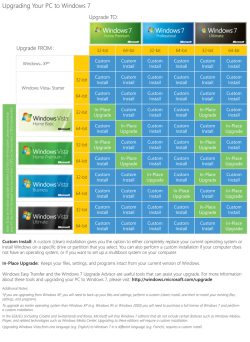
Here's the official upgrade path chart...
 

Attachments

  • windows-upgrade-chart.png
    windows-upgrade-chart.png
    135.7 KB · Views: 419

My Computer My Computer

At a glance

Windows 7 Ultimate x64 ®™Intel Core 2 Duo (2.2 GHz)2x 2GB Corsair (667 MHz)NVIDIA 8600M GS (256MB)
Computer Manufacturer/Model Number
Sony Vaio FZ21Z
OS
Windows 7 Ultimate x64 ®™
CPU
Intel Core 2 Duo (2.2 GHz)
Motherboard
Sony (Intel Chipset)
Memory
2x 2GB Corsair (667 MHz)
Graphics Card(s)
NVIDIA 8600M GS (256MB)
Sound Card
Sigmatel
Monitor(s) Displays
15.4" TFT X-Black
Screen Resolution
1280x800
Hard Drives
Western Digital 300GB Scorpio Black (7200rpm)
Mouse
Logitech Anywhere MX
Internet Speed
Sky 5MB
Thnks for that path chart, I can use it to my PC upgrades alsoo.

And Twes I don't want to do a cle instal, becouse I have only one partition, I will have to move and save to many files and programs. I know that 64 bit is better but I want only to upgrade my 32 bit version.

I have only one more question I have 4GB of RAM, and I see in my computer propieties that vista x86 see all 4GB, I supose that 7-x86 will see the same?
 

My Computer My Computer

At a glance

WINDOWS 7 ULTIMATEAMD 64 ATHLON X22GB DDR2ATI HD3450
OS
WINDOWS 7 ULTIMATE
CPU
AMD 64 ATHLON X2
Memory
2GB DDR2
Graphics Card(s)
ATI HD3450
Sound Card
REALTEK
I have only one more question I have 4GB of RAM, and I see in my computer propieties that vista x86 see all 4GB, I supose that 7-x86 will see the same?
No. in Vista, and I guess 7, that only shows what's installed, not what's being used by the system.
 

My Computer My Computer

At a glance

Windows 7 Ultimate x64 ®™Intel Core 2 Duo (2.2 GHz)2x 2GB Corsair (667 MHz)NVIDIA 8600M GS (256MB)
Computer Manufacturer/Model Number
Sony Vaio FZ21Z
OS
Windows 7 Ultimate x64 ®™
CPU
Intel Core 2 Duo (2.2 GHz)
Motherboard
Sony (Intel Chipset)
Memory
2x 2GB Corsair (667 MHz)
Graphics Card(s)
NVIDIA 8600M GS (256MB)
Sound Card
Sigmatel
Monitor(s) Displays
15.4" TFT X-Black
Screen Resolution
1280x800
Hard Drives
Western Digital 300GB Scorpio Black (7200rpm)
Mouse
Logitech Anywhere MX
Internet Speed
Sky 5MB
I don't know what went rong. I uninstaled skype, but reapeared in the incompatibility chek, may be something remained in the registry. And I didn't find any upgrades for storege control & keyboard filter, I only tryed the HP update program and he didn't find anything, and I don't think this is the cause of my problem. The error apeared afther he tryed to identifie user files,settings and program to be gathered it styed a bit to 20%, and then showed imieditly 34% and the error. Here are the screnshots.
xfe1qq.jpg

35bb3f5.jpg

1f9r13.jpg

Restarted tryed again but same thing hapend, can anyoane advise me what to do, I even disabeld all proceses from msconfig and allsoo stoped the antivirus.
 

My Computer My Computer

At a glance

WINDOWS 7 ULTIMATEAMD 64 ATHLON X22GB DDR2ATI HD3450
OS
WINDOWS 7 ULTIMATE
CPU
AMD 64 ATHLON X2
Memory
2GB DDR2
Graphics Card(s)
ATI HD3450
Sound Card
REALTEK
You need to back up your files, as in-place Upgrades can and do fail with data loss.

Since you must do this anyway, then you might as well clean install. You can see the kinds of problems that occur with in-place Upgrade, which always imports some level of corruption. Now is the time to start fresh with the cleanest possible install.

If you do not have access to an external drive to store your files, then shrink Vista in Disk Management enough to store your files in a data partition. Then clean install Win7 (premium is fine, BTW) over the Vista partition, using a Custom install with Drive Tools to format the partition first.

Afterwards your files willl be waiting in the data partition, as long as you do not touch that parititon during install.

If you have SATA HD then try install with SATA controller setting in BIOS set to ACHI first, then IDE if necessary. If IDE HD, you may need to Google the IDE controller drive listed, download and unzip it to CD or USB stick, then load it at Load Drivers link shown in Screenshot 7 here: http://www.sevenforums.com/tutorials/1649-clean-install-windows-7-a.html
 
For know I will remain to vista. May be tomorow I will try to move all my files from my laptop to my PC thru my whirles network the speed is only 2m/s soo it will take some time becouse I have to move all most 100GB. Then Probaly I will try the 64bit version. Can I allsoo delete that recovery partition, I don't even know how to use it?
 

My Computer My Computer

At a glance

WINDOWS 7 ULTIMATEAMD 64 ATHLON X22GB DDR2ATI HD3450
OS
WINDOWS 7 ULTIMATE
CPU
AMD 64 ATHLON X2
Memory
2GB DDR2
Graphics Card(s)
ATI HD3450
Sound Card
REALTEK
Yes you can delete the Recovery partition which will probably be disabled during Win7 install anyway.

But I would make the Recovery disk(s) first so you have a path back to factory condition if necessary.

Once you install and have everything set up as you like, save a Win7 backup image to a primary partition and/or on the network so you never have to reinstall again, just reimage the HD or a replacement from the backup using your DVD.
 
I instaled, and worked perfectly on my pasario laptop, find all the drivers on the hp site.

I tryed all soo on my old laptop a hp zv5000, but didn't find any drivers from hp site to this old laptop, the theames looked nice becouse had themes from hp, even the hp logo in propieties, to bad I didn't save them. I instaled audio in xp compatibility mod and I have just an eroor afther the first restart, but afther a second restart the error disapeard, for the ati mobility I tried some omega driver, alsoo had an eror from this, and when I entered solitair, I realised that 3d wasn't enabled, and alsoo becouse I had no aero and no glass transparance I decided to return to xp3 on this old laptop.
 

My Computer My Computer

At a glance

WINDOWS 7 ULTIMATEAMD 64 ATHLON X22GB DDR2ATI HD3450
OS
WINDOWS 7 ULTIMATE
CPU
AMD 64 ATHLON X2
Memory
2GB DDR2
Graphics Card(s)
ATI HD3450
Sound Card
REALTEK
Did you run the Aero troubleshooter (type Aero in start search box) to see if you could make it work?

It may need a newer display driver. Check the Support Downloads webpage for your model computer or graphics chip/card. Use Vista driver if Win7 isn't available. Try compatibility mode if needed.

There is a way to extract HP apps you want to keep from the HP Recovery Disks: http://www.sevenforums.com/installa...are-after-clean-win-7-install.html#post488270

You should bring these issues here as they arise rather than just giving up.
 
Back
Top