Solved upgrade from Vista Home Prem Svc Pk 2 to Windows 7 Professional?

Fmik

New member
Local time
1:24 AM
Messages
20
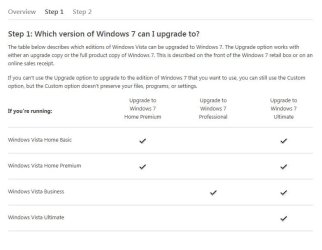
I bought Windows 7 Professional and now I am ready to upgrade from my present Windows Vista Service Pack 2 on a Sony Computer with Core Duo processor. I downloaded and ran the Win 7 Advisor, it says I can upgrade no problem to Windows 7 Home Premium or Ultimate. But what about Windows 7 Professional?
Are there any caveats before I install Windows 7 Professional as an upgrade? Do I need to do a clean install instead because it is Win 7 Pro? Thanks.
 

My Computer My Computer

At a glance

windows vista 32 bit
OS
windows vista 32 bit
Make sure you have your Windows 7 on a DVD/flash drive incase anything goes wrong. Just run the Windows 7 setup from within Vista and choose upgrade option during setup. See how it goes. Even if something goes wrong, all you'll have to do is to clean install. Make sure you have proper data backups.

What's your Vista version btw?

Also confirm what license you have actually bought -- is it just an upgrade key?

   Tip
Clean install is always a better option than upgrade
 
Last edited:

My Computer My Computer

At a glance

Win 10 Pro x64Intel I5-2500K @3.3GHz16GB G.Skill Ripjaws X (4x4GB)EVGA GeForce 750 Ti SC 2GB
Computer type
PC/Desktop
Computer Manufacturer/Model Number
Self Built
OS
Win 10 Pro x64
CPU
Intel I5-2500K @3.3GHz
Motherboard
Asrock P67 Extreme4
Memory
16GB G.Skill Ripjaws X (4x4GB)
Graphics Card(s)
EVGA GeForce 750 Ti SC 2GB
Sound Card
ASUS Xonar DG 5.1 Channels 24-bit 96KHz PCI Interface Sound
Monitor(s) Displays
auria eq2367
Screen Resolution
1920 x 1080
Hard Drives
250GB Samsung 850 EVO SSD
1TB WD Blue
1TB Hitachi
PSU
SeaSonic X 650W 80 Plus Gold
Case
Corsair Obsidian 750D
Cooling
Corsair H60, Three 140mm case fans
Keyboard
Logitech Wireless Keyboard K520
Mouse
Logitech Wireless Mouse M310
Internet Speed
Wave Broadband ~ 100 dn 5 up
Antivirus
Windows Defender, Malwarebytes Premium
Browser
Edge, IE11, Chrome
Other Info
Laptop specs: HP g7-1365dx /
CPU: AMD A6-3420M APU with Radeon(tm) HD Graphics /
RAM: Crucial 8Gb (2x4Gb) /
SSD: Crucial M4-CT128M4SSD2 ATA Device/ FW 000F /
GFX: AMD Radeon HD 6520G /
OS: Windows 10 Pro x64
Backup all your data and do a clean install.
 

My Computer My Computer

At a glance

Windows 10 Pro x64Intel Core i7 6700KGSkill TridentZ RGB 16GB 3600 16-16-16-36EVGA GTX 980 Ti SC x2
Computer type
PC/Desktop
Computer Manufacturer/Model Number
Skylake Special #666
OS
Windows 10 Pro x64
CPU
Intel Core i7 6700K
Motherboard
Asus Sabertooth Z170 Mark 1
Memory
GSkill TridentZ RGB 16GB 3600 16-16-16-36
Graphics Card(s)
EVGA GTX 980 Ti SC x2
Sound Card
Realtek High Definition
Monitor(s) Displays
AOC G2460PG
Screen Resolution
1920 x 1080 144Hz
Hard Drives
Samsung 860 Pro 256GB, Seagate Barracuda 4TB x2
PSU
EVGA 1000 P2, EVGA White Custom Braided Cables
Case
Corsair Vengeance C70 Gunmetal Black
Cooling
Corsair H100i v2, Corsair ML120 x2, Thermal Grizzly Kryonaut
Keyboard
Logitech G910 Orion Spectrum
Mouse
Logitech G700s
Internet Speed
Verizon Fios Quantum Gateway 75/75
Antivirus
Windows Defender, Malwarebytes Free 3.8.3
Browser
Chrome
Other Info
Corsair SP120 x4, LG Blu-ray Drive, Durabrand HT-395 100 Watt Dolby Digital Amp, Corsair H2100 Wireless 7.1 Headset
As already indicated you'll have to do the Clean Install Windows 7.

Gather your program installers and back up your files. If you have any questions about what needs backing up ask back or look over the steps in the Reinstall tutorial in my signature picture below.

When you boot the Win7 Upgrade disk to clean install Pro it will scan the HD to see the Vista OS and allow use of Upgrade version key during install - even if you use the drive options shown in Steps 6-7 of Clean Install Windows 7 to go on to delete all partitions and create new as is best.
 
I read your information in the Clean Install OEM and I thank you. It sounds like I can just follow all the instructions therein. I don't know what to expect once I begin.
I am nervous about the process because from what I read concerning possibly not having drivers to operate my Sony Vaio computer once the HD is wiped.(not being able to use the keyboard, mouse, DVD drive, wired Lan, etc.) Or having my favorites once I install the new OS. I read some older posts they speak of using Easy Transfer before install to transfer all my settings to a disk. or using Anytime Transfer which sounds like it is better since Microsoft designed it to encourage people to upgrade from Vista to Win 7. Do I use Anytime Upgrade before starting the install?
Do I wipe the HD myself before inserting the Win 7 Pro disk to begin the install or will it prompt me then perform the HD wipe and repartition as you mentioned in your post? (my Windows 7 Professional is still unopened in the box.)
 
Last edited:

My Computer My Computer

At a glance

windows vista 32 bit
OS
windows vista 32 bit
Pretty much everything that needs to be considered is in the Reinstall OEM link below. I would not use Easy Transfer since it can fail and also imports settings which are a corruption path - better to start with fresh settings. If you have any specific questions about certain programs or aspects of backup feel free to ask back.

If you'll post back a screenshot of the Sony's Disk Management - Post a Screen Capture Image - Windows 7 Forums, we can advise you better which partitions should go. I would make my Vista Recovery disks if you haven't already so you have a path back to the licensed OS in case you'd ever want to sell the machine with it. Then you can delete all partitions during install to regain all of the disk space and have the cleanest slate for install.

What's important is to have your wireless LAN driver in your backup so that if Win7 installer doesn't provide it you can install it to get online quickly to install all rounds of Important and Optional Windows Updates after enabling Automatically deliver drivers via Windows Update (Step 3).

Any drivers missing after all Updates are done can be imported from the Sony Support Downloads webpage for your model. Ask back if you need specific help.

The tools and methods which assure you'll get and keep a perfect install are all in the tutorial, so study it closely and ask back until you feel you've got all questions answered.
 
If you`re nervous, get a flash drive and store your favorites on it, and get the network driver from Sony`s website before you start the install.
 

My Computer My Computer

At a glance

Windows 10 Pro x64Intel Core i7 6700KGSkill TridentZ RGB 16GB 3600 16-16-16-36EVGA GTX 980 Ti SC x2
Computer type
PC/Desktop
Computer Manufacturer/Model Number
Skylake Special #666
OS
Windows 10 Pro x64
CPU
Intel Core i7 6700K
Motherboard
Asus Sabertooth Z170 Mark 1
Memory
GSkill TridentZ RGB 16GB 3600 16-16-16-36
Graphics Card(s)
EVGA GTX 980 Ti SC x2
Sound Card
Realtek High Definition
Monitor(s) Displays
AOC G2460PG
Screen Resolution
1920 x 1080 144Hz
Hard Drives
Samsung 860 Pro 256GB, Seagate Barracuda 4TB x2
PSU
EVGA 1000 P2, EVGA White Custom Braided Cables
Case
Corsair Vengeance C70 Gunmetal Black
Cooling
Corsair H100i v2, Corsair ML120 x2, Thermal Grizzly Kryonaut
Keyboard
Logitech G910 Orion Spectrum
Mouse
Logitech G700s
Internet Speed
Verizon Fios Quantum Gateway 75/75
Antivirus
Windows Defender, Malwarebytes Free 3.8.3
Browser
Chrome
Other Info
Corsair SP120 x4, LG Blu-ray Drive, Durabrand HT-395 100 Watt Dolby Digital Amp, Corsair H2100 Wireless 7.1 Headset
I have attached a screen shot of Disk Management.
Also how exactly do I save my Favorites ahead of time onto a flash drive.(just in case Win 7 Pro does not install them correctly.)
I downloaded my LAN driver from Sony and saved it onto my flash drive backup. what can I expect... Will Windows 7 Installer ask me to insert my flash drive in order to load the Lan driver? If not then do you have instructions for me as to how I can do it manually once the Setup is complete for Windows 7?
Thanks.
 

Attachments

  • Disk Management Screen.JPG
    Disk Management Screen.JPG
    83.9 KB · Views: 8

My Computer My Computer

At a glance

windows vista 32 bit
OS
windows vista 32 bit
Read over Clean Reinstall - Factory OEM Windows 7 now as all of these questions are answered there.

Your Internet Explorer Favorites are stored in the User Favorites file so back it up along with your other User folders. Other needed backups are outlined in the tutorial.

During booted install use the Drive Options in Steps 6 and 7 of Clean Install Windows 7
to delete all partitions, then create New as you wish, format and install Win7 to first big partition. Ignore the small 100mb boot partition it creates at the front of the drive.

If the install completes and you are not yet connected to the internet, install your network adapter and connect to your network in the bottom right System tray.
 
Thank you for all the information that you have supplied.
Just so I am clear about everything I would like to ask: (I am wanting to perform a clean install of Windows 7 and get rid of my old Vista operating system which is on my computer now)
1. Since I am getting rid of Vista and I have the new Windows 7 disks, I do not need to save Vista anywhere do I?
2. After I backup everything that I need from my computer before beginning the installation of Windows 7, do I need to wipe the HD on my computer first before I insert the Windows 7 disk to begin installing Windows 7?
3. Or will the Windows 7 disk automatically wipe my computer's HD as part of the installation process?
4. It sounds like the ideal thing is for Windows 7 to create a single unallocated partition in which case I can click Next and move on to Step 9.
If this does not happen then it will likely create the following instead:
"Disk 0 Partition 1, Recovery 9.9 GB"
"Disk 0 Partition 2, (C:) 139.1 GB"
in which case I can click OK to confirm the selection.
Do I have this right?
 

My Computer My Computer

At a glance

windows vista 32 bit
OS
windows vista 32 bit
As it says in Clean Reinstall - Factory OEM Windows 7 you can make your Vista Recovery disks in case you'd ever want to return it to factory condition, or not. Then I'd get rid of the Vista Recovery partition since it's wasted space.

I specifically explained how to handle the partitions during install in my last post:

During booted install use the Drive Options in Steps 6 and 7 of Clean Install Windows 7
to delete all partitions, then create New as you wish, format and install Win7 to first big partition. Ignore the small 100mb boot partition it creates at the front of the drive.
 
I successfully installed the Windows 7 software using the clean install process and it went pretty smoothly. I backed up everything. The system installed enough drivers and figured out the Lan settings so I was able to get on the internet right away for updates and downloads. There were not any real problems.
I followed the Clean install Windows 7 and Clean Reinstall Factory OEM directions.
Thanks Greg and Shawn for your help.
Mike
 

My Computer My Computer

At a glance

windows vista 32 bit
OS
windows vista 32 bit
Good to hear, Mike. :geek:

Keep us posted on how it goes, stick with the tools and methods in the tutorials to keep a perfect install.
 
Back
Top