Can I upgrade my graphics card..?

I concur, I see 2 also.

Red dots 6 and 11

I think they are just numbered 1 and 2, as all sata ports are, I`m sure they`re both the same speed.

The layout says there are two SATA ports. One a SATA II, for the SSD, port two is SATA I where you would attach the HDD.

Oh yeah, Forgot to mention one of these are connected to my disc drive (DVD)
 

My Computer My Computer

At a glance

Windows 7 Home Premium 64 bitAMD Athlon(tm) II X4 620 Processor (4 CPUs) 2...4GB 2X2GBNDIDIA GeForce 9200
Computer type
PC/Desktop
Computer Manufacturer/Model Number
Acer - Aspire X 1301
OS
Windows 7 Home Premium 64 bit
CPU
AMD Athlon(tm) II X4 620 Processor (4 CPUs) 2.6GHz
Motherboard
Aspire X1301
Memory
4GB 2X2GB
Graphics Card(s)
NDIDIA GeForce 9200
Sound Card
Unknown
Monitor(s) Displays
2x 22" Acer 1080p
Screen Resolution
1920 x 1080
Hard Drives
Seagate Barracuda 7200
PSU
Acer Aspire Liteon PE-5221-08 - 210 Watt
Keyboard
Acer SK-9620
Internet Speed
Down: 30MB/s - Up: 16MB/s - Sky Fiber
Antivirus
AVG 2013
Browser
Chrome 31.x
Each SATA port will run one device, there is no splitting them. You can get an add in SATA card which you can put in the PCIe X1 slot.
 

My Computer My Computer

At a glance

Windows 7 Ultimate X64 SP1Intel i5-2550K, Differing ~4.4-4.8GHz No buil...16GB G.Skill Sniper 1866MHz @ 2133MHz 2x8GBASUS GTX650TIB-DC2OC-2GD5, (650TI Boost)
Computer type
PC/Desktop
Computer Manufacturer/Model Number
Home Built Desktop By DataTech
OS
Windows 7 Ultimate X64 SP1
CPU
Intel i5-2550K, Differing ~4.4-4.8GHz No built in GPU
Motherboard
ASUS P8Z68-V PRO/GEN3
Memory
16GB G.Skill Sniper 1866MHz @ 2133MHz 2x8GB
Graphics Card(s)
ASUS GTX650TIB-DC2OC-2GD5, (650TI Boost)
Sound Card
Onboard Realtek 5-1
Monitor(s) Displays
Samsung P2570HD
Screen Resolution
1920x1080
Hard Drives
Samsung 840 Pro 256GB SSD for OS, 500GB Seagate Constellation (Enterprise drive) for Data
PSU
Corsair HX650W
Case
Inwin Dragon Rider
Cooling
Hyper 212 EVO w/two Noctua fans, push-pull, @1300 RPM
Keyboard
E-Z Eyes, bright yellow keys with large characters
Mouse
steelseries SENSEI Laser Pro Gaming
Internet Speed
48-51Mbs Mbs down, 11 Mbs up Xfinity Cable
Antivirus
Norton Internet Security 2013
Browser
IE 10, Opera, Pale Moon if needed
Other Info
4 case fans, LG BluRay-RE, ASUS DVD-RW, Mr. Fusion power supply, 1.21 gigawatts.
Each SATA port will run one device, there is no splitting them. You can get an add in SATA card which you can put in the PCIe X1 slot.

Yeah I understand I can't split them,
Going back to what I said earlier but edited..

I only have:
SATA - HDD currently connected
SATA 2 - disc drive (dvd)
PCI Express x16 slot - nothing connected (what wires would I need to connect SATA?)
PCI Express x1 slot - nothing connected (what wires would I need to connect SATA?)
eSATA - on back of tower - nothing connected

So if I wanted to add another SATA would that be done through the x1/x16 slot & what connectors would I need (sorry for being so dumb :( )
 

My Computer My Computer

At a glance

Windows 7 Home Premium 64 bitAMD Athlon(tm) II X4 620 Processor (4 CPUs) 2...4GB 2X2GBNDIDIA GeForce 9200
Computer type
PC/Desktop
Computer Manufacturer/Model Number
Acer - Aspire X 1301
OS
Windows 7 Home Premium 64 bit
CPU
AMD Athlon(tm) II X4 620 Processor (4 CPUs) 2.6GHz
Motherboard
Aspire X1301
Memory
4GB 2X2GB
Graphics Card(s)
NDIDIA GeForce 9200
Sound Card
Unknown
Monitor(s) Displays
2x 22" Acer 1080p
Screen Resolution
1920 x 1080
Hard Drives
Seagate Barracuda 7200
PSU
Acer Aspire Liteon PE-5221-08 - 210 Watt
Keyboard
Acer SK-9620
Internet Speed
Down: 30MB/s - Up: 16MB/s - Sky Fiber
Antivirus
AVG 2013
Browser
Chrome 31.x
1. RAM - for normal usage, a RAM upgrade does not buy you much once you have 4GB or more.

2. SSD - as was said, that should be installed like another disk connected to a Sata port on the mobo. If you have a 6Gb port, that would be best but the 3Gb ports work too.

3. SSD usage - Once the SSD is installed, you transfer the OS to it. Here is a tutorial describing a couple of ways how to do that. http://www.sevenforums.com/tutorials/149969-ssd-install-transfer-operating-system.html. You may have to park the user data temporarily on an external disk to make the OS fit on the SSD.

4. HDD usage - once your OS is running on the SSD, you make a data partition on the HDD. There you define folders for your user data (Documents, Music, Videos, Pictures). Give them names like Music2, Videos2, etc. to distinguish them from the default folders in the system. Then you right click on each folder and INCLUDE it into the appropriate library. Finally you transfer your files into those folders.

Note: In Documents there are sometimes folders that were generated by the system or a program. Do not transfer those.
 

My Computer My Computer

At a glance

Vista, Windows7, Mint Mate, Zorin, Windows 8from 1.6GHz Duo to i7
Computer Manufacturer/Model Number
HP, Dell, Gateway, Toshiba - 4 laptops and 2 desktops
OS
Vista, Windows7, Mint Mate, Zorin, Windows 8
CPU
from 1.6GHz Duo to i7
Monitor(s) Displays
2x HP w2207
Hard Drives
5x HDD, 7x SSD, 12x Externals
Keyboard
with trackball - no mices
Mouse
Trackball mice
Internet Speed
DSL 6000
Each SATA port will run one device, there is no splitting them. You can get an add in SATA card which you can put in the PCIe X1 slot.

Yeah I understand I can't split them,
Going back to what I said earlier but edited..

I only have:
SATA - HDD currently connected
SATA 2 - disc drive (dvd)
PCI Express x16 slot - nothing connected (what wires would I need to connect SATA?)
PCI Express x1 slot - nothing connected (what wires would I need to connect SATA?)
eSATA - on back of tower - nothing connected

So if I wanted to add another SATA would that be done through the x1/x16 slot & what connectors would I need (sorry for being so dumb :( )
Click SATA card in my post. ;)
 

My Computer My Computer

At a glance

Windows 7 Ultimate X64 SP1Intel i5-2550K, Differing ~4.4-4.8GHz No buil...16GB G.Skill Sniper 1866MHz @ 2133MHz 2x8GBASUS GTX650TIB-DC2OC-2GD5, (650TI Boost)
Computer type
PC/Desktop
Computer Manufacturer/Model Number
Home Built Desktop By DataTech
OS
Windows 7 Ultimate X64 SP1
CPU
Intel i5-2550K, Differing ~4.4-4.8GHz No built in GPU
Motherboard
ASUS P8Z68-V PRO/GEN3
Memory
16GB G.Skill Sniper 1866MHz @ 2133MHz 2x8GB
Graphics Card(s)
ASUS GTX650TIB-DC2OC-2GD5, (650TI Boost)
Sound Card
Onboard Realtek 5-1
Monitor(s) Displays
Samsung P2570HD
Screen Resolution
1920x1080
Hard Drives
Samsung 840 Pro 256GB SSD for OS, 500GB Seagate Constellation (Enterprise drive) for Data
PSU
Corsair HX650W
Case
Inwin Dragon Rider
Cooling
Hyper 212 EVO w/two Noctua fans, push-pull, @1300 RPM
Keyboard
E-Z Eyes, bright yellow keys with large characters
Mouse
steelseries SENSEI Laser Pro Gaming
Internet Speed
48-51Mbs Mbs down, 11 Mbs up Xfinity Cable
Antivirus
Norton Internet Security 2013
Browser
IE 10, Opera, Pale Moon if needed
Other Info
4 case fans, LG BluRay-RE, ASUS DVD-RW, Mr. Fusion power supply, 1.21 gigawatts.
Each SATA port will run one device, there is no splitting them. You can get an add in SATA card which you can put in the PCIe X1 slot.

Yeah I understand I can't split them,
Going back to what I said earlier but edited..

I only have:
SATA - HDD currently connected
SATA 2 - disc drive (dvd)
PCI Express x16 slot - nothing connected (what wires would I need to connect SATA?)
PCI Express x1 slot - nothing connected (what wires would I need to connect SATA?)
eSATA - on back of tower - nothing connected

So if I wanted to add another SATA would that be done through the x1/x16 slot & what connectors would I need (sorry for being so dumb :( )
Click SATA card in my post. ;)

Oh yeah haha thanks!

So if I bought this I can run 4 SATA's from it?

But then here come's my next question.. Where do I run the power from say on a 3.5 SATA HDD?
Ah, Yes I'm dumb and this all started from a graphics update but my PC does need updating :confused:
 

My Computer My Computer

At a glance

Windows 7 Home Premium 64 bitAMD Athlon(tm) II X4 620 Processor (4 CPUs) 2...4GB 2X2GBNDIDIA GeForce 9200
Computer type
PC/Desktop
Computer Manufacturer/Model Number
Acer - Aspire X 1301
OS
Windows 7 Home Premium 64 bit
CPU
AMD Athlon(tm) II X4 620 Processor (4 CPUs) 2.6GHz
Motherboard
Aspire X1301
Memory
4GB 2X2GB
Graphics Card(s)
NDIDIA GeForce 9200
Sound Card
Unknown
Monitor(s) Displays
2x 22" Acer 1080p
Screen Resolution
1920 x 1080
Hard Drives
Seagate Barracuda 7200
PSU
Acer Aspire Liteon PE-5221-08 - 210 Watt
Keyboard
Acer SK-9620
Internet Speed
Down: 30MB/s - Up: 16MB/s - Sky Fiber
Antivirus
AVG 2013
Browser
Chrome 31.x
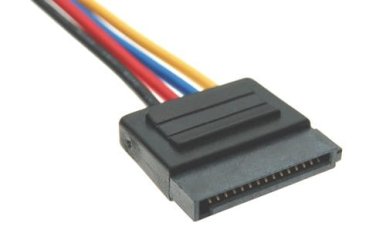
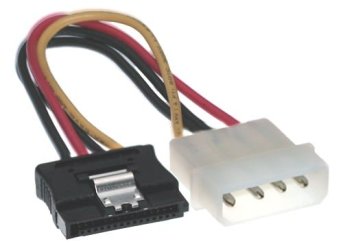
Yes that would add 4 SATA III ports for you. The HDD power will come directly from your PSU.
SATA Power connector:

6560_sata-hard-drive-power-cable-connector.jpg

Or if you don't have enough there's adapters like this from Molex to SATA.

icon_1377854854.jpg
 

My Computer My Computer

At a glance

Windows 7 Ultimate X64 SP1Intel i5-2550K, Differing ~4.4-4.8GHz No buil...16GB G.Skill Sniper 1866MHz @ 2133MHz 2x8GBASUS GTX650TIB-DC2OC-2GD5, (650TI Boost)
Computer type
PC/Desktop
Computer Manufacturer/Model Number
Home Built Desktop By DataTech
OS
Windows 7 Ultimate X64 SP1
CPU
Intel i5-2550K, Differing ~4.4-4.8GHz No built in GPU
Motherboard
ASUS P8Z68-V PRO/GEN3
Memory
16GB G.Skill Sniper 1866MHz @ 2133MHz 2x8GB
Graphics Card(s)
ASUS GTX650TIB-DC2OC-2GD5, (650TI Boost)
Sound Card
Onboard Realtek 5-1
Monitor(s) Displays
Samsung P2570HD
Screen Resolution
1920x1080
Hard Drives
Samsung 840 Pro 256GB SSD for OS, 500GB Seagate Constellation (Enterprise drive) for Data
PSU
Corsair HX650W
Case
Inwin Dragon Rider
Cooling
Hyper 212 EVO w/two Noctua fans, push-pull, @1300 RPM
Keyboard
E-Z Eyes, bright yellow keys with large characters
Mouse
steelseries SENSEI Laser Pro Gaming
Internet Speed
48-51Mbs Mbs down, 11 Mbs up Xfinity Cable
Antivirus
Norton Internet Security 2013
Browser
IE 10, Opera, Pale Moon if needed
Other Info
4 case fans, LG BluRay-RE, ASUS DVD-RW, Mr. Fusion power supply, 1.21 gigawatts.
I don't know if you guys have noticed, but recommending a PSU for this computer would not work, or a graphics card for that matter, the Acer AX1031 uses a slim PSU as it is a low profile chassis.

A chassis would be required to fix the PSU required to run the desired GPU if it needs a higher power.
 

My Computer My Computer

At a glance

Windows 7 professional X64AMD A10-5800K OC@ 4.4Ghz.8GB Kingston HyperX Blu 1333mhzXFX HD7870 2GB Core Edition
Computer type
PC/Desktop
OS
Windows 7 professional X64
CPU
AMD A10-5800K OC@ 4.4Ghz.
Motherboard
Gigabyte F2A85X-UP4
Memory
8GB Kingston HyperX Blu 1333mhz
Graphics Card(s)
XFX HD7870 2GB Core Edition
Monitor(s) Displays
Acer AL2216W
Screen Resolution
1680x1050
Hard Drives
Seagate Barracuda 500gb 7200rpm
Seagate Barracuda 1.5TB 7200rpm
PSU
Cooler Master Silent Pro M 850W
Case
Thermaltake Commander MS-I
Cooling
Cooler Master N520
Mouse
Logitech M504
Internet Speed
10Mbps
I don't know if you guys have noticed, but recommending a PSU for this computer would not work, or a graphics card for that matter, the Acer AX1031 uses a slim PSU as it is a low profile chassis.

A chassis would be required to fix the PSU required to run the desired GPU if it needs a higher power.
:o:o:o You are so right, I usually check it out. :o:o:o
 

My Computer My Computer

At a glance

Windows 7 Ultimate X64 SP1Intel i5-2550K, Differing ~4.4-4.8GHz No buil...16GB G.Skill Sniper 1866MHz @ 2133MHz 2x8GBASUS GTX650TIB-DC2OC-2GD5, (650TI Boost)
Computer type
PC/Desktop
Computer Manufacturer/Model Number
Home Built Desktop By DataTech
OS
Windows 7 Ultimate X64 SP1
CPU
Intel i5-2550K, Differing ~4.4-4.8GHz No built in GPU
Motherboard
ASUS P8Z68-V PRO/GEN3
Memory
16GB G.Skill Sniper 1866MHz @ 2133MHz 2x8GB
Graphics Card(s)
ASUS GTX650TIB-DC2OC-2GD5, (650TI Boost)
Sound Card
Onboard Realtek 5-1
Monitor(s) Displays
Samsung P2570HD
Screen Resolution
1920x1080
Hard Drives
Samsung 840 Pro 256GB SSD for OS, 500GB Seagate Constellation (Enterprise drive) for Data
PSU
Corsair HX650W
Case
Inwin Dragon Rider
Cooling
Hyper 212 EVO w/two Noctua fans, push-pull, @1300 RPM
Keyboard
E-Z Eyes, bright yellow keys with large characters
Mouse
steelseries SENSEI Laser Pro Gaming
Internet Speed
48-51Mbs Mbs down, 11 Mbs up Xfinity Cable
Antivirus
Norton Internet Security 2013
Browser
IE 10, Opera, Pale Moon if needed
Other Info
4 case fans, LG BluRay-RE, ASUS DVD-RW, Mr. Fusion power supply, 1.21 gigawatts.
I don't know if you guys have noticed, but recommending a PSU for this computer would not work, or a graphics card for that matter, the Acer AX1031 uses a slim PSU as it is a low profile chassis.

A chassis would be required to fix the PSU required to run the desired GPU if it needs a higher power.

I don't know if you guys have noticed, but recommending a PSU for this computer would not work, or a graphics card for that matter, the Acer AX1031 uses a slim PSU as it is a low profile chassis.

A chassis would be required to fix the PSU required to run the desired GPU if it needs a higher power.
:o:o:o You are so right, I usually check it out. :o:o:o

Thats why, for now I've scrapped the idea of upgrading graphics.
I just want a quick boot with smooth running.. I don't game on my PC just general use but I am on it alot !

Sometimes its days before it gets fully powered down, Just want advice on upgrading little things... Then a good shell to fully build a new one with a new mobo.
 

My Computer My Computer

At a glance

Windows 7 Home Premium 64 bitAMD Athlon(tm) II X4 620 Processor (4 CPUs) 2...4GB 2X2GBNDIDIA GeForce 9200
Computer type
PC/Desktop
Computer Manufacturer/Model Number
Acer - Aspire X 1301
OS
Windows 7 Home Premium 64 bit
CPU
AMD Athlon(tm) II X4 620 Processor (4 CPUs) 2.6GHz
Motherboard
Aspire X1301
Memory
4GB 2X2GB
Graphics Card(s)
NDIDIA GeForce 9200
Sound Card
Unknown
Monitor(s) Displays
2x 22" Acer 1080p
Screen Resolution
1920 x 1080
Hard Drives
Seagate Barracuda 7200
PSU
Acer Aspire Liteon PE-5221-08 - 210 Watt
Keyboard
Acer SK-9620
Internet Speed
Down: 30MB/s - Up: 16MB/s - Sky Fiber
Antivirus
AVG 2013
Browser
Chrome 31.x
I don't know if you guys have noticed, but recommending a PSU for this computer would not work, or a graphics card for that matter, the Acer AX1031 uses a slim PSU as it is a low profile chassis.

A chassis would be required to fix the PSU required to run the desired GPU if it needs a higher power.

I don't know if you guys have noticed, but recommending a PSU for this computer would not work, or a graphics card for that matter, the Acer AX1031 uses a slim PSU as it is a low profile chassis.

A chassis would be required to fix the PSU required to run the desired GPU if it needs a higher power.
:o:o:o You are so right, I usually check it out. :o:o:o

Thats why, for now I've scrapped the idea of upgrading graphics.
I just want a quick boot with smooth running.. I don't game on my PC just general use but I am on it alot !

Sometimes its days before it gets fully powered down, Just want advice on upgrading little things... Then a good shell to fully build a new one with a new mobo.

Then you really won't see the benefits of an SSD. Sure, you will be able to access multimedia much faster and to boot up pretty fast, and you will also have a quieter system, but do you really require high boot speed when you computer can stay on for days? Is that the only feature that attracts you to a SSD?

Even more, do you believe a 6 second boot is worth the price of an SSD? Or perhaps data reliability is worth the price. I mean, you will only see an SSD shine with it's access speed, that's it, if you open an application.. say Word, it will open up incredibly fast, but it will not make the program react faster to your typing, or modify the format of your text any faster than you had perceived before. What I am trying to say is that you will only perceive the benefits of an SSD in the blink of an eye and then you will resume your daily computer activities forgetting you even have an SSD. Please note I have nothing against SSDs, I would love to acquire a couple myself, I just do not think I need to invest in one, a lot of people with incredibly fast machines do not feel the need to use an SSD even when using applications that could greatly benefit from them. It depends on what is worth your money.

This is the situation where you need to ask the following:

What are the activities I normally do in my computer?

Am I encountering issues when performing such activities?
If I am not encountering issues, which ones would I like to enhance or make easier for me?
Are there features that I would like to incorporate into my computer such as running HD movies with frame interpolation, rendering, multitasking or file host?

Answering those will definitely help you and us determine what would be the best piece of hardware or maybe even a peripheral that could help you.
 

My Computer My Computer

At a glance

Windows 7 professional X64AMD A10-5800K OC@ 4.4Ghz.8GB Kingston HyperX Blu 1333mhzXFX HD7870 2GB Core Edition
Computer type
PC/Desktop
OS
Windows 7 professional X64
CPU
AMD A10-5800K OC@ 4.4Ghz.
Motherboard
Gigabyte F2A85X-UP4
Memory
8GB Kingston HyperX Blu 1333mhz
Graphics Card(s)
XFX HD7870 2GB Core Edition
Monitor(s) Displays
Acer AL2216W
Screen Resolution
1680x1050
Hard Drives
Seagate Barracuda 500gb 7200rpm
Seagate Barracuda 1.5TB 7200rpm
PSU
Cooler Master Silent Pro M 850W
Case
Thermaltake Commander MS-I
Cooling
Cooler Master N520
Mouse
Logitech M504
Internet Speed
10Mbps
I don't know if you guys have noticed, but recommending a PSU for this computer would not work, or a graphics card for that matter, the Acer AX1031 uses a slim PSU as it is a low profile chassis.

A chassis would be required to fix the PSU required to run the desired GPU if it needs a higher power.

:o:o:o You are so right, I usually check it out. :o:o:o

Thats why, for now I've scrapped the idea of upgrading graphics.
I just want a quick boot with smooth running.. I don't game on my PC just general use but I am on it alot !

Sometimes its days before it gets fully powered down, Just want advice on upgrading little things... Then a good shell to fully build a new one with a new mobo.

Then you really won't see the benefits of an SSD. Sure, you will be able to access multimedia much faster and to boot up pretty fast, and you will also have a quieter system, but do you really require high boot speed when you computer can stay on for days? Is that the only feature that attracts you to a SSD?

Even more, do you believe a 6 second boot is worth the price of an SSD? Or perhaps data reliability is worth the price. I mean, you will only see an SSD shine with it's access speed, that's it, if you open an application.. say Word, it will open up incredibly fast, but it will not make the program react faster to your typing, or modify the format of your text any faster than you had perceived before. What I am trying to say is that you will only perceive the benefits of an SSD in the blink of an eye and then you will resume your daily computer activities forgetting you even have an SSD. Please note I have nothing against SSDs, I would love to acquire a couple myself, I just do not think I need to invest in one, a lot of people with incredibly fast machines do not feel the need to use an SSD even when using applications that could greatly benefit from them. It depends on what is worth your money.

This is the situation where you need to ask the following:

What are the activities I normally do in my computer?

Am I encountering issues when performing such activities?
If I am not encountering issues, which ones would I like to enhance or make easier for me?
Are there features that I would like to incorporate into my computer such as running HD movies with frame interpolation, rendering, multitasking or file host?

Answering those will definitely help you and us determine what would be the best piece of hardware or maybe even a peripheral that could help you.

You make perfect sense, I understand 100% where you are coming from.

Its just I've had this PC now for around 5 years and yes that seems a long time but in all honestly I've only had 1 major issue with it and it was when my 1TB HDD broke.. View my previous threads, You'll understand how frustrating that was for me when all the icons broke etc anyways thats going off subject.

I'm basically wanting to buy parts to put into my PC but as stated before, I have a very small tower/frame so I can't buy massive upgrades.

I've been thinking about it over the last couple of hours, This PC is getting old.. The USB slots are broken and yeah I can fix them but I've been wanting a fast PC for a while now.

My PC is fast, no doubt its fine for me.. But I always want 'better' and with it being a couple of years old basically I want to 'build' my own PC as well as trying to keep some parts from my current one as its been with me for such a long time it would literally feel like loosing an arm or a leg!

- Firstly, I'm wanting a fast boot PC which yes, will boot within seconds.
- I have 3 x 22" monitors & a 40" TV which currently are no good to me, I can't use them because i don't have the HDMI's/VGA's to connect them.
- I have my Amilight kit, Which I was selling because there's no point connecting them until I have my monitors sorted out.
- My data, I have so much.. With me having the 1TB, I got used to having the space.. I had over 600GB's of films alone on my pc then 300GB's of pics/music ect which are currently stored on a old external HDD which i rarely plug in because I'm simply scared of loosing my data off it!
- Rainmeter, I know people love it, people hate it. Personally, I like to change every week.. I'm always swapping things around.. Currently with how my PC stands, I install it and things start to go wrong.
- Everything in one place. So .. Thats what I want, My PC back to fully functional without sitting thinking 'if i install that.. will it brake?!'

I know all of this started from a simple 'graphics update' but in all honesty I just want my PC running fast and smooth at a low-ish cost with plenty of memory and plenty of room to upgrade.

 

My Computer My Computer

At a glance

Windows 7 Home Premium 64 bitAMD Athlon(tm) II X4 620 Processor (4 CPUs) 2...4GB 2X2GBNDIDIA GeForce 9200
Computer type
PC/Desktop
Computer Manufacturer/Model Number
Acer - Aspire X 1301
OS
Windows 7 Home Premium 64 bit
CPU
AMD Athlon(tm) II X4 620 Processor (4 CPUs) 2.6GHz
Motherboard
Aspire X1301
Memory
4GB 2X2GB
Graphics Card(s)
NDIDIA GeForce 9200
Sound Card
Unknown
Monitor(s) Displays
2x 22" Acer 1080p
Screen Resolution
1920 x 1080
Hard Drives
Seagate Barracuda 7200
PSU
Acer Aspire Liteon PE-5221-08 - 210 Watt
Keyboard
Acer SK-9620
Internet Speed
Down: 30MB/s - Up: 16MB/s - Sky Fiber
Antivirus
AVG 2013
Browser
Chrome 31.x
I'm basically wanting to buy parts to put into my PC but as stated before, I have a very small tower/frame so I can't buy massive upgrades.

What do you mean by massive? Size or cost? Realistically the two biggest things physically you'd be currently limited by size would be a new PSU and GPU.

Also depending on your USB issues, it could be time for a new case anyway. USB 3.0 would be guareenteed to make you smile.


- Firstly, I'm wanting a fast boot PC which yes, will boot within seconds.

An SSD will get you close to that. However even desktops still have to spend 10-30 secs POSTing from a cold start.


- I have 3 x 22" monitors & a 40" TV which currently are no good to me, I can't use them because i don't have the HDMI's/VGA's to connect them

New GPU will help there ;)


I know all of this started from a simple 'graphics update' but in all honesty I just want my PC running fast and smooth at a low-ish cost with plenty of memory and plenty of room to upgrade.

Typically what you buy now, even if it's a part here or a part there, can be transferred over to a new build.
 

My Computer My Computer

At a glance

8 Pro x64i7 3770K 4.6GHz16GB G.Skill Trident X 2666mhzx2 EVGA 780 Ti Superclocked SLI
Computer type
PC/Desktop
Computer Manufacturer/Model Number
Systems by SmartEyeball
OS
8 Pro x64
CPU
i7 3770K 4.6GHz
Motherboard
ASUS P8Z77 WS
Memory
16GB G.Skill Trident X 2666mhz
Graphics Card(s)
x2 EVGA 780 Ti Superclocked SLI
Sound Card
SB X-FI Surround 5.1 PRO USB / ATH-AD900 Headphones
Monitor(s) Displays
x3 Dell U2410 / 58" Samsung
Screen Resolution
5760*1200/ 1920*1200
Hard Drives
2x Intel 520 240GB (RAID 0) * 2x WD Caviar Blacks 2TB (RAID 0) * 2TB WD Caviar Black * Sony Optirac DVD
PSU
Silverstone Strider Evolution 1200W
Case
Thermaltake Level 10 GT Snow Edition
Cooling
Noctua NH-D14
Keyboard
Topre Realforce // Ducky Shine MX Black // Filco Ninja TKL
Mouse
Thermaltake Theron (Highly Recommended) + Razer Imperator
Antivirus
MSE
Browser
IE, FF, WaterFox
Other Info
GT Extreme V2 Sim Racing Cockpit + 40" LCD and K/B Mouse stand ▼
Fanatec CSR Elite Wheel + Clubsport V1 Pedals + CSR shifter/7G-H ▼Saitek X52 Pro ▼ TrackIR 5 Pro
Buttkicker v2 Seat Rumbler with Dedicated 5.1 and Sub Woofer attached to frame ▼
=
Bloody Big Grin
I'm basically wanting to buy parts to put into my PC but as stated before, I have a very small tower/frame so I can't buy massive upgrades.

What do you mean by massive? Size or cost? Realistically the two biggest things physically you'd be currently limited by size would be a new PSU and GPU.

Also depending on your USB issues, it could be time for a new case anyway. USB 3.0 would be guareenteed to make you smile.


- Firstly, I'm wanting a fast boot PC which yes, will boot within seconds.

An SSD will get you close to that. However even desktops still have to spend 10-30 secs POSTing from a cold start.


- I have 3 x 22" monitors & a 40" TV which currently are no good to me, I can't use them because i don't have the HDMI's/VGA's to connect them

New GPU will help there ;)


I know all of this started from a simple 'graphics update' but in all honesty I just want my PC running fast and smooth at a low-ish cost with plenty of memory and plenty of room to upgrade.

Typically what you buy now, even if it's a part here or a part there, can be transferred over to a new build.

Basically before I start doing big upgrades (performance) I need to get a bigger PCU? which won't fit in my current tower..

However,
To fix the duel screen issues, I was wondering.. If i bought THIS or THIS or something along those lines.. Would I still be able to use the VGA & HDMI thats connected to my mobo?

So basically, plug one of those in to the PCI express, then just plug another monitor into that and still running my current monitor how its connected at this very second or can't I run 2 graphic cards?
 

My Computer My Computer

At a glance

Windows 7 Home Premium 64 bitAMD Athlon(tm) II X4 620 Processor (4 CPUs) 2...4GB 2X2GBNDIDIA GeForce 9200
Computer type
PC/Desktop
Computer Manufacturer/Model Number
Acer - Aspire X 1301
OS
Windows 7 Home Premium 64 bit
CPU
AMD Athlon(tm) II X4 620 Processor (4 CPUs) 2.6GHz
Motherboard
Aspire X1301
Memory
4GB 2X2GB
Graphics Card(s)
NDIDIA GeForce 9200
Sound Card
Unknown
Monitor(s) Displays
2x 22" Acer 1080p
Screen Resolution
1920 x 1080
Hard Drives
Seagate Barracuda 7200
PSU
Acer Aspire Liteon PE-5221-08 - 210 Watt
Keyboard
Acer SK-9620
Internet Speed
Down: 30MB/s - Up: 16MB/s - Sky Fiber
Antivirus
AVG 2013
Browser
Chrome 31.x
I doubt if either of those cards will fit the slim case. A low profile or one made specifically for a small HTPC (Home Theater Personal Computer) might work. A usable PC case can be had for $50-$75 if it will accommodate a mATX motherboard.
 

My Computer My Computer

At a glance

Windows 7 Ultimate X64 SP1Intel i5-2550K, Differing ~4.4-4.8GHz No buil...16GB G.Skill Sniper 1866MHz @ 2133MHz 2x8GBASUS GTX650TIB-DC2OC-2GD5, (650TI Boost)
Computer type
PC/Desktop
Computer Manufacturer/Model Number
Home Built Desktop By DataTech
OS
Windows 7 Ultimate X64 SP1
CPU
Intel i5-2550K, Differing ~4.4-4.8GHz No built in GPU
Motherboard
ASUS P8Z68-V PRO/GEN3
Memory
16GB G.Skill Sniper 1866MHz @ 2133MHz 2x8GB
Graphics Card(s)
ASUS GTX650TIB-DC2OC-2GD5, (650TI Boost)
Sound Card
Onboard Realtek 5-1
Monitor(s) Displays
Samsung P2570HD
Screen Resolution
1920x1080
Hard Drives
Samsung 840 Pro 256GB SSD for OS, 500GB Seagate Constellation (Enterprise drive) for Data
PSU
Corsair HX650W
Case
Inwin Dragon Rider
Cooling
Hyper 212 EVO w/two Noctua fans, push-pull, @1300 RPM
Keyboard
E-Z Eyes, bright yellow keys with large characters
Mouse
steelseries SENSEI Laser Pro Gaming
Internet Speed
48-51Mbs Mbs down, 11 Mbs up Xfinity Cable
Antivirus
Norton Internet Security 2013
Browser
IE 10, Opera, Pale Moon if needed
Other Info
4 case fans, LG BluRay-RE, ASUS DVD-RW, Mr. Fusion power supply, 1.21 gigawatts.
There is a 300w PSU for the X1301, they are around $70 USD. From what I can tell, it looks to be a mini-ITX/Flex-ATX PSU.

300W Replacement Power Supply for Acer Aspire X1200 X1300 X1301 X1400 X1420 New | eBay

FSP Group FSP300-60LG 300W Mini ITX / Flex ATX 80 PLUS BRONZE Certified Active PFC Power Supply - Newegg.com

The two of them look the same .. but the Acer one might have different mounting spots.

FWIW, I've upgraded three HP DC 5800 Small Form Factor computers, stock 240W PSU, with low profile Radeon HD 6450s.


edit: also your motherboard supports DDR2 memory, and IIRC 2GB max per slot .. 4GB max for your system.

edit2: yep 2x2GB DDR2 max http://www.crucial.com/store/listparts.aspx?model=Aspire X1301
 

My Computer My Computer

At a glance

Windows 7 Professional x64AMD Phenom II X4 9254x1024mb Kingston HyperX DDR2-1066 KHX8500D2/1GAsus GTS 450 OC
Computer Manufacturer/Model Number
Asus V2-M3M8200 Barebones
OS
Windows 7 Professional x64
CPU
AMD Phenom II X4 925
Motherboard
V2-M3M8200 (basically a M3N78-VM)
Memory
4x1024mb Kingston HyperX DDR2-1066 KHX8500D2/1G
Graphics Card(s)
Asus GTS 450 OC
Sound Card
Creative Sound Blaster X-Fi Titanium PCIe
Monitor(s) Displays
Asus 24" LCD VH242H
Screen Resolution
1920x1080
Hard Drives
WDC WD5000AAKS
WDC WD5002ABYS
Seagate ST325062 USB-to-IDE
Fujitsu 160GB Pocket USB HDD
PSU
Antec Earthwatts EA-430D
Case
Asus V2-M3M8200
Cooling
120mm side fan & 80mm front & 92mm rear fan
Keyboard
Dell USB mini Multimedia
Mouse
Logitech MX518
Internet Speed
Comcast Xfinity
Other Info
Logitech Webcam Pro 9000
Accurian 40-1462 Speakers
little dot MKII Headphone Amp
Okey! I checked out the psu.
Its 220W With 16A on the 12v rail, You wont power much at all
A Geforce Gt 610 At its best, But if you consider not to game as much with high settings and stuff it will be more than enough, Costs around like $45-50
The psu is a special build psu so you probably cant upgrade that much
 

My Computer My Computer

At a glance

Windows 10 64BitIntel i7 6700K Cooled by Noctua NH-U14S16GB 2133MHZ DDR4 CorsairASUS Direct CUII OC GTX 660
Computer type
PC/Desktop
Computer Manufacturer/Model Number
Custom Built
OS
Windows 10 64Bit
CPU
Intel i7 6700K Cooled by Noctua NH-U14S
Motherboard
ASUS Z170 Pro Gaming
Memory
16GB 2133MHZ DDR4 Corsair
Graphics Card(s)
ASUS Direct CUII OC GTX 660
Sound Card
Supreme FX (On-Board)
Monitor(s) Displays
1: 24" Asus 144hz 2: 21.5" Benq 3: 20" Hp 2009m
Screen Resolution
1:1920x1080 2:1920x1080 3:1600:900
Hard Drives
Primary/OS: Samsung 850 EVO SSD 250GB
Secondary/Main: Seagate 1TB SSHD 3.5"
Media/Backups: WD Green 2TB HDD 3.5"
PSU
Corsair RM 650W
Case
Fractal Design R4
Cooling
2 140mm Noctua NF-A14 ULN, Noctua NH-U14S Cpu cooler
Keyboard
Corsair K70 RGB
Mouse
ROCCAT Kone XTD
Internet Speed
100 Mbit/s Download 100MBit/s Upload
Antivirus
F-Secure SAFE
Browser
Chrome, Firefox
Other Info
I hope hanging up your harddrives in rubber-bands for noise reasons isn't too harmful for the drives :S, but eh, rather silence than lasting drives.. :|
I'm basically wanting to buy parts to put into my PC but as stated before, I have a very small tower/frame so I can't buy massive upgrades.

What do you mean by massive? Size or cost? Realistically the two biggest things physically you'd be currently limited by size would be a new PSU and GPU.

Also depending on your USB issues, it could be time for a new case anyway. USB 3.0 would be guareenteed to make you smile.


An SSD will get you close to that. However even desktops still have to spend 10-30 secs POSTing from a cold start.


New GPU will help there ;)


I know all of this started from a simple 'graphics update' but in all honesty I just want my PC running fast and smooth at a low-ish cost with plenty of memory and plenty of room to upgrade.

Typically what you buy now, even if it's a part here or a part there, can be transferred over to a new build.

Basically before I start doing big upgrades (performance) I need to get a bigger PCU? which won't fit in my current tower..

However,
To fix the duel screen issues, I was wondering.. If i bought THIS or THIS or something along those lines.. Would I still be able to use the VGA & HDMI thats connected to my mobo?

So basically, plug one of those in to the PCI express, then just plug another monitor into that and still running my current monitor how its connected at this very second or can't I run 2 graphic cards?

Just to use 2 screens dont need much juice at all.. my gt 430 did that with no prob and you will probably be able to put a GT 610 in there with no psu upgrade. well if you are ready to take some risks, it may not be able to take enough power but i have used a gpu with higher power ratings than the psu can provide with no stabillity issues, Its just the gpu companies that sets the " Requirements" higher than they accually are so they dont get in trouble becouse people blew their psu's when then put a titan to a laptop psu...
 

My Computer My Computer

At a glance

Windows 10 64BitIntel i7 6700K Cooled by Noctua NH-U14S16GB 2133MHZ DDR4 CorsairASUS Direct CUII OC GTX 660
Computer type
PC/Desktop
Computer Manufacturer/Model Number
Custom Built
OS
Windows 10 64Bit
CPU
Intel i7 6700K Cooled by Noctua NH-U14S
Motherboard
ASUS Z170 Pro Gaming
Memory
16GB 2133MHZ DDR4 Corsair
Graphics Card(s)
ASUS Direct CUII OC GTX 660
Sound Card
Supreme FX (On-Board)
Monitor(s) Displays
1: 24" Asus 144hz 2: 21.5" Benq 3: 20" Hp 2009m
Screen Resolution
1:1920x1080 2:1920x1080 3:1600:900
Hard Drives
Primary/OS: Samsung 850 EVO SSD 250GB
Secondary/Main: Seagate 1TB SSHD 3.5"
Media/Backups: WD Green 2TB HDD 3.5"
PSU
Corsair RM 650W
Case
Fractal Design R4
Cooling
2 140mm Noctua NF-A14 ULN, Noctua NH-U14S Cpu cooler
Keyboard
Corsair K70 RGB
Mouse
ROCCAT Kone XTD
Internet Speed
100 Mbit/s Download 100MBit/s Upload
Antivirus
F-Secure SAFE
Browser
Chrome, Firefox
Other Info
I hope hanging up your harddrives in rubber-bands for noise reasons isn't too harmful for the drives :S, but eh, rather silence than lasting drives.. :|
Back
Top