Solved Can I Use a W7 Professional Disk to Reinstall on a W7 Home Premium PC

boweasel

New member
Power User
Local time
4:49 AM
Messages
678
Two months ago we upgraded our Lenovo desktop from Windows 7 Home Premium to Windows 10. Now we've decided we don't like it. I couldn't find my W7 Home 64 disk, but I have a W7 Professional 64 DVD which I then used to reinstall the OS. At the end of the installation I was prompted to enter the product code. I, of course entered the code from the W7 Home Premium sticker, and was given an error message indicating some sort of mismatch. I then skipped that step, and the tower is now functional.

Before I use another PC to get the proper drivers from Lenovo, and reinstall the printer, MSE and copy the pictures, documents, etc. from a flash drive I'd like to know if this is going to work. Will I be able to activate over the phone? If I get the Ethernet driver installed will I be able to activate online? Or do I have to find a Windows 7 64 Home Premium iso image (I think one may be available somewhere on this site) and do another reinstall?
 

My Computer My Computer

At a glance

Windows 7 home premium 64 bitAMD K103.00GB Dual-Channel DDR3 @ 532MHzATI AMD M880G with ATI Mobility Radeon HD 425...
Computer type
Laptop
OS
Windows 7 home premium 64 bit
CPU
AMD K10
Motherboard
Hewlett-Packard 1444 (Socket S1G4)
Memory
3.00GB Dual-Channel DDR3 @ 532MHz
Graphics Card(s)
ATI AMD M880G with ATI Mobility Radeon HD 4250 (HP)
Sound Card
Realtek
Screen Resolution
1366 x 768
Hard Drives
465GB Western Digital
Antivirus
MSE
Windows 7 COA key will only work on the Proper Windows 7 installation.

Home Premium for Home Premium only.
Pro for Pro only ect.
 

My Computer My Computer

At a glance

Windows 10 Pro. 64/ version 1709 Windows 7 Pr...Intel i7-6800K @ 4.3Corsair Platinum 16 gig @2400EVGA GTX 1070 OC
Computer type
PC/Desktop
Computer Manufacturer/Model Number
Home made Desktop
OS
Windows 10 Pro. 64/ version 1709 Windows 7 Pro/64
CPU
Intel i7-6800K @ 4.3
Motherboard
ASUS X-99 Deluxe II
Memory
Corsair Platinum 16 gig @2400
Graphics Card(s)
EVGA GTX 1070 OC
Monitor(s) Displays
Asus 27" LED LCD/VE278Q
Screen Resolution
1920-1080 or 1280-720 HDMI
Hard Drives
INTEL SSD 730-240 Gb Sata 3.0/
PSU
EVGA Platium 1200W
Case
Phanteks Luxe Tempered Glass 8 fans/ one radiator
Cooling
XSPC/ Water Cooled CPU
Keyboard
Das 4 Professional
Mouse
Logitech M705/MX Anywhere 2-S
Internet Speed
100 mbits
Antivirus
Microsoft Security Essentials/ Malwarebytes Premium 3.0/ SAS
Browser
I.E. 11 default/Firefox/ ISP Time Warner Cable/Spectrum
Other Info
LG BluRay Burner/
Sound system-KLipsch-THX/
Icy Dock ssd Hot Swap bays.
I no longer seem to be able to find those iso image files I used to see on these pages. I have no idea where my W7 Home Premium disk has disappeared to. If those images are no longer available is there something I can do to create a W7HP disk on the laptop I'm using now? It is a W7 64 bit Home Premium laptop.
 

My Computer My Computer

At a glance

Windows 7 home premium 64 bitAMD K103.00GB Dual-Channel DDR3 @ 532MHzATI AMD M880G with ATI Mobility Radeon HD 425...
Computer type
Laptop
OS
Windows 7 home premium 64 bit
CPU
AMD K10
Motherboard
Hewlett-Packard 1444 (Socket S1G4)
Memory
3.00GB Dual-Channel DDR3 @ 532MHz
Graphics Card(s)
ATI AMD M880G with ATI Mobility Radeon HD 4250 (HP)
Sound Card
Realtek
Screen Resolution
1366 x 768
Hard Drives
465GB Western Digital
Antivirus
MSE

My Computer My Computer

At a glance

Windows 10 Pro x64Intel Core i7 6700KGSkill TridentZ RGB 16GB 3600 16-16-16-36EVGA GTX 980 Ti SC x2
Computer type
PC/Desktop
Computer Manufacturer/Model Number
Skylake Special #666
OS
Windows 10 Pro x64
CPU
Intel Core i7 6700K
Motherboard
Asus Sabertooth Z170 Mark 1
Memory
GSkill TridentZ RGB 16GB 3600 16-16-16-36
Graphics Card(s)
EVGA GTX 980 Ti SC x2
Sound Card
Realtek High Definition
Monitor(s) Displays
AOC G2460PG
Screen Resolution
1920 x 1080 144Hz
Hard Drives
Samsung 860 Pro 256GB, Seagate Barracuda 4TB x2
PSU
EVGA 1000 P2, EVGA White Custom Braided Cables
Case
Corsair Vengeance C70 Gunmetal Black
Cooling
Corsair H100i v2, Corsair ML120 x2, Thermal Grizzly Kryonaut
Keyboard
Logitech G910 Orion Spectrum
Mouse
Logitech G700s
Internet Speed
Verizon Fios Quantum Gateway 75/75
Antivirus
Windows Defender, Malwarebytes Free 3.8.3
Browser
Chrome
Other Info
Corsair SP120 x4, LG Blu-ray Drive, Durabrand HT-395 100 Watt Dolby Digital Amp, Corsair H2100 Wireless 7.1 Headset
Well I finally found my W7 Home Premium disk and I reinstalled, and the product key was accepted. But even though the disk installed SP1, it's only running IE8. I tried running Windows Update, but after searching for a good 20 minutes it finally errored on a 80244019 - Windows could not search for new updates.
 

My Computer My Computer

At a glance

Windows 7 home premium 64 bitAMD K103.00GB Dual-Channel DDR3 @ 532MHzATI AMD M880G with ATI Mobility Radeon HD 425...
Computer type
Laptop
OS
Windows 7 home premium 64 bit
CPU
AMD K10
Motherboard
Hewlett-Packard 1444 (Socket S1G4)
Memory
3.00GB Dual-Channel DDR3 @ 532MHz
Graphics Card(s)
ATI AMD M880G with ATI Mobility Radeon HD 4250 (HP)
Sound Card
Realtek
Screen Resolution
1366 x 768
Hard Drives
465GB Western Digital
Antivirus
MSE

My Computer My Computer

At a glance

Windows 10 Pro x64Intel Core i7 6700KGSkill TridentZ RGB 16GB 3600 16-16-16-36EVGA GTX 980 Ti SC x2
Computer type
PC/Desktop
Computer Manufacturer/Model Number
Skylake Special #666
OS
Windows 10 Pro x64
CPU
Intel Core i7 6700K
Motherboard
Asus Sabertooth Z170 Mark 1
Memory
GSkill TridentZ RGB 16GB 3600 16-16-16-36
Graphics Card(s)
EVGA GTX 980 Ti SC x2
Sound Card
Realtek High Definition
Monitor(s) Displays
AOC G2460PG
Screen Resolution
1920 x 1080 144Hz
Hard Drives
Samsung 860 Pro 256GB, Seagate Barracuda 4TB x2
PSU
EVGA 1000 P2, EVGA White Custom Braided Cables
Case
Corsair Vengeance C70 Gunmetal Black
Cooling
Corsair H100i v2, Corsair ML120 x2, Thermal Grizzly Kryonaut
Keyboard
Logitech G910 Orion Spectrum
Mouse
Logitech G700s
Internet Speed
Verizon Fios Quantum Gateway 75/75
Antivirus
Windows Defender, Malwarebytes Free 3.8.3
Browser
Chrome
Other Info
Corsair SP120 x4, LG Blu-ray Drive, Durabrand HT-395 100 Watt Dolby Digital Amp, Corsair H2100 Wireless 7.1 Headset
Tried to use the Windows Updates Fix-It tool to no avail. Downloaded Tweaking.com's Windows Repair and ran it with only the Windows Update box checked. Rebooted when it finished and am now installing 283 updates. Whether IE11 is one of them is a crapshoot. That Repair tool almost never fails to impress me.
 

My Computer My Computer

At a glance

Windows 7 home premium 64 bitAMD K103.00GB Dual-Channel DDR3 @ 532MHzATI AMD M880G with ATI Mobility Radeon HD 425...
Computer type
Laptop
OS
Windows 7 home premium 64 bit
CPU
AMD K10
Motherboard
Hewlett-Packard 1444 (Socket S1G4)
Memory
3.00GB Dual-Channel DDR3 @ 532MHz
Graphics Card(s)
ATI AMD M880G with ATI Mobility Radeon HD 4250 (HP)
Sound Card
Realtek
Screen Resolution
1366 x 768
Hard Drives
465GB Western Digital
Antivirus
MSE
Updates completed. Everything working fine. IE11 was apparently included in that batch of updates.
 

My Computer My Computer

At a glance

Windows 7 home premium 64 bitAMD K103.00GB Dual-Channel DDR3 @ 532MHzATI AMD M880G with ATI Mobility Radeon HD 425...
Computer type
Laptop
OS
Windows 7 home premium 64 bit
CPU
AMD K10
Motherboard
Hewlett-Packard 1444 (Socket S1G4)
Memory
3.00GB Dual-Channel DDR3 @ 532MHz
Graphics Card(s)
ATI AMD M880G with ATI Mobility Radeon HD 4250 (HP)
Sound Card
Realtek
Screen Resolution
1366 x 768
Hard Drives
465GB Western Digital
Antivirus
MSE
I told you it was, now you have to be careful not to install any windows 10 updates, they will be in the optional updates.

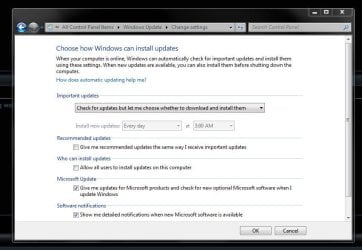
You should have your settings like this. And this is my list of updates not to install, not all pertain to windows 10, there a few useless updates too.

After the initial round of updates, you should be diligently checking the description of each update to see if it`s needed. If it`s not needed, just right click and hide it.

And be sure to make a disk image of windows when you`re done updating and installing your programs, so you don`t have to go through this again.

Updates not to Install

KB2876229 SKYPE, If you want Skype then install it.
KB2923545 RDP
KB2970228
KB3035583
KB2990214
KB3021917
KB3068708 Telemetry
KB2592687
KB2660075
KB2506928
KB2952664 x2
KB3050265
KB2726535
KB2994023
KB3022345 Replaced by KB3068708 Telemetry

KB3022345 Caused false sfc result
KB2545698 (IE9)
KB3065987
KB3077715
KB3078667
KB3080149 Telemetry
KB3075249 Telemetry
KB2999226
KB3083710
KB3097966
KB3095649
KB3102810 Fixes slow Windows update, I don`t need it.
KB3107998
KB3097877 Cause sidebar to stop working
KB3102429 Foreign Currency update
 

Attachments

  • WUS.JPG
    WUS.JPG
    60.3 KB · Views: 0

My Computer My Computer

At a glance

Windows 10 Pro x64Intel Core i7 6700KGSkill TridentZ RGB 16GB 3600 16-16-16-36EVGA GTX 980 Ti SC x2
Computer type
PC/Desktop
Computer Manufacturer/Model Number
Skylake Special #666
OS
Windows 10 Pro x64
CPU
Intel Core i7 6700K
Motherboard
Asus Sabertooth Z170 Mark 1
Memory
GSkill TridentZ RGB 16GB 3600 16-16-16-36
Graphics Card(s)
EVGA GTX 980 Ti SC x2
Sound Card
Realtek High Definition
Monitor(s) Displays
AOC G2460PG
Screen Resolution
1920 x 1080 144Hz
Hard Drives
Samsung 860 Pro 256GB, Seagate Barracuda 4TB x2
PSU
EVGA 1000 P2, EVGA White Custom Braided Cables
Case
Corsair Vengeance C70 Gunmetal Black
Cooling
Corsair H100i v2, Corsair ML120 x2, Thermal Grizzly Kryonaut
Keyboard
Logitech G910 Orion Spectrum
Mouse
Logitech G700s
Internet Speed
Verizon Fios Quantum Gateway 75/75
Antivirus
Windows Defender, Malwarebytes Free 3.8.3
Browser
Chrome
Other Info
Corsair SP120 x4, LG Blu-ray Drive, Durabrand HT-395 100 Watt Dolby Digital Amp, Corsair H2100 Wireless 7.1 Headset
Back
Top