W7 Professional restoring to W7 Home Premium - cyclic redundancy check

Phoenixcode

New member
Local time
4:11 PM
Messages
6
Hi there,

My apologies if this has already been covered elsewhere on the forum, I'm sure that someone will have had at least a similar issue before but I did a few searches and couldn't find anything that helped.

Firstly I'm not even sure what I'm doing is meant to be possible. My old laptop (HP dv1111ea running 32bit Windows 7 Professional) Gave up the ghost. I have a backup on a usb-powered external HDD which if I remember rightly includes system files as well as my user files (never been any other users) Now I have my new laptop (Sony Viao running 64bit Windows 7 Home Premium).

I have a second external HDD and have taken a backup of the new machine, I now essentially just want my pictures and documents from the old restore, that is the only thing on there of value to me, but they are very valuable. Is it possible to grab just this file and that out of the backup? I don't really want to restore the whole thing.

My concern manifests in that I don't know if it is possible to restore from a 32bit system to a 64bit system?? I presume, going between Professional and Home Premium is ok.

Anyway, upon trying to restore I get through to finding and selecting the backup and clicking 'ok' then the computer thinks about things for a bit and returns the following message:

Windows was not able to load the selected backup for the following reason:

Data Error (cyclic redundancy check). (0x80070017)

Verify that this location is valid and try again, or consider choosing a different backup.

Answers and a way to get my files from that backup would be much appreciated. I'm fairly sure that the old HDD, from the laptop that broke, is toast, so this backup is the only record of my old files that I have.

Thank you.
 

My Computer My Computer

At a glance

Windows 7 Home Premium (64bit)
OS
Windows 7 Home Premium (64bit)
cyclic reduncancy check normally means there's an error on the disk. It's some kind of hash-check.
Is it a normal"win7 "system image backup"? or win7 backup? Or did you made the backup with special software?
Please explain
 

My Computer My Computer

At a glance

Microsoft Windows 7 Home Premium 64-bits 7601...Intel(R) Core(TM) i3 CPU M 370 @ 2.40GHz4,00 GBATI Mobility Radeon HD 5400 Series
Computer type
Laptop
Computer Manufacturer/Model Number
ACER ASPIRE 5742G
OS
Microsoft Windows 7 Home Premium 64-bits 7601 Multiprocessor Free Service Pack 1
CPU
Intel(R) Core(TM) i3 CPU M 370 @ 2.40GHz
Motherboard
Acer Aspire 5742G
Memory
4,00 GB
Graphics Card(s)
ATI Mobility Radeon HD 5400 Series
Sound Card
(1) AMD High Definition Audio Device (2) Realtek High Defi
Screen Resolution
1366 x 768 x 32 bits (4294967296 colors) @ 60 Hz
Hard Drives
WDC WD5000BEVT-22ZAT0
Ahh, yea, sorry, I should have mentioned.

It is just with the backup and restore suite within windows. I didn't use any 3rd party software or anything. It's a normal windows backup file.
 

My Computer My Computer

At a glance

Windows 7 Home Premium (64bit)
OS
Windows 7 Home Premium (64bit)

My Computer My Computer

At a glance

Microsoft Windows 7 Home Premium 64-bits 7601...Intel(R) Core(TM) i3 CPU M 370 @ 2.40GHz4,00 GBATI Mobility Radeon HD 5400 Series
Computer type
Laptop
Computer Manufacturer/Model Number
ACER ASPIRE 5742G
OS
Microsoft Windows 7 Home Premium 64-bits 7601 Multiprocessor Free Service Pack 1
CPU
Intel(R) Core(TM) i3 CPU M 370 @ 2.40GHz
Motherboard
Acer Aspire 5742G
Memory
4,00 GB
Graphics Card(s)
ATI Mobility Radeon HD 5400 Series
Sound Card
(1) AMD High Definition Audio Device (2) Realtek High Defi
Screen Resolution
1366 x 768 x 32 bits (4294967296 colors) @ 60 Hz
Hard Drives
WDC WD5000BEVT-22ZAT0
Okay, thanks for helping me out. As far as I understand it the results of the chkdsk operation were that Windows couldn't find any problems but I shall paste in the entire blurb in case you can see something in it that I can't:

C:\Windows\system32>chkdsk/f f:
The type of the file system is NTFS.
Volume label is 250GB.

CHKDSK is verifying files (stage 1 of 3)...
2048 file records processed.
File verification completed.
0 large file records processed.
0 bad file records processed.
0 EA records processed.
0 reparse records processed.
CHKDSK is verifying indexes (stage 2 of 3)...
2086 index entries processed.
Index verification completed.
0 unindexed files scanned.
0 unindexed files recovered.
CHKDSK is verifying security descriptors (stage 3 of 3)...
2048 file SDs/SIDs processed.
Security descriptor verification completed.
20 data files processed.
CHKDSK is verifying Usn Journal...
9408000 USN bytes processed.
Usn Journal verification completed.
Windows has checked the file system and found no problems.

244196351 KB total disk space.
113378344 KB in 1991 files.
996 KB in 21 indexes.
0 KB in bad sectors.
84671 KB in use by the system.
65536 KB occupied by the log file.
130732340 KB available on disk.

4096 bytes in each allocation unit.
61049087 total allocation units on disk.
32683085 allocation units available on disk.
 

My Computer My Computer

At a glance

Windows 7 Home Premium (64bit)
OS
Windows 7 Home Premium (64bit)
Okay, thanks for helping me out. As far as I understand it the results of the chkdsk operation were that Windows couldn't find any problems but I shall paste in the entire blurb in case you can see something in it that I can't:

C:\Windows\system32>chkdsk/f f:
The type of the file system is NTFS.
Volume label is 250GB.

CHKDSK is verifying files (stage 1 of 3)...
2048 file records processed.
File verification completed.
0 large file records processed.
0 bad file records processed.
0 EA records processed.
0 reparse records processed.
CHKDSK is verifying indexes (stage 2 of 3)...
2086 index entries processed.
Index verification completed.
0 unindexed files scanned.
0 unindexed files recovered.
CHKDSK is verifying security descriptors (stage 3 of 3)...
2048 file SDs/SIDs processed.
Security descriptor verification completed.
20 data files processed.
CHKDSK is verifying Usn Journal...
9408000 USN bytes processed.
Usn Journal verification completed.
Windows has checked the file system and found no problems.

244196351 KB total disk space.
113378344 KB in 1991 files.
996 KB in 21 indexes.
0 KB in bad sectors.
84671 KB in use by the system.
65536 KB occupied by the log file.
130732340 KB available on disk.

4096 bytes in each allocation unit.
61049087 total allocation units on disk.
32683085 allocation units available on disk.
Your drive is working fine!! I assume you backup files (actually zip-files) have some crc checking as well(?) or the catalog with the file locations.

I'll invetsage that
 

My Computer My Computer

At a glance

Microsoft Windows 7 Home Premium 64-bits 7601...Intel(R) Core(TM) i3 CPU M 370 @ 2.40GHz4,00 GBATI Mobility Radeon HD 5400 Series
Computer type
Laptop
Computer Manufacturer/Model Number
ACER ASPIRE 5742G
OS
Microsoft Windows 7 Home Premium 64-bits 7601 Multiprocessor Free Service Pack 1
CPU
Intel(R) Core(TM) i3 CPU M 370 @ 2.40GHz
Motherboard
Acer Aspire 5742G
Memory
4,00 GB
Graphics Card(s)
ATI Mobility Radeon HD 5400 Series
Sound Card
(1) AMD High Definition Audio Device (2) Realtek High Defi
Screen Resolution
1366 x 768 x 32 bits (4294967296 colors) @ 60 Hz
Hard Drives
WDC WD5000BEVT-22ZAT0
check event log. which file has crc error?
 

My Computer My Computer

At a glance

Microsoft Windows 7 Home Premium 64-bits 7601...Intel(R) Core(TM) i3 CPU M 370 @ 2.40GHz4,00 GBATI Mobility Radeon HD 5400 Series
Computer type
Laptop
Computer Manufacturer/Model Number
ACER ASPIRE 5742G
OS
Microsoft Windows 7 Home Premium 64-bits 7601 Multiprocessor Free Service Pack 1
CPU
Intel(R) Core(TM) i3 CPU M 370 @ 2.40GHz
Motherboard
Acer Aspire 5742G
Memory
4,00 GB
Graphics Card(s)
ATI Mobility Radeon HD 5400 Series
Sound Card
(1) AMD High Definition Audio Device (2) Realtek High Defi
Screen Resolution
1366 x 768 x 32 bits (4294967296 colors) @ 60 Hz
Hard Drives
WDC WD5000BEVT-22ZAT0
uhhmm-.. sorry, I'm not sure what you are asking here. Do you mean check event viewer for information on the error? If so, I just tried again and can't see it in event viewer, which log would it be in? I don't know any other kind of event log that would help me out here.

Perhaps you could offer more specific instructions on where I can find the log you mean? Stored on the HDD where the backup is I only have the backup itself (type just says 'File Folder' are they really just fancy zip files?) and I have a 'MediaID.bin' file, that is all that is on the external HDD.
 

My Computer My Computer

At a glance

Windows 7 Home Premium (64bit)
OS
Windows 7 Home Premium (64bit)
Sorry, does anyone have any further suggestions?
 

My Computer My Computer

At a glance

Windows 7 Home Premium (64bit)
OS
Windows 7 Home Premium (64bit)
go into http://www.sevenforums.com/tutorials/783-elevated-command-prompt.html
and do:
DIR X:\
replace X with actual drive letter of partition where backup is located.
maybe you have to do:
DIR /ah X:\
this shows you hidden files as well.
Do you see mediaid.bin and a folder called YourComputerName.[some extension] ?
Remember the name so you can rename it back later if you want!

X:\
REN YourComputerName.[some extension] YourComputerName
Now you can browse that folder normally in explorer. You find a lot of zip files.
 

My Computer My Computer

At a glance

Microsoft Windows 7 Home Premium 64-bits 7601...Intel(R) Core(TM) i3 CPU M 370 @ 2.40GHz4,00 GBATI Mobility Radeon HD 5400 Series
Computer type
Laptop
Computer Manufacturer/Model Number
ACER ASPIRE 5742G
OS
Microsoft Windows 7 Home Premium 64-bits 7601 Multiprocessor Free Service Pack 1
CPU
Intel(R) Core(TM) i3 CPU M 370 @ 2.40GHz
Motherboard
Acer Aspire 5742G
Memory
4,00 GB
Graphics Card(s)
ATI Mobility Radeon HD 5400 Series
Sound Card
(1) AMD High Definition Audio Device (2) Realtek High Defi
Screen Resolution
1366 x 768 x 32 bits (4294967296 colors) @ 60 Hz
Hard Drives
WDC WD5000BEVT-22ZAT0
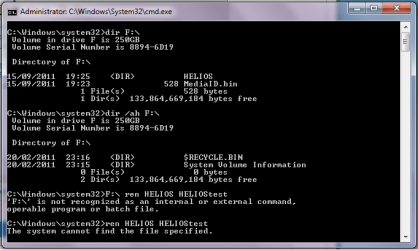
Hey there, thanks for getting back to me, sorry it took me a long while to respond. It's been a busy week -_- hah. I ran those commands and tried to do as you suggested but struggled with the last one, renaming the file. Upon running the command to just look at the directory (F: in my case) the mediaID.bin file was there, as was one with 'just' my computer name, no extension (my computer name is 'HELIOS') I tried to rename that anyway but it didn't like the various amalgamations of that last command. Here is a screen of the command prompt window, to show you what I was getting.
 

Attachments

  • cmdScreen.png
    cmdScreen.png
    15.9 KB · Views: 15

My Computer My Computer

At a glance

Windows 7 Home Premium (64bit)
OS
Windows 7 Home Premium (64bit)
in elevated command prompt:
f:
cd HELIOS
md \blabla
xcopy/s *.zip \blabla

In folder f:\blabla are now many zip files.
 

My Computer My Computer

At a glance

Microsoft Windows 7 Home Premium 64-bits 7601...Intel(R) Core(TM) i3 CPU M 370 @ 2.40GHz4,00 GBATI Mobility Radeon HD 5400 Series
Computer type
Laptop
Computer Manufacturer/Model Number
ACER ASPIRE 5742G
OS
Microsoft Windows 7 Home Premium 64-bits 7601 Multiprocessor Free Service Pack 1
CPU
Intel(R) Core(TM) i3 CPU M 370 @ 2.40GHz
Motherboard
Acer Aspire 5742G
Memory
4,00 GB
Graphics Card(s)
ATI Mobility Radeon HD 5400 Series
Sound Card
(1) AMD High Definition Audio Device (2) Realtek High Defi
Screen Resolution
1366 x 768 x 32 bits (4294967296 colors) @ 60 Hz
Hard Drives
WDC WD5000BEVT-22ZAT0
Back
Top