I have a new, never used, Lenovo e540 with Win-7 PRO x64
Purchased in Aug-2015, but a week later I had a stroke so the Lenovo sat in its wrapper until about Mar-2017 (this year)
The Lenovo came with a lot of Lenovo crud and following Greg Rockers mantra I was cautiously uninstalling Lenovo "extras" using Revounistaller PRO
- the washup is no boot, no BIOS ... and C:\ drive is empty (I tried recovering the C:\ partition with 2 programs)
I gave the broken Lenovo to a local significant repair shop, who installed a non-Lenovo Win-7 onto the machine again.
- cost was $200, no discs, no recovery partition ... nothing else. !
The shop loaded a lot of commercial trial-ware onto my machine

- so I have been uninstalling "stuff" with Revounistaller PRO
Now the system is unstable some Windows features have disappeared ...
... no Safely Remove and no "Eject"
Time for a clean slate ... I havewasted lost too much time already
 A new HDD and a fresh install of Win-7 PRO x64 using an ISO file.
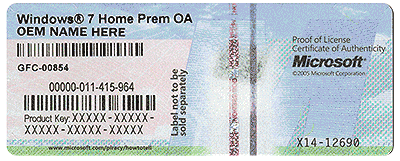
The repair shop did give me this list of "product codes" .... beyond my knowledge
OR
would it be easier to buy a new OEM with new keys and start afresh ?
- a new Win-7 PRO OEM (ISO download) is cheaper ($85) than another $200 and gives me a Recovery (sought of) in the future.
From reading today the OEM: DM means the activation is stored in the BIOS but (again) my understanding is DM is only applicable to Win-8.x and later (?)
So I assume the original pre-installed Win-7 PRO x64 does not know about the DM in BIOS.
- I originally activated the pre-installed Win-7 PRO x64 online, no problems ...
I would appreciate any help
Purchased in Aug-2015, but a week later I had a stroke so the Lenovo sat in its wrapper until about Mar-2017 (this year)
The Lenovo came with a lot of Lenovo crud and following Greg Rockers mantra I was cautiously uninstalling Lenovo "extras" using Revounistaller PRO
- the washup is no boot, no BIOS ... and C:\ drive is empty (I tried recovering the C:\ partition with 2 programs)
I gave the broken Lenovo to a local significant repair shop, who installed a non-Lenovo Win-7 onto the machine again.
- cost was $200, no discs, no recovery partition ... nothing else. !
The shop loaded a lot of commercial trial-ware onto my machine
- so I have been uninstalling "stuff" with Revounistaller PRO
Now the system is unstable some Windows features have disappeared ...
... no Safely Remove and no "Eject"
Time for a clean slate ... I have
A new HDD and a fresh install of Win-7 PRO x64 using an ISO file.The repair shop did give me this list of "product codes" .... beyond my knowledge
Is this enough info to use a generic OEM ISO to install Win-7 PRO x64 onto the new HDDWindows Product Key Information
Product Name: Windows 7 Professional
Product ID: xxxxx-OEM-xxxxxxx-xxxxx
Installed Key: xxxxx-xxxxx-7H2VR-VQ29D-xxxxx
OEM Key: xxxxx-xxxxx-xxxxx-PKRB3-xxxxx
OEM Edition: Win 8.1 RTM Professional OEM: DM
OR
would it be easier to buy a new OEM with new keys and start afresh ?
- a new Win-7 PRO OEM (ISO download) is cheaper ($85) than another $200 and gives me a Recovery (sought of) in the future.
From reading today the OEM: DM means the activation is stored in the BIOS but (again) my understanding is DM is only applicable to Win-8.x and later (?)
So I assume the original pre-installed Win-7 PRO x64 does not know about the DM in BIOS.
- I originally activated the pre-installed Win-7 PRO x64 online, no problems ...
I would appreciate any help
My Computer
At a glance
XP Pro (x86) | 7 HP (x86) & (x64) | 7 Pro (x64)
- Computer type
- PC/Desktop
- Computer Manufacturer/Model Number
- Toshiba, Lenovo (laptops) + 4 rigs
- OS
- XP Pro (x86) | 7 HP (x86) & (x64) | 7 Pro (x64)