Can join homegroup, but netbook can't see desktop!

lecseven

New member
Local time
3:59 PM
Messages
13
Hello everyone.

Clean install on both computers, win7 professional, everything on default, no 3rd party firewalls or antiviral software.

Internet access through router (D-Link DIR-320). Desktop connects to it through LAN, netbook (asus eeepc 1000h) - wireless. Router's firewall is off.

The PCs can see each other in the network (the "old" way, they have the same workgroup name), but only netbook sees desktop in the homegroup. Desktop can't see netbook.

I can create homegroup on PC and gain access to the shared files from the netbook, but can't do it the other way.

IMPORTANT! When I connected netbook to the router through cable, everything worked fine! This means that there's something wrong with netbook wifi adapter? But I've already tried install the latest drivers - it didn't help.

Please, people, what am I doing wrong? Spent the whole weekend on this, really need to make it work.

Hope you may help, thanks.

UPD:
Changed the router from DIR-320 to DIR-615, the problem's gone.
 
Last edited:

My Computer My Computer

At a glance

Windows 7
OS
Windows 7
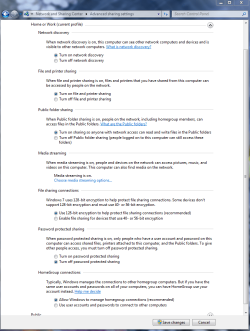
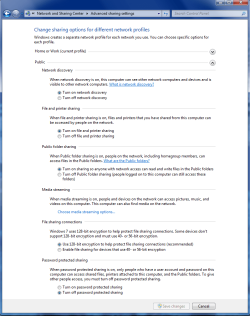
First make sure these settings are the same on both machines. Pay attention to the network discovery setting and the password protected sharing. These Advanced Sharing settings need to look like the pictures below.

I'm assuming that both machines are using Windows 7?

Do you have any AV software installed?
 

Attachments

  • Home or work homegroup enable.PNG
    Home or work homegroup enable.PNG
    45 KB · Views: 789
  • public sharing enabled all.PNG
    public sharing enabled all.PNG
    39.7 KB · Views: 453

My Computer My Computer

At a glance

Windows 7 Ult, Windows 8.1 Pro,Q9650-4.275GHz, E8600 4.5GHz, E6750-3.8GHzG.Skill PC2 9600 1200Mhz 5 5 5 15 2TGTX480
Computer type
PC/Desktop
Computer Manufacturer/Model Number
Home built
OS
Windows 7 Ult, Windows 8.1 Pro,
CPU
Q9650-4.275GHz, E8600 4.5GHz, E6750-3.8GHz
Motherboard
Evga 780i FTW
Memory
G.Skill PC2 9600 1200Mhz 5 5 5 15 2T
Graphics Card(s)
GTX480
Sound Card
Asus Xonar D2
Monitor(s) Displays
HannsG
Screen Resolution
1680X1050
Hard Drives
GSkill Phoenix Pro 120GB SSD
PSU
ThermalTake Toughpower 1000Watt modular
Case
ThermalTake XaserV
Cooling
Xigmatek S1283
Keyboard
Logitech G15
Mouse
Logitech G9
Internet Speed
T1
First make sure these settings are the same on both machines. Pay attention to the network discovery setting and the password protected sharing. These Advanced Sharing settings need to look like the pictures below.

I'm assuming that both machines are using Windows 7?

Do you have any AV software installed?

The setting are like in the screenshots, both machines use win7, no AV software or 3rd party firewall. Have just reinstalled OS on both computers. :confused:

Desktop has 64x version, netbook - 32x.
 

My Computer My Computer

At a glance

Windows 7
OS
Windows 7
Sounds good to me. I think you want to set up a Homegroup since both machines are Win 7.

Or if you already have set up the Homegroup read further.

If you are using the wifi on the netbook it helps to join the Homegroup from the wireless connection instead of the wired one. If you set up the Homegroup on the netbook from the wired connection you should leave the Homegroup then rejoin using the wireless connection. You will need to know the Homegroup password for that.

It can be a bit trickier setting up the Homegroup from a wireless connection but it's not too difficult usually.

http://www.sevenforums.com/tutorials/43980-homegroup-leave.html?filter
http://www.sevenforums.com/tutorials/43972-homegroup-add-computer-join.html?filter

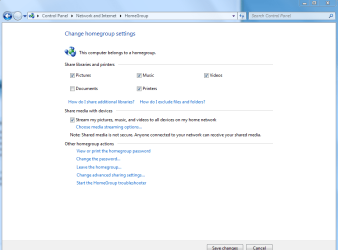
Make sure you tell Homegroups which folders you want to share. This windows is helpful for that.
 

Attachments

  • Homegroup settings documents unchecked.PNG
    Homegroup settings documents unchecked.PNG
    23.3 KB · Views: 142

My Computer My Computer

At a glance

Windows 7 Ult, Windows 8.1 Pro,Q9650-4.275GHz, E8600 4.5GHz, E6750-3.8GHzG.Skill PC2 9600 1200Mhz 5 5 5 15 2TGTX480
Computer type
PC/Desktop
Computer Manufacturer/Model Number
Home built
OS
Windows 7 Ult, Windows 8.1 Pro,
CPU
Q9650-4.275GHz, E8600 4.5GHz, E6750-3.8GHz
Motherboard
Evga 780i FTW
Memory
G.Skill PC2 9600 1200Mhz 5 5 5 15 2T
Graphics Card(s)
GTX480
Sound Card
Asus Xonar D2
Monitor(s) Displays
HannsG
Screen Resolution
1680X1050
Hard Drives
GSkill Phoenix Pro 120GB SSD
PSU
ThermalTake Toughpower 1000Watt modular
Case
ThermalTake XaserV
Cooling
Xigmatek S1283
Keyboard
Logitech G15
Mouse
Logitech G9
Internet Speed
T1
Pardon me, which settings? The ones on the screenshots? Checked them already, they are correct.
 

My Computer My Computer

At a glance

Windows 7
OS
Windows 7
So, nobody? :(
 

My Computer My Computer

At a glance

Windows 7
OS
Windows 7
Alright dude...
You said that you turned the Firewall off your router...
How about the computer

What internet security are you using for your netbook..

hmm so when you do hardwire it works but then when you go wireless it doesnt...

sounds like a MAC or a IP Issue...wwith a trusted site.

I definitly like to get to the bottom of this. I am interested... hmm brain hurts.
 

My Computer My Computer

At a glance

Windows 7 Ultimate x64AMD Phenom x6 1045t8 GBATI Radeon HD 5570
Computer Manufacturer/Model Number
HP Pavilion Elite HPE-410f
OS
Windows 7 Ultimate x64
CPU
AMD Phenom x6 1045t
Motherboard
N/A
Memory
8 GB
Graphics Card(s)
ATI Radeon HD 5570
Sound Card
Realtek Highdefinition Audio / 5.1 Dolby Setup
Monitor(s) Displays
HP w2207h Widescreen
Screen Resolution
1680*1050
Hard Drives
1 TB (fixed), 320 Portable maxtor, Server Hard drives
PSU
350 Watt
Case
HP CASE
Cooling
Bass
Keyboard
Logitech MX 5500
Mouse
Logitech MX 5500
Internet Speed
ROAD RUNNER 16MB D/512 U
No 3rd party firewalls, only windows' default one.

And yes, ethernet cable works just fine - i can see and share everything.

Here's what "network map" shows me, when i launch it on desktop, when netbook is connected wireless:


When launched on netbook, still wireless:


And here's what is shown, when it is connected via cable (launched on desktop):

(those icons in the bottom: "windows located the next devices in the network, but couldn't place them on the net map")

And launched on netbook:

(question mark is "Unknown")

"Lecteur" is the SSID.
 

My Computer My Computer

At a glance

Windows 7
OS
Windows 7
If you are using the wifi on the netbook it helps to join the Homegroup from the wireless connection instead of the wired one. If you set up the Homegroup on the netbook from the wired connection you should leave the Homegroup then rejoin using the wireless connection. You will need to know the Homegroup password for that.

Thank you, but still no luck. I tried already all different options of creating and joining homegroups, wireless and wiremore :), but it always ends in netbook locating desktop, and desktop not locating netbook.
 

My Computer My Computer

At a glance

Windows 7
OS
Windows 7
This is for Shiiittzzs and Giggles...

Uninstall the drivers for one of the network device for the netbook, let it reinstal...

once that is done, then uninstall the wireless for the netbook... and try it again

see how that goes... let me know if there is any changes.
 

My Computer My Computer

At a glance

Windows 7 Ultimate x64AMD Phenom x6 1045t8 GBATI Radeon HD 5570
Computer Manufacturer/Model Number
HP Pavilion Elite HPE-410f
OS
Windows 7 Ultimate x64
CPU
AMD Phenom x6 1045t
Motherboard
N/A
Memory
8 GB
Graphics Card(s)
ATI Radeon HD 5570
Sound Card
Realtek Highdefinition Audio / 5.1 Dolby Setup
Monitor(s) Displays
HP w2207h Widescreen
Screen Resolution
1680*1050
Hard Drives
1 TB (fixed), 320 Portable maxtor, Server Hard drives
PSU
350 Watt
Case
HP CASE
Cooling
Bass
Keyboard
Logitech MX 5500
Mouse
Logitech MX 5500
Internet Speed
ROAD RUNNER 16MB D/512 U
I don't have any drivers from the manufacturer installed on the netbook, or do I need to uninstall the devices itself from the device manager? If yes, I've tried that already. No changes.
 

My Computer My Computer

At a glance

Windows 7
OS
Windows 7
Cool, your from russia, i was trying to figure out that language on your computer screen.. thought it was thai

glad you speak english though.... hy if you want dude. I could establish a instant messenger with you and we can fix the comptue one at a time.. get thisthing rollin
 

My Computer My Computer

At a glance

Windows 7 Ultimate x64AMD Phenom x6 1045t8 GBATI Radeon HD 5570
Computer Manufacturer/Model Number
HP Pavilion Elite HPE-410f
OS
Windows 7 Ultimate x64
CPU
AMD Phenom x6 1045t
Motherboard
N/A
Memory
8 GB
Graphics Card(s)
ATI Radeon HD 5570
Sound Card
Realtek Highdefinition Audio / 5.1 Dolby Setup
Monitor(s) Displays
HP w2207h Widescreen
Screen Resolution
1680*1050
Hard Drives
1 TB (fixed), 320 Portable maxtor, Server Hard drives
PSU
350 Watt
Case
HP CASE
Cooling
Bass
Keyboard
Logitech MX 5500
Mouse
Logitech MX 5500
Internet Speed
ROAD RUNNER 16MB D/512 U
Oh I would really appreciate that. How do we connect?
 

My Computer My Computer

At a glance

Windows 7
OS
Windows 7
Solved.

Don't know, what was the reason of the problem, but it definetly was in the router.

Changed D-Link DIR-320 to DIR-615, and everything worked just great.

Thanks to acurasd anyway, he's a great guy :)
 

My Computer My Computer

At a glance

Windows 7
OS
Windows 7
oh thats what it was... sweet!


well at least we got everything configured.


so did they give you the money back for the 320... you know the comrads *lol*
 

My Computer My Computer

At a glance

Windows 7 Ultimate x64AMD Phenom x6 1045t8 GBATI Radeon HD 5570
Computer Manufacturer/Model Number
HP Pavilion Elite HPE-410f
OS
Windows 7 Ultimate x64
CPU
AMD Phenom x6 1045t
Motherboard
N/A
Memory
8 GB
Graphics Card(s)
ATI Radeon HD 5570
Sound Card
Realtek Highdefinition Audio / 5.1 Dolby Setup
Monitor(s) Displays
HP w2207h Widescreen
Screen Resolution
1680*1050
Hard Drives
1 TB (fixed), 320 Portable maxtor, Server Hard drives
PSU
350 Watt
Case
HP CASE
Cooling
Bass
Keyboard
Logitech MX 5500
Mouse
Logitech MX 5500
Internet Speed
ROAD RUNNER 16MB D/512 U
Yeah, they did. And everything went realy fast and smooth :) didn't really expect that.
 

My Computer My Computer

At a glance

Windows 7
OS
Windows 7
Back
Top