Can LED mouse shut down depending on the surface reflective texture ?

sdowney717

New member
Power User
VIP
Local time
12:33 AM
Messages
705
I have a worn area on my wood desk where the Logitech mouse sits.
I can use the mouse for months and then the mouse starts having weird issues.
It will start acting jerky - halts, catches up
Then it will turn off it's LED light.

The fix is to unplug the mouse and plug back in.

So after putting up with that I moved the mouse to another spot, works fine.
Then put mouse back to original position, it shuts down again.

So then I took a razor blade and scraped the worn shiny wood desk spot where the mouse sits and it again works fine for months, TILL that spot smooths over again shiny.

I do not use a mouse pad, ans I suppose the area gets 'skin greased' from my hand over the months of use.

I have been experiencing this problem for maybe 3 years.
 

My Computer My Computer

OS
Windows 7 Ultimate x64
Well you have already answered your question.

Can LED mouse shut down depending on the surface reflective texture ?

Some mice are sensitive to different surfaces. The newer quality mice pretty much work on almost every surface. What ever the surface is it's always best to keep that surface clean.

Exactly what mouse are you referring to.

It would be very helpful if you did this tutorial by Brink so we would have some idea of your system specs.

http://www.sevenforums.com/tutorials/180324-system-info-see-your-system-specs.html
 

My Computer My Computer

Computer type
PC/Desktop
Computer Manufacturer/Model Number
Home made Desktop
OS
Windows 10 Pro. 64/ version 1709 Windows 7 Pro/64
CPU
Intel i7-6800K @ 4.3
Motherboard
ASUS X-99 Deluxe II
Memory
Corsair Platinum 16 gig @2400
Graphics Card(s)
EVGA GTX 1070 OC
Monitor(s) Displays
Asus 27" LED LCD/VE278Q
Screen Resolution
1920-1080 or 1280-720 HDMI
Hard Drives
INTEL SSD 730-240 Gb Sata 3.0/
PSU
EVGA Platium 1200W
Case
Phanteks Luxe Tempered Glass 8 fans/ one radiator
Cooling
XSPC/ Water Cooled CPU
Keyboard
Das 4 Professional
Mouse
Logitech M705/MX Anywhere 2-S
Internet Speed
100 mbits
Antivirus
Microsoft Security Essentials/ Malwarebytes Premium 3.0/ SAS
Browser
I.E. 11 default/Firefox/ ISP Time Warner Cable/Spectrum
Other Info
LG BluRay Burner/
Sound system-KLipsch-THX/
Icy Dock ssd Hot Swap bays.
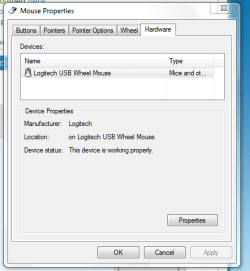
Logitech USB wheel mouse is what windows 7 calls it.

Been working perfectly since I cleaned up the desk a little.
I admit the mouse is worn but as long as it keeps working, why get another?

Mouse has a clear red plastic base where you see the LED and white top.
 

Attachments

  • Logwheel mouse.PNG
    Logwheel mouse.PNG
    14.1 KB · Views: 23

My Computer My Computer

OS
Windows 7 Ultimate x64
model number should be on bottom of the mouse.
 

My Computer My Computer

Computer type
PC/Desktop
Computer Manufacturer/Model Number
dell xps 9000
OS
win 10
model is
M/N M-BJ58
P/N 830524
 

My Computer My Computer

OS
Windows 7 Ultimate x64
looks to a pretty basic mouse. i have a thin piece of plastic about 8" x 8" that i use at home on my desk for the mouse durable and very smooth.
 

My Computer My Computer

Computer type
PC/Desktop
Computer Manufacturer/Model Number
dell xps 9000
OS
win 10
The mouse has lost its 3 slick pads, but that was a long time ago.
Wonder if since it is a tiny bit closer to the surface if that would affect it.
 

My Computer My Computer

OS
Windows 7 Ultimate x64
well you could always replace the mouse they are not that much. could even replace the pads with something like this. Eels Mouse Glide Tape
 

My Computer My Computer

Computer type
PC/Desktop
Computer Manufacturer/Model Number
dell xps 9000
OS
win 10
Can LED mouse shut down depending on the surface reflective texture ?

Yes!

I experienced this in a hotel one night. I was using the laptop mouse on the room desk and I of course thought it broke in transit. Started fiddling with it and was almost ready to take it apart when I randomly tried it on top of a newspaper. Works perfectly. Back on the shiny desk: 'broken' again.

Cheaper optical mice have a laser that can read up to 600 dpi (dots per inch). Mainstream mice up to 800 dpi. High performance mice have dpi at 1000 and 1200. The higher the dpi the more accurate the mouse can track on a surface, picking up even minor changes in texture. The cheaper mice cannot track well on shiny surfaces because they can't read the movement accurately.

So either buy an expensive high dpi mouse, or buy a mouse pad, or work on top of a sheet of printer paper!
 

My Computer My Computer

Computer type
PC/Desktop
Computer Manufacturer/Model Number
Home Built - Jan 2013
OS
Windows 7 64 Bit Home Premium SP1
CPU
i7-3820
Motherboard
Asus P9X79-PRO - Bios 4608
Memory
GSkill F3-14900CL9Q - 16GB
Graphics Card(s)
EVGA GeForce GTX660 - Driver 352.86
Sound Card
On board Realtek ALC898
Monitor(s) Displays
Acer S271HL
Screen Resolution
1920 x 1080
Hard Drives
#1- Samsung 840 Pro Series
#2- Western Digital WD1002FAEX Sata3 Black
#3- Western Digital WD1002FAEX Sata3 Black
PSU
Corsair CMPSU-850TX-V2 - 850 watt (by Seasonic)
Case
Corsair Obsidian 550D
Cooling
Standard 3 120mm case fans, Cooler Master Hyper 212 EVO
Keyboard
MS KC-0405
Mouse
Intellimouse 5-button
Internet Speed
56 Mbits/Sec (on a good day)
Antivirus
Avast & Malwarebytes
Browser
Firefox
Other Info
Asus DVD - DRW-24B1ST 24X
Can LED mouse shut down depending on the surface reflective texture ?

Yes!

I experienced this in a hotel one night. I was using the laptop mouse on the room desk and I of course thought it broke in transit. Started fiddling with it and was almost ready to take it apart when I randomly tried it on top of a newspaper. Works perfectly. Back on the shiny desk: 'broken' again.

Cheaper optical mice have a laser that can read up to 600 dpi (dots per inch). Mainstream mice up to 800 dpi. High performance mice have dpi at 1000 and 1200. The higher the dpi the more accurate the mouse can track on a surface, picking up even minor changes in texture. The cheaper mice cannot track well on shiny surfaces because they can't read the movement accurately.

So either buy an expensive high dpi mouse, or buy a mouse pad, or work on top of a sheet of printer paper!

Somehow the mouse gets confused and just turns off?
 

My Computer My Computer

OS
Windows 7 Ultimate x64
Maybe it's just time to replace the mouse
 

My Computer My Computer

Computer type
PC/Desktop
Computer Manufacturer/Model Number
dell xps 9000
OS
win 10
Well the shutting off part is a new one on me, but it could be 'feature' of that particular mouse.
Or it could be failing.

I was going mostly on this statement:
"I can use the mouse for months and then the mouse starts having weird issues.
It will start acting jerky - halts, catches up"
More than this one:
"Then it will turn off it's LED light."
 

My Computer My Computer

Computer type
PC/Desktop
Computer Manufacturer/Model Number
Home Built - Jan 2013
OS
Windows 7 64 Bit Home Premium SP1
CPU
i7-3820
Motherboard
Asus P9X79-PRO - Bios 4608
Memory
GSkill F3-14900CL9Q - 16GB
Graphics Card(s)
EVGA GeForce GTX660 - Driver 352.86
Sound Card
On board Realtek ALC898
Monitor(s) Displays
Acer S271HL
Screen Resolution
1920 x 1080
Hard Drives
#1- Samsung 840 Pro Series
#2- Western Digital WD1002FAEX Sata3 Black
#3- Western Digital WD1002FAEX Sata3 Black
PSU
Corsair CMPSU-850TX-V2 - 850 watt (by Seasonic)
Case
Corsair Obsidian 550D
Cooling
Standard 3 120mm case fans, Cooler Master Hyper 212 EVO
Keyboard
MS KC-0405
Mouse
Intellimouse 5-button
Internet Speed
56 Mbits/Sec (on a good day)
Antivirus
Avast & Malwarebytes
Browser
Firefox
Other Info
Asus DVD - DRW-24B1ST 24X
Well its working perfect all day here.
I have been wondering if the cord is broke on the inside. So I pulled on it hard and the light stayed on.
I will just keep on with it as is.
Maybe I should refinish the desk with some zep floor polish from HDepot.

I found that it works great on interior woodwork on our boat, easy to paint on, easy cleanup, dries fast. Takes 2-3 coats to give the wood a durable shine finished look and it is waterproof. All that for $19 per gallon which way cheaper than Minwax.
 

My Computer My Computer

OS
Windows 7 Ultimate x64
For a test you should try using it for a while on a sheet of printer paper.
Test first, then remodel!
 

My Computer My Computer

Computer type
PC/Desktop
Computer Manufacturer/Model Number
Home Built - Jan 2013
OS
Windows 7 64 Bit Home Premium SP1
CPU
i7-3820
Motherboard
Asus P9X79-PRO - Bios 4608
Memory
GSkill F3-14900CL9Q - 16GB
Graphics Card(s)
EVGA GeForce GTX660 - Driver 352.86
Sound Card
On board Realtek ALC898
Monitor(s) Displays
Acer S271HL
Screen Resolution
1920 x 1080
Hard Drives
#1- Samsung 840 Pro Series
#2- Western Digital WD1002FAEX Sata3 Black
#3- Western Digital WD1002FAEX Sata3 Black
PSU
Corsair CMPSU-850TX-V2 - 850 watt (by Seasonic)
Case
Corsair Obsidian 550D
Cooling
Standard 3 120mm case fans, Cooler Master Hyper 212 EVO
Keyboard
MS KC-0405
Mouse
Intellimouse 5-button
Internet Speed
56 Mbits/Sec (on a good day)
Antivirus
Avast & Malwarebytes
Browser
Firefox
Other Info
Asus DVD - DRW-24B1ST 24X
For a test you should try using it for a while on a sheet of printer paper.
Test first, then remodel!

yes, I will eventually. But right now it is still working good just on the desk.
Maybe will work for another few months again :)

I took it apart to clean it, and it was very dirty inside.
Make sure you clean the inner wheel, the tiny slits.

The little wheel click spring took a while to figure out how it goes back in.
There is a little tiny hole that the square hook fits into.
The spring will be on top of the black plastic
The round spring end is what rubs on the inner wheel.

I am refinishing the desk, mouse works good so far again.
The wheel clicks nicely like new.

Halp with M-BJ58 optical mouse - Logitech Forums
 
Last edited:

My Computer My Computer

OS
Windows 7 Ultimate x64
Back
Top