Can no longer connect to home computer over home network

mbh9700

New member
Local time
6:57 AM
Messages
5
I have a home desktop computer, and a work laptop. Over the years I've changed laptops and home computers, and have always been able to get network sharing working so I can transfer files between them by using \\<hostname>

I've had my current setup for about 6 months now, and have been able to share files. Let's call my home computer "alien" and my work computer "laptop".

A couple of days ago, I found I was not able to connect to alien from laptop, but I could connect the other way. Also, alien can ping laptop, but NOT vice versa. alien has a static IP of 192.168.1.200, and laptop has an IP address of 192.168.1.8 via DHCP.

Any ideas about why laptop cannot ping alien (which would explain why I can't connect to it)?
 

My Computer My Computer

At a glance

Windows 7 Home Premium x64Intel i7-2600K 3.4 GHz16GBAMD Radeon HD 6800
Computer type
PC/Desktop
Computer Manufacturer/Model Number
Alienware (Dell)
OS
Windows 7 Home Premium x64
CPU
Intel i7-2600K 3.4 GHz
Memory
16GB
Graphics Card(s)
AMD Radeon HD 6800
Antivirus
Microsoft Security Essentials
Browser
IE, Firefox, Chrome
I have a home desktop computer, and a work laptop. Over the years I've changed laptops and home computers, and have always been able to get network sharing working so I can transfer files between them by using \\<hostname>

I've had my current setup for about 6 months now, and have been able to share files. Let's call my home computer "alien" and my work computer "laptop".

A couple of days ago, I found I was not able to connect to alien from laptop, but I could connect the other way. Also, alien can ping laptop, but NOT vice versa. alien has a static IP of 192.168.1.200, and laptop has an IP address of 192.168.1.8 via DHCP.

Any ideas about why laptop cannot ping alien (which would explain why I can't connect to it)?

You may want to disable the antivirus software for testing. With the ping not working it would seem like something is blocking the connection. Do the machines appear in the network folder under network?

Obviously you should make sure that Network Discovery and File and Printer sharing are turned on in the Advanced Sharing settings.

Make sure they are on the same Workgroup etc. and that file sharing is enabled through the sharing tab >Advanced Sharing> of the C:>Users folder.
 

My Computer My Computer

At a glance

Windows 7 Ult, Windows 8.1 Pro,Q9650-4.275GHz, E8600 4.5GHz, E6750-3.8GHzG.Skill PC2 9600 1200Mhz 5 5 5 15 2TGTX480
Computer type
PC/Desktop
Computer Manufacturer/Model Number
Home built
OS
Windows 7 Ult, Windows 8.1 Pro,
CPU
Q9650-4.275GHz, E8600 4.5GHz, E6750-3.8GHz
Motherboard
Evga 780i FTW
Memory
G.Skill PC2 9600 1200Mhz 5 5 5 15 2T
Graphics Card(s)
GTX480
Sound Card
Asus Xonar D2
Monitor(s) Displays
HannsG
Screen Resolution
1680X1050
Hard Drives
GSkill Phoenix Pro 120GB SSD
PSU
ThermalTake Toughpower 1000Watt modular
Case
ThermalTake XaserV
Cooling
Xigmatek S1283
Keyboard
Logitech G15
Mouse
Logitech G9
Internet Speed
T1
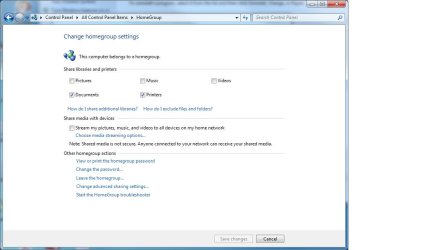
Antivirus off, Network discovery, File and printer sharing, and public folder sharing are all turned on. Not using "workgroup" using homegroup. When double-checking these things, though, I noticed in the homegroup settings that Pictures, Music, and Videos were all unchecked. So, I checked them and clicked "Save changes". But when I went in to check again, they were still off. Changes to those checkmarks don't seem to get saved:
 

Attachments

  • homegroup settings.jpg
    homegroup settings.jpg
    46.6 KB · Views: 1

My Computer My Computer

At a glance

Windows 7 Home Premium x64Intel i7-2600K 3.4 GHz16GBAMD Radeon HD 6800
Computer type
PC/Desktop
Computer Manufacturer/Model Number
Alienware (Dell)
OS
Windows 7 Home Premium x64
CPU
Intel i7-2600K 3.4 GHz
Memory
16GB
Graphics Card(s)
AMD Radeon HD 6800
Antivirus
Microsoft Security Essentials
Browser
IE, Firefox, Chrome
Also, this computer is part of a domain at work. But like I said, it's been that way for years, and I've never had this problem.
 

My Computer My Computer

At a glance

Windows 7 Home Premium x64Intel i7-2600K 3.4 GHz16GBAMD Radeon HD 6800
Computer type
PC/Desktop
Computer Manufacturer/Model Number
Alienware (Dell)
OS
Windows 7 Home Premium x64
CPU
Intel i7-2600K 3.4 GHz
Memory
16GB
Graphics Card(s)
AMD Radeon HD 6800
Antivirus
Microsoft Security Essentials
Browser
IE, Firefox, Chrome
Antivirus off, Network discovery, File and printer sharing, and public folder sharing are all turned on. Not using "workgroup" using homegroup. When double-checking these things, though, I noticed in the homegroup settings that Pictures, Music, and Videos were all unchecked. So, I checked them and clicked "Save changes". But when I went in to check again, they were still off. Changes to those checkmarks don't seem to get saved:

Those sharing check marks not being saved is rather strange. You might want to check that the required services are turned on.

The services that need to be turned on are listed below:

  • DNS Client
  • Function Discovery Provider Host
  • Function Discovery Resource Publication
  • Peer Networking Grouping
  • HomeGroup Provider
  • HomeGroup Listener
  • SSDP Discovery
  • UPnP Device Host
Can you check that Network Discovery stay's turned on, sometimes it will shut off by itself and cause problems but there is a way to fix it.

When in doubt it sometimes helps to leave the Homegroup on all Homegroup machines and create a new one then rejoin.
 

My Computer My Computer

At a glance

Windows 7 Ult, Windows 8.1 Pro,Q9650-4.275GHz, E8600 4.5GHz, E6750-3.8GHzG.Skill PC2 9600 1200Mhz 5 5 5 15 2TGTX480
Computer type
PC/Desktop
Computer Manufacturer/Model Number
Home built
OS
Windows 7 Ult, Windows 8.1 Pro,
CPU
Q9650-4.275GHz, E8600 4.5GHz, E6750-3.8GHz
Motherboard
Evga 780i FTW
Memory
G.Skill PC2 9600 1200Mhz 5 5 5 15 2T
Graphics Card(s)
GTX480
Sound Card
Asus Xonar D2
Monitor(s) Displays
HannsG
Screen Resolution
1680X1050
Hard Drives
GSkill Phoenix Pro 120GB SSD
PSU
ThermalTake Toughpower 1000Watt modular
Case
ThermalTake XaserV
Cooling
Xigmatek S1283
Keyboard
Logitech G15
Mouse
Logitech G9
Internet Speed
T1
All but HomeGroup Listener is started. When I try to start it it says "Windows could not start the HomeGroup Listener on Local Computer" But, do I need HomeGroup just to ping an IP address? Not even pinging works from laptop to alien. I turned off firewall and antivirus, and that didn't work either.
 

My Computer My Computer

At a glance

Windows 7 Home Premium x64Intel i7-2600K 3.4 GHz16GBAMD Radeon HD 6800
Computer type
PC/Desktop
Computer Manufacturer/Model Number
Alienware (Dell)
OS
Windows 7 Home Premium x64
CPU
Intel i7-2600K 3.4 GHz
Memory
16GB
Graphics Card(s)
AMD Radeon HD 6800
Antivirus
Microsoft Security Essentials
Browser
IE, Firefox, Chrome
All but HomeGroup Listener is started. When I try to start it it says "Windows could not start the HomeGroup Listener on Local Computer" But, do I need HomeGroup just to ping an IP address? Not even pinging works from laptop to alien. I turned off firewall and antivirus, and that didn't work either.

Yes without that particular service working the Homegroup will not function correctly.

First you should confirm that the Windows firewall and the related service are both up and running as the Homegroup listener service depends on this.

Disabling any third party A/V or firewall may be required for testing.

First try running the command below in an elevated command prompt and let it run until it completes. Check to see if the scan fixed or could not fix any problems then reboot the machine to complete repairs.

Code:
sfc /scannow
 
Last edited:

My Computer My Computer

At a glance

Windows 7 Ult, Windows 8.1 Pro,Q9650-4.275GHz, E8600 4.5GHz, E6750-3.8GHzG.Skill PC2 9600 1200Mhz 5 5 5 15 2TGTX480
Computer type
PC/Desktop
Computer Manufacturer/Model Number
Home built
OS
Windows 7 Ult, Windows 8.1 Pro,
CPU
Q9650-4.275GHz, E8600 4.5GHz, E6750-3.8GHz
Motherboard
Evga 780i FTW
Memory
G.Skill PC2 9600 1200Mhz 5 5 5 15 2T
Graphics Card(s)
GTX480
Sound Card
Asus Xonar D2
Monitor(s) Displays
HannsG
Screen Resolution
1680X1050
Hard Drives
GSkill Phoenix Pro 120GB SSD
PSU
ThermalTake Toughpower 1000Watt modular
Case
ThermalTake XaserV
Cooling
Xigmatek S1283
Keyboard
Logitech G15
Mouse
Logitech G9
Internet Speed
T1
Microsoft Security Essentials back on, and my router firewall back on...still not connecting, and of course, still no pings. No problems with sfc scan:

C:\Windows\system32>sfc /scannow

Beginning system scan. This process will take some time.

Beginning verification phase of system scan.
Verification 100% complete.

Windows Resource Protection did not find any integrity violations.

C:\Windows\system32>
 

My Computer My Computer

At a glance

Windows 7 Home Premium x64Intel i7-2600K 3.4 GHz16GBAMD Radeon HD 6800
Computer type
PC/Desktop
Computer Manufacturer/Model Number
Alienware (Dell)
OS
Windows 7 Home Premium x64
CPU
Intel i7-2600K 3.4 GHz
Memory
16GB
Graphics Card(s)
AMD Radeon HD 6800
Antivirus
Microsoft Security Essentials
Browser
IE, Firefox, Chrome

My Computer My Computer

At a glance

Windows 7 Ult, Windows 8.1 Pro,Q9650-4.275GHz, E8600 4.5GHz, E6750-3.8GHzG.Skill PC2 9600 1200Mhz 5 5 5 15 2TGTX480
Computer type
PC/Desktop
Computer Manufacturer/Model Number
Home built
OS
Windows 7 Ult, Windows 8.1 Pro,
CPU
Q9650-4.275GHz, E8600 4.5GHz, E6750-3.8GHz
Motherboard
Evga 780i FTW
Memory
G.Skill PC2 9600 1200Mhz 5 5 5 15 2T
Graphics Card(s)
GTX480
Sound Card
Asus Xonar D2
Monitor(s) Displays
HannsG
Screen Resolution
1680X1050
Hard Drives
GSkill Phoenix Pro 120GB SSD
PSU
ThermalTake Toughpower 1000Watt modular
Case
ThermalTake XaserV
Cooling
Xigmatek S1283
Keyboard
Logitech G15
Mouse
Logitech G9
Internet Speed
T1
Back
Top