Can not reinstaill nor activate Windows

Mitch656

New member
Power User
VIP
Local time
12:18 AM
Messages
722
Location
Australia
Hi,
So i upgraded pretty much all the parts in my PC and i had to reinstaill Windows.
Now when i put my windows 7 code in, it says it for upgrades only.

So i then went to reinstall Windows 7 on a new partion as I managed to get a virus within like 30mins. It wouldn't let me as it kept saying windows could not configure hardware..... so then I made a new partion for it, and said it could not be installed on the type (NFTS).

So then I wanted to activate windows as I think malwarebytes remove the virus/spyware, and then I load the disk from windows itself instead of restarting and saying I don't have enough space for windows to write temporary files.

Plus a fresh install would of been good as im having problems with my CD drive saying application not found, and so can only install thing if I right click and open CD.

So im left with a half functioning PC and can not even activate my windows

Edit: I decided to try and do an upgrade install when I do a fresh boot an get a message saying that I started with an instaillion disk, take it out and try again

Disc 0 I believe is a SSD and was meant to have OS X on it
 

Attachments
  • Capture.JPG
    Capture.JPG
    104 KB · Views: 13

My Computer My Computer

At a glance

Windows 7 Professional 64bitIntel Core i5 - 2500K @ 3.30GHz4GB DDR3EVGA Nvidia GeForce GT 740 2GB DDR3
Computer type
PC/Desktop
Computer Manufacturer/Model Number
Custom Build
OS
Windows 7 Professional 64bit
CPU
Intel Core i5 - 2500K @ 3.30GHz
Motherboard
Gigabyte Z77-HD3
Memory
4GB DDR3
Graphics Card(s)
EVGA Nvidia GeForce GT 740 2GB DDR3
Screen Resolution
1680 x 1050
Hard Drives
1T Samaung HD/ 1T toshiba external drive/ 1T western digital external drive/ 2T seagate external drive/ 250gb samaung SSD
PSU
Antec 430W
Keyboard
Microsoft Wireless Keyboard 800
Mouse
Microsoft Wireless Mouse 1000
Antivirus
AVG
Browser
Internet Explorer
How did you get a virus (or whatever) in 30 minutes, what are you downloading ?

Where did you get the key from ?

You believe Disk 0 is a ssd ?

Did you unplug it before you started the install ?

Why aren`t you putting windows on the ssd ?

Always unplug all drives except the drive you want windows on.
 

My Computer My Computer

At a glance

Windows 10 Pro x64Intel Core i7 6700KGSkill TridentZ RGB 16GB 3600 16-16-16-36EVGA GTX 980 Ti SC x2
Computer type
PC/Desktop
Computer Manufacturer/Model Number
Skylake Special #666
OS
Windows 10 Pro x64
CPU
Intel Core i7 6700K
Motherboard
Asus Sabertooth Z170 Mark 1
Memory
GSkill TridentZ RGB 16GB 3600 16-16-16-36
Graphics Card(s)
EVGA GTX 980 Ti SC x2
Sound Card
Realtek High Definition
Monitor(s) Displays
AOC G2460PG
Screen Resolution
1920 x 1080 144Hz
Hard Drives
Samsung 860 Pro 256GB, Seagate Barracuda 4TB x2
PSU
EVGA 1000 P2, EVGA White Custom Braided Cables
Case
Corsair Vengeance C70 Gunmetal Black
Cooling
Corsair H100i v2, Corsair ML120 x2, Thermal Grizzly Kryonaut
Keyboard
Logitech G910 Orion Spectrum
Mouse
Logitech G700s
Internet Speed
Verizon Fios Quantum Gateway 75/75
Antivirus
Windows Defender, Malwarebytes Free 3.8.3
Browser
Chrome
Other Info
Corsair SP120 x4, LG Blu-ray Drive, Durabrand HT-395 100 Watt Dolby Digital Amp, Corsair H2100 Wireless 7.1 Headset
How did you get a virus (or whatever) in 30 minutes, what are you downloading ?

Where did you get the key from ?

You believe Disk 0 is a ssd ?

Did you unplug it before you started the install ?

Why aren`t you putting windows on the ssd ?

Always unplug all drives except the drive you want windows on.


Ok, So when I first installed windows, I didn't have a display driver and so everything was in 'safe mode' style. My sister insisted I install uTorrent and during the setup process I couldn't read everything and clicked accepted for everything and it installed something called Omgia which kind of hijacked all my browsers.

The key came from Microsoft, from Student Advantage.... it is an upgrade key but I cant even upgrade this windows 7 to activate it.

One of my disks is a SSD only 250gbs, it was meant to have OS X on it, and it did but it kinda crumble when windows crumbled too.
 

My Computer My Computer

At a glance

Windows 7 Professional 64bitIntel Core i5 - 2500K @ 3.30GHz4GB DDR3EVGA Nvidia GeForce GT 740 2GB DDR3
Computer type
PC/Desktop
Computer Manufacturer/Model Number
Custom Build
OS
Windows 7 Professional 64bit
CPU
Intel Core i5 - 2500K @ 3.30GHz
Motherboard
Gigabyte Z77-HD3
Memory
4GB DDR3
Graphics Card(s)
EVGA Nvidia GeForce GT 740 2GB DDR3
Screen Resolution
1680 x 1050
Hard Drives
1T Samaung HD/ 1T toshiba external drive/ 1T western digital external drive/ 2T seagate external drive/ 250gb samaung SSD
PSU
Antec 430W
Keyboard
Microsoft Wireless Keyboard 800
Mouse
Microsoft Wireless Mouse 1000
Antivirus
AVG
Browser
Internet Explorer
To activate Win7 Upgrade version follow Option 3 in Clean Install with a Upgrade Windows 7 Version.

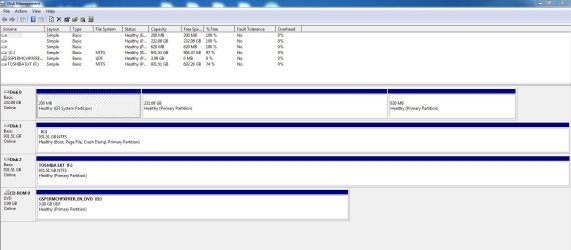
Why does Disk0 have an EFI SYstem partition on it? Do you have an EFI BIOS with an OS on that disk that is installed to UEFI? UEFI (Unified Extensible Firmware Interface) - Install Windows 7 with - Windows 7 Forums

Disk1 is a normal MBR install but it is lacking its System partition even though booted in the screenshot. So with all other hard drives unplugged, boot into the Win7 disk to run Startup Repair - Run up to 3 Separate Times
until the System flag appears on C.

Download, install, decline trial version, update and run a full scan with Malwarebytes and SUPERAntiSpyware.

I would also uninstall your AV and install Panda Cloud which is the most aggressive free AV that doesn't impact performance at all.
 
To activate Win7 Upgrade version follow Option 3 in Clean Install with a Upgrade Windows 7 Version.

Why does Disk0 have an EFI SYstem partition on it? Do you have an EFI BIOS with an OS on that disk that is installed to UEFI? UEFI (Unified Extensible Firmware Interface) - Install Windows 7 with - Windows 7 Forums

Disk1 is a normal MBR install but it is lacking its System partition even though booted in the screenshot. So with all other hard drives unplugged, boot into the Win7 disk to run Startup Repair - Run up to 3 Separate Times
until the System flag appears on C.

Download, install, decline trial version, update and run a full scan with Malwarebytes and SUPERAntiSpyware.

I would also uninstall your AV and install Panda Cloud which is the most aggressive free AV that doesn't impact performance at all.

I guess I have UEFI, as I got a new CPU, motherboard, GPU and ram.
I don't know if I feel comfortable doing the tutorial, as this is my only PC that's half works and I have uni work to do (Maybe I should wait a couple of weeks for my brother to come home and fix this mess)
plus im assuming the remnants of OSX is on the SSD still as when I boot up it wants me to install OSX.


In the tutorial what does manually activate windows mean. As ive tried to disable my internet connection and activate by phone, but the automated system after entering ID wanted to transfer me to consonant, or will it not do that in the tutorial.


Edit: was able to activate windows
 

My Computer My Computer

At a glance

Windows 7 Professional 64bitIntel Core i5 - 2500K @ 3.30GHz4GB DDR3EVGA Nvidia GeForce GT 740 2GB DDR3
Computer type
PC/Desktop
Computer Manufacturer/Model Number
Custom Build
OS
Windows 7 Professional 64bit
CPU
Intel Core i5 - 2500K @ 3.30GHz
Motherboard
Gigabyte Z77-HD3
Memory
4GB DDR3
Graphics Card(s)
EVGA Nvidia GeForce GT 740 2GB DDR3
Screen Resolution
1680 x 1050
Hard Drives
1T Samaung HD/ 1T toshiba external drive/ 1T western digital external drive/ 2T seagate external drive/ 250gb samaung SSD
PSU
Antec 430W
Keyboard
Microsoft Wireless Keyboard 800
Mouse
Microsoft Wireless Mouse 1000
Antivirus
AVG
Browser
Internet Explorer
Why would she insist you install utorrent, you need to download and install your video drivers to get it looking normal.

Utorrent has nothing to do with windows, and it`s not a virus.

Once again, unplug all the other drives and use this tutorial.

http://www.sevenforums.com/tutorials/31402-clean-install-upgrade-windows-7-version.html

Manually activate means to do it after you install windows, don`t enter a key while you are first installing windows.

And don`t disable your internet connection, what are you thinking ?
 

My Computer My Computer

At a glance

Windows 10 Pro x64Intel Core i7 6700KGSkill TridentZ RGB 16GB 3600 16-16-16-36EVGA GTX 980 Ti SC x2
Computer type
PC/Desktop
Computer Manufacturer/Model Number
Skylake Special #666
OS
Windows 10 Pro x64
CPU
Intel Core i7 6700K
Motherboard
Asus Sabertooth Z170 Mark 1
Memory
GSkill TridentZ RGB 16GB 3600 16-16-16-36
Graphics Card(s)
EVGA GTX 980 Ti SC x2
Sound Card
Realtek High Definition
Monitor(s) Displays
AOC G2460PG
Screen Resolution
1920 x 1080 144Hz
Hard Drives
Samsung 860 Pro 256GB, Seagate Barracuda 4TB x2
PSU
EVGA 1000 P2, EVGA White Custom Braided Cables
Case
Corsair Vengeance C70 Gunmetal Black
Cooling
Corsair H100i v2, Corsair ML120 x2, Thermal Grizzly Kryonaut
Keyboard
Logitech G910 Orion Spectrum
Mouse
Logitech G700s
Internet Speed
Verizon Fios Quantum Gateway 75/75
Antivirus
Windows Defender, Malwarebytes Free 3.8.3
Browser
Chrome
Other Info
Corsair SP120 x4, LG Blu-ray Drive, Durabrand HT-395 100 Watt Dolby Digital Amp, Corsair H2100 Wireless 7.1 Headset
UEFI is a whole new BIOS. In order to install Win7 on it did you make a change in BIOS setup to enable CSM, Legacy BIOS, or otherwise disabled UEFI? These settings would determine how WIn7 was installed to MBR disk in Legacy Mode, and could also have disabled iOS' ability to boot. However we do not support iOS so you'd need to approach an Apple forums to ask about it.

For your Win7 installs on this and your other PC's are you following closely the steps in Clean Reinstall Windows 7
since those who do never come back with problems as long as they stick with those tools and methods given.
 
UEFI is a whole new BIOS. In order to install Win7 on it did you make a change in BIOS setup to enable CSM, Legacy BIOS, or otherwise disabled UEFI? These settings would determine how WIn7 was installed to MBR disk in Legacy Mode, and could also have disabled iOS' ability to boot. However we do not support iOS so you'd need to approach an Apple forums to ask about it.

For your Win7 installs on this and your other PC's are you following closely the steps in Clean Reinstall Windows 7
since those who do never come back with problems as long as they stick with those tools and methods given.

To be honest I don't know what he changed in the BIOS/UFEI. I saw him fiddle around with it.

When I do try to do a reinstall of windows, I use partition wizard, and partition the drive, then simply plop in the disc and install it on the partition.


However the past two time, I get either can error saying windows cant configure the hardware.... or "Please remove the CD and restart the installing from desktop or there is not enough room to write temporary files.


My sister was board at home with no laptop and wanted me to get her something. Whenever I install windows I never have internet as I manually need to install the drivers. For me to get the phone activation I had to disable internet, but anyway windows is activated now.
 

My Computer My Computer

At a glance

Windows 7 Professional 64bitIntel Core i5 - 2500K @ 3.30GHz4GB DDR3EVGA Nvidia GeForce GT 740 2GB DDR3
Computer type
PC/Desktop
Computer Manufacturer/Model Number
Custom Build
OS
Windows 7 Professional 64bit
CPU
Intel Core i5 - 2500K @ 3.30GHz
Motherboard
Gigabyte Z77-HD3
Memory
4GB DDR3
Graphics Card(s)
EVGA Nvidia GeForce GT 740 2GB DDR3
Screen Resolution
1680 x 1050
Hard Drives
1T Samaung HD/ 1T toshiba external drive/ 1T western digital external drive/ 2T seagate external drive/ 250gb samaung SSD
PSU
Antec 430W
Keyboard
Microsoft Wireless Keyboard 800
Mouse
Microsoft Wireless Mouse 1000
Antivirus
AVG
Browser
Internet Explorer
That's not how drivers are handled in WIn7 which is a driver-complete OS. Please read the steps printed in red in Clean Reinstall Windows 7 to understand what works best for drivers because forcing a bunch of drivers like it's XP can cause problems down the line.

There is no reason to not be connected to the internet during install, in fact the tutorial recommends plugging in by ethernet cable to increase the chances (about 30%) that you'll start up connected to immediately install all of your Important and Optional WIndows Updates which should deliver almost all drivers. Only import drivers still missing after all rounds of Updates are installed, with requested reboots, and no more are offered when you go back to Check for Updates.
 
Could you post a new shot of disk management for us please.
 

My Computer My Computer

At a glance

Windows 10 Pro x64Intel Core i7 6700KGSkill TridentZ RGB 16GB 3600 16-16-16-36EVGA GTX 980 Ti SC x2
Computer type
PC/Desktop
Computer Manufacturer/Model Number
Skylake Special #666
OS
Windows 10 Pro x64
CPU
Intel Core i7 6700K
Motherboard
Asus Sabertooth Z170 Mark 1
Memory
GSkill TridentZ RGB 16GB 3600 16-16-16-36
Graphics Card(s)
EVGA GTX 980 Ti SC x2
Sound Card
Realtek High Definition
Monitor(s) Displays
AOC G2460PG
Screen Resolution
1920 x 1080 144Hz
Hard Drives
Samsung 860 Pro 256GB, Seagate Barracuda 4TB x2
PSU
EVGA 1000 P2, EVGA White Custom Braided Cables
Case
Corsair Vengeance C70 Gunmetal Black
Cooling
Corsair H100i v2, Corsair ML120 x2, Thermal Grizzly Kryonaut
Keyboard
Logitech G910 Orion Spectrum
Mouse
Logitech G700s
Internet Speed
Verizon Fios Quantum Gateway 75/75
Antivirus
Windows Defender, Malwarebytes Free 3.8.3
Browser
Chrome
Other Info
Corsair SP120 x4, LG Blu-ray Drive, Durabrand HT-395 100 Watt Dolby Digital Amp, Corsair H2100 Wireless 7.1 Headset
Could you post a new shot of disk management for us please.[/Q]

I haven't done anything yet expect for activating windows, as im not quite sure what is the net step that I need to take.
 

My Computer My Computer

At a glance

Windows 7 Professional 64bitIntel Core i5 - 2500K @ 3.30GHz4GB DDR3EVGA Nvidia GeForce GT 740 2GB DDR3
Computer type
PC/Desktop
Computer Manufacturer/Model Number
Custom Build
OS
Windows 7 Professional 64bit
CPU
Intel Core i5 - 2500K @ 3.30GHz
Motherboard
Gigabyte Z77-HD3
Memory
4GB DDR3
Graphics Card(s)
EVGA Nvidia GeForce GT 740 2GB DDR3
Screen Resolution
1680 x 1050
Hard Drives
1T Samaung HD/ 1T toshiba external drive/ 1T western digital external drive/ 2T seagate external drive/ 250gb samaung SSD
PSU
Antec 430W
Keyboard
Microsoft Wireless Keyboard 800
Mouse
Microsoft Wireless Mouse 1000
Antivirus
AVG
Browser
Internet Explorer
OK, Then my I ask just 2 questions ?

Did you intend to keep the OS X on the ssd ? ( Drive 0 )

Did you intend to install Windows 0n Disk 1 ? ( the 931 GB drive )

According to your shot, the ssd is completely empty, why didn`t you install windows to that ?
 

My Computer My Computer

At a glance

Windows 10 Pro x64Intel Core i7 6700KGSkill TridentZ RGB 16GB 3600 16-16-16-36EVGA GTX 980 Ti SC x2
Computer type
PC/Desktop
Computer Manufacturer/Model Number
Skylake Special #666
OS
Windows 10 Pro x64
CPU
Intel Core i7 6700K
Motherboard
Asus Sabertooth Z170 Mark 1
Memory
GSkill TridentZ RGB 16GB 3600 16-16-16-36
Graphics Card(s)
EVGA GTX 980 Ti SC x2
Sound Card
Realtek High Definition
Monitor(s) Displays
AOC G2460PG
Screen Resolution
1920 x 1080 144Hz
Hard Drives
Samsung 860 Pro 256GB, Seagate Barracuda 4TB x2
PSU
EVGA 1000 P2, EVGA White Custom Braided Cables
Case
Corsair Vengeance C70 Gunmetal Black
Cooling
Corsair H100i v2, Corsair ML120 x2, Thermal Grizzly Kryonaut
Keyboard
Logitech G910 Orion Spectrum
Mouse
Logitech G700s
Internet Speed
Verizon Fios Quantum Gateway 75/75
Antivirus
Windows Defender, Malwarebytes Free 3.8.3
Browser
Chrome
Other Info
Corsair SP120 x4, LG Blu-ray Drive, Durabrand HT-395 100 Watt Dolby Digital Amp, Corsair H2100 Wireless 7.1 Headset
OK, Then my I ask just 2 questions ?

Did you intend to keep the OS X on the ssd ? ( Drive 0 )

Did you intend to install Windows 0n Disk 1 ? ( the 931 GB drive )

According to your shot, the ssd is completely empty, why didn`t you install windows to that ?

Yes, I did intended to install OSX on the SSD and windows on disk 1


We didn't install windows on that because we brought the SSD for OS X.
It may be empty because I might of accidentally formatted it. I'm not to sure, because I can boot into OS X but then it wants me to install OS X.


My main concern is that I'm always getting errors when trying to fresh install windows
 

My Computer My Computer

At a glance

Windows 7 Professional 64bitIntel Core i5 - 2500K @ 3.30GHz4GB DDR3EVGA Nvidia GeForce GT 740 2GB DDR3
Computer type
PC/Desktop
Computer Manufacturer/Model Number
Custom Build
OS
Windows 7 Professional 64bit
CPU
Intel Core i5 - 2500K @ 3.30GHz
Motherboard
Gigabyte Z77-HD3
Memory
4GB DDR3
Graphics Card(s)
EVGA Nvidia GeForce GT 740 2GB DDR3
Screen Resolution
1680 x 1050
Hard Drives
1T Samaung HD/ 1T toshiba external drive/ 1T western digital external drive/ 2T seagate external drive/ 250gb samaung SSD
PSU
Antec 430W
Keyboard
Microsoft Wireless Keyboard 800
Mouse
Microsoft Wireless Mouse 1000
Antivirus
AVG
Browser
Internet Explorer
If OS X is like any other type of Linux or Ubuntu ( OS X is a Mac os isn`t it ? ) If it`s on a disc or a stick you can try it or install it, that`s why it`s asking you to install it.

But according to that DM shot, the ssd is empty, but has 3 partitions.

One more time, did you disconnect all the drives when you tried to install windows to the hard drive ?

There are no system files on it and it is not marked active.
 

My Computer My Computer

At a glance

Windows 10 Pro x64Intel Core i7 6700KGSkill TridentZ RGB 16GB 3600 16-16-16-36EVGA GTX 980 Ti SC x2
Computer type
PC/Desktop
Computer Manufacturer/Model Number
Skylake Special #666
OS
Windows 10 Pro x64
CPU
Intel Core i7 6700K
Motherboard
Asus Sabertooth Z170 Mark 1
Memory
GSkill TridentZ RGB 16GB 3600 16-16-16-36
Graphics Card(s)
EVGA GTX 980 Ti SC x2
Sound Card
Realtek High Definition
Monitor(s) Displays
AOC G2460PG
Screen Resolution
1920 x 1080 144Hz
Hard Drives
Samsung 860 Pro 256GB, Seagate Barracuda 4TB x2
PSU
EVGA 1000 P2, EVGA White Custom Braided Cables
Case
Corsair Vengeance C70 Gunmetal Black
Cooling
Corsair H100i v2, Corsair ML120 x2, Thermal Grizzly Kryonaut
Keyboard
Logitech G910 Orion Spectrum
Mouse
Logitech G700s
Internet Speed
Verizon Fios Quantum Gateway 75/75
Antivirus
Windows Defender, Malwarebytes Free 3.8.3
Browser
Chrome
Other Info
Corsair SP120 x4, LG Blu-ray Drive, Durabrand HT-395 100 Watt Dolby Digital Amp, Corsair H2100 Wireless 7.1 Headset
If OS X is like any other type of Linux or Ubuntu ( OS X is a Mac os isn`t it ? ) If it`s on a disc or a stick you can try it or install it, that`s why it`s asking you to install it.

But according to that DM shot, the ssd is empty, but has 3 partitions.

One more time, did you disconnect all the drives when you tried to install windows to the hard drive ?

There are no system files on it and it is not marked active.

I somehow managed to find my OSX installion and then lost it again.
I haven't removed the drive because I don't know how/don't feel comfortable


It's at 250gb SSD and OSX shows about 10gb takens...
 
Last edited:

My Computer My Computer

At a glance

Windows 7 Professional 64bitIntel Core i5 - 2500K @ 3.30GHz4GB DDR3EVGA Nvidia GeForce GT 740 2GB DDR3
Computer type
PC/Desktop
Computer Manufacturer/Model Number
Custom Build
OS
Windows 7 Professional 64bit
CPU
Intel Core i5 - 2500K @ 3.30GHz
Motherboard
Gigabyte Z77-HD3
Memory
4GB DDR3
Graphics Card(s)
EVGA Nvidia GeForce GT 740 2GB DDR3
Screen Resolution
1680 x 1050
Hard Drives
1T Samaung HD/ 1T toshiba external drive/ 1T western digital external drive/ 2T seagate external drive/ 250gb samaung SSD
PSU
Antec 430W
Keyboard
Microsoft Wireless Keyboard 800
Mouse
Microsoft Wireless Mouse 1000
Antivirus
AVG
Browser
Internet Explorer
I did some partitioning and screwed it up, as now when windows load I get boot error and startup repair can not fix it.


I have no OS and when I install windows I get the message it can't be install on the drive.


Edit: unplugged the SSD and all good. Got windows again.... Waiting for display driver to install
 
Last edited:

My Computer My Computer

At a glance

Windows 7 Professional 64bitIntel Core i5 - 2500K @ 3.30GHz4GB DDR3EVGA Nvidia GeForce GT 740 2GB DDR3
Computer type
PC/Desktop
Computer Manufacturer/Model Number
Custom Build
OS
Windows 7 Professional 64bit
CPU
Intel Core i5 - 2500K @ 3.30GHz
Motherboard
Gigabyte Z77-HD3
Memory
4GB DDR3
Graphics Card(s)
EVGA Nvidia GeForce GT 740 2GB DDR3
Screen Resolution
1680 x 1050
Hard Drives
1T Samaung HD/ 1T toshiba external drive/ 1T western digital external drive/ 2T seagate external drive/ 250gb samaung SSD
PSU
Antec 430W
Keyboard
Microsoft Wireless Keyboard 800
Mouse
Microsoft Wireless Mouse 1000
Antivirus
AVG
Browser
Internet Explorer
Well whata ya know, I kept telling you to unplug the ssd.

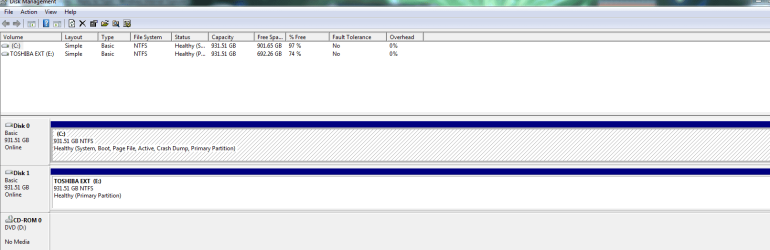
Now please posta shot of disk management, with only the windows hard drive installed.

And I don`t mean remove the drive, just unplug the power cord from the ssd. (Just be careful)

2 Suggestions, if I may.

Get rid of AVG. MSE and Malwarbytes are all you need.

Microsoft Security Essentials - Microsoft Windows

https://www.malwarebytes.org/

Consider replacing that power supply unit........ Antec, not so good at all.;)

My recommendations;

EVGA
Corsair
Seasonic
Thermaltake
 

My Computer My Computer

At a glance

Windows 10 Pro x64Intel Core i7 6700KGSkill TridentZ RGB 16GB 3600 16-16-16-36EVGA GTX 980 Ti SC x2
Computer type
PC/Desktop
Computer Manufacturer/Model Number
Skylake Special #666
OS
Windows 10 Pro x64
CPU
Intel Core i7 6700K
Motherboard
Asus Sabertooth Z170 Mark 1
Memory
GSkill TridentZ RGB 16GB 3600 16-16-16-36
Graphics Card(s)
EVGA GTX 980 Ti SC x2
Sound Card
Realtek High Definition
Monitor(s) Displays
AOC G2460PG
Screen Resolution
1920 x 1080 144Hz
Hard Drives
Samsung 860 Pro 256GB, Seagate Barracuda 4TB x2
PSU
EVGA 1000 P2, EVGA White Custom Braided Cables
Case
Corsair Vengeance C70 Gunmetal Black
Cooling
Corsair H100i v2, Corsair ML120 x2, Thermal Grizzly Kryonaut
Keyboard
Logitech G910 Orion Spectrum
Mouse
Logitech G700s
Internet Speed
Verizon Fios Quantum Gateway 75/75
Antivirus
Windows Defender, Malwarebytes Free 3.8.3
Browser
Chrome
Other Info
Corsair SP120 x4, LG Blu-ray Drive, Durabrand HT-395 100 Watt Dolby Digital Amp, Corsair H2100 Wireless 7.1 Headset
Well whata ya know, I kept telling you to unplug the ssd.

Now please posta shot of disk management, with only the windows hard drive installed.

And I don`t mean remove the drive, just unplug the power cord from the ssd. (Just be careful)

2 Suggestions, if I may.

Get rid of AVG. MSE and Malwarbytes are all you need.

Microsoft Security Essentials - Microsoft Windows

https://www.malwarebytes.org/

Consider replacing that power supply unit........ Antec, not so good at all.;)

My recommendations;

EVGA
Corsair
Seasonic
Thermaltake


What happens if i plug the SSD back in?
 

Attachments

  • Capture.PNG
    Capture.PNG
    19.8 KB · Views: 7

My Computer My Computer

At a glance

Windows 7 Professional 64bitIntel Core i5 - 2500K @ 3.30GHz4GB DDR3EVGA Nvidia GeForce GT 740 2GB DDR3
Computer type
PC/Desktop
Computer Manufacturer/Model Number
Custom Build
OS
Windows 7 Professional 64bit
CPU
Intel Core i5 - 2500K @ 3.30GHz
Motherboard
Gigabyte Z77-HD3
Memory
4GB DDR3
Graphics Card(s)
EVGA Nvidia GeForce GT 740 2GB DDR3
Screen Resolution
1680 x 1050
Hard Drives
1T Samaung HD/ 1T toshiba external drive/ 1T western digital external drive/ 2T seagate external drive/ 250gb samaung SSD
PSU
Antec 430W
Keyboard
Microsoft Wireless Keyboard 800
Mouse
Microsoft Wireless Mouse 1000
Antivirus
AVG
Browser
Internet Explorer
Nothing should happen, but if you want to format it and not have any issues with windows booting up.........

For now I would hook the ssd up to anything but sata port 1 on the motherboard.

Windows should boot fine and you can then format the ssd.

By the way, your windows drive looks perfect, everything on the C partition, no system reserved partition, that`s exactly how I do it.

:thumbsup:

Now, whenever you install this OS X on the ssd, make sure you unplug all the hard drives when you do the install.

Then you just use the 1 time boot menu key to choose either the hard drive or the solid state drive to boot into.

You put the drive you want to boot into all the time (called the default) 1st in the bios. That way when you turn on your pc it will always go right to that operating system.

I would also right click on the CD rom in disk management and change the letter to X Y or Z, that way you`ll have the D letter free to use.
 
Last edited:

My Computer My Computer

At a glance

Windows 10 Pro x64Intel Core i7 6700KGSkill TridentZ RGB 16GB 3600 16-16-16-36EVGA GTX 980 Ti SC x2
Computer type
PC/Desktop
Computer Manufacturer/Model Number
Skylake Special #666
OS
Windows 10 Pro x64
CPU
Intel Core i7 6700K
Motherboard
Asus Sabertooth Z170 Mark 1
Memory
GSkill TridentZ RGB 16GB 3600 16-16-16-36
Graphics Card(s)
EVGA GTX 980 Ti SC x2
Sound Card
Realtek High Definition
Monitor(s) Displays
AOC G2460PG
Screen Resolution
1920 x 1080 144Hz
Hard Drives
Samsung 860 Pro 256GB, Seagate Barracuda 4TB x2
PSU
EVGA 1000 P2, EVGA White Custom Braided Cables
Case
Corsair Vengeance C70 Gunmetal Black
Cooling
Corsair H100i v2, Corsair ML120 x2, Thermal Grizzly Kryonaut
Keyboard
Logitech G910 Orion Spectrum
Mouse
Logitech G700s
Internet Speed
Verizon Fios Quantum Gateway 75/75
Antivirus
Windows Defender, Malwarebytes Free 3.8.3
Browser
Chrome
Other Info
Corsair SP120 x4, LG Blu-ray Drive, Durabrand HT-395 100 Watt Dolby Digital Amp, Corsair H2100 Wireless 7.1 Headset
Back
Top