Can Save to Desktop But Can't see it

raceman3

New member
Local time
6:30 PM
Messages
8
The other day I downloaded a PDF and saved it to my desktop, to my surpirse I did not see it on the desktop. I downloaded it again thinking I fat fingered something and tried to save it to my desktop but now it says the file already exist. Iv'e done the right click deal to desplay icons and refreshed the screen but I still can't see the file. I am logged in as an administrator as well. I checked some of the threads out here but most of them are related to disappearing icons, in my case they never show up in the first place. I'm pretty new to Windows 7 so it may be some setting I'm missing, any help would be appreciated:(
 

My Computer My Computer

At a glance

Windows 7 Home Premium 23bit
Computer Manufacturer/Model Number
HP
OS
Windows 7 Home Premium 23bit

My Computer My Computer

At a glance

64-bit Windows 11 Pro for WorkstationsIntel i7-8700K OC'd to 5 GHz64 GB (4x16GB) G.SKILL TridentZ RGB DDR4 3600...ASUS ROG-STRIX-GTX1080TI-O11G-GAMING
Computer type
PC/Desktop
Computer Manufacturer/Model Number
Self built custom
OS
64-bit Windows 11 Pro for Workstations
CPU
Intel i7-8700K OC'd to 5 GHz
Motherboard
ASUS ROG Maximus XI Formula Z390
Memory
64 GB (4x16GB) G.SKILL TridentZ RGB DDR4 3600 MHz
Graphics Card(s)
ASUS ROG-STRIX-GTX1080TI-O11G-GAMING
Sound Card
Integrated
Monitor(s) Displays
2 x Samsung Odyssey G7 27"
Screen Resolution
2560x1440
Hard Drives
1TB Samsung 990 PRO M.2,
4TB Samsung 990 PRO PRO M.2,
TerraMaster F8 SSD Plus NAS
PSU
Seasonic Prime Titanium 850W
Case
Thermaltake Core P3
Cooling
Corsair Hydro H115i
Keyboard
Logitech wireless K800
Mouse
Logitech MX Master 4
Internet Speed
2 Gb/s Download and 100 Mb/s Upload
Antivirus
Malwarebyte Anti-Malware Premium
Browser
Google Chrome
Other Info
Logitech Z625 speaker system,
Logitech BRIO 4K Pro webcam,
HP Color LaserJet Pro MFP M477fdn,
APC SMART-UPS RT 1000 XL - SURT1000XLI,
Galaxy S23 Plus phone
Which desktop did you save it to? Each user has his/her own desktop which contains shortcuts to programs/applications/files that they place there. They are not visible to any other user. In addition, there is the Public desktop, and any shortcuts placed there are visible to all users, together with any shortcuts on the individual's own personal desktop (in effect, for display purposes, the 2 desktops are superimposed on top of each other and the icons arranged so that they are not overlapping).

Regardless of which desktop you saved the file to, you will not be able to see it unless you have Show Desktop Icons enabled, as mentioned by Shawn above.
 

My Computer My Computer

At a glance

Windows 8.1 Pro RTM x64Intel Core-i5-3570K 4-core @ 3.4GHz (Ivy Brid...4 x 4GB DDR3-1600 Corsair Vengeance CMZ8GX3M2...MSI GeForce GTX770 Gaming OC 2GB
Computer type
PC/Desktop
Computer Manufacturer/Model Number
Dwarf Dwf/11/2012 r09/2013
OS
Windows 8.1 Pro RTM x64
CPU
Intel Core-i5-3570K 4-core @ 3.4GHz (Ivy Bridge) (OC 4.4GHz)
Motherboard
ASRock Z77 Extreme4-M
Memory
4 x 4GB DDR3-1600 Corsair Vengeance CMZ8GX3M2A1600C9B (16GB)
Graphics Card(s)
MSI GeForce GTX770 Gaming OC 2GB
Sound Card
Realtek High Definition on board solution (ALC 898)
Monitor(s) Displays
ViewSonic VA1912w Widescreen (VGA)
Screen Resolution
1440x900
Hard Drives
OCZ Agility 3 SSD 120GB SATA III x2 (RAID 0)
Samsung HD501LJ 500GB SATA II x2
Hitachi HDS721010CLA332 1TB SATA II
Iomega 1.5TB Ext USB 2.0
WD 2.0TB Ext USB 3.0
PSU
XFX Pro Series 850W Semi-Modular
Case
Gigabyte IF233
Cooling
1 x 120mm Front Inlet 1 x 120mm Rear Exhaust
Keyboard
Microsoft Comfort Curve Keyboard 3000 (USB)
Mouse
Microsoft Comfort Mouse 3000 for Business (USB)
Internet Speed
NetGear DG834Gv3 ADSL Modem/Router (Ethernet) ~4.0 Mb/s (O2)
Antivirus
Avast! 8.0.1497
Browser
IE 11
Other Info
Optical Drive: HL-DT-ST BD-RE BH10LS30 SATA Bluray
Lexmark S305 Printer/Scanner/Copier (USB)
WEI Score: 8.1/8.1/8.5/8.5/8.25
Asus Eee PC 1011PX Netbook (Windows 7 x86 Starter)
I've checked and " show destop Icons' is enabled
 

My Computer My Computer

At a glance

Windows 7 Home Premium 23bit
Computer Manufacturer/Model Number
HP
OS
Windows 7 Home Premium 23bit
Have you tried to "search" for the file name, and then see exactly what folder it was placed in (assuming it is found by search, which presumably it must be)?
 

My Computer My Computer

At a glance

Windows 7 Pro x64 (1), Win7 Pro X64 (2)i5-3350p 3.1Ghz/6MB-cache (1); E8400 3.0Ghz/6...8GB PC3-12800 DDR3 (1); 4GB PC3-10600 DDR3 (2)ATI HD7750 (1), (see TV cards); ATI R7 250 (2)
Computer type
PC/Desktop
Computer Manufacturer/Model Number
Home-built, two systems (1) and (2)
OS
Windows 7 Pro x64 (1), Win7 Pro X64 (2)
CPU
i5-3350p 3.1Ghz/6MB-cache (1); E8400 3.0Ghz/6MB-cache (2)
Motherboard
ASUS P8Z77-V Pro (1); ASUS P5Q3 (2)
Memory
8GB PC3-12800 DDR3 (1); 4GB PC3-10600 DDR3 (2)
Graphics Card(s)
ATI HD7750 (1), (see TV cards); ATI R7 250 (2)
Sound Card
Realtek ALC892 HD Audio (1); Realtek ALC1200 HD Audio (2)
Monitor(s) Displays
Eizo HD2441W LCD, Eizo S2433W (1); Eizo 24" S2433W (2)
Screen Resolution
1920x1200, 1920x1200 (1); 1920x1200 (2)
Hard Drives
(1) 1TB SATA-II (7200RPM), 2x2TB SATA-III (7200RPM), 250GB SATA-III (10000RPM) for OS; 2x2TB external USB 3.0

(2) 320GB SATA-II (7200RPM), 750GB SATA-II (7200RPM), 150GB SATA-II (10000RPM) for OS; 2TB external USB 3.0
PSU
Nesteq ECS-6001 600W (1); Nesteq ECS-5001 500W (2)
Case
Acousti-Case 360 (1) and (2)
Cooling
Noctua NH-U12P SE2 for CPU, 2x120mm case fans (1) and (2)
Keyboard
IBM PS/2 (1) and (2)
Mouse
Logitech MX Revolution wireless (1); Microsoft wired (2)
Internet Speed
100mbps down / 10mbps up
Antivirus
Microsoft Security Essentials; Malwarebyte Anti-Malware Pro
Browser
Firefox
Other Info
Ceton InfiniTV 4-tuner cablecard-enabled TV card as well as Hauppauge HVR-2250 OTA/ATSC 2-tuner TV card in (1), running under Win7 WMC
Last edited by a moderator:

My Computer My Computer

At a glance

Windows 7 Ultimate RTM (Technet)3.00 gigahertz Intel Core2 Duo E84004GBATI Radeon X1950 Pro
Computer Manufacturer/Model Number
Custom
OS
Windows 7 Ultimate RTM (Technet)
CPU
3.00 gigahertz Intel Core2 Duo E8400
Motherboard
ASUSTeK Computer INC. P5K/EPU Rev 1.xx
Memory
4GB
Graphics Card(s)
ATI Radeon X1950 Pro
Sound Card
Built in HD Audio
Monitor(s) Displays
22" Gateway LCD
Screen Resolution
1920 x 1200
Hard Drives
ST3160023A [Hard drive] (160.04 GB) -- drive 0, rev 8.01, ST3500630AS [Hard drive] (500.11 GB) -- drive 2, rev 3.AAK
ST3500630AS [Hard drive] (500.11 GB) -- drive 1, rev 3.AAK
Keyboard
Logitech G11
Mouse
Microsoft Wireless Laser Mouse 5000
Internet Speed
13.44 Mbps
Three things come to mind:

1. Temporarily reduce your screen resolution to see if you can see the icon and drag it toward the center of the screen. Then you can set your resolution back to what it was.

2. If your Desktop is filled with too many icons you may not be able to add any more. If this is the case, try deleting one and see if a new one that you hadn't seen, appears somewhere on the Desktop. (This happened to me when I used to fill my Desktop with tons of icons.)

3. Here's a work-around: Save the PDF file to your Documents. Then, go into Windows Explorer and manually move (Cut and Paste) the file from your Documents to your Desktop.
 

My Computer My Computer

At a glance

Vista 64 bit and 32 bit (SP2)Intel(R) Core(TM)2 Duo Processor T9400 (2.53 GHz4GB DDR2 System Memory (2 Dimm)512 MB NVIDIA GeForce 9600M GT
Computer Manufacturer/Model Number
HP Pavillion dv5t (generation 1)
OS
Vista 64 bit and 32 bit (SP2)
CPU
Intel(R) Core(TM)2 Duo Processor T9400 (2.53 GHz
Memory
4GB DDR2 System Memory (2 Dimm)
Graphics Card(s)
512 MB NVIDIA GeForce 9600M GT
Monitor(s) Displays
15.4" diagonal WSXGA+ High-Definition HP BrightView Widescre
Screen Resolution
1680 x 1050
Hard Drives
320GB 5400RPM SATA Hard Drive with HP ProtectSmart Hard Drive Protection
Keyboard
Built-in HP
Mouse
Built in - Synaptics TouchPad V6.5 on PS/2 Port
Internet Speed
Max
Other Info
~ Intel Next-Gen Wireless-N Mini-card w/Bluetooth ~ Blu-Ray ROM DVD+/-R/RW ~ Integ. HDTV Hybrid Tuner ~ 12 Cell Battery ~ MS Office (Home Premium) 2007 ~
1. Temporarily reduce your screen resolution to see if you can see the icon and drag it toward the center of the screen. Then you can set your resolution back to what it was.
Good thought, but I think the resolution needs to be numerically INCREASED rather than decreased, in order to hunt for icons which for some reason may currently be "off-screen".

In other words, if 4:3 resolution is currently 1024x768, increase it to 1152x864 or 1280x960 to enlarge the desktop real estate presented on your screen, and sure enough you may now see what previously were "off-screen" icons.

Same idea with rectangular 16:9 or 16:10 LCD screens, again increasing the numeric resolution to make more visible on that screen.

Maybe this is just semantics... and you were suggesting "making things smaller" by increasing the desktop size in pixels, which means we're both saying the same thing.


But I still think a "search" would at least locate the file location using Explorer. Then we could determine if it really did go into the "Desktop" folder (of what user?), or somewhere else.
 

My Computer My Computer

At a glance

Windows 7 Pro x64 (1), Win7 Pro X64 (2)i5-3350p 3.1Ghz/6MB-cache (1); E8400 3.0Ghz/6...8GB PC3-12800 DDR3 (1); 4GB PC3-10600 DDR3 (2)ATI HD7750 (1), (see TV cards); ATI R7 250 (2)
Computer type
PC/Desktop
Computer Manufacturer/Model Number
Home-built, two systems (1) and (2)
OS
Windows 7 Pro x64 (1), Win7 Pro X64 (2)
CPU
i5-3350p 3.1Ghz/6MB-cache (1); E8400 3.0Ghz/6MB-cache (2)
Motherboard
ASUS P8Z77-V Pro (1); ASUS P5Q3 (2)
Memory
8GB PC3-12800 DDR3 (1); 4GB PC3-10600 DDR3 (2)
Graphics Card(s)
ATI HD7750 (1), (see TV cards); ATI R7 250 (2)
Sound Card
Realtek ALC892 HD Audio (1); Realtek ALC1200 HD Audio (2)
Monitor(s) Displays
Eizo HD2441W LCD, Eizo S2433W (1); Eizo 24" S2433W (2)
Screen Resolution
1920x1200, 1920x1200 (1); 1920x1200 (2)
Hard Drives
(1) 1TB SATA-II (7200RPM), 2x2TB SATA-III (7200RPM), 250GB SATA-III (10000RPM) for OS; 2x2TB external USB 3.0

(2) 320GB SATA-II (7200RPM), 750GB SATA-II (7200RPM), 150GB SATA-II (10000RPM) for OS; 2TB external USB 3.0
PSU
Nesteq ECS-6001 600W (1); Nesteq ECS-5001 500W (2)
Case
Acousti-Case 360 (1) and (2)
Cooling
Noctua NH-U12P SE2 for CPU, 2x120mm case fans (1) and (2)
Keyboard
IBM PS/2 (1) and (2)
Mouse
Logitech MX Revolution wireless (1); Microsoft wired (2)
Internet Speed
100mbps down / 10mbps up
Antivirus
Microsoft Security Essentials; Malwarebyte Anti-Malware Pro
Browser
Firefox
Other Info
Ceton InfiniTV 4-tuner cablecard-enabled TV card as well as Hauppauge HVR-2250 OTA/ATSC 2-tuner TV card in (1), running under Win7 WMC
Yes I have "Show Hidden Files" turned on but this should not be a hidden file since I saved it to my desktop. I'll try the screen resolution tonight when I get home. I would think if I do a search on my C: drive I should be able to find the file in my desktop directory, I'll try that tonight and post the results
 

My Computer My Computer

At a glance

Windows 7 Home Premium 23bit
Computer Manufacturer/Model Number
HP
OS
Windows 7 Home Premium 23bit
Have you tried to log odd and log on again?

Also have you tried to Refresh your Desktop (Rightclick and then click Refresh)

Is the file seen in your User Desktop - C:\Users\*user name*\Desktop

   Note
The above is where C:\ is your Windows Installation


Josh
 

My Computer My Computer

At a glance

Windows 7 Professional x64 SP1 ; Windows Serv...Intel Core i5 2400 @ 3.10GHz8.0GB DDR3 @ 665MHz (2GBx4)AMD Radeon HD 6870
Computer type
PC/Desktop
Computer Manufacturer/Model Number
Custom Built
OS
Windows 7 Professional x64 SP1 ; Windows Server 2012 R2 Standard
CPU
Intel Core i5 2400 @ 3.10GHz
Motherboard
Foxconn H67MP-S/-V/H67MP
Memory
8.0GB DDR3 @ 665MHz (2GBx4)
Graphics Card(s)
AMD Radeon HD 6870
Sound Card
Realtek High Definition Audio
Monitor(s) Displays
AOC 2243W & SMB1930NW
Screen Resolution
1440x900 & 1920x1080
Hard Drives
977GB Seagate ST31000524AS ATA Drive (SATA)
250GB WD iSCSI attached Drive
PSU
750W Gaming PSU
Case
Novatech Night
Cooling
Fan
Keyboard
Dell Standard PS/2 Keyboard
Mouse
R.A.T 07 Gaming Mouse
Internet Speed
Download: 10 Mbps Ping: 30ms Upload: 0.81 Mbps
Browser
Google Chrome
Other Info
Optiarc DVD RW AD-5260S ATA Device
1. Temporarily reduce your screen resolution to see if you can see the icon and drag it toward the center of the screen. Then you can set your resolution back to what it was.
Good thought, but I think the resolution needs to be numerically INCREASED rather than decreased, in order to hunt for icons which for some reason may currently be "off-screen".

In other words, if 4:3 resolution is currently 1024x768, increase it to 1152x864 or 1280x960 to enlarge the desktop real estate presented on your screen, and sure enough you may now see what previously were "off-screen" icons.

Same idea with rectangular 16:9 or 16:10 LCD screens, again increasing the numeric resolution to make more visible on that screen.

Maybe this is just semantics... and you were suggesting "making things smaller" by increasing the desktop size in pixels, which means we're both saying the same thing.

Hmmmm, thanks dsperber. Clearly math was not my forte! :p But I'm glad you did, at least, understand what I was trying to accomplish. Let's hope this helped the OP.
 

My Computer My Computer

At a glance

Vista 64 bit and 32 bit (SP2)Intel(R) Core(TM)2 Duo Processor T9400 (2.53 GHz4GB DDR2 System Memory (2 Dimm)512 MB NVIDIA GeForce 9600M GT
Computer Manufacturer/Model Number
HP Pavillion dv5t (generation 1)
OS
Vista 64 bit and 32 bit (SP2)
CPU
Intel(R) Core(TM)2 Duo Processor T9400 (2.53 GHz
Memory
4GB DDR2 System Memory (2 Dimm)
Graphics Card(s)
512 MB NVIDIA GeForce 9600M GT
Monitor(s) Displays
15.4" diagonal WSXGA+ High-Definition HP BrightView Widescre
Screen Resolution
1680 x 1050
Hard Drives
320GB 5400RPM SATA Hard Drive with HP ProtectSmart Hard Drive Protection
Keyboard
Built-in HP
Mouse
Built in - Synaptics TouchPad V6.5 on PS/2 Port
Internet Speed
Max
Other Info
~ Intel Next-Gen Wireless-N Mini-card w/Bluetooth ~ Blu-Ray ROM DVD+/-R/RW ~ Integ. HDTV Hybrid Tuner ~ 12 Cell Battery ~ MS Office (Home Premium) 2007 ~
Yes I have logged out and back in, I have rebooted, I have tried to change the screen resolution, none of them made a difference. This afternoon I searched the whole C: drive for pdf's after not finding them in the desktcop directory. That turned up nothingbut if I go out on the net and download the same pdf and try to save it to my desktop it says the file already exists. I've been in the IT business for 20 years i'll be it mostly on the network side but this is driving me nuts. I'd rather have XP at this point
 

My Computer My Computer

At a glance

Windows 7 Home Premium 23bit
Computer Manufacturer/Model Number
HP
OS
Windows 7 Home Premium 23bit
Have you tried looking in .. Start orb>YOUR NAME>Desktop.... to see if its showing there? You can also put a "new folder" onto the desktop, name it and download the pdf to it. Then drag the pdf out of the folder onto the desktop to see if it will show up and replace the one you can not see.

Or go to your pdf reader open it, after it opens click on open file and browse to desktop to see if it shows there.

EDIT: What pdf reader do you use? I see you have an HP, did it come with or do you use "pdf complete" if so check here ... HP Support Forum
 
Last edited:

My Computer My Computer

At a glance

Windows 7 Ultimate 64bitIntel Core i7-2600K Sandy Bridge 3.4GHz (@4.5...G.SKILL Ripjaws X Series 16GB 1600Mhz (4 x 4G...x2 EVGA GeForce GTX 760's w/ACXCoolers in SLI...
Computer type
PC/Desktop
Computer Manufacturer/Model Number
Jeepmann/Custom Built
OS
Windows 7 Ultimate 64bit
CPU
Intel Core i7-2600K Sandy Bridge 3.4GHz (@[email protected])
Motherboard
Asus Maximus IV Extreme LGA 1155 Intel P67
Memory
G.SKILL Ripjaws X Series 16GB 1600Mhz (4 x 4GB) (Stock)
Graphics Card(s)
x2 EVGA GeForce GTX 760's w/ACXCoolers in SLI Surround
Sound Card
On-Board
Monitor(s) Displays
3x Acer 24" HDMI Widescreen LCD Monitor
Screen Resolution
3@ 1920x1080 (5760x1080 In Surround)
Hard Drives
Samsung 830 128gb ssd
Western Digital Caviar Black 640GB 7200 RPM
Western Digital Caviar Black 500GB 7200 RPM
Seagate 2tb 7200 RPM
PSU
COOLER MASTER Silent Pro 1000W
Case
COOLER MASTER HAF X Black
Cooling
CORSAIR Hydro H70
Keyboard
Logitech G510
Mouse
Zalman M300
Internet Speed
100mbps-ish Down & 5mbps-ish Up
Other Info
I installed the stock 140mm case fan outside of case then installed the H70+ 1 of its 120mm fans inside case. Used the 2nd 120mm from the H70 to go in the Gpu tunnel.
230mm Front,200mm side,200mm top,120mm Gpu tunnel,120mm&140mm on H70.
Logged out, logged in, rebooted same deal.
 

My Computer My Computer

At a glance

Windows 7 Home Premium 23bit
Computer Manufacturer/Model Number
HP
OS
Windows 7 Home Premium 23bit
I suspect you have the same issue I have which is the desktop NOT auto refreshing.

I have been unable to find a permanent resolution to this problem.

Is there a permanent fix anyone knows about ?

p.s. Registry "fix" to turn auto refresh on is not working.
 

My Computer My Computer

At a glance

Windows 7 32 bit and 64 bit ProfessionalIntel Pentium 4 ; AMD SEMPRON 3600+2.5GB ; 4GBNVIDIA GS8400
Computer Manufacturer/Model Number
IBM 8291-E2U ; 9120-CTO ; 4061-BL2
OS
Windows 7 32 bit and 64 bit Professional
CPU
Intel Pentium 4 ; AMD SEMPRON 3600+
Memory
2.5GB ; 4GB
Graphics Card(s)
NVIDIA GS8400
Monitor(s) Displays
HP W2207
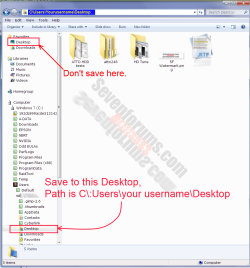
this has been said but make sure you are saving to the correct Desktop folder, there are at least two. See snip below.
Desktop.png
 

My Computer My Computer

At a glance

Windows 7 Ultimate X64 SP1Intel i5-2550K, Differing ~4.4-4.8GHz No buil...16GB G.Skill Sniper 1866MHz @ 2133MHz 2x8GBASUS GTX650TIB-DC2OC-2GD5, (650TI Boost)
Computer type
PC/Desktop
Computer Manufacturer/Model Number
Home Built Desktop By DataTech
OS
Windows 7 Ultimate X64 SP1
CPU
Intel i5-2550K, Differing ~4.4-4.8GHz No built in GPU
Motherboard
ASUS P8Z68-V PRO/GEN3
Memory
16GB G.Skill Sniper 1866MHz @ 2133MHz 2x8GB
Graphics Card(s)
ASUS GTX650TIB-DC2OC-2GD5, (650TI Boost)
Sound Card
Onboard Realtek 5-1
Monitor(s) Displays
Samsung P2570HD
Screen Resolution
1920x1080
Hard Drives
Samsung 840 Pro 256GB SSD for OS, 500GB Seagate Constellation (Enterprise drive) for Data
PSU
Corsair HX650W
Case
Inwin Dragon Rider
Cooling
Hyper 212 EVO w/two Noctua fans, push-pull, @1300 RPM
Keyboard
E-Z Eyes, bright yellow keys with large characters
Mouse
steelseries SENSEI Laser Pro Gaming
Internet Speed
48-51Mbs Mbs down, 11 Mbs up Xfinity Cable
Antivirus
Norton Internet Security 2013
Browser
IE 10, Opera, Pale Moon if needed
Other Info
4 case fans, LG BluRay-RE, ASUS DVD-RW, Mr. Fusion power supply, 1.21 gigawatts.
this has been said but make sure you are saving to the correct Desktop folder, there are at least two. See snip below.
View attachment 164536

I tried this as well w/o success ---- the desktop is not automatically refreshing.

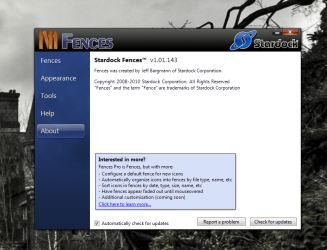
I am using a product called Fences and I am wondering if this might be the issue. I will be uninstalling the product and will report findings..

UPDATE : Removing FENCES seems to have fixed the problem for now ( its a shame cause I like this product's ability to manage desktop icons )
 
Last edited:

My Computer My Computer

At a glance

Windows 7 32 bit and 64 bit ProfessionalIntel Pentium 4 ; AMD SEMPRON 3600+2.5GB ; 4GBNVIDIA GS8400
Computer Manufacturer/Model Number
IBM 8291-E2U ; 9120-CTO ; 4061-BL2
OS
Windows 7 32 bit and 64 bit Professional
CPU
Intel Pentium 4 ; AMD SEMPRON 3600+
Memory
2.5GB ; 4GB
Graphics Card(s)
NVIDIA GS8400
Monitor(s) Displays
HP W2207
Well I'm glad you figured that out porkr.:)
There are many programs which do Windows jobs "better" but end up causing conflicts too. Have you checked to see if Fences has an updated version compatible with Win7?
 

My Computer My Computer

At a glance

Windows 7 Ultimate X64 SP1Intel i5-2550K, Differing ~4.4-4.8GHz No buil...16GB G.Skill Sniper 1866MHz @ 2133MHz 2x8GBASUS GTX650TIB-DC2OC-2GD5, (650TI Boost)
Computer type
PC/Desktop
Computer Manufacturer/Model Number
Home Built Desktop By DataTech
OS
Windows 7 Ultimate X64 SP1
CPU
Intel i5-2550K, Differing ~4.4-4.8GHz No built in GPU
Motherboard
ASUS P8Z68-V PRO/GEN3
Memory
16GB G.Skill Sniper 1866MHz @ 2133MHz 2x8GB
Graphics Card(s)
ASUS GTX650TIB-DC2OC-2GD5, (650TI Boost)
Sound Card
Onboard Realtek 5-1
Monitor(s) Displays
Samsung P2570HD
Screen Resolution
1920x1080
Hard Drives
Samsung 840 Pro 256GB SSD for OS, 500GB Seagate Constellation (Enterprise drive) for Data
PSU
Corsair HX650W
Case
Inwin Dragon Rider
Cooling
Hyper 212 EVO w/two Noctua fans, push-pull, @1300 RPM
Keyboard
E-Z Eyes, bright yellow keys with large characters
Mouse
steelseries SENSEI Laser Pro Gaming
Internet Speed
48-51Mbs Mbs down, 11 Mbs up Xfinity Cable
Antivirus
Norton Internet Security 2013
Browser
IE 10, Opera, Pale Moon if needed
Other Info
4 case fans, LG BluRay-RE, ASUS DVD-RW, Mr. Fusion power supply, 1.21 gigawatts.
Many people use Fences without any conflicts or problems concerning saving items to the Desktop. Perhaps you just got a corrupted download of Fences. Why don't you try uninstalling it (and be sure you get all of the little remnants that are sometimes left behind!), and then reinstalling it? If you get a clean, uncorrupted installation, you might still be able to use the app without any problem with saving items to the Desktop. If you like Fences so much, it might be worth a try. If it still causes problems you can always delete it again.
 

My Computer My Computer

At a glance

Vista 64 bit and 32 bit (SP2)Intel(R) Core(TM)2 Duo Processor T9400 (2.53 GHz4GB DDR2 System Memory (2 Dimm)512 MB NVIDIA GeForce 9600M GT
Computer Manufacturer/Model Number
HP Pavillion dv5t (generation 1)
OS
Vista 64 bit and 32 bit (SP2)
CPU
Intel(R) Core(TM)2 Duo Processor T9400 (2.53 GHz
Memory
4GB DDR2 System Memory (2 Dimm)
Graphics Card(s)
512 MB NVIDIA GeForce 9600M GT
Monitor(s) Displays
15.4" diagonal WSXGA+ High-Definition HP BrightView Widescre
Screen Resolution
1680 x 1050
Hard Drives
320GB 5400RPM SATA Hard Drive with HP ProtectSmart Hard Drive Protection
Keyboard
Built-in HP
Mouse
Built in - Synaptics TouchPad V6.5 on PS/2 Port
Internet Speed
Max
Other Info
~ Intel Next-Gen Wireless-N Mini-card w/Bluetooth ~ Blu-Ray ROM DVD+/-R/RW ~ Integ. HDTV Hybrid Tuner ~ 12 Cell Battery ~ MS Office (Home Premium) 2007 ~
I have and use Fences without any issues on 64bit Ultimate. Great program, if you liked it should do as "Imperfect1" has said and try again. Stardock Fences
 

Attachments

  • fences.PNG
    fences.PNG
    114.2 KB · Views: 10

My Computer My Computer

At a glance

Windows 7 Ultimate 64bitIntel Core i7-2600K Sandy Bridge 3.4GHz (@4.5...G.SKILL Ripjaws X Series 16GB 1600Mhz (4 x 4G...x2 EVGA GeForce GTX 760's w/ACXCoolers in SLI...
Computer type
PC/Desktop
Computer Manufacturer/Model Number
Jeepmann/Custom Built
OS
Windows 7 Ultimate 64bit
CPU
Intel Core i7-2600K Sandy Bridge 3.4GHz (@[email protected])
Motherboard
Asus Maximus IV Extreme LGA 1155 Intel P67
Memory
G.SKILL Ripjaws X Series 16GB 1600Mhz (4 x 4GB) (Stock)
Graphics Card(s)
x2 EVGA GeForce GTX 760's w/ACXCoolers in SLI Surround
Sound Card
On-Board
Monitor(s) Displays
3x Acer 24" HDMI Widescreen LCD Monitor
Screen Resolution
3@ 1920x1080 (5760x1080 In Surround)
Hard Drives
Samsung 830 128gb ssd
Western Digital Caviar Black 640GB 7200 RPM
Western Digital Caviar Black 500GB 7200 RPM
Seagate 2tb 7200 RPM
PSU
COOLER MASTER Silent Pro 1000W
Case
COOLER MASTER HAF X Black
Cooling
CORSAIR Hydro H70
Keyboard
Logitech G510
Mouse
Zalman M300
Internet Speed
100mbps-ish Down & 5mbps-ish Up
Other Info
I installed the stock 140mm case fan outside of case then installed the H70+ 1 of its 120mm fans inside case. Used the 2nd 120mm from the H70 to go in the Gpu tunnel.
230mm Front,200mm side,200mm top,120mm Gpu tunnel,120mm&140mm on H70.
Back
Top