
Ok, first... I have now discovered where "desktop" is in what I'd been referring to as the "standard Win7 save as dialog". It's in "Favorites", which I normally have closed up.
But sure enough, when I expand "Favorites" and select the "Desktop" item inside it, sure enough the Address Bar at the top of the screen shows simply "desktop" as yours does. There is nothing more, which I was looking for or thought would be present even with this special shortcut.
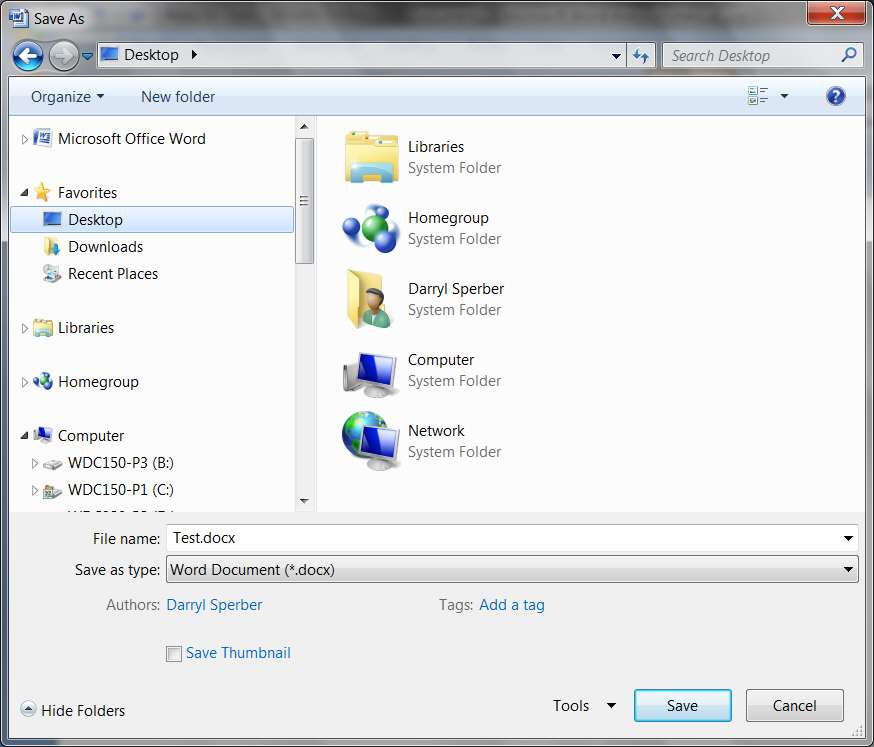
However, once I enter the name for saving (TEST.DOCX) and push the SAVE button (saving the document as a TEST.DOCX, not a PDF as you're trying to do), it really DOES go to the desktop.
Ok, still a bit confused because you're choosing to save your "document" as an Adobe PDF (do you also have Acrobat installed?) I then closed Word and re-opened it.
I then re-opened that TEST.DOCX as the last document I worked on, and now did a second SAVE AS... with DESKTOP still selected as my last destination. Surprisingly, now the Address Bar at the top really did show the fully expanded path to my desktop (unlike the first use, which simply showed "Desktop" as in the earlier screenshot).
I also changed the "type" for the saved document to PDF as you'd done (I DO have Adobe Acrobat Standard installed on my system, so PDF was available as an option), and pushed the SAVE button.

And sure enough, the second TEST.PDF document was now saved to my true desktop, exactly as had the first TEST.DOCX been saved to my true desktop.

I'm now puzzled why you are not seeing what I'm seeing, insofar as after closing and re-opening Word 2007 a second time and performing that second "save as" to the Desktop, why you are not seeing the true standard Win7 "save as" dialog with the standard Address Bar at the top showing the fully expanded path to the desktop???
In fact, your experiments continue to present what looks like an XP-like dialog, rather than a Win7 dialog. I wonder if it's your Office 2003???
I'm baffled by why you don't produce the standard Win7 "save as" dialog out of your Office 2003??
But sure enough, when I expand "Favorites" and select the "Desktop" item inside it, sure enough the Address Bar at the top of the screen shows simply "desktop" as yours does. There is nothing more, which I was looking for or thought would be present even with this special shortcut.
However, once I enter the name for saving (TEST.DOCX) and push the SAVE button (saving the document as a TEST.DOCX, not a PDF as you're trying to do), it really DOES go to the desktop.
Ok, still a bit confused because you're choosing to save your "document" as an Adobe PDF (do you also have Acrobat installed?) I then closed Word and re-opened it.
I then re-opened that TEST.DOCX as the last document I worked on, and now did a second SAVE AS... with DESKTOP still selected as my last destination. Surprisingly, now the Address Bar at the top really did show the fully expanded path to my desktop (unlike the first use, which simply showed "Desktop" as in the earlier screenshot).
I also changed the "type" for the saved document to PDF as you'd done (I DO have Adobe Acrobat Standard installed on my system, so PDF was available as an option), and pushed the SAVE button.
And sure enough, the second TEST.PDF document was now saved to my true desktop, exactly as had the first TEST.DOCX been saved to my true desktop.
I'm now puzzled why you are not seeing what I'm seeing, insofar as after closing and re-opening Word 2007 a second time and performing that second "save as" to the Desktop, why you are not seeing the true standard Win7 "save as" dialog with the standard Address Bar at the top showing the fully expanded path to the desktop???
In fact, your experiments continue to present what looks like an XP-like dialog, rather than a Win7 dialog. I wonder if it's your Office 2003???
I'm baffled by why you don't produce the standard Win7 "save as" dialog out of your Office 2003??
My Computer
At a glance
Windows 7 Pro x64 (1), Win7 Pro X64 (2)i5-3350p 3.1Ghz/6MB-cache (1); E8400 3.0Ghz/6...8GB PC3-12800 DDR3 (1); 4GB PC3-10600 DDR3 (2)ATI HD7750 (1), (see TV cards); ATI R7 250 (2)
- Computer type
- PC/Desktop
- Computer Manufacturer/Model Number
- Home-built, two systems (1) and (2)
- OS
- Windows 7 Pro x64 (1), Win7 Pro X64 (2)
- CPU
- i5-3350p 3.1Ghz/6MB-cache (1); E8400 3.0Ghz/6MB-cache (2)
- Motherboard
- ASUS P8Z77-V Pro (1); ASUS P5Q3 (2)
- Memory
- 8GB PC3-12800 DDR3 (1); 4GB PC3-10600 DDR3 (2)
- Graphics Card(s)
- ATI HD7750 (1), (see TV cards); ATI R7 250 (2)
- Sound Card
- Realtek ALC892 HD Audio (1); Realtek ALC1200 HD Audio (2)
- Monitor(s) Displays
- Eizo HD2441W LCD, Eizo S2433W (1); Eizo 24" S2433W (2)
- Screen Resolution
- 1920x1200, 1920x1200 (1); 1920x1200 (2)
- Hard Drives
- (1) 1TB SATA-II (7200RPM), 2x2TB SATA-III (7200RPM), 250GB SATA-III (10000RPM) for OS; 2x2TB external USB 3.0
(2) 320GB SATA-II (7200RPM), 750GB SATA-II (7200RPM), 150GB SATA-II (10000RPM) for OS; 2TB external USB 3.0
- PSU
- Nesteq ECS-6001 600W (1); Nesteq ECS-5001 500W (2)
- Case
- Acousti-Case 360 (1) and (2)
- Cooling
- Noctua NH-U12P SE2 for CPU, 2x120mm case fans (1) and (2)
- Keyboard
- IBM PS/2 (1) and (2)
- Mouse
- Logitech MX Revolution wireless (1); Microsoft wired (2)
- Internet Speed
- 100mbps down / 10mbps up
- Antivirus
- Microsoft Security Essentials; Malwarebyte Anti-Malware Pro
- Browser
- Firefox
- Other Info
- Ceton InfiniTV 4-tuner cablecard-enabled TV card as well as Hauppauge HVR-2250 OTA/ATSC 2-tuner TV card in (1), running under Win7 WMC


