Can someone explain SSL to me?

computergeekguy

New member
Pro User
Local time
7:15 AM
Messages
334
What I understand: SSL Is used by many sites. Basically it is an encrypted connection between you and a website. When you go to a store like newegg it has SSL. You know you are connected via SSL when the web address has a https rather than a http.

What i don't understand: Why don't we have it on all the time? They say that it is dangerous but they don't explain why. Why is it dangerous to be connected to HTTPS whenever it is available? After all we trust are finial info with it when we shop.

I little bit of explaining would be nice. Thanks
 

My Computer My Computer

Computer type
PC/Desktop
Computer Manufacturer/Model Number
self build
OS
7 home premium 64 bit
CPU
AMD Phenom II X6 1055T
Motherboard
Asus M4A785TD-M EVO
Memory
DDR3 1333 6144 MBytes each modual 2048 mb
Graphics Card(s)
Power Color ATI R9 270x bluescreen edition
Sound Card
s/pdif part of my motherboard
Monitor(s) Displays
It is a 42" lcd tv :D
Screen Resolution
1920 X 1080
Hard Drives
Samsung 120gb SSD (EVO 840)
Hitachi 500gb 3gb\s sata hard drive, slow boring but gets the job done
PSU
Orion 585w psu Model# HP585D (updated to EVGA 600W)
Case
A shoebox
Cooling
Box fan....
Keyboard
I telepathically convay what I want said.
Mouse
Cat
Internet Speed
Loading...
Antivirus
A facial mask
Browser
Firefail, Internet Exploder
Other Info
I love my gaming rig, FreeCell and Solitaire never looked so good.
Well; granted i am not a 100% expert on this topic; however; what i do know is that it has a lot do with the fact that i believe the only real reason we need ssl and https is like you mentioned; for doing financial transactions online and shopping online and the like. The reason its not on all the time i believe is realistically because the other times when you are just surfing a site say with like news; well that really doesnt need to have a secure connection for its use because its not private or secure information. Its just a news site. In short; really the only time you really need a secure connection is for like email, doing financial transactions, and the like. There are probably better explanations than mine which you can find probably on google.
 

My Computer My Computer

Computer type
PC/Desktop
Computer Manufacturer/Model Number
custom built
OS
Windows 7 ultimate 64-bit
CPU
Intel I7 2600K 3.4ghz
Motherboard
Asus Evo P8P67
Memory
Corsair 16gb ddr3 1600mhz
Graphics Card(s)
Nvidia Geforce gt 430
Sound Card
Sound Blaster Titanium x-fi pci express
Monitor(s) Displays
Dell E198WFP
Hard Drives
1 western digital 2TB drive.
PSU
Antec 1200 watt
Case
Inwin Dragon Rider
Cooling
6 case supplied cooling fans
Keyboard
logitech mk700
Mouse
logitech m705
Internet Speed
25-50mbps download; 10mbps upload(i think)
Antivirus
avg free 2014
Browser
mozilla firefox
Other Info
Also have a pretty bad speaker setup which is a klipsch promedia 5.1 surround speaker setup with huge subwoofer and lg blu ray player/writer. Also a hp officejet pro 8600 plus wireless all in one and a logitech s7500 webcam.
  • Like
Reactions: whs
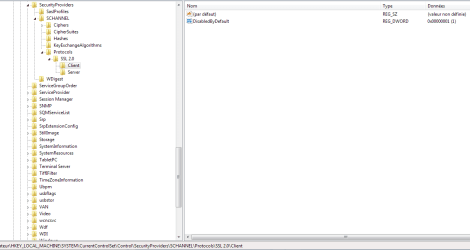
In Addition you can find here some infos about which SSL Protocols Windows 7 & others MS Operating Systems handles.

Article ID: 245030

[HKEY_LOCAL_MACHINE\SYSTEM\CurrentControlSet\Control\SecurityProviders\Schannel\Protocols\SSL 2.0\Client]
"DisabledByDefault"=dword:00000001

Is the default key in Windows 7 x64bits
 

Attachments

  • Capture.PNG
    Capture.PNG
    15.8 KB · Views: 1

My Computer My Computer

Computer type
PC/Desktop
Computer Manufacturer/Model Number
Custom Build
OS
Windows 7 Professional SP1 - x64 [Non-UEFI Boot]
CPU
Ivy Bridge Core i5 3570K (Delidded)
Motherboard
Asus P8Z77-V LE PLUS
Memory
G.Skill "Ares" DDR3 PC3-12800 - 1600MHz (16Gb)
Graphics Card(s)
Asus Dual-RX480-O4G
Sound Card
Creative Sound Blaster Z w/5.1 sound system
Monitor(s) Displays
Asus IPS 23"
Screen Resolution
16/9
Hard Drives
Internal:
500Go Sata 6Gb/s (x2)
500Go Sata 3Gb/s (x2)
SSD 60Go Sata 6Gb/s
PSU
In Win C 900W Series 80+ Platinum
Case
Thermaltake Chaser A71
Cooling
Custom Water Cooling Loop
Keyboard
Cooler Master QuickFire XTi
Mouse
Razer Imperator 2012 (4G)
Antivirus
MSE
Browser
IE 11.0.xxx Rtm
Other Info
"Raid0" with Intel Smart Response Technology (HDD/SSD)

My Computer My Computer

Computer type
PC/Desktop
Computer Manufacturer/Model Number
Custom Build
OS
Windows 7 Professional SP1 - x64 [Non-UEFI Boot]
CPU
Ivy Bridge Core i5 3570K (Delidded)
Motherboard
Asus P8Z77-V LE PLUS
Memory
G.Skill "Ares" DDR3 PC3-12800 - 1600MHz (16Gb)
Graphics Card(s)
Asus Dual-RX480-O4G
Sound Card
Creative Sound Blaster Z w/5.1 sound system
Monitor(s) Displays
Asus IPS 23"
Screen Resolution
16/9
Hard Drives
Internal:
500Go Sata 6Gb/s (x2)
500Go Sata 3Gb/s (x2)
SSD 60Go Sata 6Gb/s
PSU
In Win C 900W Series 80+ Platinum
Case
Thermaltake Chaser A71
Cooling
Custom Water Cooling Loop
Keyboard
Cooler Master QuickFire XTi
Mouse
Razer Imperator 2012 (4G)
Antivirus
MSE
Browser
IE 11.0.xxx Rtm
Other Info
"Raid0" with Intel Smart Response Technology (HDD/SSD)
The main reason why SSL isn't used universally is cost. SSL is more than just encryption. The cost of setting up and maintaining a website for SSL is considerable. Encryption means more work for a server and there is also extra bandwidth required. For a company like Newegg it is just a part of the cost of doing business. But for many non-commercial websites the cost would be prohibitive. Many popular websites would not exist and others would have to charge for their services.
 

My Computer My Computer

Computer type
PC/Desktop
Computer Manufacturer/Model Number
HP
OS
Windows 7 Pro 64 bit
CPU
Xeon W3520
Memory
8 GB
Graphics Card(s)
Nvidia Geforce 210
Yes I did some research to and it mostly looked like they were worried about the resources that ssl took up. However firefox has the warning that acts like your computer will die with some ssl conections.
Firefox-3-HTTPS-Certificate-Error-Page.jpg

From my research it is not that it is dangerous it is that their ssl certificate didn't cover that portion of the website.
This is from a website that i cant remember were i saw it.
Unofficial quote that i tried to pull out of memory.
Some websites don't fully understand ssl certificates. There are several versions to purchase and most go with the cheapest. The cheapest only covers websites with "www.example.com" However if you type example.com without www the ssl certificate wont cover that website.
So once again, if that is all it is than why dosen't firefox redirect me to "www.example.com" instead of giving me that error that i posted above? I have always seen that error before and thought "This website must be full of viruses and run away" Now the error just seems insignificant. So from my research there realy is nothing dangerous about being connected to ssl whenever possible other than some sites bought the wrong certificate.

Also i looked at ssl and people have said that it no longer poses a problem as computer technology has grown. They claimed that ssl only accounted for 1% of their resources.

So that is interesting stuff to know.

Thanks
 

My Computer My Computer

Computer type
PC/Desktop
Computer Manufacturer/Model Number
self build
OS
7 home premium 64 bit
CPU
AMD Phenom II X6 1055T
Motherboard
Asus M4A785TD-M EVO
Memory
DDR3 1333 6144 MBytes each modual 2048 mb
Graphics Card(s)
Power Color ATI R9 270x bluescreen edition
Sound Card
s/pdif part of my motherboard
Monitor(s) Displays
It is a 42" lcd tv :D
Screen Resolution
1920 X 1080
Hard Drives
Samsung 120gb SSD (EVO 840)
Hitachi 500gb 3gb\s sata hard drive, slow boring but gets the job done
PSU
Orion 585w psu Model# HP585D (updated to EVGA 600W)
Case
A shoebox
Cooling
Box fan....
Keyboard
I telepathically convay what I want said.
Mouse
Cat
Internet Speed
Loading...
Antivirus
A facial mask
Browser
Firefail, Internet Exploder
Other Info
I love my gaming rig, FreeCell and Solitaire never looked so good.
Yes I did some research to and it mostly looked like they were worried about the resources that ssl took up. However firefox has the warning that acts like your computer will die with some ssl conections.
Firefox-3-HTTPS-Certificate-Error-Page.jpg

From my research it is not that it is dangerous it is that their ssl certificate didn't cover that portion of the website.
This is from a website that i cant remember were i saw it.
Unofficial quote that i tried to pull out of memory.
Some websites don't fully understand ssl certificates. There are several versions to purchase and most go with the cheapest. The cheapest only covers websites with "www.example.com" However if you type example.com without www the ssl certificate wont cover that website.
So once again, if that is all it is than why dosen't firefox redirect me to "www.example.com" instead of giving me that error that i posted above? I have always seen that error before and thought "This website must be full of viruses and run away" Now the error just seems insignificant. So from my research there realy is nothing dangerous about being connected to ssl whenever possible other than some sites bought the wrong certificate.

Also i looked at ssl and people have said that it no longer poses a problem as computer technology has grown. They claimed that ssl only accounted for 1% of their resources.

So that is interesting stuff to know.

Thanks

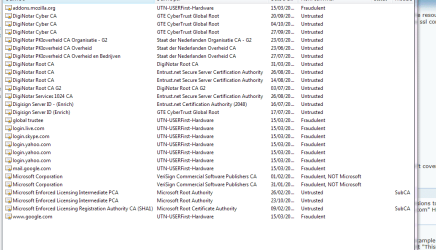
If you look at your certmgr.msc => untrusted certificats, you'll see that some sites have been classified untrusted/fraudulent and might be the error you encountered.

How Windows updates root certificates

Windows Vista and Windows 7:
Root certificates on Windows Vista and later versions are distributed through the automatic root update mechanism. That is, they are distributed through the root certificate. When a user goes to a secure website (by using HTTPS SSL), reads a secure email message (S/MIME), or downloads an ActiveX control that is signed (code signing), and then encounters a new root certificate, the Windows certificate chain verification software checks Microsoft Update for the root certificate. If the software finds the root certificate, the software downloads the current Certificate Trust List (CTL). The CTL contains the list of all trusted root certificates in the program and verifies that the root certificate is listed there. Then, it downloads the specified root certificate to the system and installs the certificate in the Windows Trusted Root Certification Authorities Store. If the root certificate is not found, the certificate chain is not completed, and the system returns an error.

To the user, a successful root update is seamless. The user does not see any security dialog boxes or warnings. The download happens automatically. In addition, for Windows Vista and later versions, client SKUs support weekly pre-fetching from Microsoft Update to check for updated root certificate properties (for example, extended validation (EV), code signing, or server authentication properties [that is, certificate properties that are added to a root certificate]).
 

Attachments

  • Capture.PNG
    Capture.PNG
    18.7 KB · Views: 0

My Computer My Computer

Computer type
PC/Desktop
Computer Manufacturer/Model Number
Custom Build
OS
Windows 7 Professional SP1 - x64 [Non-UEFI Boot]
CPU
Ivy Bridge Core i5 3570K (Delidded)
Motherboard
Asus P8Z77-V LE PLUS
Memory
G.Skill "Ares" DDR3 PC3-12800 - 1600MHz (16Gb)
Graphics Card(s)
Asus Dual-RX480-O4G
Sound Card
Creative Sound Blaster Z w/5.1 sound system
Monitor(s) Displays
Asus IPS 23"
Screen Resolution
16/9
Hard Drives
Internal:
500Go Sata 6Gb/s (x2)
500Go Sata 3Gb/s (x2)
SSD 60Go Sata 6Gb/s
PSU
In Win C 900W Series 80+ Platinum
Case
Thermaltake Chaser A71
Cooling
Custom Water Cooling Loop
Keyboard
Cooler Master QuickFire XTi
Mouse
Razer Imperator 2012 (4G)
Antivirus
MSE
Browser
IE 11.0.xxx Rtm
Other Info
"Raid0" with Intel Smart Response Technology (HDD/SSD)
Back
Top