
Lightroom "disk activity" on the wrong drive - can someone explain?
Hi,
I am a professional photographer & am trying to optimize Adobe Lightroom for processing RAW files as fast as possible. Presently, I am trying to decrease the pause I have each time a new photo loads into the develop module (this is my biggest editing bottleneck).
Here's my system specs:
OS Win-7 64-bit
RAM 32G
CPU i7-3930K
Windows is installed on C:\ (SSD)
Windows paging is managed by the system, and usually appears on C:\ (SSD)
the Lightroom catalogue is on D:\ (SSD RAID-0)
the Lightroom Cache is also on D:\ (SSD RAID-0)
the RAW files that Lightroom accesses are on E:\ (SSD RAID-0)
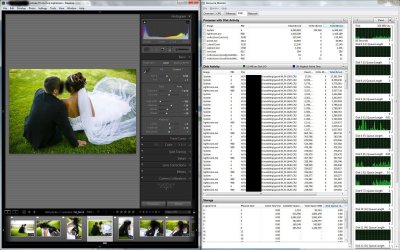
My confusion is over the way Resource Monitor displays the "disk activity" at the crucial points (when Lightroom loads a new RAW photo). The "storage" window lists drives C, D, & E as as most active during this time (according to the Active Time(%)), which seems right...
However, "disk activity" lists the system and lightroom as reading files from "H:5\file_path_etc" at the highest rate. I am concerned that this means Lightroom and system are using cached files on the H:\ drive, and my H:\ drive is a slow 7200rpm HDD... Or maybe I'm not reading the "H:5\file_path_etc" tag right. (drive H:\ doesn't have these files on it anyway, unless they are there in a cached form (?)).
I also see a similar thing for "disk activity" on "H:0\file_path_etc" for the following files:
1) the Lightroom catalogue, which should be on D:\
2) the Lightroom Cache, which should be on D:\
3) the RAW files, which should be on E:\.
These last examples of disk activity however don't occur when files are loading, so I'm not really concerned about them.
Could someone interpret what "H:5\file_path_etc" and "H:0\file_path_etc" mean and what might be going on? I'll attach a screen shot of what Resource Monitor lists during the period when I've been loading files consecutively (bride & grooms names are blacked out).
Thanks!
Hi,
I am a professional photographer & am trying to optimize Adobe Lightroom for processing RAW files as fast as possible. Presently, I am trying to decrease the pause I have each time a new photo loads into the develop module (this is my biggest editing bottleneck).
Here's my system specs:
OS Win-7 64-bit
RAM 32G
CPU i7-3930K
Windows is installed on C:\ (SSD)
Windows paging is managed by the system, and usually appears on C:\ (SSD)
the Lightroom catalogue is on D:\ (SSD RAID-0)
the Lightroom Cache is also on D:\ (SSD RAID-0)
the RAW files that Lightroom accesses are on E:\ (SSD RAID-0)
My confusion is over the way Resource Monitor displays the "disk activity" at the crucial points (when Lightroom loads a new RAW photo). The "storage" window lists drives C, D, & E as as most active during this time (according to the Active Time(%)), which seems right...
However, "disk activity" lists the system and lightroom as reading files from "H:5\file_path_etc" at the highest rate. I am concerned that this means Lightroom and system are using cached files on the H:\ drive, and my H:\ drive is a slow 7200rpm HDD... Or maybe I'm not reading the "H:5\file_path_etc" tag right. (drive H:\ doesn't have these files on it anyway, unless they are there in a cached form (?)).
I also see a similar thing for "disk activity" on "H:0\file_path_etc" for the following files:
1) the Lightroom catalogue, which should be on D:\
2) the Lightroom Cache, which should be on D:\
3) the RAW files, which should be on E:\.
These last examples of disk activity however don't occur when files are loading, so I'm not really concerned about them.
Could someone interpret what "H:5\file_path_etc" and "H:0\file_path_etc" mean and what might be going on? I'll attach a screen shot of what Resource Monitor lists during the period when I've been loading files consecutively (bride & grooms names are blacked out).
Thanks!
Attachments
Last edited:
My Computer
- Computer type
- PC/Desktop
- OS
- Windows 7 64-bit
- CPU
- i7-3930K (six core @4Ghz)
- Motherboard
- Asus Rampage IV Formula - BIOS 3404 (Nodens mod)
- Memory
- 4x8GB RipjawsZ 1.5V@1866
- Graphics Card(s)
- Evga G-force 9600GSO 1GB
- Sound Card
- Scarlett 2i2
- Monitor(s) Displays
- DELL U2410f wide gamut
- Screen Resolution
- 1920x1200
- Hard Drives
- C:\ OS on SSD 90GB
D:\ SSD's RAID-0 250GB
E:\ SSD's RAID-0 150GB
F:\ HDD 3TB 7200rpm
G:\ HDD 3TB 7200rpm
H:\ HDD 1.5TB 7200rpm
I:\ HDD 1TB 7200rpm
J:\ HDD 1.5TB 7200rpm
2x hot-swap bays
- PSU
- Seasonic M12D (750W)
- Case
- Corsair Carbide 400R
- Cooling
- Corsair H100
- Other Info
- FANS:
CPU (push/pull) 4x120mm
case intake: 2x120mm
case exhaust 3x120mm

