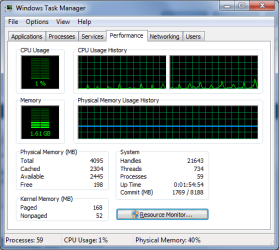
Can someone please explain cached memory?

Will2K9

New member
Local time
4:54 PM
Messages
14
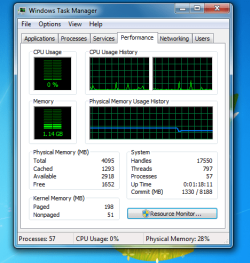
Hi I have been using windows 7 ultimate 64bit and have noticed in task manager that 28% of my ram is being used and with further looking I noticed most of this ram was under cache. Does windows 7 cache applications I use most frequently into ram?

Screenshot Attached

Thanks for any help
 

Attachments
  • cache.PNG
    cache.PNG
    25.7 KB · Views: 388

My Computer

Computer Manufacturer/Model Number
Me
OS
Windows 7 Ultimate [64Bit]
CPU
E6400 OC @ 2.8Ghz
Motherboard
Asus P5QL-EM
Memory
2X2GB Corsair DDR2 [4GB] OC
Graphics Card(s)
PowerColor 3870Xtreme
Sound Card
Realtek 7.1 Onboard
Monitor(s) Displays
Daewoo 17"
Screen Resolution
1280X1024
Hard Drives
2XSamsung 80GB (Sata)
1XSamsung 250GB (Sata)
1xSamsung 400GB (IDE)
PSU
550 Watt
Case
Akasa Zen
Cooling
Zalman CNPS9500 AT
Keyboard
Logitech LX 710 Cordless Keyboard
Mouse
Logitech LX 7 Cordless Laser Mouse
Internet Speed
10MB
Yes, Windows 7 makes intensive use of pre-fetch/cache.. my system uses almost 50% of my available RAM ... This is completely normal...
 

My Computer

Computer type
PC/Desktop
Computer Manufacturer/Model Number
LENOVO K450 @3.0GHZ
OS
64-bit Windows 8.1 Pro
CPU
Core(TM) i5 CPU 4330 Haswell @ 3.20GHz
Motherboard
LENOVO
Memory
12.00 GB
Graphics Card(s)
Intel(R) HD Graphics
Sound Card
Intel HD integtrated
Monitor(s) Displays
HP 25' ISP Monitor
Screen Resolution
1900/1020
Hard Drives
(1) ST1000DM003-1CH162 (2) Generic STORAGE DEVICE USB Device (3) Generic STORAGE DEVICE USB Device
Internet Speed
100mb down/10mb up
Thanks

Thanks both of you for the help windows 7 memory management sounds much improved and i'm guessing windows 7 will release the ram to applications which require it such as games
 

My Computer

Computer Manufacturer/Model Number
Me
OS
Windows 7 Ultimate [64Bit]
CPU
E6400 OC @ 2.8Ghz
Motherboard
Asus P5QL-EM
Memory
2X2GB Corsair DDR2 [4GB] OC
Graphics Card(s)
PowerColor 3870Xtreme
Sound Card
Realtek 7.1 Onboard
Monitor(s) Displays
Daewoo 17"
Screen Resolution
1280X1024
Hard Drives
2XSamsung 80GB (Sata)
1XSamsung 250GB (Sata)
1xSamsung 400GB (IDE)
PSU
550 Watt
Case
Akasa Zen
Cooling
Zalman CNPS9500 AT
Keyboard
Logitech LX 710 Cordless Keyboard
Mouse
Logitech LX 7 Cordless Laser Mouse
Internet Speed
10MB
That is correct. The memory management routine built in to Windows 7 is an improvement to the routines in earlier versions of Windows. Unused memory is wasted memory, and in order to speed your system up, Windows makes use of the free space to store data which makes your system run faster. When called for, this data is then retrieved from RAM instead of the much-slower HDD. Should you run an application (including games) that require this memory space, then the management routine relinquishes that space and it is made available for your application.

For example, here is mine. I am running Windows 7 (64-bit) with a single instance of IE8 (64-bit) with 2 tabs and Office Outlook 2007 for my email.

Capture.PNG
 

My Computer

Computer type
PC/Desktop
Computer Manufacturer/Model Number
Dwarf Dwf/11/2012 r09/2013
OS
Windows 8.1 Pro RTM x64
CPU
Intel Core-i5-3570K 4-core @ 3.4GHz (Ivy Bridge) (OC 4.4GHz)
Motherboard
ASRock Z77 Extreme4-M
Memory
4 x 4GB DDR3-1600 Corsair Vengeance CMZ8GX3M2A1600C9B (16GB)
Graphics Card(s)
MSI GeForce GTX770 Gaming OC 2GB
Sound Card
Realtek High Definition on board solution (ALC 898)
Monitor(s) Displays
ViewSonic VA1912w Widescreen (VGA)
Screen Resolution
1440x900
Hard Drives
OCZ Agility 3 SSD 120GB SATA III x2 (RAID 0)
Samsung HD501LJ 500GB SATA II x2
Hitachi HDS721010CLA332 1TB SATA II
Iomega 1.5TB Ext USB 2.0
WD 2.0TB Ext USB 3.0
PSU
XFX Pro Series 850W Semi-Modular
Case
Gigabyte IF233
Cooling
1 x 120mm Front Inlet 1 x 120mm Rear Exhaust
Keyboard
Microsoft Comfort Curve Keyboard 3000 (USB)
Mouse
Microsoft Comfort Mouse 3000 for Business (USB)
Internet Speed
NetGear DG834Gv3 ADSL Modem/Router (Ethernet) ~4.0 Mb/s (O2)
Antivirus
Avast! 8.0.1497
Browser
IE 11
Other Info
Optical Drive: HL-DT-ST BD-RE BH10LS30 SATA Bluray
Lexmark S305 Printer/Scanner/Copier (USB)
WEI Score: 8.1/8.1/8.5/8.5/8.25
Asus Eee PC 1011PX Netbook (Windows 7 x86 Starter)
  • Like
Reactions: JMH
Back
Top