Solved Can someone tell me why windows search can not find this file?

riffwraith

New member
Member
VIP
Local time
4:08 AM
Messages
240
Hi

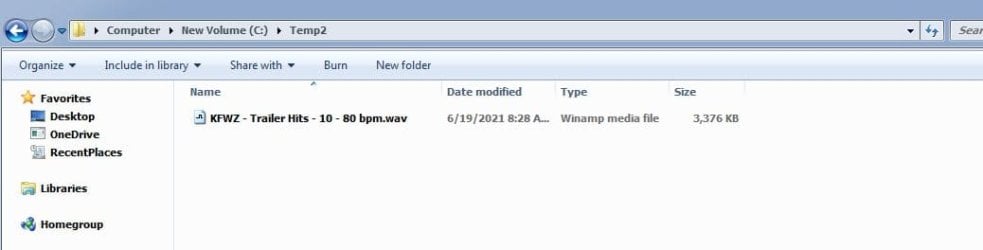
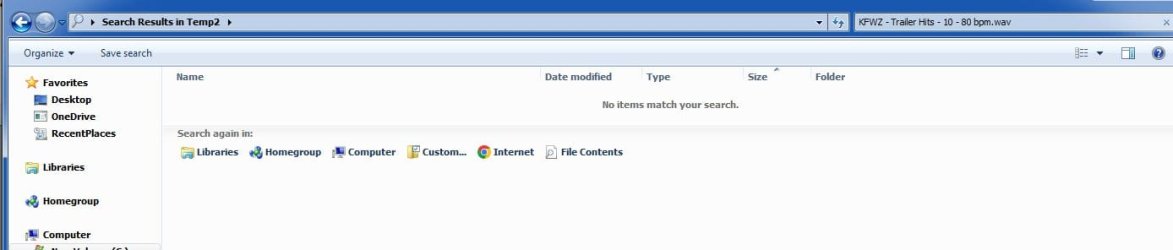
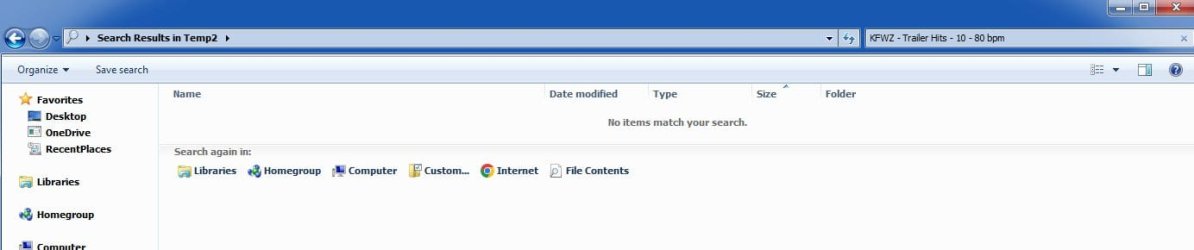
It's right there - why can Win not find it?
 

Attachments

  • 1.jpg
    1.jpg
    20.6 KB · Views: 5
  • 2.jpg
    2.jpg
    27.1 KB · Views: 3
  • 3.jpg
    3.jpg
    29.6 KB · Views: 1

My Computer My Computer

At a glance

W7 64 UltIntel Core i9-7940xGSkill 128GBAMD Radeon RX 560
Computer type
PC/Desktop
Computer Manufacturer/Model Number
Custom
OS
W7 64 Ult
CPU
Intel Core i9-7940x
Motherboard
ASUS x299 TUF
Memory
GSkill 128GB
Graphics Card(s)
AMD Radeon RX 560
Sound Card
RME
Screen Resolution
1920x1080
Hard Drives
5
PSU
BeQuiet!
Case
BeQuiet!
Keyboard
HyperX
Mouse
Logitech
Browser
IE - what else is there?
It may be because of the spaces. Try putting double quotes around the entire name.
 

My Computers My Computers

  • At a glance

    Windows 7 pro/Windows 10 ProIntel i7 860 Quad core 2.8 ghz8 gbATI Radeon HD 5770 1 gb ram
    Computer type
    PC/Desktop
    Computer Manufacturer/Model Number
    HP Pavillion Elite HPE-250f
    OS
    Windows 7 pro/Windows 10 Pro
    CPU
    Intel i7 860 Quad core 2.8 ghz
    Memory
    8 gb
    Graphics Card(s)
    ATI Radeon HD 5770 1 gb ram
    Monitor(s) Displays
    Alienware 25 AW2521HF & Viewsonic
    Screen Resolution
    1920 x1080 & 1680x1050
    Hard Drives
    WD blue 1 tb & 500 gb.
    Browser
    FF of course.
    Other Info
    https://www.bestbuy.com/site/hp-pavilion-elite-desktop-intel-core-i7-processor-8gb-memory-1tb-hard-drive/9921493.p?skuId=9921493
  • At a glance

    Windows 2012 R2 Data center/Linux Minti3 9100 3.6GHz, 8M cache, 4C/4T8GB 2666MT/s DDR4 ECC UDIMM
    Computer type
    PC/Desktop
    System Manufacturer/Model Number
    Dell Poweredge T140
    OS
    Windows 2012 R2 Data center/Linux Mint
    CPU
    i3 9100 3.6GHz, 8M cache, 4C/4T
    Memory
    8GB 2666MT/s DDR4 ECC UDIMM
    Monitor(s) Displays
    Viewsonic
    Screen Resolution
    1680x1050
    Hard Drives
    1 TB & 750 GB
    Other Info
    https://www.dell.com/en-us/work/shop/productdetailstxn/poweredge-t140?~ck=bt
Oh - good call. So, that's it. When I first read your post, I am saying, wait - I have done successful searches with spaces... what gives here? It's the presence of the hyphens. Hyphens are fine; spaces are fine. But the two together are not.

mom label-Copy

Win can find that ^

mom label - Copy

But it can't find that ^

In order to find the file named as the second entry, I need to enter into the search field :

"mom label - Copy"

I wonder if that's a bug, or if it's designed like that on purpose.

In any event, thank you.
 

My Computer My Computer

At a glance

W7 64 UltIntel Core i9-7940xGSkill 128GBAMD Radeon RX 560
Computer type
PC/Desktop
Computer Manufacturer/Model Number
Custom
OS
W7 64 Ult
CPU
Intel Core i9-7940x
Motherboard
ASUS x299 TUF
Memory
GSkill 128GB
Graphics Card(s)
AMD Radeon RX 560
Sound Card
RME
Screen Resolution
1920x1080
Hard Drives
5
PSU
BeQuiet!
Case
BeQuiet!
Keyboard
HyperX
Mouse
Logitech
Browser
IE - what else is there?
Back
Top