
You are using an out of date browser. It may not display this or other websites correctly.
You should upgrade or use an alternative browser.
You should upgrade or use an alternative browser.
Can´t pin to taskbar
- Thread starter IngoPan
- Start date

Hello InfoPan,
Not everything can be pinned to the taskbar. What type of file are you trying to pin to it?
Not everything can be pinned to the taskbar. What type of file are you trying to pin to it?
My Computer
- Computer type
- PC/Desktop
- Computer Manufacturer/Model Number
- Self built custom
- OS
- 64-bit Windows 11 Pro for Workstations
- CPU
- Intel i7-8700K OC'd to 5 GHz
- Motherboard
- ASUS ROG Maximus XI Formula Z390
- Memory
- 64 GB (4x16GB) G.SKILL TridentZ RGB DDR4 3600 MHz
- Graphics Card(s)
- ASUS ROG-STRIX-GTX1080TI-O11G-GAMING
- Sound Card
- Integrated
- Monitor(s) Displays
- 2 x Samsung Odyssey G7 27"
- Screen Resolution
- 2560x1440
- Hard Drives
- 1TB Samsung 990 PRO M.2,
4TB Samsung 990 PRO PRO M.2,
TerraMaster F8 SSD Plus NAS
- PSU
- Seasonic Prime Titanium 850W
- Case
- Thermaltake Core P3
- Cooling
- Corsair Hydro H115i
- Keyboard
- Logitech wireless K800
- Mouse
- Logitech MX Master 4
- Internet Speed
- 2 Gb/s Download and 100 Mb/s Upload
- Antivirus
- Malwarebyte Anti-Malware Premium
- Browser
- Google Chrome
- Other Info
- Logitech Z625 speaker system,
Logitech BRIO 4K Pro webcam,
HP Color LaserJet Pro MFP M477fdn,
APC SMART-UPS RT 1000 XL - SURT1000XLI,
Galaxy S23 Plus phone

When i try to pin something on the taskbar (via drag´n´drop) it doesn´t work as i get a "denied" Symbol. Whats the matter ?
Thanks, Ingo
When you right mouse click on any desktop icon can you select "pin to taskbar".
Does that way work?
My Computer
- Computer type
- PC/Desktop
- Computer Manufacturer/Model Number
- Self Built
- OS
- Windows 10 Pro
- CPU
- Intel i5
- Motherboard
- I have a fatherboard
- Memory
- I'm old and lost a few chips
- Graphics Card(s)
- Yup
- Sound Card
- Yup
- Monitor(s) Displays
- Samsung 32" UHD
- Screen Resolution
- 3840 x 2160
- Hard Drives
- Samsung 860 EVO drives
- PSU
- 450 Watt and some fans that blow
- Case
- Small tower
- Cooling
- Yes I am cool. lol
- Keyboard
- Who needs a keyboard?
- Mouse
- Logitech Laser G7 wireless
- Internet Speed
- Zippy fast UP and DOWN
- Antivirus
- I got a shot
- Browser
- The new Improved EDGE 2020
When i try to pin something on the taskbar (via drag´n´drop) it doesn´t work as i get a "denied" Symbol. Whats the matter ?
Thanks, Ingo
When you right mouse click on any desktop icon can you select "pin to taskbar".
Does that way work?
The "pin to taskbar" option is there. Any idea?
My Computer
- OS
- XP, Windows 7
My Computer
- Computer type
- PC/Desktop
- Computer Manufacturer/Model Number
- Self built custom
- OS
- 64-bit Windows 11 Pro for Workstations
- CPU
- Intel i7-8700K OC'd to 5 GHz
- Motherboard
- ASUS ROG Maximus XI Formula Z390
- Memory
- 64 GB (4x16GB) G.SKILL TridentZ RGB DDR4 3600 MHz
- Graphics Card(s)
- ASUS ROG-STRIX-GTX1080TI-O11G-GAMING
- Sound Card
- Integrated
- Monitor(s) Displays
- 2 x Samsung Odyssey G7 27"
- Screen Resolution
- 2560x1440
- Hard Drives
- 1TB Samsung 990 PRO M.2,
4TB Samsung 990 PRO PRO M.2,
TerraMaster F8 SSD Plus NAS
- PSU
- Seasonic Prime Titanium 850W
- Case
- Thermaltake Core P3
- Cooling
- Corsair Hydro H115i
- Keyboard
- Logitech wireless K800
- Mouse
- Logitech MX Master 4
- Internet Speed
- 2 Gb/s Download and 100 Mb/s Upload
- Antivirus
- Malwarebyte Anti-Malware Premium
- Browser
- Google Chrome
- Other Info
- Logitech Z625 speaker system,
Logitech BRIO 4K Pro webcam,
HP Color LaserJet Pro MFP M477fdn,
APC SMART-UPS RT 1000 XL - SURT1000XLI,
Galaxy S23 Plus phone
Well the option is there.
I asking this question because i once (before i deleted it by accident) I had a network folder \\IP\folder\ pinned to the explorer jumplist. How do i add this again?
My Computer
- OS
- XP, Windows 7
The only way that I know of to pin a network folder to the taskbar is to place it in Quick Launch or another pinned folder as a workaround.
My Computer
- Computer type
- PC/Desktop
- Computer Manufacturer/Model Number
- Self built custom
- OS
- 64-bit Windows 11 Pro for Workstations
- CPU
- Intel i7-8700K OC'd to 5 GHz
- Motherboard
- ASUS ROG Maximus XI Formula Z390
- Memory
- 64 GB (4x16GB) G.SKILL TridentZ RGB DDR4 3600 MHz
- Graphics Card(s)
- ASUS ROG-STRIX-GTX1080TI-O11G-GAMING
- Sound Card
- Integrated
- Monitor(s) Displays
- 2 x Samsung Odyssey G7 27"
- Screen Resolution
- 2560x1440
- Hard Drives
- 1TB Samsung 990 PRO M.2,
4TB Samsung 990 PRO PRO M.2,
TerraMaster F8 SSD Plus NAS
- PSU
- Seasonic Prime Titanium 850W
- Case
- Thermaltake Core P3
- Cooling
- Corsair Hydro H115i
- Keyboard
- Logitech wireless K800
- Mouse
- Logitech MX Master 4
- Internet Speed
- 2 Gb/s Download and 100 Mb/s Upload
- Antivirus
- Malwarebyte Anti-Malware Premium
- Browser
- Google Chrome
- Other Info
- Logitech Z625 speaker system,
Logitech BRIO 4K Pro webcam,
HP Color LaserJet Pro MFP M477fdn,
APC SMART-UPS RT 1000 XL - SURT1000XLI,
Galaxy S23 Plus phone
The only way that I know of to pin a network folder to the taskbar is to place it in Quick Launch or another pinned folder as a workaround.
This tut works from sevenforums:
http://www.sevenforums.com/tutorials/6769-user-files-folder-pin-taskbar.html
Thanks for all your help.
My Computer
- OS
- XP, Windows 7
You're welcome InfoPan. I'm happy you got it sorted. 
My Computer
- Computer type
- PC/Desktop
- Computer Manufacturer/Model Number
- Self built custom
- OS
- 64-bit Windows 11 Pro for Workstations
- CPU
- Intel i7-8700K OC'd to 5 GHz
- Motherboard
- ASUS ROG Maximus XI Formula Z390
- Memory
- 64 GB (4x16GB) G.SKILL TridentZ RGB DDR4 3600 MHz
- Graphics Card(s)
- ASUS ROG-STRIX-GTX1080TI-O11G-GAMING
- Sound Card
- Integrated
- Monitor(s) Displays
- 2 x Samsung Odyssey G7 27"
- Screen Resolution
- 2560x1440
- Hard Drives
- 1TB Samsung 990 PRO M.2,
4TB Samsung 990 PRO PRO M.2,
TerraMaster F8 SSD Plus NAS
- PSU
- Seasonic Prime Titanium 850W
- Case
- Thermaltake Core P3
- Cooling
- Corsair Hydro H115i
- Keyboard
- Logitech wireless K800
- Mouse
- Logitech MX Master 4
- Internet Speed
- 2 Gb/s Download and 100 Mb/s Upload
- Antivirus
- Malwarebyte Anti-Malware Premium
- Browser
- Google Chrome
- Other Info
- Logitech Z625 speaker system,
Logitech BRIO 4K Pro webcam,
HP Color LaserJet Pro MFP M477fdn,
APC SMART-UPS RT 1000 XL - SURT1000XLI,
Galaxy S23 Plus phone
Just to discuss this issue further...
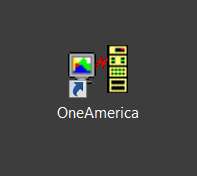
I have an application installed (IBM Personal Communications) that is a 3270 emulator app, running under a TN3270 connection link to IBM mainframes. The characteristics and specifics of each connection (e.g. host IP) is uniquely described in a profile whose filename extension is ".WS". The installation of the software associates the program's icon with all files of type ".WS", such that all references to .WS files show the program's icon (either small, medium or large as appropriate).
These .WS files can have a shortcut created on the desktop through the usual RMB->Send to desktop... method, for convenient launching of the 3270 emulator as configured for that particular connection... to that particular mainframe:
And these desktop shortcuts can also be moved/copied to the START menu, for launching that way:

However as you will notice from the latter screenshot, THERE IS NO "PIN TO TASKBAR" option on the RMB context menu associated with the shortcut when placed in the START menu.
Similarly, the exact same inability to "PIN TO TASKBAR" from the RMB context menu also occurs from the desktop shortcut itself:
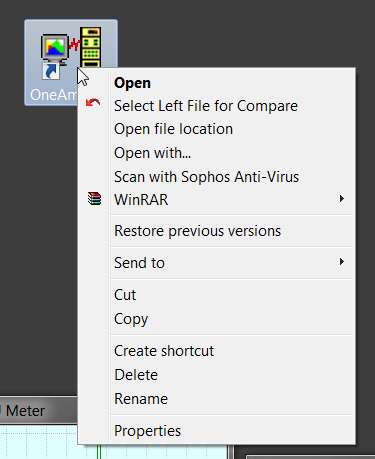
Confirming this last problem, dragging a desktop shortcut to the taskbar normally is exactly the same as using the "PIN TO TASKBAR" except that the drag-and-drop approach can be positioned by the user to be between two existing taskbar objects in order to get the newly dropped taskbar object where you want it. This is in contrast to the "PIN TO TASKBAR" method which always puts the newly pinned object at the very end of the taskbar with no option for placement. Well with these .WS desktop/START shortcuts (from a .WS file), it is impossible to drag-and-drop anything to the taskbar. It simply does not even present the usual GUI results.
NOTE: this is a problem unique to Win7, as none of this occurs under WinXP. Every one of the above "problems" in Win7 is NOT a problem in WinXP, and you can drag-and-drop the shortcut for a .WS file (either from desktop or START menu) to the WinXP taskbar without a problem.
I have experimented with other file types (e.g. PDF) as to whether they, too, exhibit this same inability to "PIN TO TASKBAR" (either via RMB menu on START/desktop shortcut, or by drag-and-drop from existing START/desktop shortcut directly to taskbar) as I see with a .WS file shortcut. In fact, the problem is NOT UNIQUE to this particular .WS file association.
In fact, it appears to be true for ALL shortcuts created from files associated with programs. For example, you also CANNOT "PIN TO TASKBAR" (either from RMB menu, nor by drag-and-drop) a shortcut for a PDF file.
I have an application installed (IBM Personal Communications) that is a 3270 emulator app, running under a TN3270 connection link to IBM mainframes. The characteristics and specifics of each connection (e.g. host IP) is uniquely described in a profile whose filename extension is ".WS". The installation of the software associates the program's icon with all files of type ".WS", such that all references to .WS files show the program's icon (either small, medium or large as appropriate).
These .WS files can have a shortcut created on the desktop through the usual RMB->Send to desktop... method, for convenient launching of the 3270 emulator as configured for that particular connection... to that particular mainframe:
And these desktop shortcuts can also be moved/copied to the START menu, for launching that way:
However as you will notice from the latter screenshot, THERE IS NO "PIN TO TASKBAR" option on the RMB context menu associated with the shortcut when placed in the START menu.
Similarly, the exact same inability to "PIN TO TASKBAR" from the RMB context menu also occurs from the desktop shortcut itself:
Confirming this last problem, dragging a desktop shortcut to the taskbar normally is exactly the same as using the "PIN TO TASKBAR" except that the drag-and-drop approach can be positioned by the user to be between two existing taskbar objects in order to get the newly dropped taskbar object where you want it. This is in contrast to the "PIN TO TASKBAR" method which always puts the newly pinned object at the very end of the taskbar with no option for placement. Well with these .WS desktop/START shortcuts (from a .WS file), it is impossible to drag-and-drop anything to the taskbar. It simply does not even present the usual GUI results.
NOTE: this is a problem unique to Win7, as none of this occurs under WinXP. Every one of the above "problems" in Win7 is NOT a problem in WinXP, and you can drag-and-drop the shortcut for a .WS file (either from desktop or START menu) to the WinXP taskbar without a problem.
I have experimented with other file types (e.g. PDF) as to whether they, too, exhibit this same inability to "PIN TO TASKBAR" (either via RMB menu on START/desktop shortcut, or by drag-and-drop from existing START/desktop shortcut directly to taskbar) as I see with a .WS file shortcut. In fact, the problem is NOT UNIQUE to this particular .WS file association.
In fact, it appears to be true for ALL shortcuts created from files associated with programs. For example, you also CANNOT "PIN TO TASKBAR" (either from RMB menu, nor by drag-and-drop) a shortcut for a PDF file.
My Computer
- Computer type
- PC/Desktop
- Computer Manufacturer/Model Number
- Home-built, two systems (1) and (2)
- OS
- Windows 7 Pro x64 (1), Win7 Pro X64 (2)
- CPU
- i5-3350p 3.1Ghz/6MB-cache (1); E8400 3.0Ghz/6MB-cache (2)
- Motherboard
- ASUS P8Z77-V Pro (1); ASUS P5Q3 (2)
- Memory
- 8GB PC3-12800 DDR3 (1); 4GB PC3-10600 DDR3 (2)
- Graphics Card(s)
- ATI HD7750 (1), (see TV cards); ATI R7 250 (2)
- Sound Card
- Realtek ALC892 HD Audio (1); Realtek ALC1200 HD Audio (2)
- Monitor(s) Displays
- Eizo HD2441W LCD, Eizo S2433W (1); Eizo 24" S2433W (2)
- Screen Resolution
- 1920x1200, 1920x1200 (1); 1920x1200 (2)
- Hard Drives
- (1) 1TB SATA-II (7200RPM), 2x2TB SATA-III (7200RPM), 250GB SATA-III (10000RPM) for OS; 2x2TB external USB 3.0
(2) 320GB SATA-II (7200RPM), 750GB SATA-II (7200RPM), 150GB SATA-II (10000RPM) for OS; 2TB external USB 3.0
- PSU
- Nesteq ECS-6001 600W (1); Nesteq ECS-5001 500W (2)
- Case
- Acousti-Case 360 (1) and (2)
- Cooling
- Noctua NH-U12P SE2 for CPU, 2x120mm case fans (1) and (2)
- Keyboard
- IBM PS/2 (1) and (2)
- Mouse
- Logitech MX Revolution wireless (1); Microsoft wired (2)
- Internet Speed
- 100mbps down / 10mbps up
- Antivirus
- Microsoft Security Essentials; Malwarebyte Anti-Malware Pro
- Browser
- Firefox
- Other Info
- Ceton InfiniTV 4-tuner cablecard-enabled TV card as well as Hauppauge HVR-2250 OTA/ATSC 2-tuner TV card in (1), running under Win7 WMC
Similar threads

- Replies
- 2
- Views
- 6K
- Replies
- 3
- Views
- 6K
- Replies
- 4
- Views
- 361
