
Hello I am having some trouble with the BSOD with "Memory_Management" title and I was trying to solve it. I found out on the internet that it could be some problem with drivers so I checked it and found a yellow sign in the device management so I downloaded the missing driver and thought that it would solve the problem. Unfortunately that was not the reason. Then I found the program called "DriverView" which can show you all your drivers and their properties easily. So I used it to see if there's something suspicious that could be causing the problem. Then I found three drivers that are signed as "unknown".
Well now I don't know what to do next because I don't know whether I can remove them safely and It will solve my problem or it will cause some worse damage to my computer if they are not causing any problems. Or if I could remove them, then how?
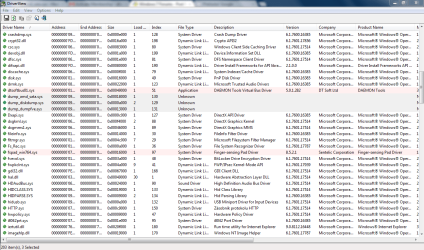
I didn't know how to show you so I decided to add the print screen of the "DriverView" where you can see these Unknown drivers. And I also added the text document with all my drivers and properties and the text document with just these unknown drivers.
I have a laptop msi x370 once reinstalled
Can anybody give me some advice please?
Well now I don't know what to do next because I don't know whether I can remove them safely and It will solve my problem or it will cause some worse damage to my computer if they are not causing any problems. Or if I could remove them, then how?
I didn't know how to show you so I decided to add the print screen of the "DriverView" where you can see these Unknown drivers. And I also added the text document with all my drivers and properties and the text document with just these unknown drivers.
I have a laptop msi x370 once reinstalled
Can anybody give me some advice please?
Attachments
My Computer
- OS
- Windows 7 Professional 64bit

