
Hey, I finally installed Windows 11 on an unsupported CPU after a lot of troubles. I want to share my experience for reference for friends in need. At first, I used Microsoft's official tool to make a USB flash drive, but it was directly blocked, saying "unsupported CPU", and I almost gave up.
Later, I tried WinBootmate (Online Tutorial of SYSCute WinBootMate), a tool that can skip TPM and CPU restrictions, and it was easy to get it done! I used it to make a Windows 11 bootable USB installer, and the installation process went smoothly without any problems.
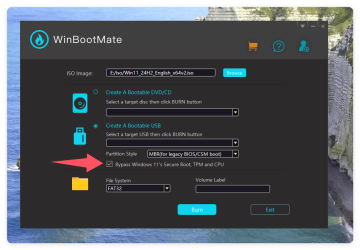
I think WinBootMate is a great tool and I would recommend it to anyone who needs it.
Now I have used it for a while, except that Windows Update may remind you that your device is not supported, everything else is normal and runs smoothly. Has anyone used WinBootMate tool or other methods? For example, modifying the registry, changing the ISO image, etc.? Welcome to share your experience!
Later, I tried WinBootmate (Online Tutorial of SYSCute WinBootMate), a tool that can skip TPM and CPU restrictions, and it was easy to get it done! I used it to make a Windows 11 bootable USB installer, and the installation process went smoothly without any problems.
I think WinBootMate is a great tool and I would recommend it to anyone who needs it.
Now I have used it for a while, except that Windows Update may remind you that your device is not supported, everything else is normal and runs smoothly. Has anyone used WinBootMate tool or other methods? For example, modifying the registry, changing the ISO image, etc.? Welcome to share your experience!
My Computer
At a glance
Windows 10
- Computer type
- PC/Desktop
- OS
- Windows 10


