Solved Can you put Recovery Drive D on a flash drive to free up hard drive

mgb007

New member
Local time
4:13 PM
Messages
3
Sorry I am a computer novice; but, I am running out of hard drive C space and I thought maybe I could put Recovery Drive D on a flash drive in order to free up drive C space.

If this is possible, can you refer me to some instructions on how to do this?

Thanks in advance for your help.
 

My Computer My Computer

At a glance

Windows 7 Home Premium
Computer type
Laptop
Computer Manufacturer/Model Number
HP
OS
Windows 7 Home Premium
To be honest a recovery drive won't give you much space (10 GB or so?). You are better off with a USB external HDD and move your less accessed data to the external.

I wonder what others will say.
 

My Computer My Computer

At a glance

Windows 7 Ultimate x64 SP1AMD Phenom 2 1090T2x8GB Kingston HyperX Fury Black 1600Mhz Unga...MSI GTX 970 Gaming 4G
Computer type
PC/Desktop
Computer Manufacturer/Model Number
Custom Build
OS
Windows 7 Ultimate x64 SP1
CPU
AMD Phenom 2 1090T
Motherboard
Gigabyte GA-890FXA-UD5
Memory
2x8GB Kingston HyperX Fury Black 1600Mhz Unganged
Graphics Card(s)
MSI GTX 970 Gaming 4G
Sound Card
Realtek On-Board HD 7.1 Audio / Logitech G35
Monitor(s) Displays
3xAcer GD245HQ
Screen Resolution
1920x1080
Hard Drives
Samsung 850 Pro 512GB SSD - OS /
WD Caviar Black SATA 3 - 1 TBx2 - Dynamic RAID 0 /
WD Caviar Green SATA 2 - 640GBx2 - Dynamic RAID 0 /
WD Caviar Green SATA 2 - 640GB - Internal Backup /
Seagate Barracude SATA 3 - 3TB - External Backup/ Sync
PSU
HighPower 1000W
Case
Cooler Master HAF 932
Cooling
Noctua NH-D14
Keyboard
Logitech G19
Mouse
Logitech G500
Internet Speed
100/4 Mbit Cable (100GB quota)
Antivirus
ZoneAlarm Extreme Security / MBAM Pro / MBAE Free / SAS Free
Browser
IE 11 - Firefox - Chrome
Other Info
Logitech F710/ G27/ G940/ Z5500 // TrackIR 5 // Nvidia 3D Surround Vision
GokAy -- thanks for the fast reply. I had considered that; but, I fly all over the world and it would be cumbersome (near impossible) lugging around an external drive. The Recovery Drive has 18 GB allocated to it and while that is not much space it would sure help. Thanks again. We'll see what others say.
 

My Computer My Computer

At a glance

Windows 7 Home Premium
Computer type
Laptop
Computer Manufacturer/Model Number
HP
OS
Windows 7 Home Premium
I'm not a big fan of the recovery partition anyway since if you recover your system that way it restores it back to the way your system was the day you got it. Complete with any bloatware that was installed but more importantly, without the additional software you installed and without the latest system updates.

Instead, I prefer to get my system setup the way I like it then use software such as the free Macrium Reflect to create a system image of it on an external drive. An exact copy with all my software and system updates installed. This image can be used to restore my system back to working order rather than back to fresh from the factory.

If you create a system image as I described then you can safely delete the recovery partition and use that space to expand your C: drive.

Another suggestion, why not install a larger hard drive? You don't say how big your current drive is but it is likely that you could install a larger drive. Having a system image like I suggested would allow you to simply install the larger drive and then restore the system image to the larger drive and you would be up and running. A 2TB hdd can be purchased for around $100. If you lack the expertise to replace the hdd and clone the drive, a shop could do it for you but that would add around $150 service charge to the cost of the upgrade.
 

My Computer My Computer

At a glance

W10 Pro desktop, W11 laptop, W11 Pro tablet (...3.7Ghz 8700K i7, i7-11800H, i7-1065G716G desktop, 16G laptop, 4G tabletAMD Radeon RX580, RTX 3060, Intel Iris Plus
Computer type
PC/Desktop
Computer Manufacturer/Model Number
Home Built desktop, Dell G15 5511 Gaming laptop,MS Surface Pro 7 tablet
OS
W10 Pro desktop, W11 laptop, W11 Pro tablet (all 64-bit)
CPU
3.7Ghz 8700K i7, i7-11800H, i7-1065G7
Motherboard
ASUS TUF Z370-Pro Gaming in desktop
Memory
16G desktop, 16G laptop, 4G tablet
Graphics Card(s)
AMD Radeon RX580, RTX 3060, Intel Iris Plus
Sound Card
High Definition Audio (Built-in to mobo)
Monitor(s) Displays
Samsung U32J59 32" (2x), 15.6", 12"
Screen Resolution
3840x2160, 3840x2160, 1920x1080, 2160x1440
Hard Drives
500G SSD for OS; 2T, 10T & 15T HDDs for Data on Desktop, 1TB SSD laptop, 128G SSD tablet.
PSU
Corsair CX 750M
Case
Antec 100
Cooling
CM 212+
Keyboard
IBM Model M - used continuously since 1986
Mouse
Microsoft Pro IntelliMouse
Internet Speed
400M down 8M up
Antivirus
Windows Defender
Browser
FireFox
Other Info
Built my first computer (8Mhz 8088cpu, 640K RAM, 20MB HDD, 2 360K floppy drives) in 1985 and have been building them for myself, relatives and friends ever since.
Strollin, thanks for the reply -- your reply made me remember that my Carbonite back up also backs up my system components therefore, I guess I don't need that Recovery drive at all. I should have thought of that before; but, thanks for "activating" my memory.
 

My Computer My Computer

At a glance

Windows 7 Home Premium
Computer type
Laptop
Computer Manufacturer/Model Number
HP
OS
Windows 7 Home Premium
Strollin, thanks for the reply -- your reply made me remember that my Carbonite back up also backs up my system components therefore, I guess I don't need that Recovery drive at all. I should have thought of that before; but, thanks for "activating" my memory.
Glad I jogged your memory.

From my brief reading of the Carbonite website it does provide mirror imaging which is what I'm referring to but it isn't an automatic cloud thing, you need to do the mirror image to an external drive.

Also, if you're really that tight on disk space, consider upgrading to a larger hdd like I suggested.
 

My Computer My Computer

At a glance

W10 Pro desktop, W11 laptop, W11 Pro tablet (...3.7Ghz 8700K i7, i7-11800H, i7-1065G716G desktop, 16G laptop, 4G tabletAMD Radeon RX580, RTX 3060, Intel Iris Plus
Computer type
PC/Desktop
Computer Manufacturer/Model Number
Home Built desktop, Dell G15 5511 Gaming laptop,MS Surface Pro 7 tablet
OS
W10 Pro desktop, W11 laptop, W11 Pro tablet (all 64-bit)
CPU
3.7Ghz 8700K i7, i7-11800H, i7-1065G7
Motherboard
ASUS TUF Z370-Pro Gaming in desktop
Memory
16G desktop, 16G laptop, 4G tablet
Graphics Card(s)
AMD Radeon RX580, RTX 3060, Intel Iris Plus
Sound Card
High Definition Audio (Built-in to mobo)
Monitor(s) Displays
Samsung U32J59 32" (2x), 15.6", 12"
Screen Resolution
3840x2160, 3840x2160, 1920x1080, 2160x1440
Hard Drives
500G SSD for OS; 2T, 10T & 15T HDDs for Data on Desktop, 1TB SSD laptop, 128G SSD tablet.
PSU
Corsair CX 750M
Case
Antec 100
Cooling
CM 212+
Keyboard
IBM Model M - used continuously since 1986
Mouse
Microsoft Pro IntelliMouse
Internet Speed
400M down 8M up
Antivirus
Windows Defender
Browser
FireFox
Other Info
Built my first computer (8Mhz 8088cpu, 640K RAM, 20MB HDD, 2 360K floppy drives) in 1985 and have been building them for myself, relatives and friends ever since.
Come on that's a lousy excuse about the hardship of carrying it :)

Well I guess Strollin is right with his reasoning, but not sure if your Carbonite is safe. Just searched for it and it looks it only backs up data files. What if your HD fails? How will you get the OS back?

You are still better with an external drive and making OS images. Then you can get back up in half an hour.

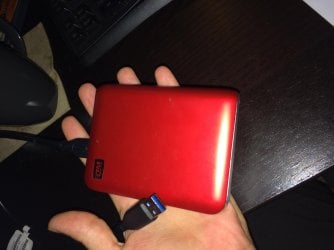
WD Passport 1TB.jpg

Is this hard to carry around? 1TB USB 3.0 WD Passport that I bought some years ago.
 

My Computer My Computer

At a glance

Windows 7 Ultimate x64 SP1AMD Phenom 2 1090T2x8GB Kingston HyperX Fury Black 1600Mhz Unga...MSI GTX 970 Gaming 4G
Computer type
PC/Desktop
Computer Manufacturer/Model Number
Custom Build
OS
Windows 7 Ultimate x64 SP1
CPU
AMD Phenom 2 1090T
Motherboard
Gigabyte GA-890FXA-UD5
Memory
2x8GB Kingston HyperX Fury Black 1600Mhz Unganged
Graphics Card(s)
MSI GTX 970 Gaming 4G
Sound Card
Realtek On-Board HD 7.1 Audio / Logitech G35
Monitor(s) Displays
3xAcer GD245HQ
Screen Resolution
1920x1080
Hard Drives
Samsung 850 Pro 512GB SSD - OS /
WD Caviar Black SATA 3 - 1 TBx2 - Dynamic RAID 0 /
WD Caviar Green SATA 2 - 640GBx2 - Dynamic RAID 0 /
WD Caviar Green SATA 2 - 640GB - Internal Backup /
Seagate Barracude SATA 3 - 3TB - External Backup/ Sync
PSU
HighPower 1000W
Case
Cooler Master HAF 932
Cooling
Noctua NH-D14
Keyboard
Logitech G19
Mouse
Logitech G500
Internet Speed
100/4 Mbit Cable (100GB quota)
Antivirus
ZoneAlarm Extreme Security / MBAM Pro / MBAE Free / SAS Free
Browser
IE 11 - Firefox - Chrome
Other Info
Logitech F710/ G27/ G940/ Z5500 // TrackIR 5 // Nvidia 3D Surround Vision
Back
Top